
Digital Touch Systems DTS-2410C Manuel utilisateur
PAGE : 1
REV.NO : 1.0REG. DATE : 2021.12.13
DTS-2410C
User Manual for
DTS-2410C
REV. DATE :
User Manual for
DTS-2410C
Appendix

PAGE :
REG. DATE : 2021.12.13
REV. DATE :
REV.NO : 1.0
2
DTS-2410C
User Manual for
DTS-2410C
Content
Revision History .................................................................................................... 3
Recommended Use ............................................................................................... 4
1. Package Contents .......................................................................................... 5
2. Product Configuration ...................................................................................... 6
3. Interface Description.......................................................................................... 7
4. OSD Control Board Description …………......................................................... 8
5. Trouble shooting .………………………............................................................. 12
6. Specification .………………………............................................................. 15

PAGE :
REG. DATE : 2021.12.13
REV. DATE :
REV.NO : 1.0
3
DTS-2410C
User Manual for
DTS-2410C
Change History of Revision
Revision Date Contents of Revision Change Remark
1.0 21.12.13 Release

PAGE :
REG. DATE : 2021.12.13
REV. DATE :
REV.NO : 1.0
4
DTS-2410C
User Manual for
DTS-2410C
FOR OPTIMUM PERFORMANCE, PLEASE NOTE THE FOLLOWING WHEN
SETTING UP AND USING THE TOUCH SCREEN MONITOR.
•DO NOT OPEN THE MONITOR.
Opening or removing covers may expose you to dangerous shock hazards or other
risks.
Once you open it the warranty voids.
•To protect from electrical shock, unplug the display power supply from the wall before
moving.
•Do not put anything on top of the monitor.
•Do not spill any liquids into the cabinet or use your monitor near water.
•Do not place this product on a sloping or unstable cart, stand or table, as the monitor
may fall, causing serious damage to the monitor.
• If you connect or disconnect the HDMI cable while both of PC’s and LCD monitor’s
power is turned on, the monitor might show some garbage on the screen or could be
damaged. Please turn off the TFT-LCD monitor’s power before connect or disconnect
HDMI cable.
•Ensure that sufficient space is available around the display to provide air circulation
for cooling.
•Ensure that ambient air temperature will not exceed the specified maximum
temperature.
•Handle with care when transporting. Save packaging for transporting.
•Do not touch or press the surface of on the LCD panel, it will cause a permanent
damage. Use only soft cloth with non-ammonia glass cleaner to clean the panel.
Recommended Use

PAGE :
REG. DATE : 2021.12.13
REV. DATE :
REV.NO : 1.0
5
DTS-2410C
User Manual for
DTS-2410C
1. Package Contents
Your LCD monitor package will consist of the primary components listed below.
Note ) Actual accessories may differ from those in this user's guide.
Touch USB Cable HMDI Cable
Power Cord
Thank you for your selection of FHD Touch Screen Display Monitor
Please take a few minutes to read this User’s manual for the best performance of this monitor.
Information in this manual is subject to change without prior notice for improving design,
function and etc.
* It's possible that it can vary from country
ADAPTER
PAGE :
REG. DATE : 2021.12.13
REV. DATE :
REV.NO : 1.0
6
DTS-2410C
User Manual for
DTS-2410C
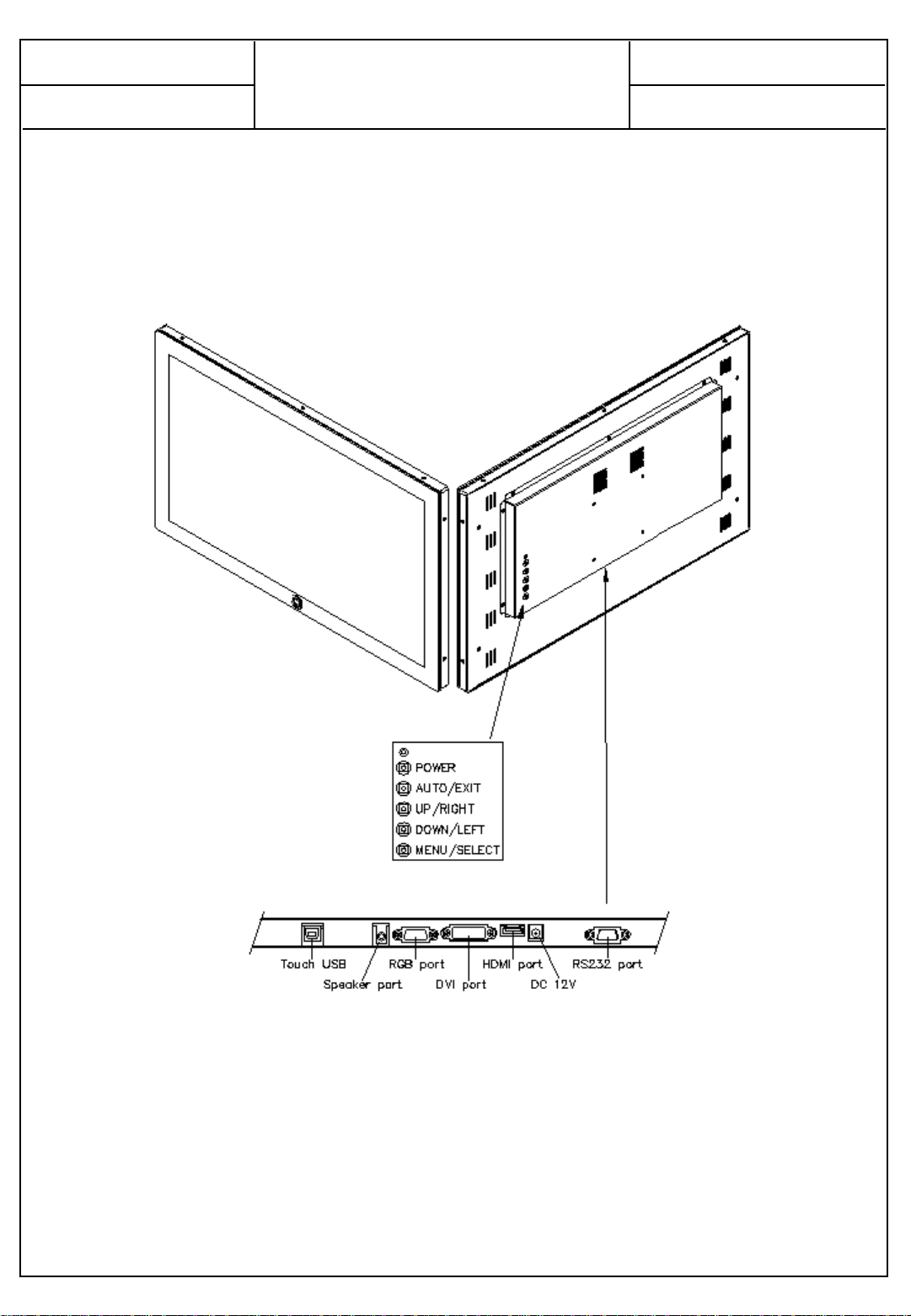
2. Product Configuration
Interface Terminal ( Attached page 7)
Note ) Actual Touch Screen Monitor may differ from those in this user's drawing

PAGE :
REG. DATE : 2021.12.13
REV. DATE :
REV.NO : 1.0
7
DTS-2410C
User Manual for
DTS-2410C
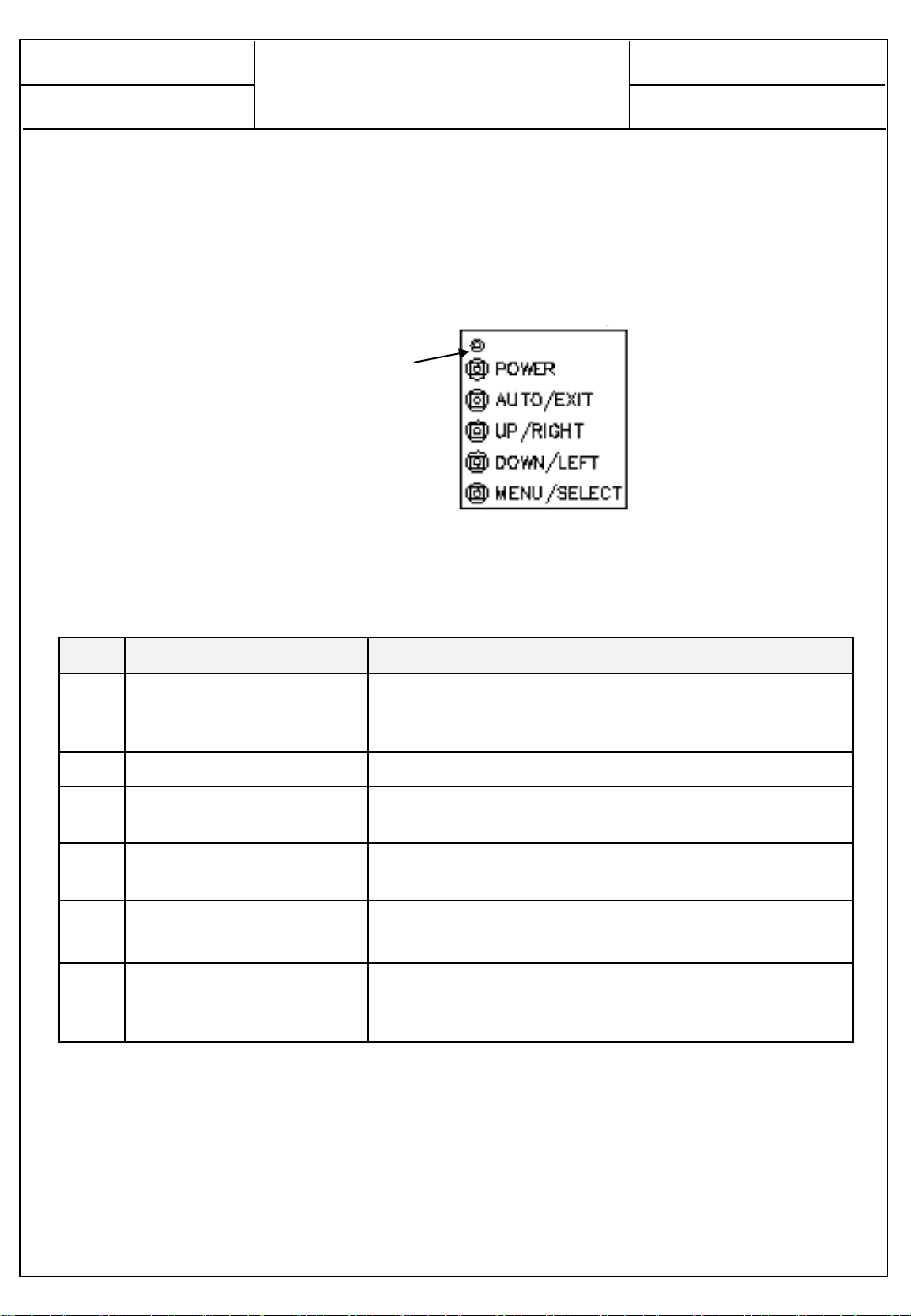
3. Interface Description
No Name Description
1 USB(Touch) •Touch screen connect USB cable.
•Connect to PC’s USB 2.0 port
2 HP In •For AUDIO In
3 VGA •For VGA Input 1
4DVI •For DVI Input 1
5 HDMI1 •For HDMI(2.0) Input 1
•Connector to the digital video and audio input terminal
6DC •DC12V 3.5A
7 RS232 •For RS232 Input 1
① ② ③④⑤⑥⑦
PAGE :
REG. DATE : 2021.12.13
REV. DATE :
REV.NO : 1.0
8
DTS-2410C
User Manual for
DTS-2410C
4. OSD Control Board Description
4.1 OSD Interface Description
LED
No Name Description
1 LED •Indicated LED
-. Red Color : Display Power On
-. Green Color : Display On
2 POWER BUTTON •Display Power On / Off
3 AUTO/EXIT •Auto Adjust(VGA Mode Only)
•Exit the present menu
4UP / RIGHT •Up shift
•Right shift
5 DOWN / LEFT •Down shift
•Left shift
6 MENU / SELECT •Display the setting menu
•Increase level
•Selected to Input video source : Hot key

PAGE :
REG. DATE : 2021.12.13
REV. DATE :
REV.NO : 1.0
9
DTS-2410C
User Manual for
DTS-2410C
OPERATING THE MONITOR
To create thebest picture, your LCD monitor hasbeen preset at the factory with the COMPLIANT
TIMING shown on page??. You are also able to adjust the picture by following the button operation
shown below. For more detailed adjustments, see page11 for SCREENADJUSTMENTS.
MAIN ICON Description Remark
ICON 1 LUMINANCE
ICON 3 PICTURE D-SUB ONLY
ICON 4 COLOR
ICON 5 OSD SETTING
ICON 6 SETUP
▪MAIN ICON
•ICON 1 : LUMINANCE

PAGE :
REG. DATE : 2021.12.13
REV. DATE :
REV.NO : 1.0
10
DTS-2410C
User Manual for
DTS-2410C
•ICON 2 : PICTURE
•ICON 3 : COLOR
•ICON 4 : OSD Setting
Table des matières


