
Digital Dream EC500 Manuel utilisateur

Mach3 Ethernet Motion Controller
EC500
User’s Manual
The version of 20180925

Contents
1. Brief Description of the EC500 Motion Controller
2. Safety Notes
5.2 Stepper/Servo Motor Control Interface Connection
5.3 Spindle Control Output Port
3. Physical Installation of the device
5. Wiring and Ports Description
4. Controller EC500 Power Solution
5.8 Power Supply for Controller System and Power Supply for IO Port
5.5 Function Switch for MPG and Connection for MPG
1
1
2
4
5
7
8
9
11
12
12
15
15
16
16
17
18
19
22
●●●●●●●●●●●●●●●●●●●●●●●●●●●●●
●●●●●●●●●●●●●●●●●●●●●●●●●●●●●●●●●●●●●●●●●●●●●
3
●●●●●●●●●●●●●●●●●●●●●●●●●●●●●●●●●●●●●●●●●●●●●●
●●●●●●●●●●●●●●●●●●●●●●●●●●●●●●●●●●●●●●●●●●●●●●●●●●●●●●●●
●●●●●●●●●●●●●●●●●●●●●●●●●●●●●●●●●●●●●●●●●●●●●●●●●●●●●●●●●●
●●●●●●●●●●●●●●●●●●●●●●●●●●●●●●●●●●●●●●●●●●●●●●
●●●●●●●●●●●●●●●●●●●●●●●●●●●●●●●●●●●●
●●●●●●●●●●●●●●●●●●●●●●●●●●●●●●●●●●●●
●●●●●●●●●●●●●●●●●●●●●●●●●●●●●●●●●●●●●●●●●●●●●●●●●●●●●●●●●●●●●●●●●
●●●●●●●●●●●●●●●●●●●●●●●●●●●●●●●●●●●●●●●●●●●●●●●●●●●●●●●●●●●●
●●●●●●●●●●●●●●●●●●●●●●●●●●●●●●●●●●●●●●●●●●●●●●●●●●●●●●●●●●●●●●●●●●●●
●●●●●●●●●●●●●●●●●●●●●●●●●●●●●●●●●●●●●●●●●●●●●●●●●●●
●●●●●●●●●●●●●●●●●●●●●●●●●●●●●●●●●●●●●●●●●●
●●●●●●●●●●●●●●●●●●●●●
16
●●●●●●●●●●●●●●●●●●●●●●●●●●●●●●●●●●●●●●●●●●●●●●●●●●●●●●●●●●●
●●●●●●●●●●●●●●●●●●●●●●●●●●●●●●●●●●●●●●●●●●●●●●●●●●●●●●●●●●●●●●
●●●●●●●●●●●●●●●●●●●●●●●●●●●●●●●●●●●●●●●●●●●●●●●●●●●●●●●●●●●●●●●●●●●●●
●●●●●●●●●●●●●●●●●●●●●●●●●●●●●●●●●●●●●●●●●●●●●●●●●●●●●●●●●●●●●●●●●●●●●●●●●●
●●●●●●●●●●●●●●●●●●●●●●●●●●●●●●●●●●●●●●●●●●●●●●●●●●●●●●●●●●●●●●●●●●●
●●●●●●●●●●●●●●●●●●●●●●
●●●●●●●●●●●●●●●●●●●●●●●●●●●●●●●
6.2 Open Mach3 Software and connect with right PlugIn file
6.6 MPG Settings
6.5 Port and Pins Setup
6. Mach 3 Configuration
6.1 PlugIn
6.3 Check EC500 Plug-In in the Mach3 software
5.4 General output interface
5.6 Serial extend port
5.7 Input Ports
5.9 LEDs Indicator for Power and communication with Mach 3 software
6.4 Motor Tuning and Setup
5.1 Ethernet Communication Interface to PC

1. Description of the EC500 Motion Controller Device:
For firstly of all we thank you for your interesting in our product and for reading this user’s guide.
The EC500 is a high-performace external motion controller for Mach3, with ethernet interface,supporting
standard MPG pendant.The device can communicate with a connection to a control computer’s network.The
network connection can be built with direct connection or via router/Swith devices.
The computer connects to the EC500 via a standard Ethernet cable.The cable may be shielded or unshield-
ed.An advantage of the Ethernet compared to a USB is that the cable length maybe as long as 100 meters.The
maximum length for a USB cable is 5 meters,and that is pushing it in a noisy working environment.Another
advantages is that Ethernet uses transformers for coupling the data signals,which galvanically isolates the
computer from the downstream electronics.
The device can be used to control machine tools with stepper or servo motor controls with pulse and direc-
tion interfaces;the controller can output a maximum of 460kHz stepping frequency for each axes and can work
with upto 6-axes.The Controller is 3-6 Axis for user’s options.
This user’s guide describes how to establish connection between the device and controler computer,the
device and stepper/Servo drives and spindle motor,how to setup the LAN network and the device for the
communication.This document also describs the inputs and outputs,the electrical parameters and properties of
the motion controller.It guides the users how to run the device with Mach3 software,and how to set the parame-
ters in the software.
Here is the brief description for the device:
1) Motion control 3-6 Axis(X,Y,Z,A,B,C) for option,max frequency output 460Khz/Axis;
2) Main power supply 24VDC,Current should higher than 1A;
3) IO Power is 24VDC power supply input,current should higher than 1A;
4) IO Power is 24VDC power supply input,current should higher than 1A. (By the IO power supply,system
already supply the power for IO ports.So no need the external power supply for IO port anymore.);
5) 18 opto-isolated digital input ports,16 opto-isolated digital output ports;
6) 1 analog output port of 0-10V adjustable speed for spindle (can change to PWM output port);
7) ARM motion control chip;
8) Compatible with Standard MPG and also Digital Dream MPG
Accessories:
Beside the main products,in our package,there are accesories:1pcs 1.5meter Ethernet cable.
2. Safety Notes:
Moving objets like machine tool axes and automatical equipments can be very dangerous.Always make
sure to keep all machines safety standards.Always install E-stop switches and the required safety equipments to
your control system and make sure that the equipment controlled by our device meets all the safety standards.
Always keep the controller dry and away from falling chips and dust,protect the device from taint
damage.Avoid conneciton mistakes,avoid high voltage damage,avoid operation errors.
Protect the device from direct intensive sunshine beams and from extreme temperature levels and from
extra high humidity weather.
We cannot take the responsibility for any persernal injury and financial loss caused by any device failure
or caused by following an error in this documentation.
Page -1Digital Dream Mach3 Motion Controller EC500 User’s Manual

3. Physical Installation of the device(Unit:mm)
The EC500 motion controller is with the sealed shell structure,there are 4pcs mounting holes around the
controller.We can fix 4pcs 4mm diameter holes at the cabinet,and install the controller into the cabinet.
Picture 3-1 EC500 Front Appearance and size
Picture 3-2 EC500 Installation Dimensions
190 mm
32 mm
113 mm
21 mm
7 mm
4 mm
116 mm
119 mm
Page -2Digital Dream Mach3 Motion Controller EC500 User’s Manual

4. Controller EC500 Power Solution
Picture 4-1 EC 500 Power supply structure
Page -3Digital Dream Mach3 Motion Controller EC500 User’s Manual
The power supply solution in the field of the Industrial automation is always very complicated, there is a
lot of the GND, now we descript the structure of the power structure as below:
The power structure as the Picture 4-1,Power supply input and Ethernet port share common GND, stepper
control module,Input&Output module,Spindle control module and MPG Port share common GND, between the
two sector there is photoelectric isolation. Inside of the board, there is GND as common-, no need to connect
external power supply.

The following drawing shows the main connections of our device.We will descrip one by one in next
pages.Here are:
1 : Ethernet Communication Interface to PC
2 : Stepper/Servo motor Driver connection port
3 : Spindle Control Output Port
4 : Gerneral Output Interface
5 : MPG Port
6 : Functional Switch for MPG:Standard MPG or Digital Dream MPG
7 : Serial Extend Port
8 : Input Port:Limit/Home/Probe and so on
9 : IO Power Port
10 : Main Power Port
11 : Power and Communication LED Indicator
Picture 5-1 EC500 Wiring Over-view
10:Main Power Port
2: Stepper/Servo Driver
1: Ethernet Interface 11: LED Indicator
4: Genernal Output
9:IO Power Port
5: MPG
8:Input Port 7:Serial Extend Port
6: Optionanl Swirtch for MPG
3: Spindle Control
Page -4Digital Dream Mach3 Motion Controller EC500 User’s Manual
5. Wiring and Ports Description

5.1 Ethernet Communication Interface to PC
5.1.1 Setup with direct connection to a LAN network card.
To setup the network on the computer side there are two ways for our device:
1) Setup with direct connection to a LAN network card;
2) Setup with connection via switch/router.
Firstly connect the EC500 controller to PC by the ethernet cable.
To Setup the connection with direct cable connection click on the name of the connection and on the pop-up
window press the Properties button.Please note that for this action to work the user must have administrator
rights inWindows account.Control Panel -> Network and Internet -> Network Connections.
Pls remember to shut down the firewall of the computer before the connection.
Picture 5-2 EC500 Ethernet Commnication Setup
Page -5Digital Dream Mach3 Motion Controller EC500 User’s Manual

5.1.2 Setup with direct connection via switch/router.
To Setup the connection with connection via a switch or router device click on the name of the connection and
on the pop-up window press the Properties button.Please note that for this action to work the user must have
administrator rights in Windows account.On the popup window find and select the ‘Internet Protocol Version
4(TCP/IPv4)’ row and click the Properties button.Find and click ‘Obtain an IP address automatically’ and
system will setup the connection.
Picture 5-3 EC500 Ethernet Communication Setup IP No.
Picture 5-4 EC500 Ethernet Communication via switch/router
IP range from
192.168.1.1 to 192.168.1.255
Subnet Mask:
255.255.255.0
Page -6Digital Dream Mach3 Motion Controller EC500 User’s Manual
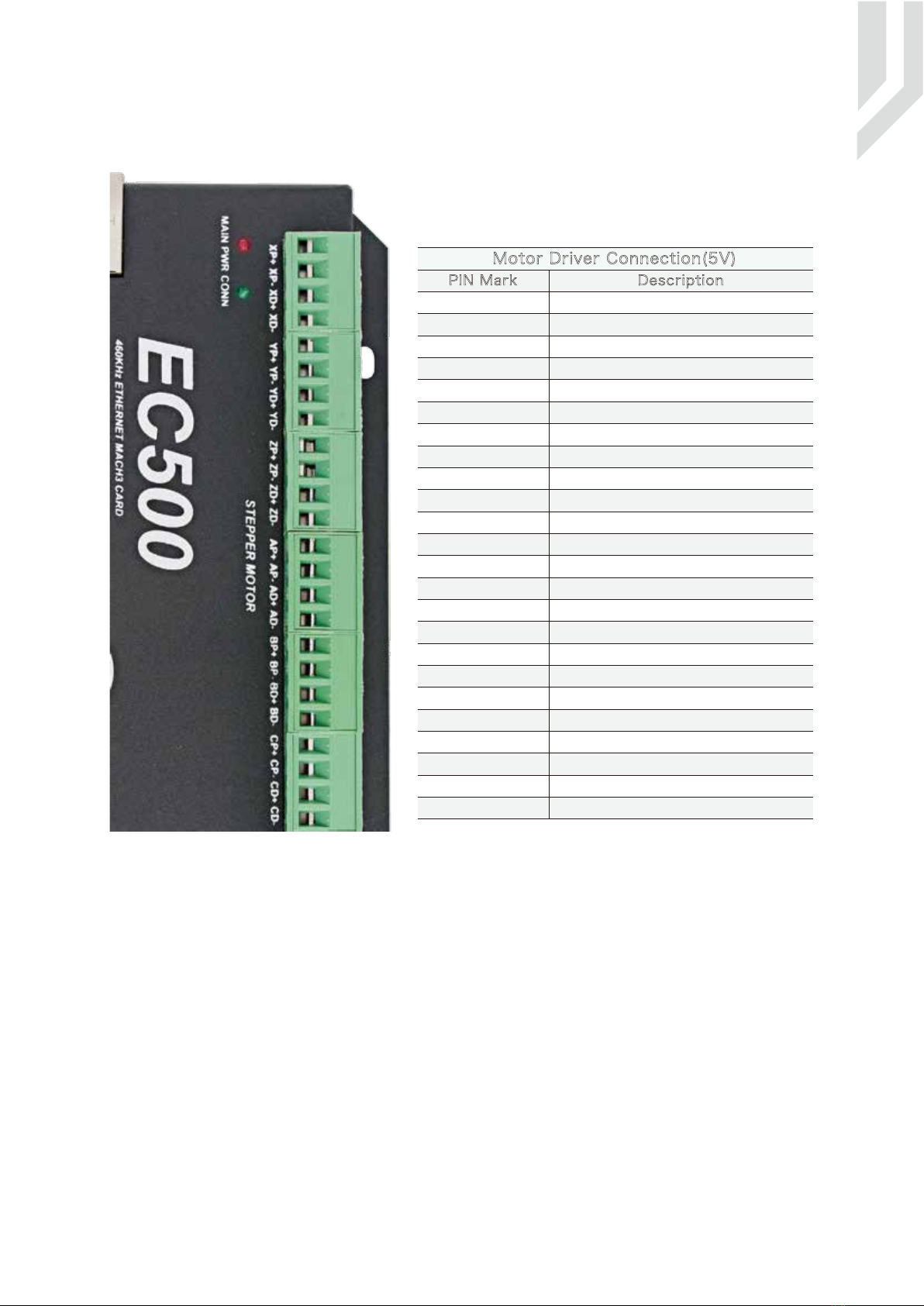
5.2 Stepper/Servo Motor Control Interface Connection
The device can be used to control machine tools with stepper
or servo motor controls with pulse and direction interfaces
upto 6-axes.
PIN Mark Description
XP+
XP-
XD+
XD-
YP+
YP-
YD+
YD-
ZP+
ZP-
ZD+
ZD-
X Axis Direction Output -
X Axis Direction Output +
X Axis Pulse Output -
X Axis Pulse Output +
Y Axis Direction Output -
Y Axis Direction Output +
Y Axis Pulse Output -
Y Axis Pulse Output +
Z Axis Direction Output -
Z Axis Direction Output +
Z Axis Pulse Output -
Z Axis Pulse Output +
AP+
AP-
AD+
AD- A Axis Direction Output -
A Axis Direction Output +
A Axis Pulse Output -
A Axis Pulse Output +
BP+
BP-
BD+
BD- X Axis Direction Output -
B Axis Direction Output +
B Axis Pulse Output -
B Axis Pulse Output +
CP+
CP-
CD+
CD-
Motor Driver Connection(5V)
Picture 5-5 EC500 Stepper/Servo Mark and description
B Axis Direction Output -
C Axis Direction Output +
C Axis Pulse Output -
C Axis Pulse Output +
C Axis Direction Output -
Page -7Digital Dream Mach3 Motion Controller EC500 User’s Manual

As Picture 5-1 showed,No.3 terminal block is for Spindle control output. We define the interface from
left are COM-,VSO,COM-,OUT1,OUT2,OUT3,OUT4,OUT5. They are Ground of output, Speed adjusting
voltage, Ground of output, Digital output1, Digital output2, Digital output3, Digital output4, Digital output5.
Take Nowforeuer inverter as the example. Spindle control output and the inverter connection showed as
Picture 5-6.X1 control spindle Clockwise RUN and STOP, AIN1 modify spindle's speed. if we need to control
spindle anti-clockwise RUN and STOP, we need to connect X2 to OUT2.
5.3 Spindle Control Output Port
Picture 5-6 EC500 Spindle Control Setup
COM
AIN1
X1
X2
VSO connects to Speed adjustment which defined by voltage 0-10V.
The relationship Max. Spindle speed and current spindle speed is as below:
VSO(Output Voltage)=10*current spindle speed(S)/Maximum Spindle Speed(Max.S).
For example if we set the Max Speed is 24000,and we need the current spindle speed is 18000,then
VSO=10*18000/24000=7.5V.
The following picture 5-7 is the setting method of Max. speed in Mach3 software.
Page -8Digital Dream Mach3 Motion Controller EC500 User’s Manual
Table des matières
Autres manuels Digital Dream Contrôleurs

Digital Dream
Digital Dream DM500T3 Manuel utilisateur

Digital Dream
Digital Dream DM500 Manuel utilisateur

Digital Dream
Digital Dream DDCS V3.1 Manuel utilisateur

Digital Dream
Digital Dream DDCS-Expert Manuel utilisateur

Digital Dream
Digital Dream DDCS V2.1 Manuel utilisateur

Digital Dream
Digital Dream NCH02 Manuel utilisateur

Digital Dream
Digital Dream UC300 Manuel utilisateur


