
Digisol DG-WR3001NE Manuel utilisateur

1
DG-WR3001NE
DIGISOL 300MBPS WALL MOUNT
WIRELESS REPEATER
User Manual
V1.0
2018-04-17
As our products undergo continuous development the specifications are subject to change without prior notice

DG-WR3001NE User Manual
2
COPYRIGHT
Copyright 2018 by DIGISOL Systems Ltd. All rights reserved. No part of this
publication may be reproduced, transmitted, transcribed, stored in a retrieval system,
or translated into any language or computer language, in any form or by any means,
electronic, mechanical, magnetic, optical, chemical, manual or otherwise, without the
prior written permission of this company.
This company makes no representations or warranties, either expressed or implied,
with respect to the contents hereof and specifically disclaims any warranties,
merchantability or fitness for any particular purpose. Any software described in this
manual is sold or licensed "as is". Should the programs prove defective following
their purchase, the buyer (and not this company, its distributor, or its dealer) assumes
the entire cost of all necessary servicing, repair, and any incidental or consequential
damages resulting from any defect in the software. Further, this company reserves the
right to revise this publication and to make changes from time to time in the contents
thereof without obligation to notify any person of such revision or changes.
Trademarks:
DIGISOL™ is a trademark of DIGISOL Systems Ltd. All other trademarks are the
property of the respective manufacturers.
Safety
This equipment is designed with the utmost care for the safety of those who install
and use it. However, special attention must be paid to the dangers of electric shock
and static electricity when working with electrical equipment. All guidelines of this
and of the computer manufacturer must therefore be allowed at all times to ensure the
safe use of the equipment.

DG-WR3001NE User Manual
3
Index
1. Product Information............................................................................................ 5
1-1 Product Introduction ................................................................................. 5
1-2 Safety Information .................................................................................... 6
1-3 System Requirements.............................................................................. 7
1-4 Package Contents.................................................................................... 7
1-5 Get familiar with your new wireless repeater......................................... 8
2. Extender mode ................................................................................................... 9
2-1 Extender mode Quick Installation Guide................................................ 9
2-1-1 Step by Step Guide to connect and configure AP/Repeater…..…..10
2-1-2 Extender mode : Configuration
........................................................11
2-2 AP Mode...................................................................................................14
2-2-1 Extender Mode Advance Settings ..............................................15
2-2-2 Home .............................................................................................16
2-2-3 Status ............................................................................................17
2-2-4 Lan Interface Setup :....................................................................18
2-2-5 WiFi Setting...................................................................................20
2-2-6 Security settings ...........................................................................21
2-2-7 MAC Control .................................................................................22
3. Management
......................................................................................................23
3-1 Upgrade Firmware...................................................................................23
3-2 Save and Load Settings ........................................................................24
3-3 Password Setup …………………………………………………………….25
4 Appendix .............................................................................................................26
4-1 Hardware Specifications.........................................................................26
4-2 Glossary …………………………………………………………………………27

DG-WR3001NE User Manual
4

DG-WR3001NE User Manual
5
1. Product Information
1-1 Product Introduction
Thank you for purchasing this 802.11N wireless repeater!
The ultra-compact design with in-built power allows you to install this repeater
everywhere, yet providing excellent network performance to extend the Wi-Fi signal
and wireless coverage.
Other features of this wireless repeater include:
•Extended wireless signal inside your home or office.
•Ultra-compact design while maintaining excellent network performance.
•LED signal indicator to easily realize the best location placement to extend
Wi-Fi signal and secure better wireless performance.
•The device can support AP mode, Repeater mode .
•WPS (Wi-Fi Protected Setup) hardware button for easy installation and secure
wireless security.

DG-WR3001NE User Manual
6
1-2 Safety Information
In order to keep the safety of users and your properties, please follow the safety
instructions mentioned below:
1. This wireless repeater is designed for indoor use only. DO NOT expose this device
to direct sun light, rain, or snow.
2. DO NOT put this at or near hot or humid places, like kitchen or bathroom. Also, DO
NOT leave this Wireless repeater in the car in summer.
3. DO NOT allow kids to put any small parts of this wireless repeater in their mouth,
it could cause serious injury or could be fatal. If they throw this wireless repeater,
it will get damaged.
PLEASE KEEP THIS WIRELESS REPEATER OUT OF
REACH OF CHILDREN!
4. This Wireless repeater will get heated up when used for a long time (This is
normal and is not a malfunction). DO NOT put the Wireless repeater on a paper,
cloth, or other flammable objects after the Wireless repeater has been used for a
long time.
5. There’s no user-serviceable part inside the Wireless repeater. If you find that the
Wireless repeater is not working properly, please contact your dealer of purchase
and ask for help. DO NOT disassemble the Wireless repeater yourself, warranty
will be void.

DG-WR3001NE User Manual
7
1-3 System Requirements
•Wireless network card which is compatible with 802.11N wireless network
standard.
•Windows 2000, 2003, XP, Vista, 7 , 10 operating system
•An available AC power socket (100-240V, 50/60Hz)
•At least 200MB of available disk space
1-4 Package Contents
Before you start using this wireless repeater, please check if there’s anything missing in
the package, and contact your dealer of purchase to claim for missing items:
•Wireless Repeater
•Quick Installation Guide
•Installation Guide CD (includes User Manual and QIG)
•Patch cord (1 No.)

DG-WR3001NE User Manual
8
1-5 Get familiar with your new Wireless Repeater
Interface Description
Name Description
Power Connector For power supply
Reset button Press for 10 seconds to factory reset the configuration
WPS button Press for 2 seconds to start WPS connection
WIFI L D
(Only 1 Bar Glow) weak signal
(Only 2 Bar Glow) good signal
(All 3 Bars Glow) strong signal
Power (WPS ) L D
ON: power is on
OFF: power is off
Blinking: WPS connection is initiated
thernet L D ON: thernet connected
OFF: thernet disconnected
USB port For Charging Devices , Output Upto 5V-0.5A
thernet port For connecting thernet nabled Devices

DG-WR3001NE User Manual
9
2. Extender mode
Extender mode is your Wi-Fi range extender. It can extend your wireless signal and
coverage and help you to solve wireless dead zone problem.
This section will show you how to quickly install this device by using quick setup and
also shows you each detailed setting on the web page of repeater mode.
2-1 Extender mode Quick Installation Guide
For the first time setup and easy installation, you can move this device close to the
Wireless Broadband Router or Access point you wish to connect, after the installation is
done and wireless connection is built, you can move the Extender to the place you wish
to use.
Insert this device into the power outlet on the wall. You should see ‘Power’ LED light
up in few seconds , If not, please check if the power the outlet you’re using is working.
You can build wireless connection via ‘Hardware WPS button’ or ‘Software web
browser’.If your broadband router or access point also supports ‘WPS button’, we
recommend you to use WPS button to establish connection, it is the fast and secure way
without the need of a computer.
DG-WR3001NE User Manual
10
2-1-1 Step by Step Guide to connect and configure AP/Repeater
using Windows System.
Connect to AP/Extender using Wireless :
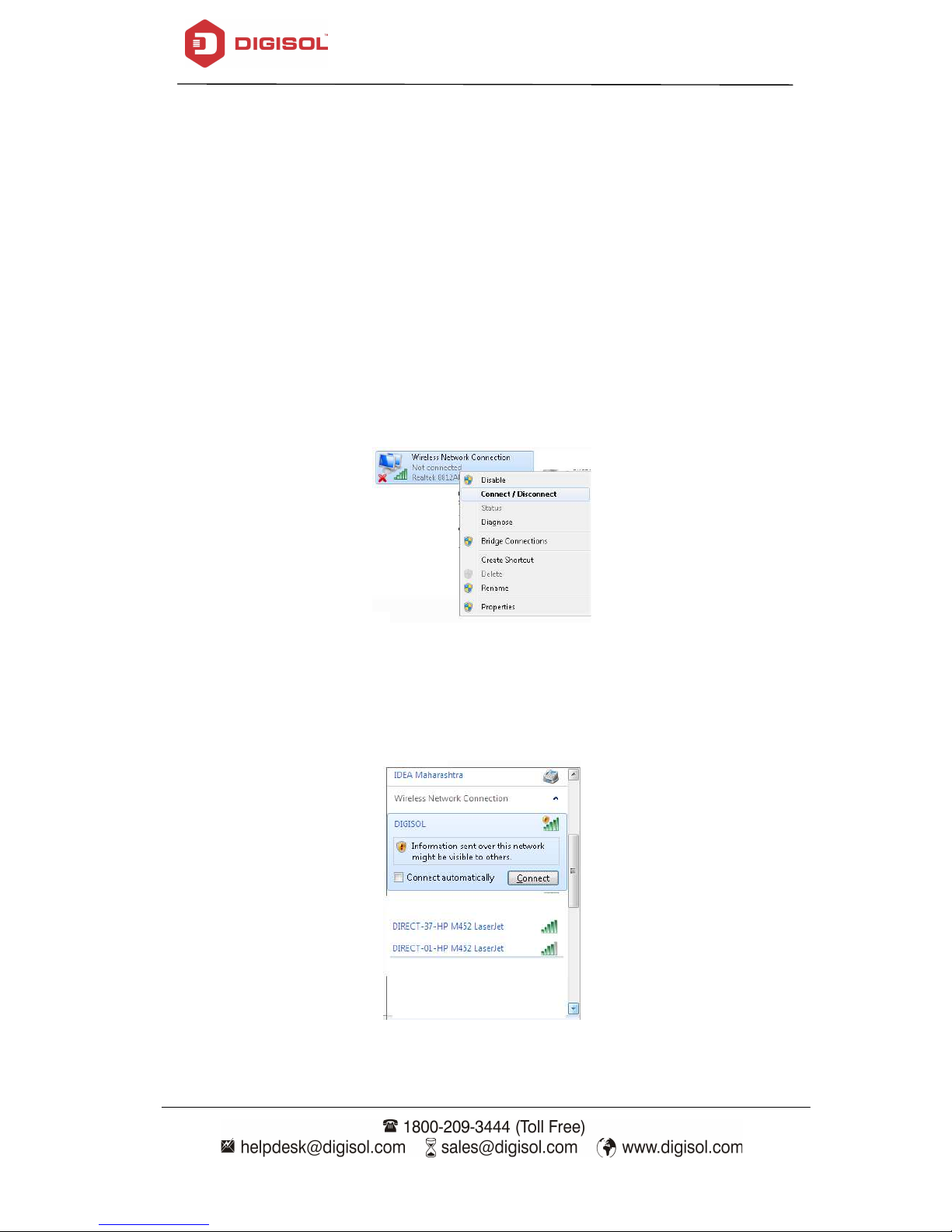
Please make sure your computer has configure wireless adapter. Then
please follow the below steps to connect to the AP/Repeater, wirelessly.
1. Click Start > Control Panel > Network and Sharing Center, click Change
adapter settings, right-click Wireless Network Connection, select
Connect/Disconnect.
2. Select the SSID or Wireless name "DIGISOL" then click Connect.
Autres manuels pour DG-WR3001NE
1
Table des matières
Autres manuels Digisol Répétiteur


