
Diasonic DDR-3032 Manuel utilisateur

User's Manual
Thank you for choosing our DIGITAL VOICE RECODER&AUDIO
PLAYER of DIASONIC TECHNOLOGY Co. LTD. Before use, read
through the User's Manual carefully, then, enjoy the player
appropriately and safely. While using, we advise you to keep this
user's manual to avoid possible technical difficulties.
DIGITAL VOICE RECORDER & AUDIO PLAYER
MODEL : DDR-3032/DDR-3064/DDR-3128
DDR-3032R/DDR-3064R/DDR-3128R
3000영문 2002.8.23 5:26 PM 페이지1 (1,1)

COPYRIGHT
●Copyright ⓒ2001, DIASONIC TECHNOLOGY CO. LTD. All rights
reserved.
No part of this User's Manual may be reproduced, translated or used
for profits. It is against copyright law to violate these rules. The
content of this User's Guide is produced under the greatest care of
our company. To improve the quality and function of the product, the
content of manual can be modified without any notice in advance. Our
company does not take any responsibility for the loss or damage by
the modification of the manual.
●MP3 files should not be used for the purpose of commercial use or
service other than personnel use. It is in conflict with the domestic
copyright law in case of below.
●It is prohibited to copy recorded matter other than the purpose of
personnel enjoyment by law.
YER
3000영문 2002.8.23 5:26 PM 페이지2 (1,1)
INFORMATION TO THE USER
This equipment has been tested and found to comply with the limits for a Class B
digital device, pursuant to part 15 of the FCC Rules. These limits are designed to
provide reasonable protection against harmful interference in a residential installation.
This equipment generates, uses and can radiate radio frequency energy and, if not
installed and used in accordance with the instructions, may cause harmful
interference to radio communications. However, there is no guarantee that
interference will not occur in a particular installation. If this equipment does cause
harmful interference to radio or television reception, which can be determined by
turning the equipment off and on, the user is encouraged to try to correct the
interference by one more of the following measures:
-. Reorient or relocate the receiving antenna.
-. Increase the separation between the equipment and receiver.
-. Connect the equipment into an outlet on a circuit different from that to which
the receiver is connected.
-. Consult the dealer or an experienced radio/TV technician for help.
WARNING
Changes or modifications not expressly approved by the manufacturer
could void the user’s authority to operate the equipment.
This device complies with Part 15 of the FCC Rules. Operation is subject to the
following two conditions: (1) this device may not cause harmful interference, and
(2) this device must accept any interference received, including interference that
may cause undesired operations.

CONTENTS
1. DDR-3000/R SERIES
1) Suggestions for Users ················· 1
2) About DDR-3000/R SERIES ··············· 2
3) Functions and Features ················· 3
4) Names of Each Part/ LCD Screen ············ 5
5) How to Use Battery and Components of Package ····· 6
6) Basic Directions for Use················· 8
7) How to Use Buttons ·················· 9
8) How to Set Menu in VOICE/MP3/FM Part ·········12
9) Operation of Playback Dial ···············13
10) How to Record and to Set Up Mode············15
11) Various Methods for Playback ··············17
12) Deleting and Controlling Data
···············
19
13) ALARM/PLAY, TIMER/REC ···············20
14) How to Connect with External Appliances ·········24
15) Signal-Receiving Function················26
2. DVR-Explorer / Mail Manager
1) What is DVR-Explorer? ·················27
2)
Connecting DDR-3000/R SERIES and setting up DVR-Explorer
··28
3) Composition of DVR-Explorer ··············30
4) Spectrum screen and sound effect ············33
5) Transferring MP3····················34
6) Sending DVF files to computer ··············35
7) Deleting MP3 and DVF files ···············37
8) Resetting flash memory ·················38
9) Managing files by using DVR-Explorer ··········39
10) Mail Manager ·····················40
3. Standard of Manufactures ··············43
4. Warranty Card of the Product ·············46
3000영문 2002.8.23 5:26 PM 페이지3 (1,1)

-1-
Suggestions for users
●Do not drop or shock the device. It can cause technical trouble.
●Please try to avoid such places.
- The place of high temperature(above 60℃)
- Direct rays of sunlight or right next to a heating apparatus
- Inside of tightly-shut car(especially in summers)
- Humid places(bathrooms)
●Overpressure can cause damage on liquid crystal display(LCD), and
it can also provoke malfunction because of its own features.
●If you put credit cards or commuter passes next to speakers, it will
change the magnetic attraction so that you cannot use your cards
any more.
●DIASONIC TECHNOLOGY Co. cannot be held responsible for any
kind of damage by the use of this product or reparation for injury by a
third party [or individuals].
●DIASONIC TECHNOLOGY Co. does not have any responsibility for
the loss of data in a memory except the one that happens while
repairing and mending technical faults of the product.
●Users should not repair, remodel or take the product apart by
themselves.
●Do not use the device on such places where the use of electrical
machines is prohibited.
●While operating one function of the product, do not try other functions.
●Applying heat to the body of the product or to batteries is
inappropriate.
●While using the product, do not adhere main device closely to the part
for insertion of support appliances.
●If a customer or a third party [or individuals] uses the device in an
inappropriate way, or if main device get shocked, data in a memory
can be changed or lost without warning.
Save important data in other ways.
3000영문 2002.8.23 5:26 PM 페이지4 (1,1)

-2-
About DDR-3000/R SERIES
DDR-3000/R SERIES is the recording and playback device with high
quality of sound and with intensive and excellent technology of
DIASONIC TECHNOLOGY. It provides customers various ways to
record (SHQ/HQ/SP/Timer Recorder Function) and to play
(ALARM/PLAY / speakers playback/ earphone playback/ real time
playback), and you can also enjoy MP3 files, which are digital
compression music files, in various ways. DDR-3000/R SERIES is the
portable digital audio device for next generation with function of
receiving and recording FM radio signals and broadcast.
●Polished, Sophisticated, Extremely Small Size & Solid Exterior
DDR-3000/R SERIES adopted the function of SAMPLING with high
quality of sound such as SHQ/HQ/SP so that it supports high quality-
voice recording and playback technology. We guarantee that
additional MP3 technology satisfies consumers' demands.
●Extension of Additional MP3/HD Function
Voice recorder together with various function of MP3 player
(equalizer/repeat function) can correspond to the advantage of MP3
players, and you can enjoy portable data-storage system or portable
hard disk-storage system.
●FM Radio Broadcast-Receiving & recording(optional function)
You can enjoy both receiving and recording FM radio signals and
broadcast and real time FM recording.
●BACKLIGHT
Even at night, JOG button will help users set menu easily so that they
can see and check the display of LCD of DARK-BLUE colors with
attached BACKLIGHT on the back.
3000영문 2002.8.23 5:26 PM 페이지5 (1,1)

●Additional DVR-EXPLORER / MAIL MANAGER
DDR-3000/R SERIES is the player, which is convenient when
transmitting recorded data, and MP3 files from one PC to another, and
which helps regenerating, managing saved data and sending data
through e-mail.
●ALARM/PLAY, TIMER/REC, SETTING UP TIMER
DDR-3000/R SERIES sets up timer or alarm to record or play
messages or songs at any time, and it helps recording or playback be
processed smoothly.
●USB INTERFACE: supports quick uploading and downloading.
●Display of time on LCD screen
●Saved calendars up to year of 2099
●Thin & slim design for portable and convenient use
●Hidden high quality-microphone inside of the device
●Total 396 messages with 4 separate files (99 messages in each file)
●ARS (Automatic Recording System): prevents unnecessary recording
when there is no sound or voice so that maximizes the time of
recording (A/B/OFF).
●KEY HOLD FUNCTION: prevents accidental operation when not in
use.
●REC MODE: for appropriate quality, time and purpose (SHQ/HQ/SP)
●RECORD DATE FUNCTION: shows time, date, and year of
recording.
●REMAIN FUNCTION: shows remain time for recording and playback.
Functions and Features
-3-
3000영문 2002.8.23 5:26 PM 페이지6 (1,1)
-4-
●TIMER RECORDER FUNCTION: can receive and record radio
broadcast automatically -daily, weekly or monthly.
●ALARM PLAY FUNCTION: can play messages automatically at
requested time after setting time and date.
●Repeat & A-B Repeat function: can play as long as you want to, and
you choose the intervals between two part that you want to listen.
●AUTO OFF FUNCTION: turns off power automatically after one
minute with no other work or operation.
●SEARCH PLAY FUNCTION: searches(forward, backward) the part
that you want to listen fast and easily.
●MONITOR FUNCTION: you can listen to the contents with
earphones while recording.
●H/D(32M/64M/128M) FUNCTION: can substitute for portable hard
disks.
●Digital output Volume control(30 levels)
●Various equalizer modes(normal, rock, jazz, classic, pop)
●Various repeat function (NORMAL/INTERVAL REPEAT/1
TRACK/ALL TRACK/RANDOM)
●On/off function of backlight on LCD (dark-blue)
●Downloading MP3 files / playback with various modes.
●Simultaneous recording function: can receive and record radio
broadcast (TIMER/REC): optional.
3000영문 2002.8.23 5:26 PM 페이지7 (1,1)
-5-
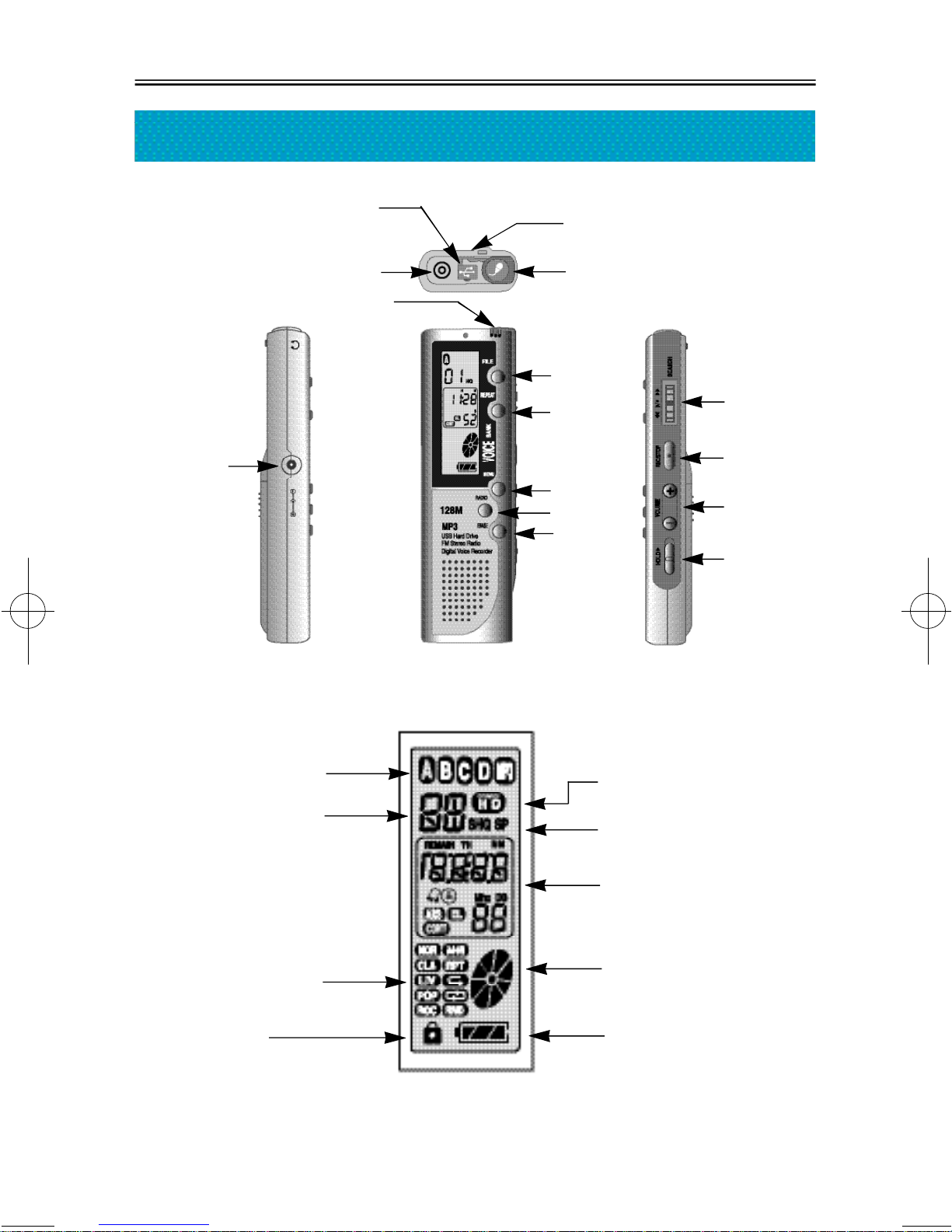
Names of Each Part/ LCD Indicator
D.C JACK
REPEAT
MENU
RADIO
ERASE
FILE
FF/PLAY/REW
REC/STOP
VOL+/VOL-
C-MIC
Ext C-MIC.JACK
NECK STRAP
USB JACK
USE OF PORTABLE
SAVING DEVICE
REC MODE
FILE
EARPHONE JACK
HOLD ON/OFF
REC TIME/PLAY TIME/
Mhz/ARS/EL/CONT/TIMER/
VOLUME/TIME
REC/PLAY/USB DISK
BATTERY
MESSAGE NO.
REPEAT/EQ
HOLD
3000영문 2002.8.23 5:26 PM 페이지8 (1,1)
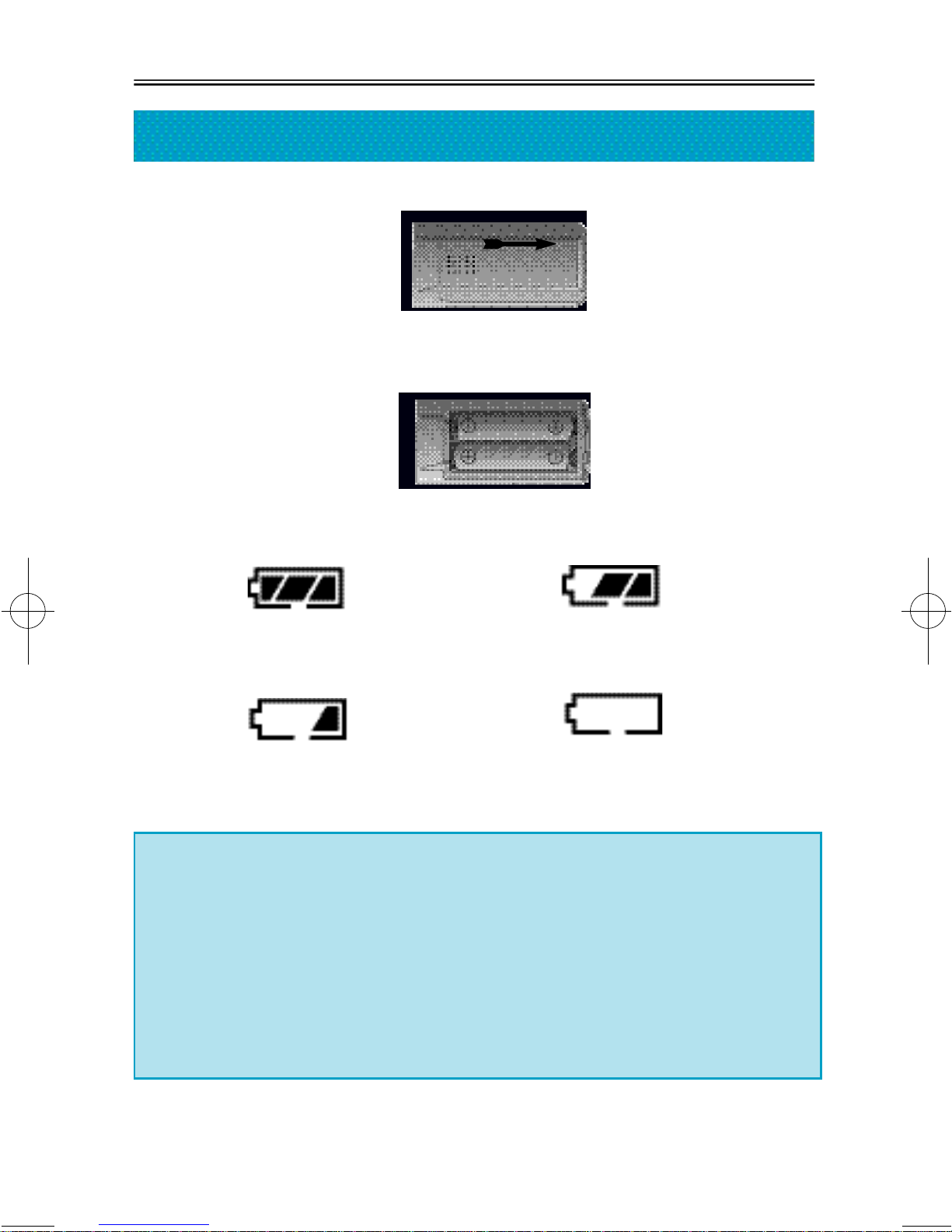
1. Open the cover of battery.
2. Put two LR 03 batteries in accordance with (+) (-) of inside of the
device, and put the cover back on.
Battery: LR 03 or similar batteries of same kind (size "AAA" or UM-4)
3. Check the extra lifetime of battery by pressing PLAY/STOP button or
REC button.
Enough power Battery has consumed
slight amount of power.
Battery has consumed Battery needs to be changed.
plenty of power.
-6-
Use of Battery and Components of Package
열림
※Caution
If LCD screen does not work even with new batteries, check polarity
of batteries immediately.
In the case that LCD screen does not work in spite of appropriate
setting of polarity, remove the batteries and ask for repair.
※Note
If you leave batteries unused in the device for a long time, it would be
wasted.
3000영문 2002.8.23 5:26 PM 페이지9 (1,1)
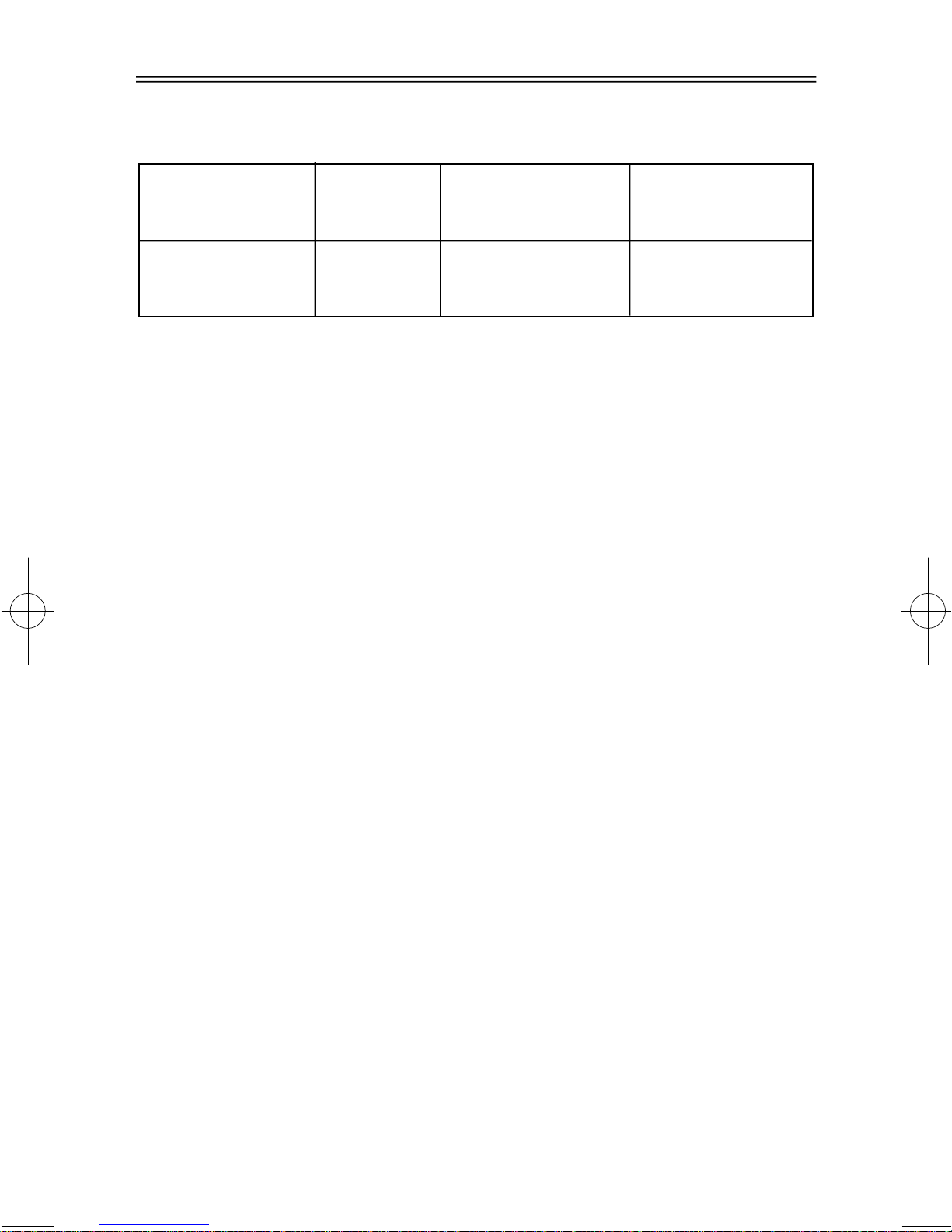
4. Lifetime of Battery
5. Suggestions when using batteries
●Do not mix and use different kinds of batteries at the same time.
●Remove batteries when you do not use the device for a long time.
●If you use charging battery, read the direction of a battery or a
charger carefully before use.
6. Components of Package
SETERO EARPHONE , TELEPHONE ADAPTOR , INSTALL CD
LINE/IN CABLE , USB CABLE , EXTERNAL MIC, BATTERY , NECK
STRAP , AC ADAPTOR (OPTION), TX 2000(OPTION) ,
REMOCON(OPTION)
-7-
Battery in use Recording
Playback through earphone
(Level of Volume: Medium)
Alkaline Battery
Size "AAA" LR-03
About 15 hr. About 9 hr. About 15 hr.
Playback through speaker
(Level of Volume: Medium)
3000영문 2002.8.23 5:26 PM 페이지10 (1,1)
Autres manuels pour DDR-3032
2
Ce manuel convient aux modèles suivants
5
Table des matières
Autres manuels Diasonic Enregistreur vocal

Diasonic
Diasonic DDR-5300 Manuel utilisateur

Diasonic
Diasonic DDR-6000 Manuel utilisateur

Diasonic
Diasonic DDR-6000R Manuel utilisateur

Diasonic
Diasonic DDR-3032 Manuel utilisateur

Diasonic
Diasonic DIGITAL VOICE RECORDER MODEL : DDR-5000 Manuel utilisateur

Diasonic
Diasonic DIGITAL VOICE RECORDER MODEL : DDR-5000 Manuel utilisateur

Diasonic
Diasonic DDR-5100 Manuel utilisateur

Diasonic
Diasonic DDR-5300 Manuel utilisateur

Diasonic
Diasonic RIR-900 Mode d’emploi

Diasonic
Diasonic DDR-3032 Manuel utilisateur


