DG Lab DG-100 Manuel utilisateur

MANUAL
DIGITAL AUDIO PLAYER
(DG-100)

CAUTION: Changes or modifications not expressly approved by the
manufacturer responsible for compliance could void the user’s authority
to operate the equipment
WARNING
This device complies with part 15 of the FCC Rules. Operation is subject to the
following two conditions: (1) This device may not cause harmful interference,
and (2) this device must accept any interference received, including
interference that may cause undesired operation.
INFORMATION TO USER:
This equipment has been tested and found to comply with the limit of a Class B
digital device, pursuant to Part 15 of the FCC Rules. These limits are designed
to provide reasonable protection against harmful interference in a residential
installation. This equipment generates, uses and can radiate radio frequency
energy and, if not installed and used in accordance with the instructions, may
cause harmful interference to radio communications. However, there is no
guarantee that interference will not occur in a particular installation; if this
equipment does cause harmful interference to radio or television reception,
which can be determined by turning the equipment off and on, the user is
encouraged to try to correct the interference by one or more of the following
measures:
1. Reorient / Relocate the receiving antenna.
2. Increase the separation between the equipment and receiver.
3. Connect the equipment into an outlet on a circuit difference from that to
which the receiver is connected.
4. Consult the dealer or an experienced radio/TV technician for help

CONTENTS
# Features
# Accessories
# Front & Side View
# LCD Display
# Controls
- Power On
- Playing
- Power Off
- Select & Search track
- Volume control
- Repeat(A<->B)
- Hold
- USB Storage
# Connecting DG-100 with PC
- Installation of USB device driver for Windows 98/SE
- Connecting DG-100 with PC
- Managing files
- Formatting
- Separating DG-100 from PC
# Precautions
# Product Specification
# Trouble Shooting

# Features
ㅇ 1 for 2 (MP3Player + USB Storage Device)
- Main Body + Battery Case = MP3 Player
- Main Body = USB Storage Device
ㅇ Built-in Memory (64MB/128MB)
ㅇ Plug & Play (No Need for File Manager)
ㅇ USB 1.1 Support
ㅇ Approximately 10Hrs Playback Time with AAA Battery 1EA
ㅇ Supported Operating System
- Windows 98/SE, Windows ME/2000/SE
( For Windows 98/SE, USB Device Driver CD is needed.)
# Accessories
ㅇ USB Device Driver CD for Windows 98/SE
ㅇ Necklace
ㅇ User’s Manual
ㅇ Battery 1EA(AAA Alkaline)
ㅇ USB Extension Cable
ㅇ Earphone

# Front & Side View
Repeat A to B
Hold
N
ex
t
Search
Previous
Search

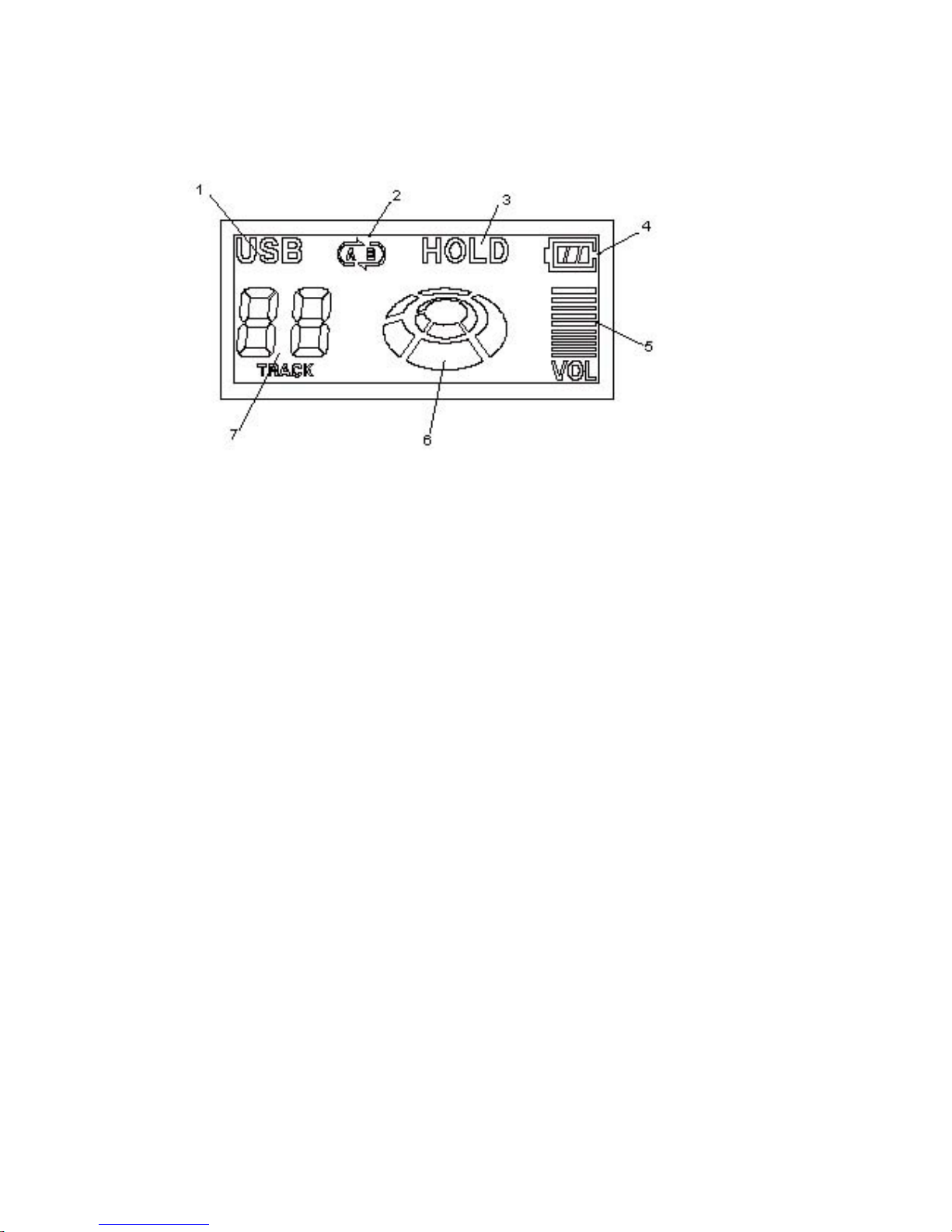
# LCD Display
1. USB
: Displayed when connected with PC
2. Repeat A↔B
: Displayed while Repeat A↔B is played
3. Hold
4. Battery Indicator
5. Volume Level
6. Play Icon
- Rotates while it is playing
- Stops when it stops
- Rotates at higher speed while it searches a track
7. Track Number(Seven Segment)
: Displays the current track number

# Controls
- Power On(▶║)
: Press Play/Stop(▶║) button and it will play the track you
stopped last time. (Resume Function)
When no MP3 file is stored in the player, the player will
be powered on for a moment and off again automatically.
- Playing(▶║)
: Press Play/Stop(▶║) button in playing mode and it will stop
playing, and if you press the Play/Stop(▶║) button again
in stop mode, it will play again.
- Power Off(▶║)
:Press the Play/Stop(▶║) button longer than 2 second in
playing or stop mode and power will be off.
In stop mode, power will be off automatically within 2 minutes.
In the event of insufficient battery power, the player may be
shut off even before the battery is completely run down.
- Select & Search Track(▶▶,◀◀)
:Press the FF(▶▶) or REW(◀◀) button to select next or
previous track.
Press the FF(▶▶),REW(◀◀) key longer than 2 second then it
searchs inside one song. This search function is only
available in present song.
If searched to first end of searched song then plays from
the first of present song
.
If searched to last end of searched song then plays from
the first of next song.
- Volume Control (+/-)
: Press volume(+/-) button for volume control.
The volume level is displayed on the LCD window.
Press volume(+/-) button 3 times shortly to increase/decrease
one volume level.
Press the +/- button longer to change volume level
continuously.
- Repeat (A↔B)
: Press Repeat(A↔B) button to set the starting point of A↔B

Repeat, and press the Repeat(A↔B) button again to set the
ending point of A↔B Repeat.
For cancellation of A↔B Repeat, Press the Repeat(A↔B)
button again.
This function is only available in present track.
- Hold
: Push Hold key to the “HOLDÆ”direction and the buttons of
the player does not work, with “HOLD” displayed on LCD window.
Pull back Hold switch to the opposite direction and
the functions of the buttons will recover.
- USB Storage
: Remove the battery case to make a portable USB storage device.
When you plug DG-100 without battery case into the USB port
of your computer, “Removable Disk” folder will be created
in My Computer out of Window Explore. The DG-100 can be used
in the same way as a floppy diskette or HDD. You can store or
delete not only mp3 files but any data files.
Note) MP3 files must be placed in the ROOT folder of the DG-
100 so that it can play right.

# Connecting DG-100 with PC
- Installation of USB Device Driver for Windows 98/SE
(1) Insert the installation CD in the CD-ROM Driver of your
computer and double click “DrvSetup.exe” file in the CD.
(2) Click “98 Driver Install” button.
(3) Click “OK” button to complete the installation.
Remark)For installation in Windows 98, you can also
double click “98Install.bat” file in the CD.
Double click “98Uninstall.bat” in the CD to
uninstall the USB Device Driver.
- Connecting DG-100 with PC
(1) Remove the battery case from the main body
(2) Plug the main body into the USB port of your computer
directly and “Removable Disk” folder will be created in
“My Computer” out of “Window Explore”.

The main body of DG-100 can be used in the same way as a floppy
diskette or HDD. You can store or delete not only mp3 files but
any data files.
“USB” icon will be displayed in the LCD window when the main
body is plugged into your computer.
When DG-100 is removed from your computer, the “Removable
Disk” folder will disappear in My Computer” of the “Window
Explore”.
- Managing files
: When you plug the DG-100 into the USB port of your computer
directly, “Removable Disk” folder will be created in “My
computer” out of “Window Explore”. First when you buy DG-
100, there is neither folder nor file in Removable Disk.
* Music files must be placed in the ROOT folder of DG-100 so
that it can play right.
* The DG-100 can be used in the same way as a floppy diskette
or HDD. You can store or delete not only mp3 files but any
data files.
Warning1) Please wait 10 seconds at least before you remove
DG-100 from your computer since the data transfer
Table des matières
Manuels Lecteur MP3 populaires d'autres marques

Blaupunkt
Blaupunkt Compact Drive MP3 Manuel utilisateur

Memorex
Memorex MMP9008 - 8GB USB 2.0 Manuel utilisateur

Meizu Electronic Technology
Meizu Electronic Technology E5 Manuel utilisateur

Naxa
Naxa NMV-173NX Manuel utilisateur

Philips
Philips PSA250 Manuel utilisateur

Zipy
Zipy go! Waving Manuel utilisateur