DF ROBOT Veyron Manuel utilisateur

VeyronServoDriver(24‐Channel)(SKU:DRI0029)
FromRobotWiki
Contents
1Introduction
2Specifications
3PinDefinitions
4InstallDriver
o
4.1WindowsOSDriver
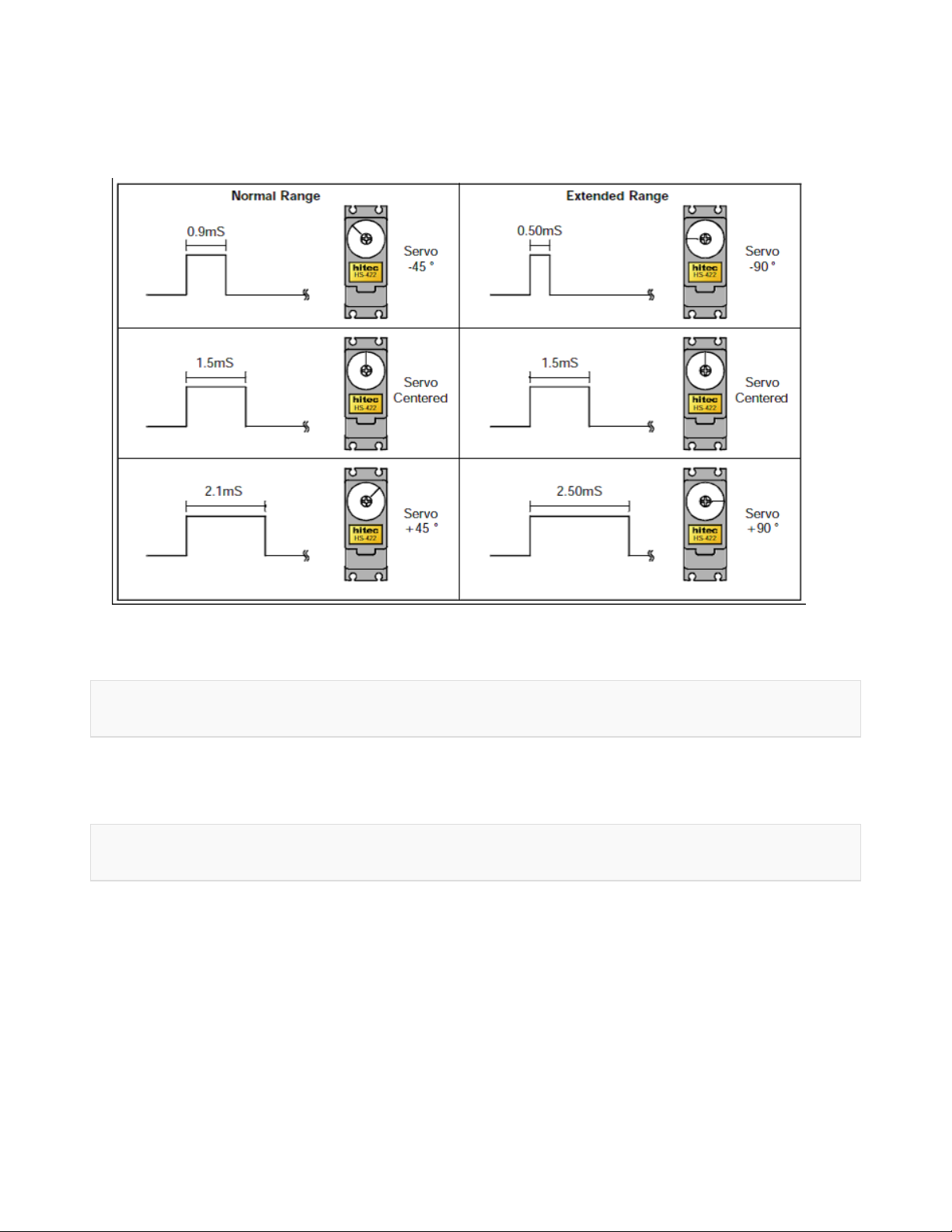
5RelationshipbetweenSteeringAngleandPWMSignal
6Formula
7Tutorial
o
7.1HowtodrivetheboardfromSerialport
o
7.2HowtodrivetheboardfromArduino
7.2.1SampleCode
o
7.3CommandLists
7.3.1StandardCommands
7.3.1.1ExampleCommands
7.3.2PulseOffset
7.3.3DigitalOutput
7.3.3.1ExampleCommmand
7.3.4ByteOutput
7.3.4.1ExampleCommmand
7.3.5QueryStateofMotion
7.3.6QueryPulseWidth
o
7.4HowtodrivetheboardfromtheDFServo
o
7.5VeyronServoDriverWirelessCommunication
7.5.1SampleCode
7.5.2XbeeWirelessCommunication
7.5.3APC220WirelessCommunication
8TroubleShooting

Introduction
Veyron Servo Driver (24-Channel) is a multiple servo controller, especially designed for
humanoid robots, spider robots, robotic arms, and many other likewise applications. The
controller integrates wireless data transmission interface, which is fully compatible with
DFRobot Bluetooth module, APC220 wireless data transmission module and Xbee module. The
controlling modes include real-time, timer, constant speed. Veyron Servo Driver (24-Channel) is
the most powerful Mirco USB servo driver with high reliability on the market. It uses a high-
performance, low-power STM32F103 microcontroller as its core control unit, which has a
powerful, fast execution speed, high accuracy, strong I / O drive power. It supports Futaba,
Hitec, Fraser and most common servos. The servo control range could be 0 ~ 180 ° (for 360 °
continuous rotation, retrofitting is needed); It has two servo control modes: single servo control,
group servo control. In group control mode, the same group can be coordinated automatically
with start and stop at the same time. It will be very useful in multi-DOF biomimetic robots,
which requires smooth actions.
DO NOT PROGRAM THIS SHIELD!
We have uploaded the firmware to Maple RET6 already. Please do NOT upload
any sketch to the chip carelessly. Or it will be defective and cannot read any
command by serial port anymore.
Specifications
Outputchannels:24(PWMoutputorTTLleveloutput);
ServoPower:DC4.8V~6V;
LogicPower:DC6V~12VorUSB(witharesettablefuseindebugging);
DriverResolution:1uS;0.09°;
DrivespeedResolution:1uS/s;0.09°/s
CommunicationInterface:MicroUSB/TTLserialinterfaces;
Baudrate:2400,9600,38400,115200
Size:57.3x72.3mm
Weight:26g(withoutpackage)

PinDefinitions
InstallDriver
It requires to install the driver, when you use it for the first time.
NOTE: If you met any problem of installing the driver, you may need disable the Windows
feature of Digital signature requirment, you need to disable that to install the driver. Actually,
there is another way to install the driver for STM32, read at the end of the wiki > More >
Share.

WindowsOSDriver
Windows Driver Download https://github.com/DFRobot/Visual-Servo-
Controller/blob/master/drivers/mapleDrv.rar?raw=true
1) Connect Veyron Servo Driver 24-Channel to a computer via USB port(USB2.0 is better).And
Open your PC Device Manager.
2) Press the "reset" button, the blue light will flash six times fast, then slow blink several times.
3) Press the "reset" button again, and then press to hold "BOOTO" button during blue lights
flashing rapidly, until the light starts blinking slowly. The blue light will keep flashing. Now you
can install the driver.

4) Windows will prompt you for a driver, manually locate the directory, select mapleDrv --
>dfu_x64/dfu_x32(Please select your OS bit: 64-bits or 32-bits) in the folder. Next install a
virtual serial port driver:
5) Reset Veyron Servo Driver 24-Channel with RET button, wait for the blue light stops
flashing. At this point Windows will prompt to install the driver, too. Please manually locate the
directory, select mapleDrv -->serial in the folder. Until now, the driver has been installed

RelationshipbetweenSteeringAngleandPWMSignal
Formula
Run Time (sec) = pulse width (us) / Speed (us / sec).
e.g.The initial position is 750us, the finial position is 2250us, the speed is 1000us/s The running
time;
T=(2250-750)/1000=1.5s
So the running time is 1.5s.
Tutorial
Device List:
VeyronServoDriver24‐Channel
MicroUSBcable
TowerProSG90Servo

Servo5Vpowersupply
9Vpowersupplylogic
Veyron requires an external power supply to support the servo
HowtodrivetheboardfromSerialport
In this section, we will use Arduino IDE as a Serial port communication tool to control the servo.
And, you also could use other Serial port software, like putty, CoolTerm etc.
Connect Micro USB cable to the Veyron Servo Driver 24-Channel, then the power indicator
LED will be on. Connect an external 5V power to the VS and GND. Then switch the DIP 3 at
SERIAL, USB has been defaulted to 57600 baudrate (cannot be changed), should be consistent
with software.
Open you Arduino IDE, click "Tools", select your board Serial port, and open the Serial monitor.
Select "Carriage return",and the right baudrate.

HowtodrivetheboardfromArduino
Sample Code
void setup() {
Serial.begin(115200);//Set the baudrate to 115200 A:1 B:1
delay(100);//wait for baudrate setting finished
}
void loop() {
Serial.print("#5 P750");// Channel 5 will move to 750us within 500ms

delay(5); //wait for first comand transmission done, if you s
end
// a long command, you'd better extend it
Serial.print("\r"); // send Carriage Return <CR>
delay(1000); //wait for servo go to the set position
Serial.print("#5 P2200");// Channel 5 will move to 2200us within 500ms
delay(5);
Serial.print("\r");
delay(1000);
}
CommandLists
Standard Commands
#<ch> P <pw> S <spd> ...# <ch> P <pw> S <spd> T <time><cr>
<ch>:Servochannelnumber,0‐23
<pw>:pulsewidth(us),500‐2500;thedestinationposition
<spd>:single‐channelspeed(us/s)(Optional)
:thewholechannelspeed(ms),maximum65535(Optional)
<cr>:carriagereturn,thesymboloftheend,ASCIIcode13(Required)
<esc>:Cancelthecurrentcommand,ASCIcode27
ExampleCommands
#5 P1600 S750 <cr>
The servo on Channel 5 will move to 1600us position at the speed of 750us/s.
#5 P1600 T1000 <cr>
The servo on Channel 5 will move to 1600us from any position after 1000ms.

#5 P1600 #10 P750 T2500 <cr>
The Servo on Channel 5 will move to 1600us position and servo on channel 10 will move to the
750us position. They will arrive simultaneously after 2500ms. This command can coordinate
multiple servo speed, even if the initial position of two servos are very far, you can make they
start to rotate and stop at one specified position. This command is very suitable for humanoid
bipedal robot
Pulse Offset
#<ch> PO <offset value> ... # <ch> PO <offset value> <cr>
<ch>:Servochannelnumber,0‐23
<offsetvalue>:100to‐100us
<cr>:theendofthecarriagereturn,ASCIIcode13
To rectify the pulse width of a channel, then humanoid robot could rectify the position without
mechanical hardware.
Digital Output
#<ch> <lvl> ... # <ch> <lvl> <cr>
<ch>:Servochannelnumber,0‐23.
<lvl>:channeloutputlogiclevelhigh'H'orlow'L'.
<cr>:thesymboloftheend,ASCIIcode13.
The channel will output a level after received carriage return symbols in 20ms.
ExampleCommmand
#3H #4L <cr>
This command makes the channel 3 output a high level(+3.3 V), Channel 4 output a low
level(0V).
Byte Output
# <bank>: <value> <cr>
Autres manuels pour Veyron
1
Table des matières
Autres manuels DF ROBOT Contrôleurs