
Desco 19662 Manuel du propriétaire

DESCO WEST - 3651 Walnut Avenue, Chino, CA 91710 • (909) 627-8178
DESCO EAST - One Colgate Way, Canton, MA 02021-1407 • (781) 821-8370 • Website: Desco.com
TB-3083 Page 1 of 5 © 2020 DESCO INDUSTRIES INC
Employee Owned
December 2020
Dual-Wire Dual Operator Monitor
Installation, Operation and Maintenance
Description
The Desco 19662 Dual-Wire Dual Operator Monitor
monitors two operators and two ESD worksurfaces
eliminating the need for periodic testing and
record keeping of wrist straps. The Dual-Wire Dual
Operator Monitor uses low-voltage steady state DC
continuous-loop technology to continuously monitor
(versus pulsed or intermittent) dual-wire wrist strap
functionality. Independent audio and visual alarm
conditions identify the status of the worksurfaces and
operators. Two operator remotes with 10 foot cables are
included for use at adjacent workstations. Each monitor
is calibrated with accepted procedures and standards
traceable to the National Institute of Standards and
Technology (NIST) and includes a NIST certificate.
Dual Wire Monitor Technology
Desco dual wire dual operator monitors uses a loop
electrical resistance technology. A +5 or +8 volt test
signal1 is generated by the monitor and placed on one
conductor of the dual wire wrist strap. The test voltage
is bridged to the opposite conductor through the skin of
the wearer of the wristband and returned to the monitor.
Resistance is monitored with a stable continuous signal
through one conductor, across the skin of the operator,
and returning to the monitor through the opposite
conductor. Desco dual wire dual operator monitors
determine that the operator’s path-to-ground is between
the 10 or 35 megohms2 upper limit (adjustable) and 1
megohm1 lower limit.
1. See Operator Test Voltage section below for pass/
fail specs. User should determine if these voltages
can damage the device being handled. Other
lower voltage monitoring systems may need to be
considered.
2. See Operator Test Range section below for pass/fail
specs.
Figure 1. Desco 19662 Dual-Wire Dual Operator Monitor
TECHNICAL BULLETIN TB-3083
Made in the
United States of America
ANSI/ESD S20.20 section 7.3 states “Compliance
verification records shall be established and maintained
to provide evidence of conformity to the technical
requirements.” Per ANSI/ESD S1.1 Annex A.3 Daily
(wrist strap system) testing may be omitted if constant
monitoring used.” Per ESD Handbook ESD TR 20.20
section 5.3.2.4.4 “Typical Test programs recommend
that wrist straps that are used daily should be tested
daily. However, if the products that are being produced
are of such value that knowledge of a continuous,
reliable ground is needed, and then continuous
monitoring should be considered or even required.”
The Dual-Wire Dual Operator Monitor and its
accessories are available in the following item numbers:
Item Description
19662 Dual-Wire Dual Operator Monitor
19663 Mounting Brackets
50524 Limit Comparator
50525 Replacement Operator Remote Kit, Black
50526 Replacement Operator Remote Kit, White
19262 Replacement Power Adapter, 12 VDC
Packaging
19662 Dual-Wire Dual Operator Monitor
1 Dual-Wire Dual Operator Monitor
1 Power Adapter, 12VDC, with interchangeable plugs
(North America, UK/Asia, Europe)
2 Operator Remotes with Attached Cables
(1 Black, 1 White)
2 White Mat Monitor Cords
1 Monitor Ground Cord
1 Certificate of Calibration
19663 Mounting Brackets
2 Mounting Brackets
4 Pan Head Screws, 8-32 x 1/8"

DESCO WEST - 3651 Walnut Avenue, Chino, CA 91710 • (909) 627-8178
DESCO EAST - One Colgate Way, Canton, MA 02021-1407 • (781) 821-8370 • Website: Desco.com
TB-3083 Page 2 of 5 © 2020 DESCO INDUSTRIES INC
Employee Owned
December 2020
Features and Components
A. Operator 1 Status LEDs: When the green LED is
illuminated, operator 1 is properly grounded. When the
LED is illuminated red or yellow and the alarm sounds,
operator 1 is not properly grounded.
B. Worksurface 1 Status LEDs: When the green LED
is illuminated, worksurface 1 is properly grounded.
When the red LED is illuminated and the alarm sounds,
worksurface 1 is not properly grounded.
C. Operator 2 Status LEDs: When the green LED is
illuminated, operator 2 is properly grounded. When the
LED is illuminated red or yellow and the alarm sounds,
operator 2 is not properly grounded.
D. Worksurface 2 Status LEDs: When the green LED
is illuminated, worksurface 2 is properly grounded.
When the LED is illuminated red and the alarm sounds,
worksurface 2 is not properly grounded.
E. Power Jack: Connect to the included 12VDC power
adapter.
F. Operator 2 Remote Jack: Connect to the black
operator remote cable.
G. Operator 1 Remote Jack: Connect to the white
operator remote cable.
H. Monitored Mat 1 Terminal: Monitors a worksurface
mat for proper dissipative resistance and static charges.
Connect the white mat monitor cord here.
I. Ground Terminal: Common ground point for the
monitor. Connect to the green and yellow monitor
ground cord.
J. Monitored Mat 2 Terminal: Monitors a worksurface
mat for proper dissipative resistance and static charges.
Connect the black monitor cord here.
K. Data Output: For manufacturer use only.
L. Alarm Audible Adjustment: Turn the trimpot
counter-clockwise to increase the audible alarm volume
and clockwise to decrease it.
M.Mounting Holes: 8-32 PEM nuts are located on the
left and right sides of the monitor for pairing with the
Desco 19663 Mounting Brackets.
N. Operator Setting Switches: Toggles the monitor’s
settings for operator test voltage and high test limit.
Switches 1 and 2 control the operator test voltage.
Switch 1 Switch 2 Operator Test Voltage
RIGHT LEFT 5V
LEFT RIGHT 8V
Switch 3 controls the operator HIGH test limit.
Switch 3 HIGH Limit Resistance
RIGHT 10 megohms (1 x 10⁷ ohms)
LEFT 35 megohms (3.5 x 10⁷ ohms)
default setting
Figure 2. Dual-Wire Dual Operator Monitor features and
components
A
C
B
D
E F G H I J K L
FRONT VIEW
BACK VIEW
LEFT-SIDE VIEW
M N
DESCO WEST - 3651 Walnut Avenue, Chino, CA 91710 • (909) 627-8178
DESCO EAST - One Colgate Way, Canton, MA 02021-1407 • (781) 821-8370 • Website: Desco.com
TB-3083 Page 3 of 5 © 2020 DESCO INDUSTRIES INC
Employee Owned
December 2020
Installation
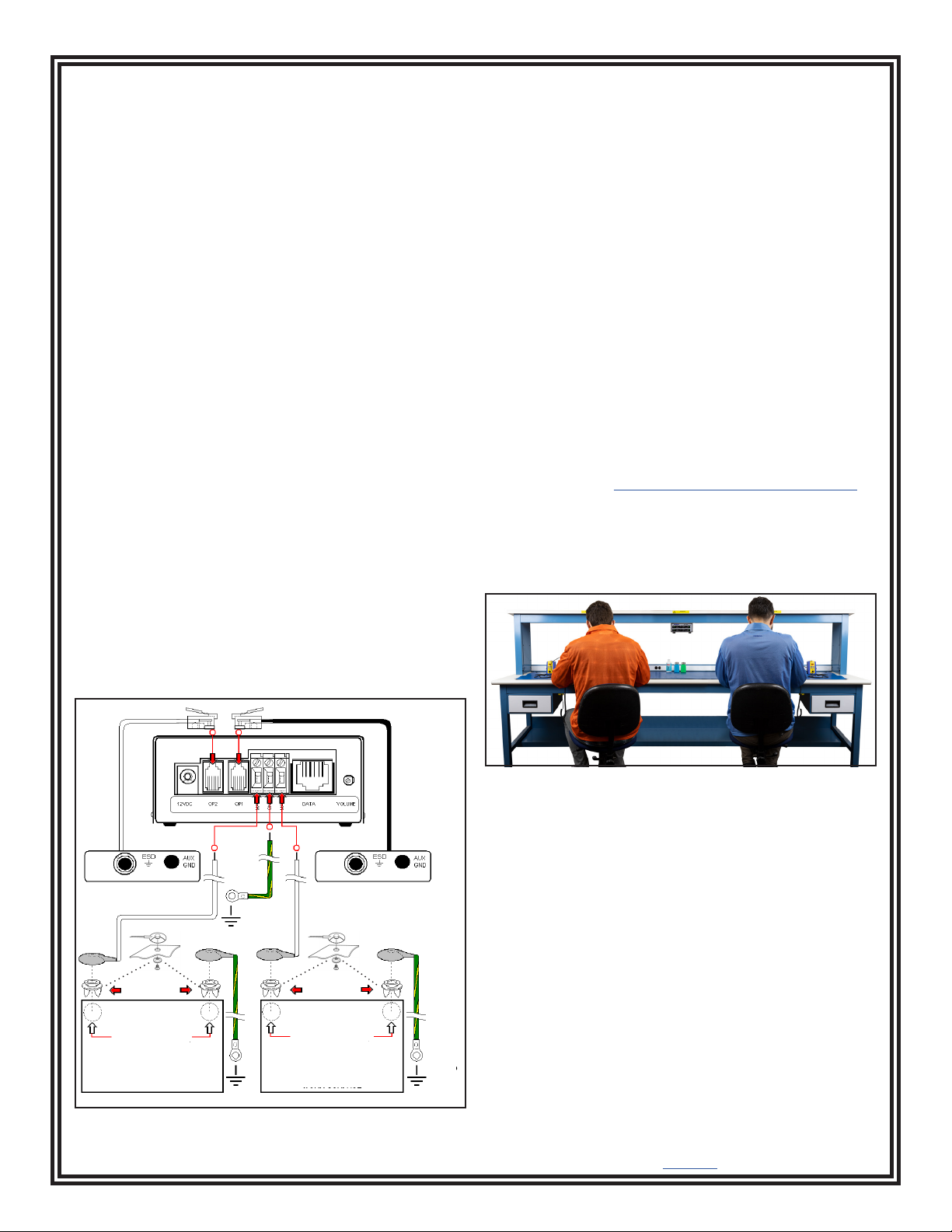
1. Locate and appropriate AC outlet near the
Dual-Wire Dual Operator Monitor, and test it for
proper wiring and grounding prior to use. The Desco
AC Outlet Analyzer or similar test equipment may
be used to verify the outlet’s functionality.
2. Determine the mounting locations of the operator
remotes. Be sure to install the remotes at a distance
that enables the 10 foot leads to reach the back of
the monitor.
3. Install tinned wire ends of the mat (must be
grounded seperately) cords to their appropriate
screw terminal block located at the back of the
monitor.
4. Install the tinned wire end of the green and yellow
moniitor ground cord to the ground terminal located
at the back of the monitor. Install its ring terminal
to an appropriate ground point. Be sure to use a
different ground point than the one used for the
mats. The face plate screw of a grounded AC wall
outlet may provide a convenient connection point.
5. Route the mat cords from the back of the monitor to
the snaps on the worksurface mats.
6. Insert the operator remote cables into their
appropriate jacks located at the back of the monitor.
The white cable is for operator #1. The black cable
is for operator #2.
7. Connect the power adapter to the power jack
located at the back of the monitor. Plug the power
adapter into a proper AC power outlet. The monitor
is now powered.
Operation
1. Monitoring of the operators will remain in the
STANDBY condition until a wrist cord is plugged
into the operator remote. STANDBY mode is
indicated by a blinking yellow operator LED.
2. Plug a wrist strap cord, not attached to the
wristband, into the monitored jack labeled WRIST
STRAP MONITOR located on the remote. This
automatically activates the selected operator
channel. The corresponding operator LED should
illuminate red and the alarm should sound on the
monitor.
3. Remove the charges from your body by making
contact with a properly grounded ESD worksurface.
4. Snap the cord to the wristband, and fit it snugly
onto your wrist. This should silence the audible
alarm and cause the corresponding operator LED
to switch from red to green. If this does not happen,
examine the wrist cord for continuity or damage and
your wrist band to ensure that it is securely fit. If you
have dry skin, apply an approved dissipative hand
lotion such as Menda Reztore® ESD Hand Lotion.
5. The AUX GND jack located on the operator remote
is a grounded and unmonitored connection for
guests, or other equipment grounds. It must be used
with a single-wire Banana plug style cord.
10mm snap needs to pierce
and clinch bottom side of
mat. Snap needs to be at
least 12" apart or 72" max.
10mm snap needs to pierce
and clinch bottom side of
mat. Snap needs to be at
least 12" apart or 72" max.
OPERATOR 1
WORKSURFACE
OPERATOR 2
WORKSURFACE
10mm PUSH &
CLINCH SNAP
10mm PUSH &
CLINCH SNAP
BENCH
GROUND
MAT 1 WIRING
WHITE CABLE MAT 2 WIRING
BLACK CABLE
WRIST
STRAP
MONITOR
WRIST
STRAP
MONITOR
ELECTRIC
GROUND
Screw allows ground cord to
be bolted to mat; keeps cord
from disconnecting.
Figure 3. Installing the Dual-Wire Dual Operator Monitor
oror
OPERATOR 2
REMOTE JACK
BLACK CABLE
OPERATOR 2
REMOTE JACK
WHITE CABLE
Figure 4. Using the Dual-Wire Dual Operator Monitor

DESCO WEST - 3651 Walnut Avenue, Chino, CA 91710 • (909) 627-8178
DESCO EAST - One Colgate Way, Canton, MA 02021-1407 • (781) 821-8370 • Website: Desco.com
TB-3083 Page 4 of 5 © 2020 DESCO INDUSTRIES INC
Employee Owned
December 2020
Calibration
The Dual-Wire Dual Operator Monitor is calibrated to
standards traceable to NIST. Frequency of recalibratrion
should be based on the critical nature of those ESD
sensitive items handled and the risk of failure for the
ESD protective equipment and materials. In general, we
recommend that calibration be performed annually.
Use the EMIT 50524 Limit Comparator for Dual-Wire
Monitors to perform periodic testing (once every 6-12
months) of the Dual-Wire Dual Operator Monitor. The
Limit Comparator can be used on the shop floor within a
few minutes virtually eliminating downtime, verifying that
the monitor is operating within tolerances.
See TB-6542 for more information.
Figure 5. EMIT 50524 Limit Comparator for Dual-Wire
Monitors
Specifications
Input Voltage and
Frequency
(External Adapter)
AC/DC Power Adapter
Power Input:
100-240 VAC, 50/60 Hz
Power Output:
12 VDC @ 0.50 A
Cable Length:
5 ft. (1.5 m)
Operating
Temperature
50 to 95 °F (10 to 35 °C)
Environmental
Requirements
Indoor use only at altitudes
less than 6500 ft. (2 km)
Maximum relative humidity
of 80 % up to 85 °F (30 °C)
decreasing linearly to 50 %
@ 85 °F (30 °C)
Dimensions
(Monitor)
4.4" x 4.7" x 2.1"
(112 mm x 119 mm x 53 mm)
Weight
(Monitor)
1.1 lbs. (0.5 kg)
Operator Test Range 1.91 megohms to 35
megohms (default)
or
1.91 megohms to 10
megohms (±10 %)
Worksurface Test
Limit*
3.5 megohms (±10 %)
Operator Test Voltage 8 V (default) or 5 V
Worksurface Test
Voltage
200 mV
Country of Origin United States of America
*The worksurface mat must have a dedicated
conductive layer.Desco workstation monitors are not
recommended for use with homogeneous matting.
ANSI/ESD S20.20 requires the use of a surface
resistance meter for periodic verification of a
worksurface’s resistance-to-ground (Rtg). Constant
monitors may not be used as a substitute for this
requirement.

DESCO WEST - 3651 Walnut Avenue, Chino, CA 91710 • (909) 627-8178
DESCO EAST - One Colgate Way, Canton, MA 02021-1407 • (781) 821-8370 • Website: Desco.com
TB-3083 Page 5 of 5 © 2020 DESCO INDUSTRIES INC
Employee Owned
December 2020
Figure 6. Operator Remote dimensions
Replacement remotes are available as Desco items
50525 and 50526
Limited Warranty, Warranty Exclusions, Limit
of Liability and RMA Request Instructions
See the Desco Warranty -
Desco.com/Limited-Warranty.aspx
Table des matières


