- 10 -
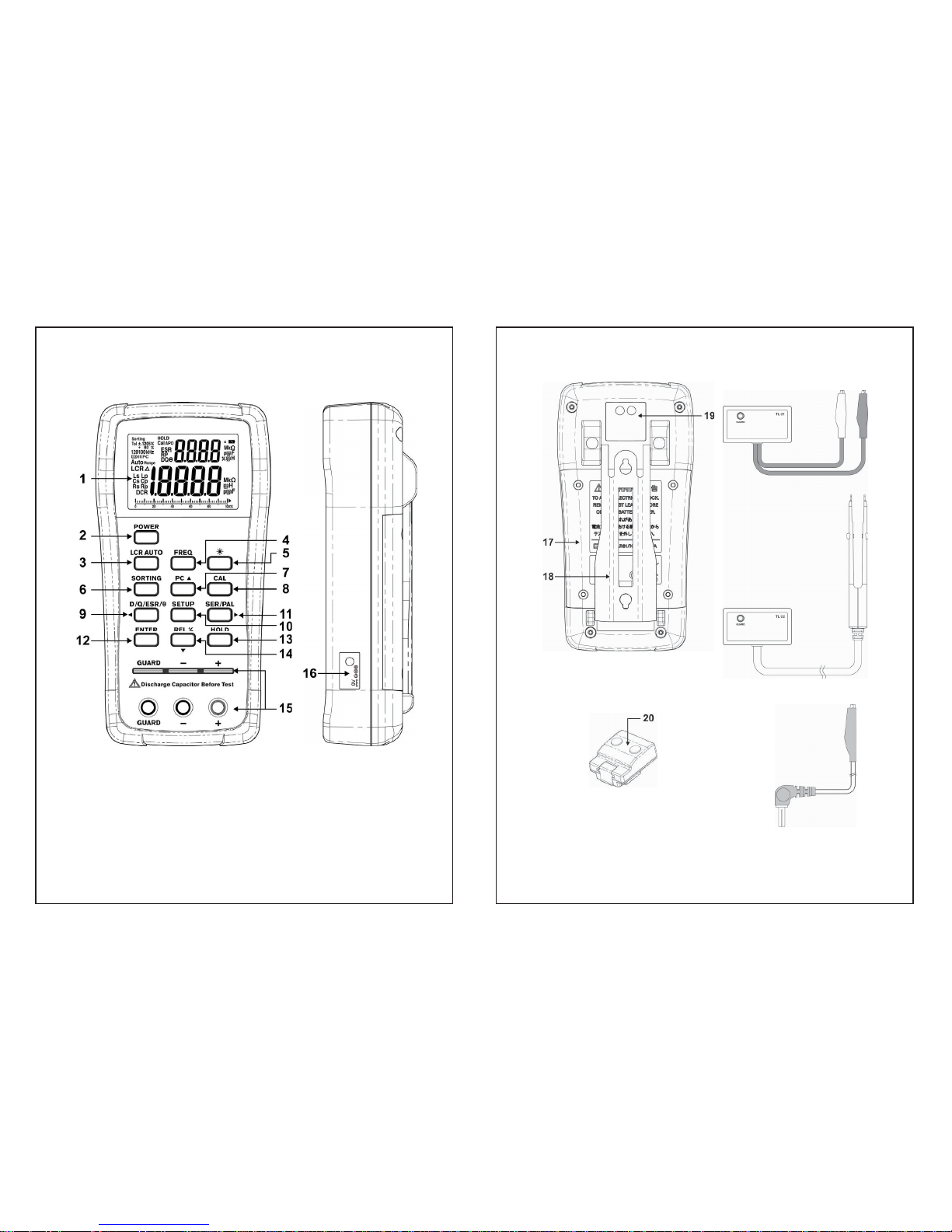
1. LCD display
2. POWER To power on/off the instrument
3. LCR AUTO LCR auto mode, Inductance,
Capacitance, Resistance and DC
resistance measurement selection key
4. FREQ Testing frequency selection key
5. Backlight display
6. SORTING Sorting mode control key
7. PC UART output control
8. CAL Open/Short calibration mode
9. D/Q/ ESR/șD/Q/ ESR/șparameters selection key
10. SETUP Setup menu control key
(in sorting mode )
11. SER/PAL Series and Parallel selection key
12. ENTER Setup menu control key
(in sorting mode )
13. REL% Relative mode
14. HOLD Data hold
15. Input sockets and Terminals
16. AC/DC power adaptor
17. Battery cover
18. Tilt-Stand
19. IR to USB Slot
20. IR to USB case (optional)
21. TL-21 Alligator Test Lead Case
22. TL-22 SMD tweezers (optional)
23. TL-23 Guard Line
- 11 -
III. LCD Display Illustration
LCD Display.
1. Sorting Sorting function is enabled
2. Tol Tolerance indication in sorting mode : ±0.25%, ±0.5%,
± 1%, ±2%, ±5%, ±10%, ±20%, & +80%-20%
3. kHz Testing frequency indication –
1kHz,10kHz,100kHz,100Hz & 120Hz
4. PC Communication is active
5. Battery capacity indication
6. Range Range selection is enabled on setup menu of sorting
mode
7. Auto Auto range for L, C or R measurement
8. LCR Checking for L/C/R mode automatically
9. ǻRelative function is enabled
10. Ls/Lp Inductance in series or parallel mode is active
11. Cs/Cp Capacitance in series or parallel mode is active
12. Rs/Rp AC Resistance in series or parallel mode is active
13. DCR DC resistance mode is selected