
Denso J2534 Manuel utilisateur

1/36
J2534 device
DN-DST-010
Hardware Manual

2/36Updated: Dec. 23, 2020
TableofContents
About this product
The countries where you can use
this product
Disposal of the product
1. Preface 4
2. Product overview 5
6. Description of the main unit 16
7. Connection 19
Trademarks
Product specifications
3. Safety precautions 8
4. Usage precautions 12
5. Product configuration 15
Main unit and accessories
6-1. Names of the parts
6-2. Indicator
6-3. Strap hole
7-1. Connecting to the vehicle
7-2. Connecting to the PC
Wireless communication
(wireless models only)
Wireless communication characteristics
USB communication
Disposal requirements

3/36Updated: Dec. 23, 2020
TableofContents
9. Warranty and disclaimer 35
9-1. Warranty
9-2. Disclaimer
8-1. Before starting diagnosis
8-2. After diagnosis
8. Use cases 30

4/36Updated: Dec. 23, 2020
1. Preface
Thank you for purchasing this product.
Before using this product, read this document carefully so that you can use this
product correctly and safely.
This document explains handling of this product.
Trademarks
-
SD Memory
CardTM and SDHC Memory CardTM are the registered trademarks of
Panasonic Corporation, SanDisk Corporation in the United State and Toshiba
Corporation.
-
Bluetooth
®is the trademark or registered trademark of Bluetooth SIG, Inc. in the
United State and other countries.
1. Preface

5/36Updated: Dec. 23, 2020
2. Product overview
About this product
This product is a compact and lightweight communication interface for diagnosis.
With this product, diagnosis can be performed by connecting to a PC with the diagnostic
software installed.
This product alone cannot perform diagnosis.
This is a compact product. Please do not forget to remove it after use.
* Some vehicles cannot be connected directly depending on the location of the
available OBD connector.
The countries where you can use this product
Japan, USA, Canada, China, EU (European Union)
Please comply with the applicable laws and regulations in the country and/or region
where the product is used.
Disposal of the product
When discarding the product or its accessories, contact authorized industrial waste-
disposal service.
Those who discard waste without authorization will be punished by law.
2. Product overview

6/36Updated: Dec. 23, 2020
2. Product overview
Disposal requirements
The product shall be disposed in accordance with all applicable legislation for disposal
of Electrical and Electronic Equipment in each country and region.
(e.g. WEEE Directive in EU)
Please contact our authorized distributor or our sales agent when disposing it.
2. Product overview

7/36Updated: Dec. 23, 2020
Product specifications
Item Specifications
MATSU TAKE UME
CPU 32-bit microcomputer
External interface *1
PC
communication
USB USB2.0 x 1 (Mini-DIN connector)
Wireless LAN IEEE802.11abgn
Bluetooth IEEE802.15.1 Ver.4.0/Class1
SD memory card
(supporting SD and SDHC memory cards) Slot x 1 - -
Vehicle
communication
ISO9141(K/L) 〇 〇 〇
HS-CAN 〇 〇 〇
ISO13400
(Ethernet) 〇- -
* Contact the distributor about other inquires related to communicationwith the vehicle.
Main unit power
supply voltage Vehicle power supply DC6.5 ~32V
USB power (BUS power) DC4.75 ~5.25V *2
Power consumption MAX. 2.5W(12VDC)
Operating
environment
Operating temperature
[Storage temperature]-10 ~50℃[-10 ~60℃]
Operating humidity 35 ~85%
Main unit dimensions 47.2mm(W) × 73.0mm(H) × 22.5mm(D)
Main unit mass Approx. 65g Approx. 60g Approx. 60g
*1 Some functions require the support software.
*2 This product can be turned on by the power supply from the USB power (BUS power), but power supply from the vehicle OBD connector is required
in order to communicate with the vehicle.
2. Product overview
2. Product overview
8/36Updated: Dec. 23, 2020
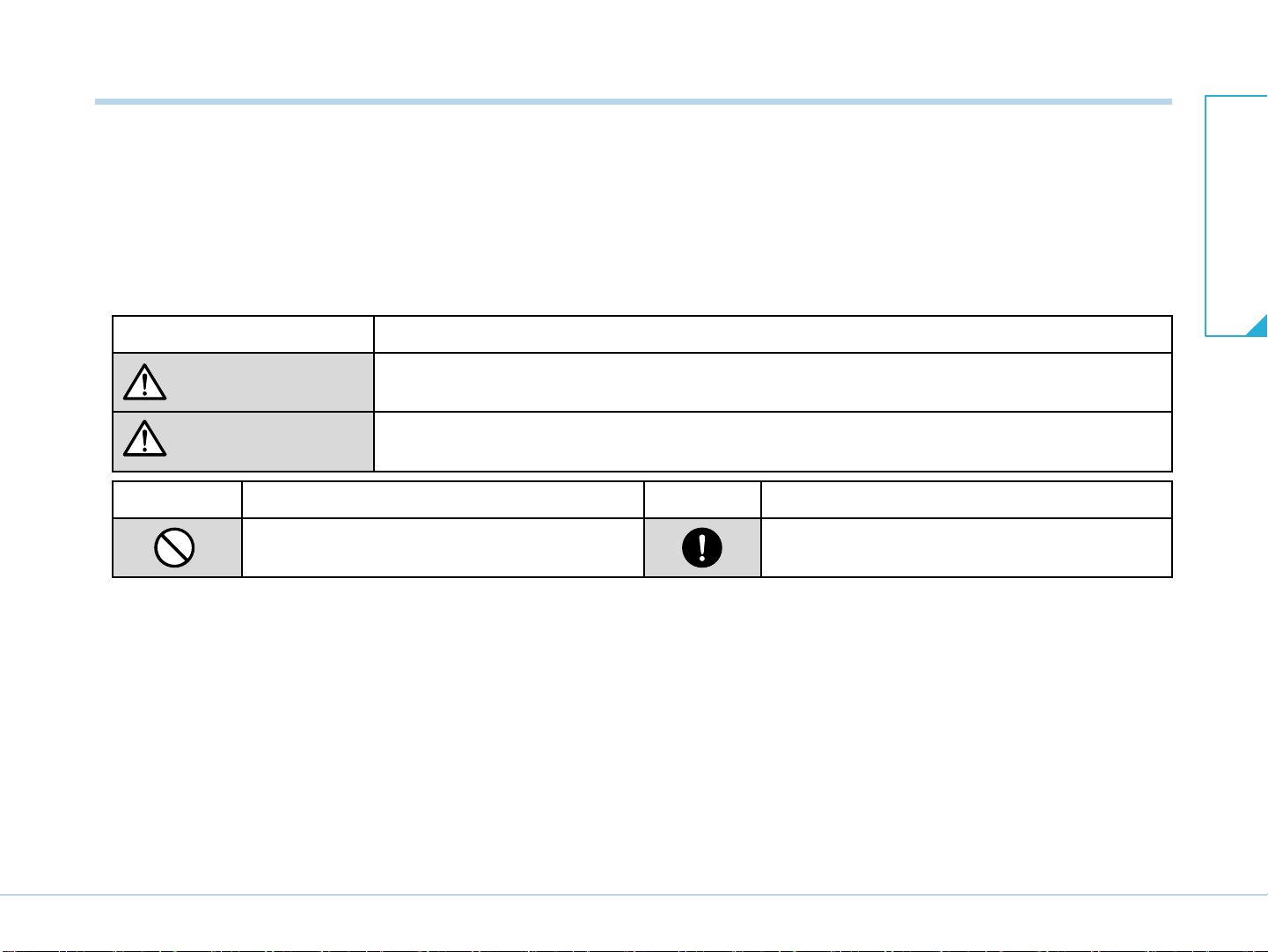
Symbol Description Symbol Description
Indicates a prohibited method of handling. Indicates a mandatory method of handling
and a forcible item.
3. Safety precautions
Indication Description
WARNING Indicates an item for which incorrect handling can result in a major
accident involving death or serious injury.
CAUTION Indicates an item for which incorrect handling can lead to injury or damage to property.
Under certain conditions, more serious consequences may result.
This section provides important information to use the product safely.
Please read the section carefully and understand the following content
(indications and symbols).
3. Safety precautions

9/36Updated: Dec. 23, 2020
WARNING
●
●
●
●
●
Do not disassemble or alter this product.
Doing
so could result an overheating, fire, explosion, and/or electric shock.
When using wireless communication with wireless models, do not use this product
inside medical facilities or near medical devices.
Doing so may cause an accident due to electric medical devices malfunction caused by the radio wave
s.
When using wireless communication with wireless models, keep this product at least 22 cm away from
the body part where the cardiac pacemaker is implemented.
The radio waves could affect the performance of the pacemaker.
Do not connect or disconnect this product while the vehicle is running.
Doing so may cause an accident.
Do not route the USB cable of this product over the engine compartment, especially if the engine is
running.
Cables and/or clothes could be caught by the belt and/or pulley, causing an accident.
3. Safety precautions
<WARNING for handling this product>
<Warnings in operation>
CAUTION
●
●
Do not remove the plate from this product.
Removing the plate will be regarded as disassembling the product and will not be eligible for
warranty.
When disconnecting this product from the diagnosis connector on the vehicle side, always turn OFF the
starter switch (the ignition switch) and turn OFF the engine.
Failure to so may cause a malfunction of the vehicle.
<CAUTION for handling this product>
3. Safety precautions

10/36Updated: Dec. 23, 2020
CAUTION
●
●
Inspect for
foreign materials or damaged pins on each connector of this product before connecting to
the diagnosis connector of the vehicle side.
They may cause damage to the diagnosis connector on the vehicle side and the product’s connector terminal.
When disconnecting this product from the diagnosis connector on the vehicle side, ensure that the
connector lock is released.
Failure to release the connector lock may damage the vehicle diagnosis connector and the product’s connector
terminal.
Do not pull the
USB cable lock portion when disconnecting this product from the diagnosis connector
on the vehicle side when using the USB cable lock.
The lock is designed to come off if certain force is applied. If the lock is pulled off by pulling the lock portion, your
hand may hit something and may cause injury
or product damage.
When connecting this product to the vehicle side diagnosis connector or disconnecting it from the
connector, ensure the correct orientation and inclination of the connector and gently
push or pull while
keeping correct angle for pins and connector.
If you attempt to connect this product with a wrong orientation, if the product is connected with an inclination, or if the
product is disconnected with an inclination, the connector terminals of the vehicle
or the product can be damaged.
Do not leave this product connected to the vehicle when not in use for diagnosis.
Connecting this product to the diagnosis connector on the vehicle side turns ON this product even if the starter
switch (ignition switch) is OFF. Leaving this product connected may results in flat battery of the vehicle.
Do not drive the vehicle while this product
is connected to the vehicle.
Driving
while this product is connected to the diagnosis connector on the vehicle side, may cause difficulty for proper
driving operation.
3. Safety precautions
3. Safety precautions
●
●
●
●
Ce manuel convient aux modèles suivants
1
Table des matières
Autres manuels Denso Équipement de diagnostic


