
Denkovi DAEnetIP2 Manuel utilisateur

DAEnetIP2 Eight Relay Module LM35DZ User Manual
21 Aug 2017
DAEnetIP2 Eight Relay Module
(optimized for temperature measurement with LM35DZ)
User Manual
Document date: 21 Aug 2017
For firmware version: 4.09
For hardware revision: rev02_06.16
-1-

DAEnetIP2 Eight Relay Module LM35DZ User Manual
21 Aug 2017
Content
1. Features ............................................................................................................................3
2. Technical parameters.........................................................................................................4
3. Application examples.........................................................................................................5
4. roduct installation.............................................................................................................6
5. Default Settings..................................................................................................................7
6. Connectors and ports.........................................................................................................9
7. Web access...................................................................................................................... 12
8. SNM access................................................................................................................... 23
9. Appendix 1. ower supply................................................................................................30
10. Appendix 2. ort forwarding - for advanced users..........................................................31
11. Appendix 3. Software.....................................................................................................33
12. Appendix 4. Software examples.....................................................................................40
13. Appendix 5. Firmware upgrade......................................................................................41
14. Appendix 5. I/O orts (DAEnetI 2 3)...........................................................................43
15. Appendix 4. LM35DZ sensor connection........................................................................44
16. Appendix 5. Mechanical draw.........................................................................................45
17. Document revisions........................................................................................................46
-2-

DAEnetIP2 Eight Relay Module LM35DZ User Manual
21 Aug 2017
1. Features
This is multifunctional standalone device for management, control and sensor
monitoring (especially suitable for LM35DZ temperature sensor) over the LAN and
WAN. It could be used for home automation, industrial automation, access control,
fire and security systems.
10 Mb Ethernet interface with Link/Activity Led
ower supply 12VDC or 24VDC - selectable by user
Maximal power consumption:
o300 mA / 12VDC
o200 mA / 24VDC
8 S DT Relay channels - 10A / 250VAC, 15A / 120VAC, 10A / 28VDC
8 analog inputs with 10 bit resolution. Can be used for one from the both
applications:
oeither LM35DZ temperature sensor monitoring (over voltage and inverse
voltage protection). Temperature range: 0°C - 100°C
oeither 0-10VDC industrial voltage measurement (over voltage and inverse
voltage protection)
8 bit configurable digital TTL I/O port
Standart protocols: AR , I , ICM (ping), DHC
Supports snmp v1 (snmpset, snmpget, snmptrap), HTT , TFT
orts for SNM (161) and HTT (80) can be changed
Two MAC addresses protection
It can be configured with SNM requests or web browser
Reset of the relays on incoming/outgoing ping timeout
Function "load outputs states from EE ROM on boot"
The ADC web page shows Temperature (°C and °F) and Voltage (0-10V)
It can send traps according analog ADC level
Analog Inputs may be referred to control the relay according their levels
CB parameters : FR4 / 1.5mm / two layers / metallized holes / HAL / white
stamp / solder mask / Extra CB openings for better voltage isolation /
Doubled CB tracks for better voltage isolation
Dimensions suitable for mounting into DIN enclosures - 122 x 82 x 20 (mm)
-3-

DAEnetIP2 Eight Relay Module LM35DZ User Manual
21 Aug 2017
2. echnical parameters
Table 1. Technical parameters
Parameter Value
Size 122mm x 825mm
ower supply voltage 12 VDC or 24 VDC
C U power supply (output level
3.3VDC)
3.3V
Relay channels count 8
Digital I/O count (0-3.3V, when output
- max current is 1mA)
8
Analog inputs count 8 (10bit ADC, Vref=1.2VDC - external
source)
Digital inputs count 1) 8
LM35DZ sensor inputs count 2) 8
Inputs (0-10VDC) count 3) 8
LED (Link, Activity,
ower On)
Yes
Save I/O states Yes
DHC Yes
Network parameters I /Mask/Default gateway
MAC lock (protection) Yes
SNM v1 Yes (snmpget,snmpset)
Read-Write Community String Yes
Read-Only Community String Yes
SNM traps Yes
SNM I/O access commands Yes
Web server for configuration/access Yes
TFT client for remote firmware
update
Yes
Command for TFT update
(Web,SNM )
Yes
Enable/Disable TFT update Yes
1) Digital inputs are the analog inputs, but the input voltage is software converted to 1 or 0
2) This port (J 1) is connected to the analog inputs port of DAEnetI 2
3) This port (J 3) is connected to the analog inputs port of DAEnetI 2 (note it is possible to use only
one pin of analog input port of DAEnetI 2 at a time - either LM35DZ sensor pin either 0-10V pin).
Otherwise the analog input port may be damaged.
-4-
DAEnetIP2 Eight Relay Module LM35DZ User Manual
21 Aug 2017
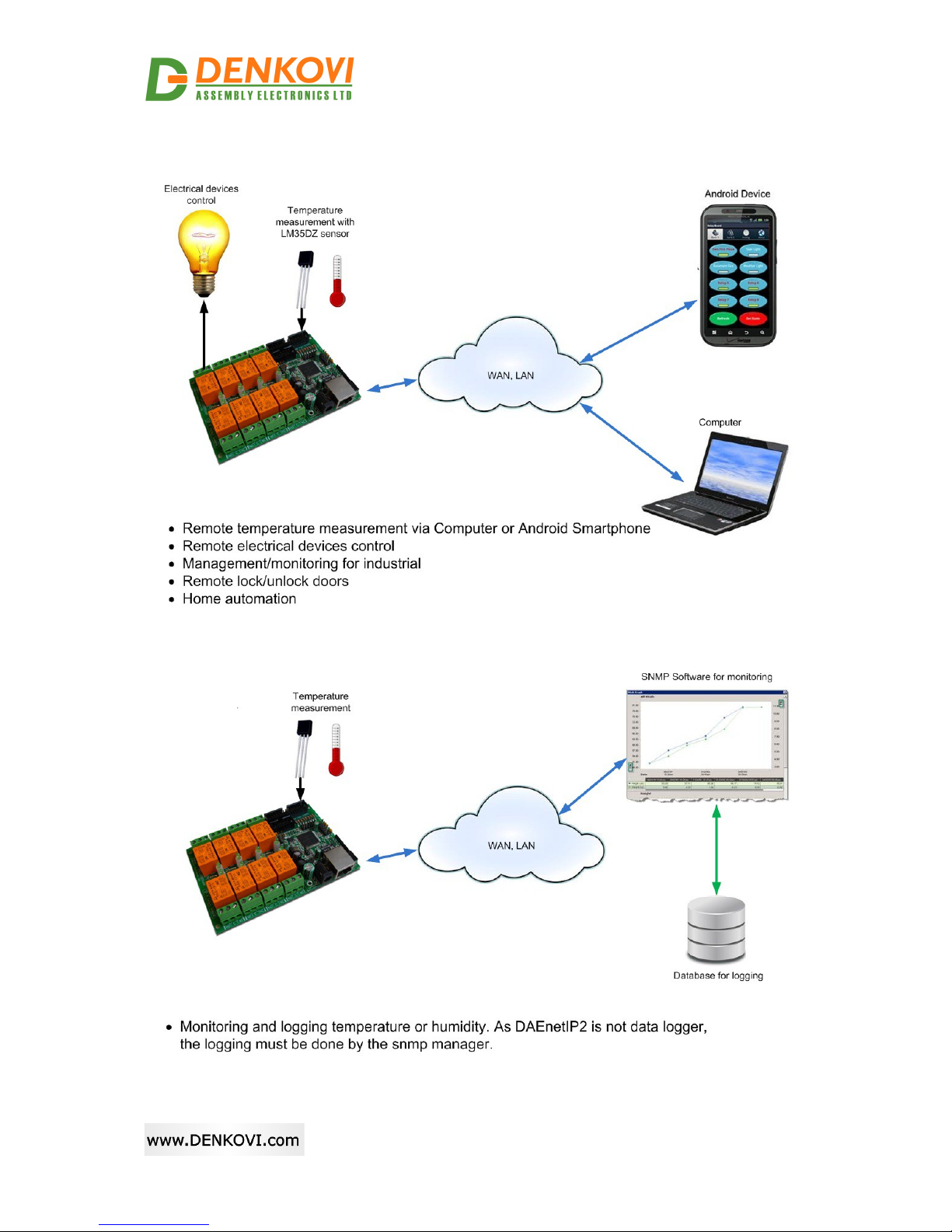
3. Application examples
Figure 1. Application example 1
Figure 2. Application example 2
-5-

DAEnetIP2 Eight Relay Module LM35DZ User Manual
21 Aug 2017
4. Product installation
4.1. Connect DAEnetIP2 Eight Relay Module to computer for
first time
1Connect the device with your computer via U P crossover cable. (note that
the device does not support AUTO MDIX)
2Supply with 12VDC or 24VDC (depending on selected model) stabilized
filtered power source.
3Your initial computer I should be in the device network. So it is recommend
to be 172.16.100.1.
4Open web browser and type 172.16.100.2 – default username/password are
“admin”/”admin”
5Now you can access all the parameters via your web browser
4.2. Connect DAEnetIP2 Eight Relay Module to router
1Do all the steps from 4.1
2Adjust the network parameters from Setup page:
◦I - must be in same network as your router. (For example if router I is
192.168.1.1, DAEnetI 2 I may be 192.168.1.2)
◦Mask
◦Gateway - usually this is the I of your router
3Click submit and wait about 5 seconds
4ower off the device
5Now you may disconnect the UT crossover cable from the DAEnetI 2 and
your computer
6Connect the DAEnetI 2 module and the network router with U P straight
cable.
7Adjust the I of your computer to be again in the router network
8Open the web browser and enter the new I of the module.
-6-

DAEnetIP2 Eight Relay Module LM35DZ User Manual
21 Aug 2017
5. Default Settings
5.1. able with default settings
These are the default (factory) settings of DAEnetI 2. When you buy the module you
will receive it with these settings. If not, please load the default settings (see 5.2).
Table 2. Default settings
Parameter
(according Web pages)
Value
DHC Disabled
I 172.16.100.2
Mask 255.255.255.0
Gateway 172.16.100.1
VLAN ID 1
VLAN mode Disabled
Access MAC 1,2 000000000000
SNM access to I Enabled
SNM listen UD port 161
SNM Read-only community string 000000000000
SNM RW community string private
SNM /Web Access network I 172.16.100.1
SNM /Web Access network Mask 0.0.0.0 (disabled)
ing Timeout 6
Restart on incoming ping timeout Disabled
Restart on remote I timeout Disabled
Remote I to ping 172.16.100.1
I/O ports settings 3, 5 - Outputs
ull-Up/ ull-Down All “pull-down”
ull-up/down for inputs Enabled
Reset I/O ports on restart Disabled
Digital filter for ADC Enabled
TFT update Enabled
TFT Server I 172.16.100.1
Broadcast Frames arse
Web Server Enabled
Web Server TC port 80
SNM traps target host 172.16.100.1
SNM traps community public
Low/High Analog Trap Threshold 0/1023 (disabled)
Analog Events – Low, High, Acc None
Web user/password admin/admin
-7-

DAEnetIP2 Eight Relay Module LM35DZ User Manual
21 Aug 2017
5.2. Steps for loading default settings
In case the access of the module is lost, factory (default settings) may be applied and
the module parameters will be returned back as those in point 5.1 from the current
document
Figure 3. Loading default settings
1. Turn off the power supply of the device
2. Move the jumper from position 1 to position 2
3. Turn on the power supply of the device
4. Move the jumper from position 2 to position 1
5. Turn off the power supply of the device
6. Turn on the power supply of the device
-8-

DAEnetIP2 Eight Relay Module LM35DZ User Manual
21 Aug 2017
6. Connectors and ports
6.1. DAEnetIP2 Eight Relay Module block diagram
Figure 4. Block diagram
-9-

DAEnetIP2 Eight Relay Module LM35DZ User Manual
21 Aug 2017
6.2. DAEnetIP2 Eight Relay Module Ports
Figure 5. orts
Note that it is strongly recommend to use only one port at a time - either JP1 -
Analog Inputs (0-10VDC) either JP3 - Port for sensors. Otherwise the device may
be permanently damaged !
-10-
Autres manuels pour DAEnetIP2
1
Table des matières


