DELTA DORE Tycam 1100 Manuel utilisateur

Tycam 1100 - Tycam 2100
Tycam 2100
Outdoor
FR Guide d’installation
EN Installation guide
DE Installationsanleitung
IT Guida di installazione
ES Manual de instalación
PL Instrukcja instalacji
NL Installatiegids
Bruksanvisning
FI Asennusopas
NO
Tycam 1100
Indoor

16
Legal information
The connection quality of your
product may be affected due to
changes on the IP architecture on
which it operates. These changes may
involve (the list is not exhaustive) a
change in hardware, software update
or conguration operations, work
on your operator's equipment or any
other multimedia devices such as
tablets, smartphones, etc.'
IOS is a Cisco trademark or registered
trademark in the United States and
in other countries, and is used under
licence.
AndroidTM and Google Play are
Google LLC registered trademarks.
Wi-FiTM is a trademark registered
by Wi-Fi Alliance.
WPS (Wi-Fi Protected Setup) is
a standard created by the Wi-Fi
Alliance.
The camera must be used and
installed in accordance with local
regulations.
You must respect the privacy of
others. It is prohibited to lm
the public highway or adjoining
properties.
You must also inform any persons
working in your home (nurse, baby-
sitter, etc.), in writing, that they are
likely to be lmed temporarily while
working.
Data processing
The acquisition of your connected
camera implies acceptance of any
data processing being carried out.
DELTA DORE uses a cloud platform to
provide the data processing service.
The sequences recorded by your
camera will not be stored at any time
by the platform providing this service.
The videos are only stored and
encrypted on the SD card of your
camera and can only be accessed
using your personal account through
the Tydom application.
The use of your camera
requires the Tydom
application available on
Google Play and App Store.
Because of changes in standards and equipment, the characteristics given in
the text and the illustrations in this document are not binding unless conrmed.

17
EN
1 - Installation recommendations 19
2 - Camera operation 19
3 - Operation of motion detection in one
or several zoness 20
4 - Operation of image analysis (SMART DETECT) 20
4.1 Selecting the detection mode 21
5 - Tycam 1100 Indoor 22
5.1 Contents 22
5.2 Description 22
5.3 Support assembly 22
5.4 Mounting 23
5.5 Setting 23
5.6 Memory card 23
5.7 Replacing the memory card 23
6 - Tycam 2100 Outdoor 24
6.1 Contents 24
6.2 Description 24
6.3 Mounting 25
6.4 Setting 25
6.5 Memory card 25
6.6 Replacing the memory card 25
6.7 Impervious sheath for RJ 45 cable 26
6.8 Antenna 26
7 - Camera connection 27
8 - Tydom application 28
9 - Delete the camera 28
10 - Technical characteristics 29

18
The Tycam 1100 Indoor and Tycam 2100 Outdoor cameras feature a new
generation of high resolution sensors providing a great quality image whatever
the lighting conditions.
Connected to your wireless router, the camera enables you to view your home
on your smartphone and record videos and photos vial the Tydom application.
Remotely, you can:
- Observe and listen (*).
- Start a recording instantly.
- Speak with your family and relatives (*).
- View the recorded videos.
- Receive notications in case of detection.
Image analysis functions
• Motion detection
The camera detects any
movement in one or several
predened grid zones.
• Crossing line detection.
The camera detects any person
that crosses a predened
detection line.
• Intrusion zone detection
The camera detects any person
entering or leaving a predened
detection zone.
Other functions
• Remote surveillance
• Surveillance mode setting
- Automatic recording on
detection
- Continuous recording
• Recording management (backup,
deletion, etc.)
• Notication of events
• Viewing of detection alerts
• Intercom (*)
• Digital Zoom x4
• Night vision
• Reversal of captured image
• Backlight compensation
• Photo capture
• Privacy mode
• 8 cameras max per TYDOM
• Embedded siren (*)
• Possible association by QR Code
(*) TYCAM 1100
The 2 crossing detection modes
require specic installation
conditions: see §4

19
EN
1 - Installation recommendations
To achieve optimum operation:
• Avoid installing the camera in
an area with strong changes in
brightness (backlighting) or one that
is too dark.
• Ensure that there is no reecting
surface too near the camera lens.
• Do not install the camera on an
unstable support that creates
vibrations.
• Avoid proximity to a heat source.
• Do not touch the lens with your
nger.
• Do not expose the camera to direct
sunlight.
• Do not subject the camera to
impacts.
• Install the Tycam 1100 Indoor
camera in dry, well ventilated place.
• Electromagnetic radiation can
affect video data transmission
and image quality. Do not install
the camera near a source of
electromagnetic radiation.
• The installation must conducted
using the best practice
of video surveillance.
• Ensure that all the associated
devices are switched off during the
installation.
• For equipment connected to the
power grid, the socket outlet must
be installed close to the equipment
and readily accessible.
2 - Camera operation
Maintenance of Tycam 2100
Outdoor cameras:
• Regularly check that there are no
insects or spider webs that could
trigger false alarms. Use a soft,
slightly damp cloth to clean the lens
of the outdoor camera.
• Periodically check the wiring and
connections of your camera.
Video recording
• The videos are automatically
deleted after 30 days.
• When the storage limit of the card
is reached, the oldest videos are
deleted automatically.
• The recording time can vary
according to the movement in the
image. These values are given for
information only and cannot be
guaranteed.
• The lifetime of the memory card
will depend on the SD card used.
Only the SD card supplied with the
camera ensures an operational life
of 2 years.
The 2 crossing detection modes
require specic installation
conditions: see §4
Videos are recorded in “medium”
resolution quality.
Each video recorded upon detection
starts 5 seconds before the event
for a total duration of 35 seconds

20
3 - Operation of motion detection in one or several zoness
Tycam 1100/2100 cameras monitor the zone or zones via video analysis to
detect any motion.
Tycam 1100 also features heat detection by a
passive infrared sensor (PIR).
Materialize the zone or zones to be excluded
according to a grid in the Tydom application.
This detection mode requires no specic
installation conditions.
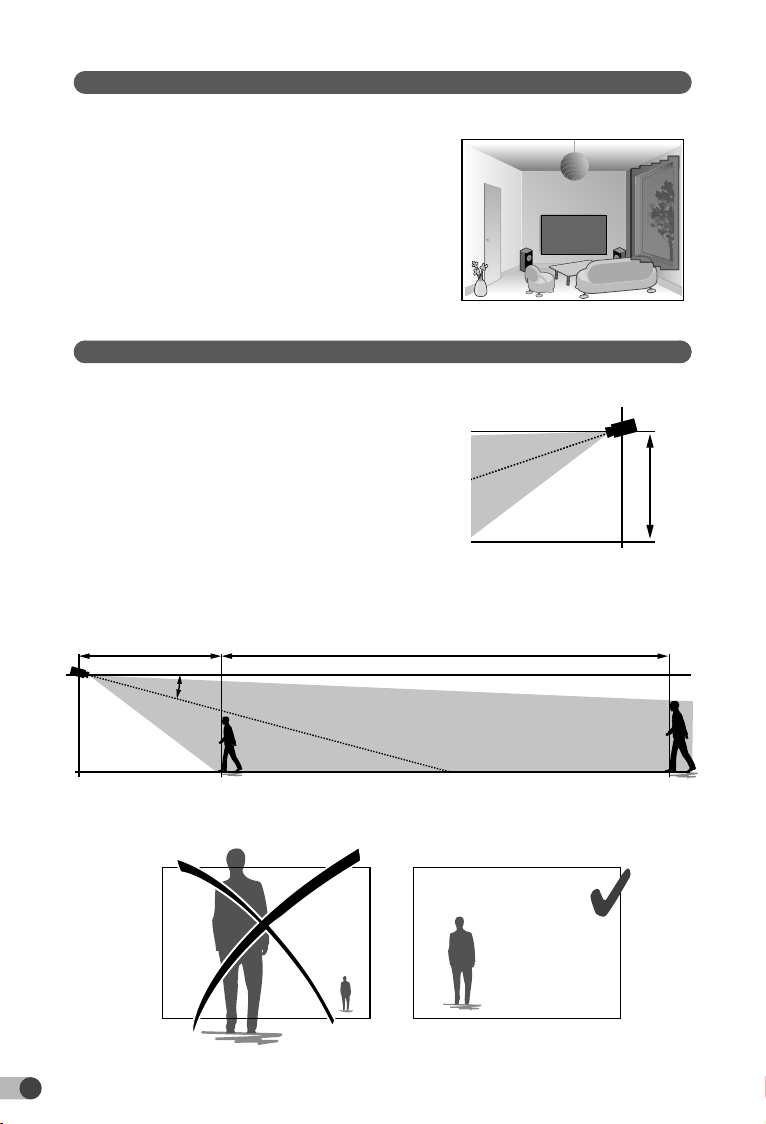
4 - Operation of image analysis (SMART DETECT)
To obtain an optimum analysis of motion in its eld of vision, position the
camera at a sufcient height and distance from
the zone to monitor.
Camera height
Tycam 1100 Indoor - h: 2 m minimum
Tycam 2100 Outdoor - h: 4 m minimum
Distance from the zone to monitor
Recommended elds of vision :
Minimum: 2.5 m/Maximum: 10m (TYCAM
1100) or 30m (TYCAM 2100)
Minimum angle of camera axis: 15°.
Ensure that a person detected does not appear
too small nor too large in the image.
15°
Mini 2,50 m
h
Min. 2.50 m
h

21
EN
4.1 Selecting the detection mode
Using the Tydom application, select the detection mode suited to the
monitored zone.
4.1.1 Crossing zone detection
This mode is recommended for external cameras.
Direct and position the camera at the recommended height to ensure reliable
crossing detection.
Dene a crossing line in the Tydom application,
any person crossing this line is detected.
4.2.2 Intrusion zone detection
Move the corners of the rectangle in the Tydom application to dene an
intrusion zone. Any person entering the zone is detected.
To ensure reliable detection, ensure that the zone to monitor is not at the edge
of the image.
• Follow the installation guidelines to get the best use out of the
camera: Height/Distance/Camera position angle.
• Whatever the operating mode chosen, you can adjust the detection
sensitivity using the Tydom application.
• When you nish conguring the camera, it is vital to run a detection
test to ensure that camera correctly analyses the scene to monitor
and effectively detects movements.
Poor camera
direction
Recommended
direction

22
5 - Tycam 1100 Indoor
5.1 Contents
5.2 Description
5.3 Support assembly
- Screw the support to the back
of the camera.
- Place the camera on a at surface.
- Loosen nut B,
- Point the camera correctly
then tighten nuts A and B.
- If the camera is not held correctly,
loosen screw C to tighten the nut B.
1- Camera
2- Support
3- EU plug
4- UK plug
5- Mains adaptor (1m50)
6- Installation guide
Regulatory documents
7- RJ 45 cable (1m50)
6
7
8
9
10
2
3
45
1
1- Memory card location
2- RESET/WPS button (Open the protective cover).
3- RJ45 Network Connector
4- Power supply socket
5- Loudspeaker
6- Microphone
7- Lens
8- Status LED
Red and steady: Camera start.
Blue and steady: The camera is connected to the
network.
Slow ashing red: No connection to the server
(checktherewalland
parentalcontrols).
Slow ashing blue: Camera is communicating on
network.
Fast ashing red: Safety installation.
Fast ashing blue: Camera updating.
Red/Blue alternative Waiting to read QR Code ashing:
ashing: or no assigned IP address.
(checkthattheDHCPfunction
isactivatedonyourrouterandthat
theWi-Finetworkisinrange).
9- PIR (passive infrared sensor)
10- Infrared LED (night vision)
12
43
6
7
5
0°/90°
0°/360°
0°/360°
B
A
1
2C
B

23
EN
5.4 Mounting
You can mount the camera on a wall or ceiling.
- Press the ‘PUSH’ button to separate
the support from the base.
- Drill the base mounting holes.
- Mount the base with suitable screws for the
support.
- Clip the support onto the base by aligning the 3 stops.
5.5 Setting
- Loosen nuts A and B,
- Point the camera correctly then
tighten nuts A and B.
5.6 Memory card
The Tycam 1100 Indoor camera is already tted with a memory card.
This card records encrypted videos that can
only be read by the Tydom application. You can
increase the recording capacity by installing a
card with a greater capacity (Micro SD/ SD HC/
SD HX class 10 required).
5.7 Replacing the memory card
- Turn off the camera power supply.
- Open the protective cover.
- Insert the new memory card
in the direction indicated.
- Format the card using the Tydom
application.
Drill Template
Screw hole All:for Mounng Base
1 1
0°/90°
0°/360°
0°/360°
A
B
Note: Videos recorded on another card
model will not be encrypted.
Memory
card
Continuous
recording time
8 GB 12h
16 GB 24h
32 GB 2,5 days
64 GB 5 days
128 GB 10 days

24
6 - Tycam 2100 Outdoor
6.1 Contents
6.2 Description
1- Camera
2- Connectors
3- EU plug
4- UK plug
5- Mains adaptor (1m50)
6- Memory card
cover key
7- Antenna socket plug
8- Drill template
9- Impervious sheath
for RJ 45 cable
10- Installation guide
Regulatory documents
11- RJ 45 cable (1m50)
8
9
10 11
6
1
2
4
12
5
3
RESET / WPS
7
1- Base
2- Camera
3- Sun visor
4- Lens
5- Clamping screw
6- RESET/WPS button
(Remove the 2 screws from
the cover using the key supplied).
7- Memory card location
8- Earth connection (Optional connection)
9- PoE cable
10- Power supply socket
11- RJ45 Network Connector
12- Infrared LED (night vision)
Slow ashing:
QR Code reading conrma-
tion /
Security set up
Fast ashing:
Pending QR Code reading for
Wi-Fi association /
Updating the camera.
Drill Template
1
2
8
6
7
4
5
3
11
9
10
Autres manuels pour Tycam 1100
1
Ce manuel convient aux modèles suivants
1
Table des matières
Autres manuels DELTA DORE Caméra de sécurité