
DEGEN DE1126 Manuel utilisateur

DE1126
FM STEREO · MW (AM) · SW DSP RECEIVER /
MP3 PLAYER / DIGITAL RECORDER
Operation Manual

1
POWER SUPPLY
INSTALLING THE BATTERY
1. Turn off the unit and open the battery cover.
2. Install the provided lithium battery according to the battery
polarity.
3. Close the battery cover.
CHARGING THE BATTERY
After installing the lithium battery, connect the unit with the
provided SB adaptor to charge the battery. While charging,
the battery symbol shown on the display will move from right
to left; it stops when the battery is fully charged.
sing the provided SB cable to connect the radio to a
computer can also charge the battery.
Note:
1. Please turn off the radio while charging the battery to avoid
interference.
2. Please only use the supplied adaptor which comes with
the radio to charge the lithium battery.
3. After fully charging the battery, please first disconnect the
SB cable before running on the radio.
2
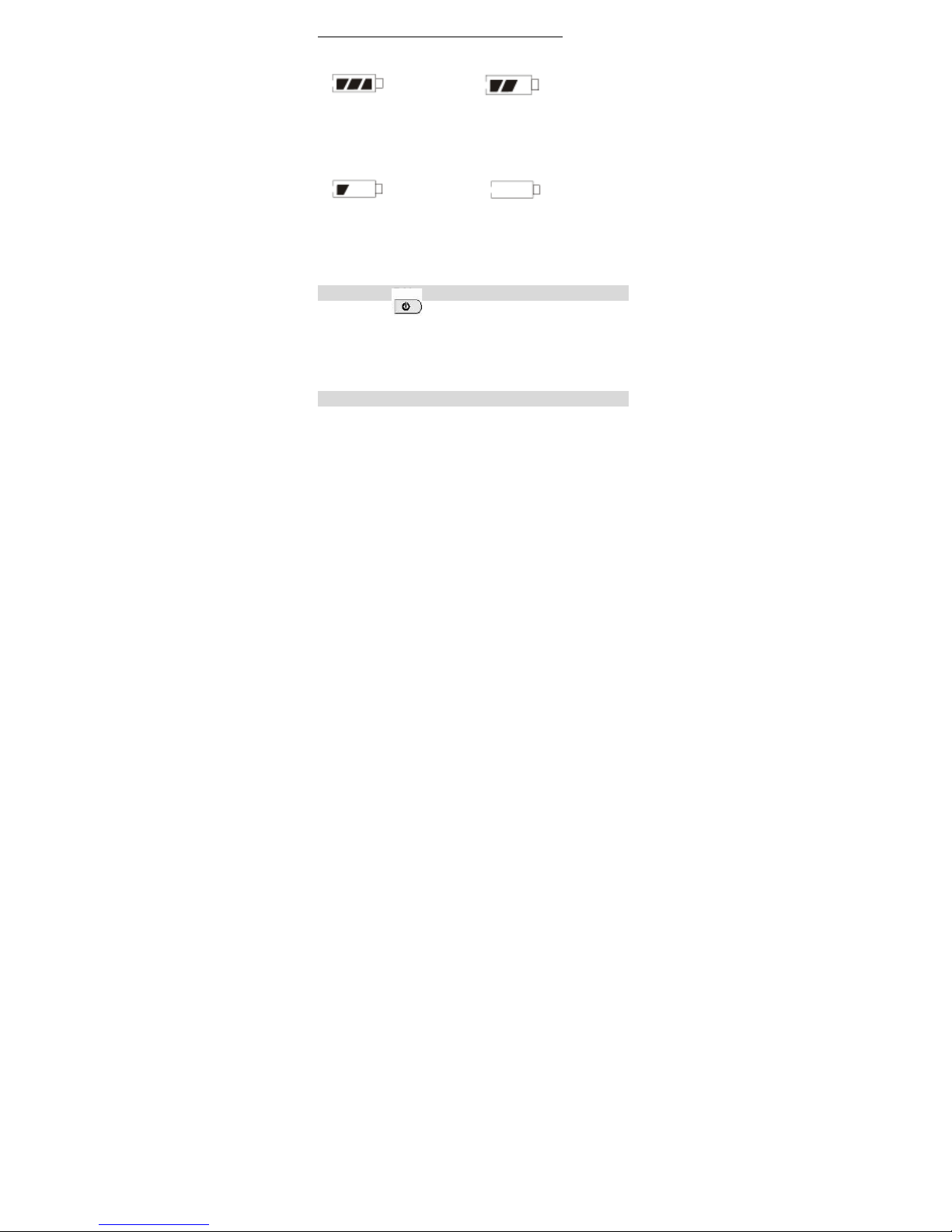
BATTERY CONSUMPTION INDICATION
1. F ll 2. Medi m
3. Low 4. Exha sted
Require to charge The unit will turn off
the battery. automatically
Note: Please fully charge and drain the battery for the first
three times in order to extend the battery's life.
HOW TO TURN ON/OFF THE UNIT
Press the [ ] button to turn on the unit; press it
again to turn it off.
BACK STAND
Open the stand on the rear of the unit to make the unit stand
upright on the desk.

3
MAIN MENU
The radio will directly enter the “Main Menu” when you turn it
on, you can rotate the [T NING] knob to select either of the
below function and then press the [MEN ] button to enter
your selection.
FM Radio: FM/MW/SW radio
After FM Radio selection, you can press either the
FM/MW/SW button to select your desired band
M sic: MP3 music play mode
Record: Mic Recording mode
Voice: Recording file play mode
Ebook: Text reading mode (Support TXT)
Sys Set (system setting): Time, Date, Calendar Info, Alarm,
Backlight, Language, Power off, Replay mode, Contrast,
Memory info, Firmware version, Firmware upgrade, Date
Format, Time Format
To direct enter “Main Menu” while you are in any of the play
mode or setting mode, press and hold the “MEN ” button
for about 2 seconds.

4
SYSTEM SETTING
In “Main Menu” mode, rotate the [T NING] knob to select
[Sys Set], press the [MEN ] button to enter below settings:
Note: Operation time for each step is about 5 seconds.
Sys Set (system setting):
- Time
- Date
- Calendar Info
- Alarm
- Backlight
- Language
- Power off
- Replay mode
- Contrast
- Memory info
- Firmware version
- Firmware upgrade
- Date Format
- Time Format
[TUNING] Knob: Rotate it to select desired function
[MENU] B tton: Press it to enter the selected function
Press & Hold to enter Main Menu

5
TIME SET
1. Select [Time] in [Sys Set] mode by rotating the [T NING]
knob
2. Press the [MEN ] button; while the hours indicator flashes;
rotate the [T NING] knob to adjust the hour,
3. Press the [MEN ] button; while the minutes indicators
flashes, rotate the [T NING] knob to adjust the minute
4. Press the [MEN ] button; while the seconds indicator
flashes; rotate the [T NING] knob to adjust
5. Press the [MEN ] button or wait for 5 seconds to confirm
and exist the time setting.
Note: If you take out the battery, you will need to reset the
clock.
DATE SET
1. Select [Date] in [Sys Set] mode
2. Press the [MEN ] button; while the indicator for year
flashes, rotate the [T NING] knob to adjust the year
3. Press the [MEN ] button to confirm and enter month
setting, then rotate the [T NING] knob to adjust the month
4. Press the [MEN ] button to confirm and enter the day
setting
5. Rotate the [T NING] knob to adjust the day and press the
[MEN ] button again to confirm and exist.
Rotate the [T NING] knob to select your desired date format
and then press the [MEN ] button again to confirm.
CALENDAR INFO
Select [Calendar info] in [Sys Set] mode, press the [MEN ]
button to display the calendar information for about 10
seconds.

6
ALARM SET
1. Select [Alarm] in [Sys Set] mode and press the [MEN ]
button. Now [New] appears on the display.
2. Press the [MEN ] button again to enter a new alarm
setting; [Normal Alarm / Power Off / Power on] appears.
3. Rotate the [T NING] knob to select [Normal Alarm] and
press the [MEN ] button. Now [Only Once / Daily]
shows on the display.
4. Rotate the [T NING] knob to select either [Only Once]
or [Daily], press the [MEN ] button again to confirm and
enter [Alarm Time Setting]
5. Rotate the [T NING] knob to adjust the hours and press
the [MEN ] button. The minutes indicator flashes.
6. Rotate the [T NING] knob to adjust the minute and
press the [MEN ] button again. Now the seconds
indicator flashes.
7. Rotate the [T NING] knob to adjust the seconds and
press the [MEN ] button. Now it shows [Alarm SET,
YES / NO] and [Do you want to add?] on the display.
8. Rotate the [T NING] knob to select [YES], press the
[MEN ] button to confirm and enter below setting
section:
*You can rotate the [T NING] knob for selection and press
the [MEN ] button to confirm
- Sleep Timer: 1~30 minutes SNOOZE timer
- Play Time: 1~30 minutes alarm time
- Alarm Co nt: 1~30 alarm count
- Alarm M sic: Audio / Record alarm music selection
- Alarm Vol me: 1~30 level
- Alarm PreView: Alarm with your preset music
- Exit: Exit the alarm setting

7
BACKLIGHT (Lighting timer)
Select [Backlight] in [Sys Set] mode and press the [MEN ]
button to enter, then rotate the [T NING] knob to adjust the
lighting timer from 5~30 seconds. Press the [MEN ] button
again or wait for about 8 seconds to confirm and exit.
LANGUAGE SELECTION
Select [Language] in [Sys Set] mode, press the [MEN ]
button and then rotate the [T NING] knob to select your
desired languages from those shown below:
- Chinese-Sim (simplified Chinese)
- English
- Chinese-Tradition (Traditional Chinese)
- Tradition BIG
- Japanese
- Korean
- French
- German
- Italy (Italian)
- Netherlands (Dutch)
- Portugal (Portugese)
- Spanish
- Swedish
- Czech
- Danish
- Polish
- Russian
- Turkish
- Hebrew
- Thai.

8
POWER OFF
Select [Power off] in [Sys Set] mode, press the [MEN ]
button and then rotate the [T NING] knob to adjust the auto
turn off timer from 5 ~ 90 minutes.
REPLAY MODE
Select [Replay mode] in [Sys Set] mode and press the
[MEN ] button. Now [Manual/Automatic] appears on the
display, rotate the [T NING] knob to select your desired
mode.
CONTRAST
Select [Contrast] in [Sys Set] mode and press the [MEN ]
button. Now the brightness level 0 ~ 16 appears on the
display. Rotate the [T NING] knob to adjust.
MEMORY INFO
Select [Memory Info] in [Sys Set] mode and press the [MEN ]
button to display the balance memory space (approx).
FIRMWARE VERSION
Select [Firmware version] in [Sys Set] mode and press the
[MEN ] button to display existing info of firmware version.

9
FIRMWARE UPGRADE
1. Download the upgrade firmware from our website to a
computer.
2. se the provided SB cable to connect the unit to the
computer and transfer the data to the unit.
3. Turn on the unit and select [Firmware upgrade] in
system setting mode
4. Press the [MEN ] button and select [Local folder] to
enter firmware upgrade software.
Note:
After finishing the firmware upgrade, please remove the
battery from the unit for a few seconds.
DATE FORMAT
Select [Date Format] in [Sys Set], press the [MEN ] button to
enter below display
- yyyy mm dd (year, month, day)
- mm dd yyyy (month, day, year)
- dd mm yyyy (day, month, year)
- Exit
TIME FORMAT
Select [Time Format] in [Sys Set] mode, repeat pressing on
the [MEM ] button to select either 12H or 24H format, then
wait for around 3 seconds to auto confirm and exist the
setting.
Table des matières


