
Decision Computer International PCCOM Manuel utilisateur

Operations Manual PCCOM PCI 8 port universal RS232 card
DECISION Computer International 9/30/2005
i
PCCOM PCI 8 PORT
UNIVERSAL RS232 ADAPTER
OPERATION MANUAL
D
DE
EC
CI
IS
SI
IO
ON
N
Computer International Co., Ltd.

Operations Manual PCCOM PCI 8 port universal RS232 card
DECISION Computer International 9/30/2005
ii
C
CH
HA
AP
PT
TE
ER
RS
S
1. Introduction…………………………………..…… 1
2. Unpacking Information……………………..…….. 3
3. System Requirements…………………………..…. 4
4. Hardware Installation …………………………..… 5
5. Switch and Jumper Settings…………….……….... 6
6. RS232 Cabling Information……………..………. 14
A
AP
PP
PE
EN
ND
DI
IC
CE
ES
S
A. PCCOM Diagnostics Under MS/DOS ………..…. 18
B. PCCOM Device Driver for MS/DOS……………. 19
C. XENIX/UNIX Configuration …………..……… 22
D. WINDOWS 95/98 Configuration ……………..… 29
E. WINDOWS 2000 Configuration ……………..… 31
F. WINDOWS/NT Configuration V3.5 up …….…. 33
G. OS/2 Configuration ……………………………… 35
H. Linux Configuration …………………………….. 39
I. Diagnostics Under Windows…………………….. 40
J. Software Development Information…………….. 42
K. Warranty Information………………………..….. 46
http://www.pccompci.com

Operations Manual PCCOM PCI 8 port universal RS232 card
DECISION Computer International
1
CHAPTER 1
INTRODUCTION
The PCCOM PCI bus 8 port universal RS232 adapter is an 32 bits
PCI bus board with Plug and Play (PnP) features, it provides eight
asynchronous RS232 serial communication ports, which link the
computer and serial peripheral devices such as terminals, modems,
serial printers, plotters, ... etc.
The PCCOM PCI bus 8 port universal RS232 adapter is particularly
suited to facilitate the connection of terminals (VDUs) in multi-user
operating systems. The PCCOM board may be installed in any
Pentium or hardware compatible systems. The PnP features let
hardware configuration for IRQ and I/O address is detected by
BIOS automatically, you don’t need set switch and jumper.
Since most of the computer has its own COM1 and COM2, the
PCCOM PCI bus 8 port universal RS232 adapter can be configured
from COM3.
On board XR16C854 chip provides four 16850 functions which
contains 128 bytes FIFO buffer for each 16850 ports. There are two
kinds of board can be choose, one is dual speed (clock rate is
7.3728MHZ) board that its baud rate up to 230K, another is octal
speed board (clock rate is 14.7456 MHZ) that its baud rate up to
1M.
The features of the PCCOM PCI bus 4 port universal RS232
adapter are:
•32 bit PCI bus with Plug and Play (PnP) features.
•Eight RS232 ports for asynchronous communications.

Operations Manual PCCOM PCI 8 port universal RS232 card
DECISION Computer International
2
•Suitable for SCO UNIX, Linux, MS/DOS, WINDOWS
NT/2000/XP, WINDOWS 95/98/ME, OS/2... etc.
•Pentium hardware compatibles.
•On board XR16C854 chip.
•Provides eight 16850 ports that contains 128 bytes FIFO for
each port.
•External or internal clock rate selectable.
•Dual speed (clock rate is 7.3728MHZ) board that its baud
rate up to 230K. Octal speed board (clock rate is 14.7456
MHZ) that its baud rate up to 1M.
•Provides RS232 interface for 3.3V internal voltage, which
has lower power consume.
•Up to 4 boards be installed in one computer system.
•Software compatible with PCCOM98/2000.
•Operating temperature 0 to 60 ºC.
•Storage temperature -20 to 70 degree °C.
•Humidity 5% to 95% in non-condensing.

Operations Manual PCCOM PCI 8 port universal RS232 card
DECISION Computer International
3
CHAPTER 2
U
UN
NP
PA
AC
CK
KI
IN
NG
G
I
IN
NF
FO
OR
RM
MA
AT
TI
IO
ON
N
Check that your PCCOM package includes the following
items:
•PCCOM PCI bus 8 port universal RS232 adapter, select one
of the follows:
Dual speed (clock rate is 7.3728MHZ) board
Octal speed board (clock rate is 14.7456 MHZ) board
•SCSI-II cable with standard DB9 pin connectors.
•User manual.
•Decision Studio CD for PCCOM software.
•Warranty form.

Operations Manual PCCOM PCI 8 port universal RS232 card
DECISION Computer International
4
CHAPTER 3
S
SY
YS
ST
TE
EM
M
R
RE
EQ
QU
UI
IR
RE
EM
ME
EN
NT
TS
S
Before installing your PCCOM PCI bus 8 port universal
RS232 adapter, make sure that:
•The host computer is a Pentium or its compatibles.
•The switch and the jumpers are properly configured.
•The operating system you intend to use is capable of driving
multiple serial ports.

Operations Manual PCCOM PCI 8 port universal RS232 card
DECISION Computer International
5
CHAPTER 4
H
HA
AR
RD
DW
WA
AR
RE
E
I
IN
NS
ST
TA
AL
LL
LA
AT
TI
IO
ON
N
Your PCCOM PCI bus 8 port universal RS232 adapter is designed
to be inserted in any available PCI slot in your Pentium or
compatibles. You must plug this board to your computer before
installing PCCOM software. In order to gain access to the expansion
slots, follow the steps listed below:
1. Turn off all power to your computer and all peripheral
devices before installing your PCCOM PCI bus 8 port
universal RS232 adapter.
2. Remove the cover of the computer.
3. Set the SW1 to identify card number.
4. Set the JP2 to select clock source.
5. Insert the PCCOM PCI bus 8 port universal RS232 adapter
into any available PCI slot. Make sure the adapter is firmly
seated in the chosen slot.
6. Replace the cover of the computer.
7. Connect cables to DB9 connectors as required.
8. Turn on the power of your computer.

Operations Manual PCCOM PCI 8 port universal RS232 card
DECISION Computer International
6
CHAPTER 5
S
SW
WI
IT
TC
CH
H
A
AN
ND
D
J
JU
UM
MP
PE
ER
R
S
SE
ET
TT
TI
IN
NG
G
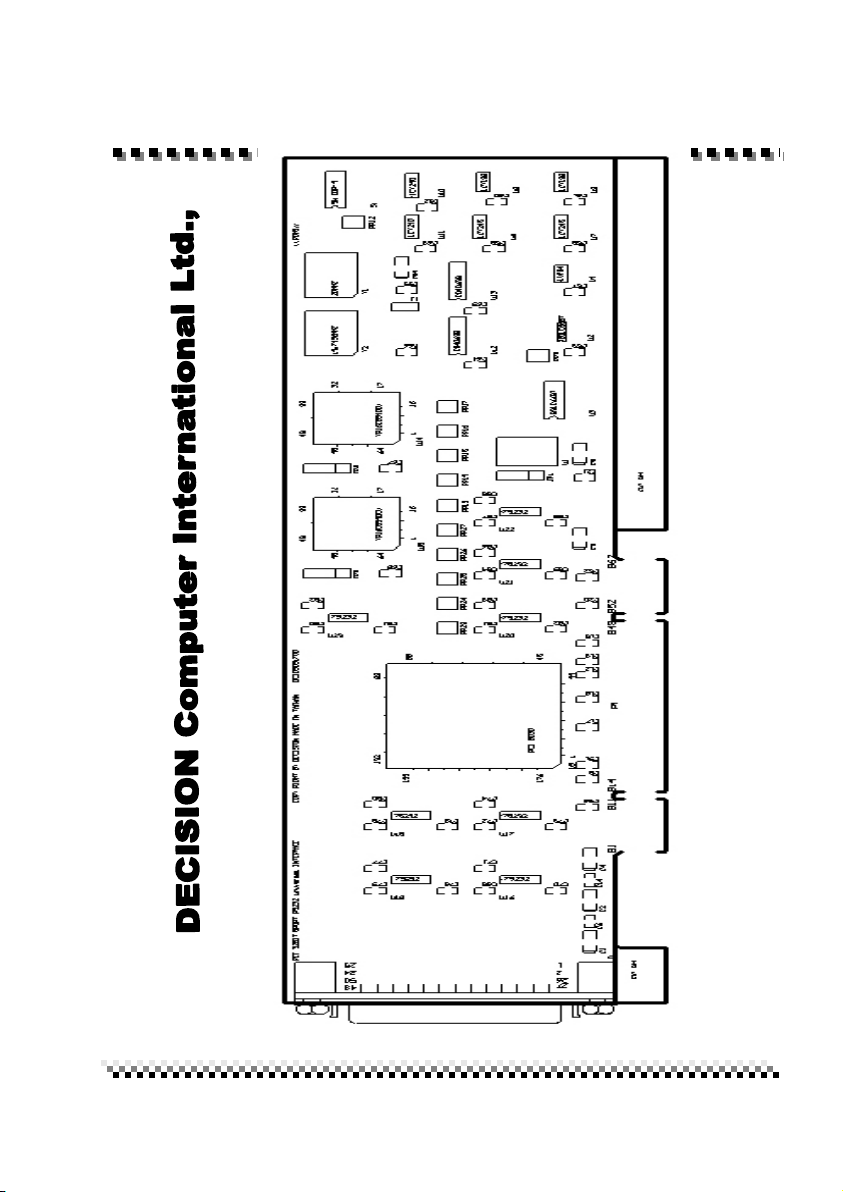
The Plug and Play features let hardware configuration for IRQ and
I/O address is detected by BIOS automatically, so that it need not
switch and jumper setting. The on board switch can be used to
identify card number by the users (if you do not set the switch, the
PnP BIOS will assign card number automatically).
JP2 (Jumper 2)
Select external clock or internal clock.
SW1 (Switch 1)
Identifies card number.
Do not set up jumpers and switch under power on condition,
otherwise it may defective your computer system.
Operations Manual PCCOM PCI 8 port universal RS232 card
DECISION Computer International
7

Operations Manual PCCOM PCI 8 port universal RS232 card
DECISION Computer International
8
1. Select External Clock or Internal Clock
JP2
3 .
2 .
1 .
The JP2 is used to select external clock or internal clock; to select
external clock, please short pin 1 and 2, to select internal clock,
please short pin 2 and 3. When internal clock is selected, the
communication speed is divided by 4.
.
Pin
Mode
Short 1,2
External Clock
Short 2,3
Internal Clock
Table des matières
Autres manuels Decision Computer International Adaptateur


