
Datecs DP-50 Manuel utilisateur

ELECTRONIC CASH REGISTER
DP-50 / DP-50D
MP-55B
ESTONIA
USERS MANUAL
Bulgaria, DATECS

DP-50 / DP-50D / MP55-B - USERS MANUAL
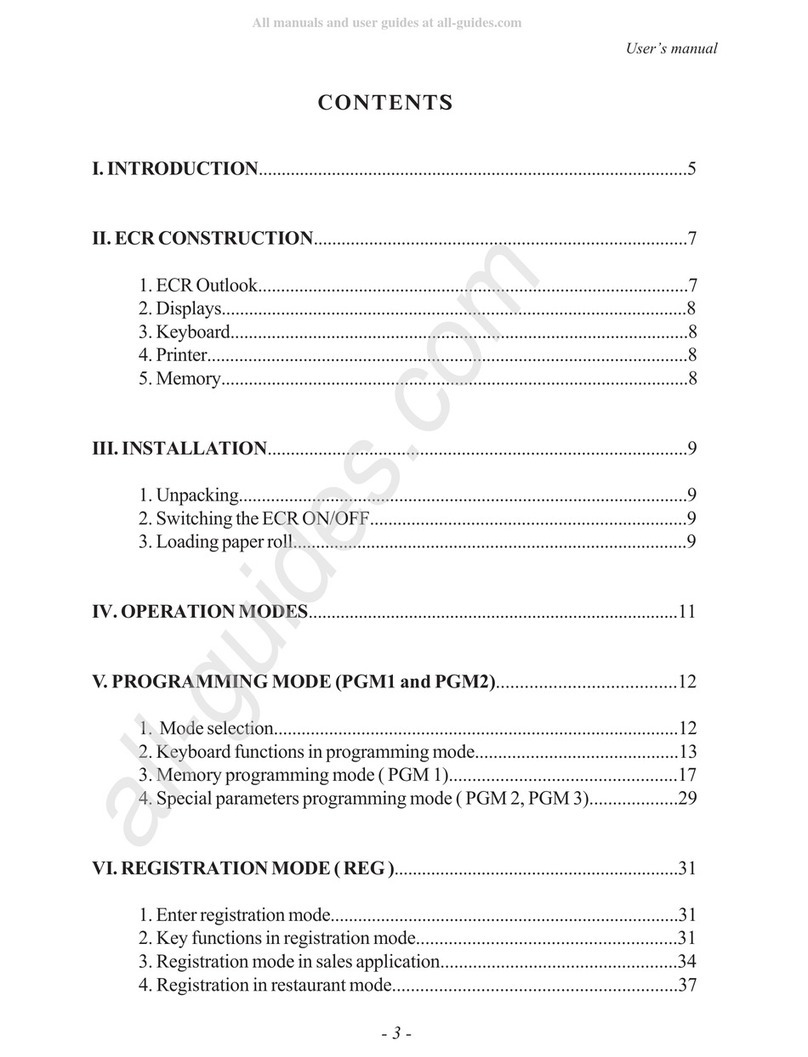
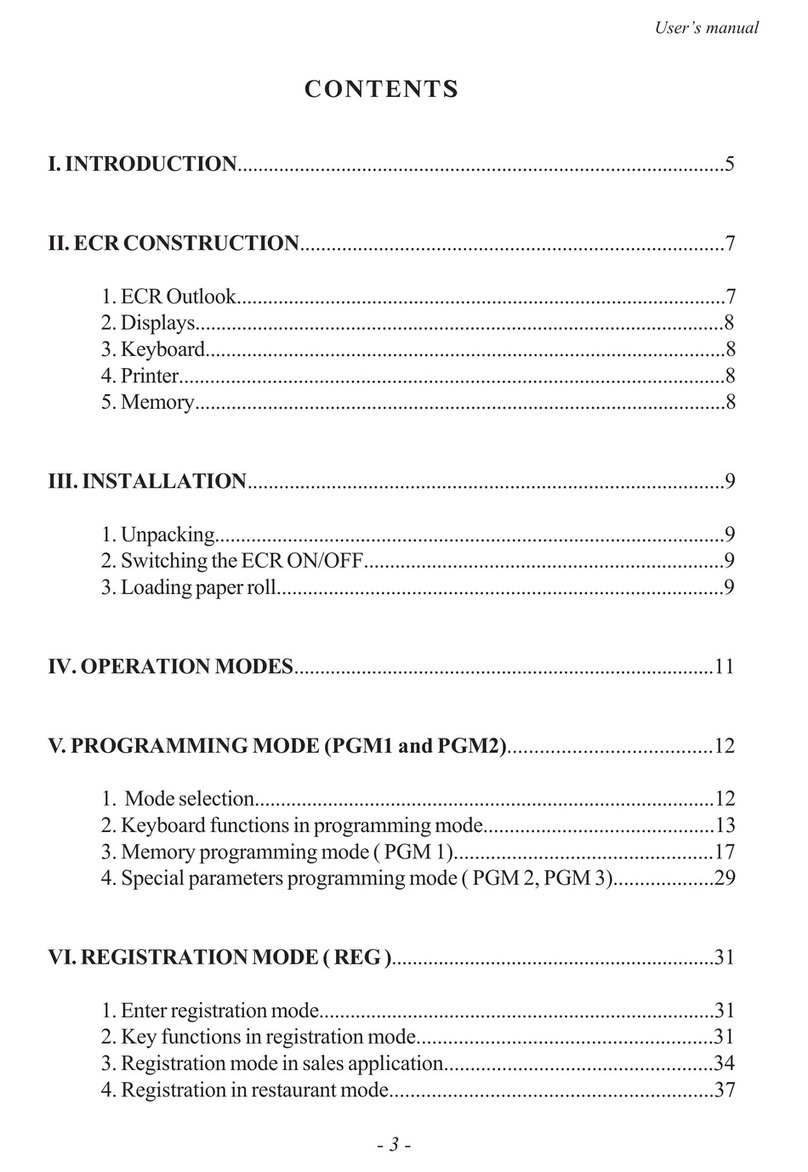
Table o contents
Page
INTRODUCTION .................................................................................................................................. 4
MAIN FUNCTION AND TECHNICAL CHARACTERISTICS OF DATECS DP-50/ DP-50D/ MP-55B ...5
ECR OUTLOOK .................................................................................................................................... 7
KEYBOARD .......................................................................................................................................... 8
UNPACKING ........................................................................................................................................ 9
IMPORTANT INSTRUCTIONS............................................................................................................... 9
SWITCHING THE ECR ON/OFF .......................................................................................................... 9
OPERATION MODES ........................................................................................................................
'PROGRAMMING' MODE .................................................................................................................... 3
FUNCTION OF THE KEYS IN 'PROGRAMMING' MODE '..................................................... 4
MODE PROGRAMMING P - PROGRAMMING OF ITEMS AND MAIN PARAMETERS ..... 7
Table 0 : Item parameters ........................................................................................ 8
Example: Programming the name and the price of an item .......................... 9
Table 02 : Shop organization .....................................................................................20
Table 03 : Operator names and passwords ..............................................................20
Table 04 : Settings for the keys '%+' and '%-' in REG ..............................................2
Table 05 : Receipt format and copies .......................................................................2
Table 06 : Texts into receipt .....................................................................................2
Table 07 : Date and time .......................................................................................... 2
Table 08 : Setting up the alternative currency operations .........................................22
MODE P2 - PROGRAMMING OF SPECIFIC PARAMETERS ...............................................22
Table 03: Identification number of the tax obligated person (BULSTAT)...................22
Table 04: Tax groups ................................................................................................23
MODE P3 - SETTING UP THE FISCAL MEMORY IN USE ..................................................23
MODE R - REGISTERING ................................................................................................................. 24
FUNCTION OF THE KEYS IN 'REGISTERING' MODE '........................................................24
SPECIFIC CASES OF OPERATION IN ‘REGISTERING’ MODE ..........................................27
MODE X - ECR REPORTS ................................................................................................................ 28
MODE Z – REPORTS WITH CLEARING............................................................................................30
2

DP-50 / DP-50D / MP55-B - USERS MANUAL
REPORTS FROM THE FISCAL MEMORY ........................................................................................3
STANDATIZED ...................................................................................................................... 3
PERIODICAL REPORT OF THE TURNOVER BY TAX GROUPS.........................................3
OTHER MODES.................................................................................................................................. 32
CONNECTION TO PC ........................................................................................................... 32
CONTROL TESTS ................................................................................................................. 32
PROGRAMMING AND REPORTING TO PC ........................................................................32
DISPLAYING THE ACCUMULTOR VALUE AND THE CURRENT DATE AND TIME ...........32
The information contained in this document is subject to change without notice. No
part of this document may be reproduced or transmitted, in any form or by any
means, mechanical, electrical or electronic without the prior written permission of
Datecs Ltd. Sofia 784 - Bulgaria
e-mail: [email protected] http://www.datecs.bg
Some of the descriptions given in this manual may differ from your device,
depending on the software installed.
3

DP-50 / DP-50D / MP55-B - USERS MANUAL
Doc. version: петък, 8 февруари 20 г. , 09: 5:24
INTRODUCTION
This manual presents the technical and functional characteristics of electronic
cash register DP-50 / DP-50D / MP-55B and its modes of operation. All important
instructions are given in order to prepare the ECR for operation, for its correct usage
and maintenance.
DATECS DP-50 / DP-50D / MP-55B is a portable cash register. Its possibilities
conform to the customer service requirements and financial accounting in shops,
supermarkets, pharmacies, restaurants or other kinds of trade organizations. The
cash register ensures complete accountancy for the manager of the trade
organisation and for the need of taxation authorities.
4
DP-50 / DP-50D / MP55-B - USERS MANUAL
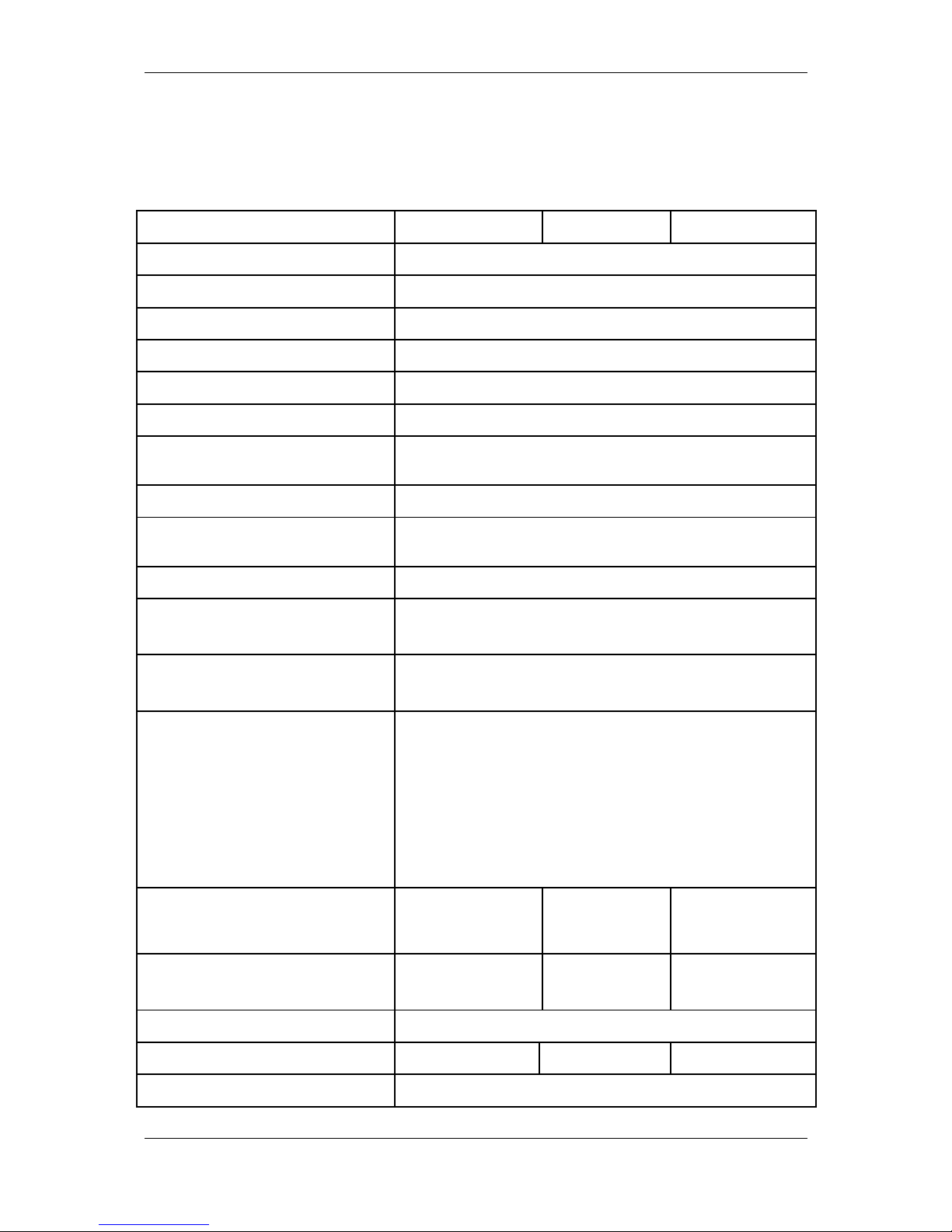
MAIN FUNCTION AND TECHNICAL CHARACTERISTICS
o DATECS DP-50 / DP-50D / MP-55B
Function / Parameter / Feature DP-50 DP-50D MP-55B
PLU database 000 items
Plu name length up to 22 characters
Maximal Sold quantity of one item up to 99 999,999kg ( 00,000 pieces)
PLU code range -9999
Barcode types EAN- 3,EAN-8,UPC
Tax type VAT, up to 8 tax groups
Number of item groups and
departments
up to 0 item groups and up to 4 departments
Number of operators up to 30 - and of them up to 2 active
Maximal number of sales in one
receipt
above 50
Receipt copy up to
Types of service - Control of store exit
- ECR which serves one stand
Types of payment Cash, with check or with coupon;
Cash with alternative currency (EUR)
ECR operation modes - REG /Registration /
- Х Report
- Z /Report with clearing /
- Test
- Communication with PC
* programming and reporting;
* sales by PC request;
Journal Electronic,
min. 500rows
with
simultaneous
printing
Electronic,
min. 500rows
Receipt archive for reading from PC yes - up to
400 receipts
no yes - up to
400 receipts
Fiscal memory Non-volatile, can keep up to 825 reports
Thermal printer type MLT289 MLT289 MLT288
Speed of printing 2 rows / sec
5

DP-50 / DP-50D / MP55-B - USERS MANUAL
Built-in accumulator yes yes optional
LCD displays
operator's 2 rows/ 6 chars yes yes yes
optional - customer 2 rows/ 6 chars yes yes yes
Consumables - thermopaper roll - paper width
57mm
- paper width 28
mm for main and
journal tapes
-paper width 57mm
- thickness 60 ÷ 72µm
- roller diameter up to 55mm
Power supply mains adapter with operating voltage 220VAC +22/-33V 50Hz
for charging of built-in accumulator
Clock/calendar Stores information for at least 90 days after switching off the
ECR
Interfaces x RS232 x RS232 x RS232
Scale support no no yes
6
DP-50 / DP-50D / MP55-B - USERS MANUAL
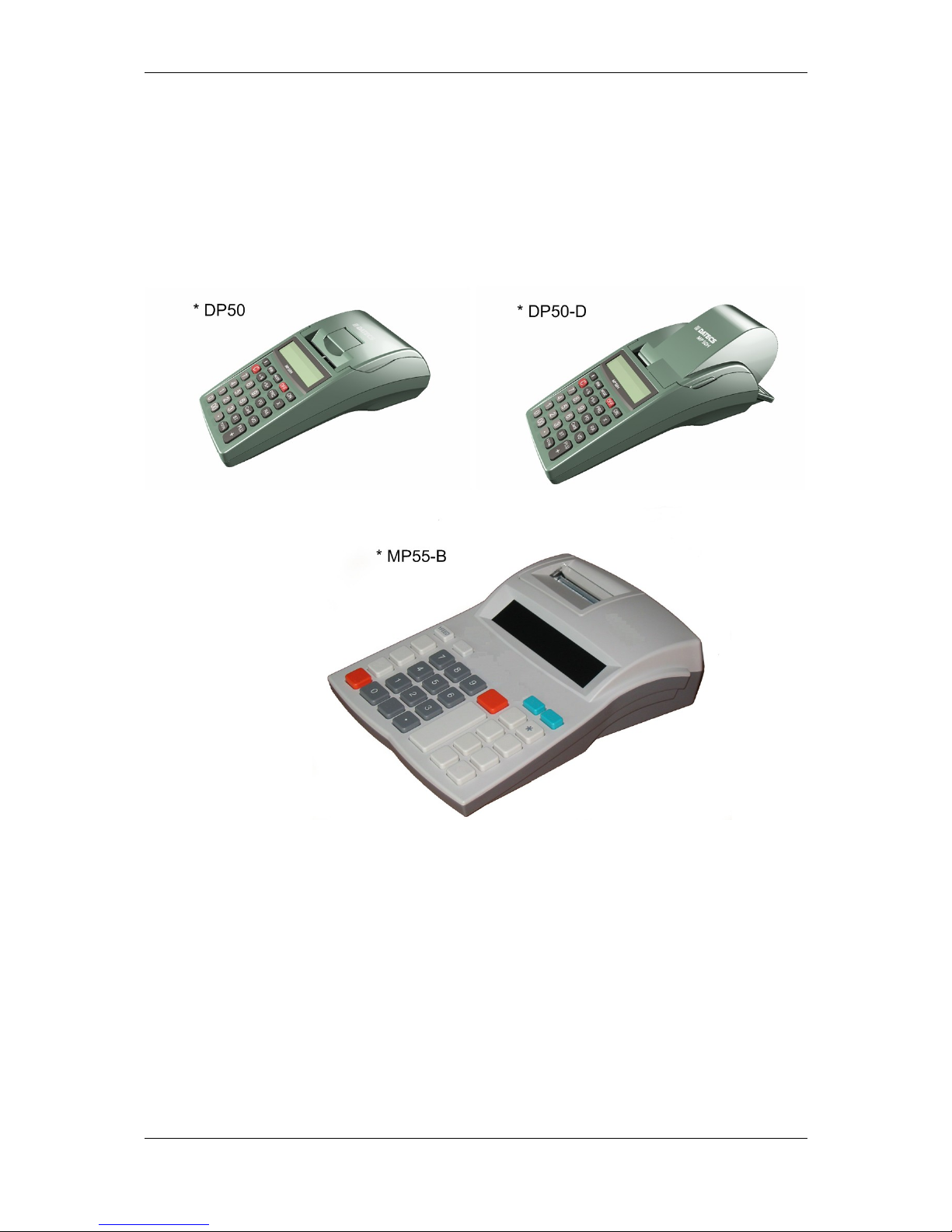
ECR OUTLOOK
7
DP-50 / DP-50D / MP55-B - USERS MANUAL
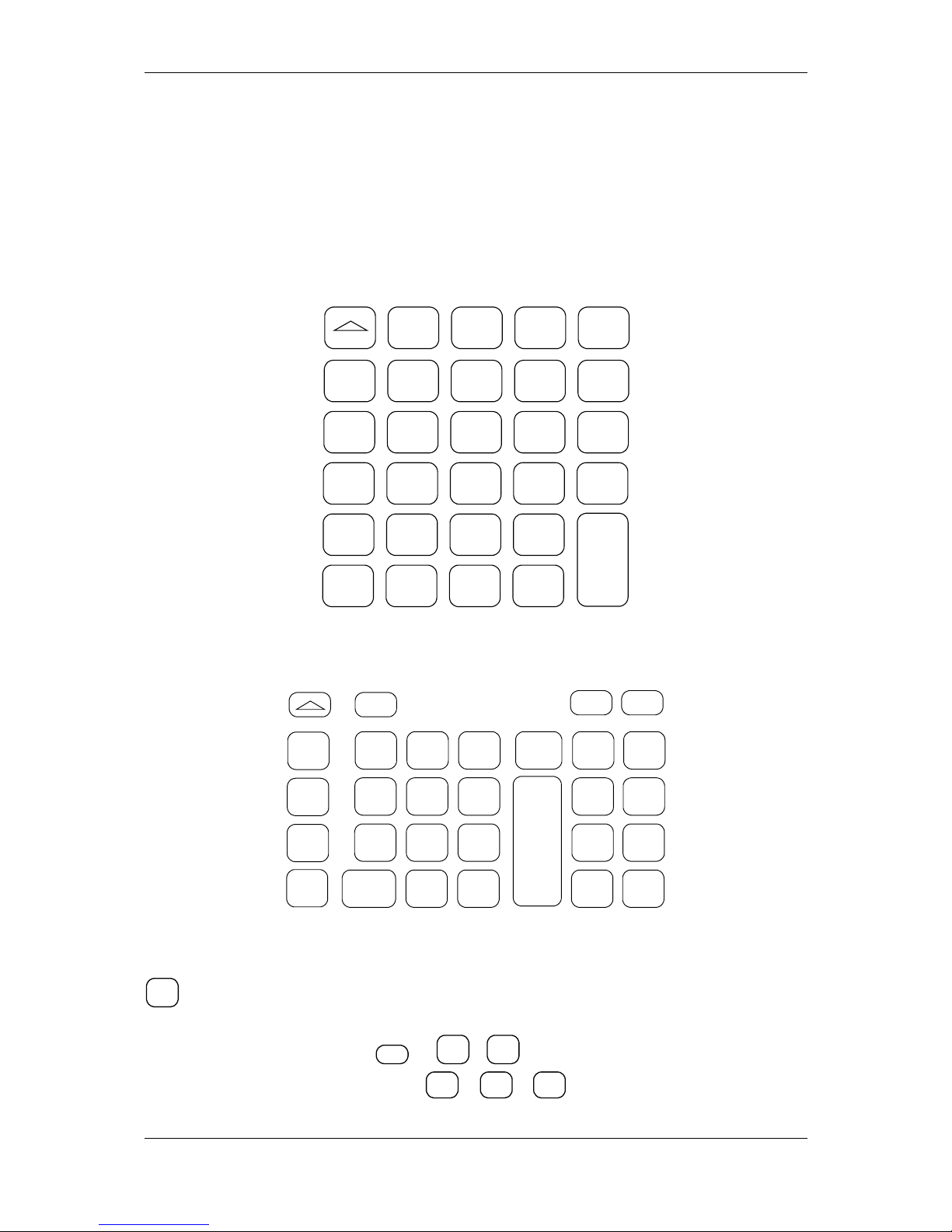
KEYBOARD
DP-50, DP-50D:
VD PRC %- %+ PLU
7 8 9 G
CRD
4 5 6 G2 STL
2 3 G3
0 Q’ty . G4
<> ONPLC C
T
O
T
A
L
MP-55B:
%+
G2
G3
G4
*%-
G
OFF PLU
789
456
2 3
0 X .
C
PLC
VD
ON
PRC
PY
STL
TL
IMPORTANT:
- МP55-B has one key more than the DP-50 / DP-50D ECR's. This is the key
*
. This key is used for payment in alternative currency. In DP-50 / DP-50D this
operation is performed using key sequence.
- Three of the keys
OFF
,
X
,
PY
of MP-55B have different symbol
appearance compared to the keys
<>
,
Q’ty
,
CRD
of DP-50 / DP-50D, but have
the same functionality.
8

DP-50 / DP-50D / MP55-B - USERS MANUAL
UNPACKING
After you take out the ECR from its carton box and remove the pickings and
the plastic cover, you will find this manual and the device passport.
IMPORTANT INSTRUCTIONS:
1. DO NOT install the device under direct sunlight or near heating apparatus!
2. DO NOT install the device in locations that have steam, humidity and dust!
3. DO NOT use a mains connection in sockets shared by other po er consumers (for
example refrigerators, motors, etc.)
4. Put the ECR on a place hich able suitable ork and hich able both to the
customer and to the operator to see the information displayed.
SWITCHING THE ECR ON/OFF
The ECR comes complete with mains adapter. The adapter is intended to
operate with 220VAC +/- 22-33V / 50Hz input voltage.
The ECR can be switched on by pressing the key
ON
.
On the display is shown:
OFF
When on the display is shown 'OFF' for 30sec, the ECR will automatically turn
off. The ECR can also be switched off manually by pressing the key
0
.
If the ECR is into a sub-mode, the operator can turn it back into 'OFF' mode by
pressing the key
- for DP-50, DP-50D:
<>
- for МP55-B:
OFF
From any state the ECR can be switched off (emergency) by simultaneously
pressing the keys:
- for DP-50, DP-50D:
PLC C
- for МP55-B:
PY
STL
TL
Turn the ECR mains adapter to charge the built-in accumulator 24 hours
before starting to use the ECR.
BEFORE STARTING WORK, CHECK WHETHER THERE IS A PAPER ROLL
9
DP-50 / DP-50D / MP55-B - USERS MANUAL
INSERTED INTO THE ECR!
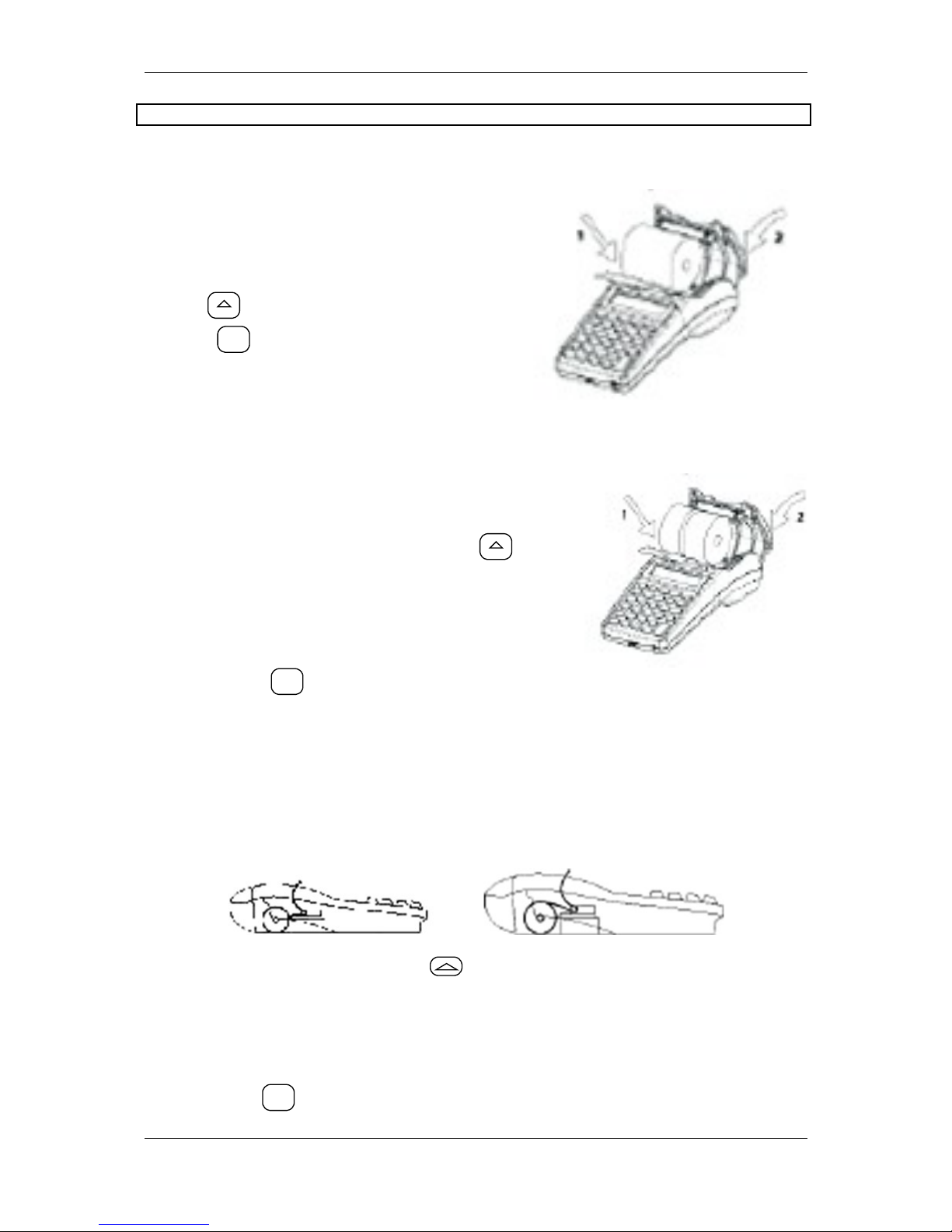
√ Loading the paper roll into DP-50
A/ Remove the printer cover;
B/ Set the paper roll as is shown in the
illustration ;
C/ Pull the paper tape out about 25-30 cm,
D/ Close the cover, to move the paper use
the key
E/ Press
C
.
√ Loading the paper rolls into DP-50D
A/ Remove the printer cover;
B/ Set the paper rolls as is shown in the
illustration;
C/ Close the cover, to move the paper use
D/ Pull the paper tape out about 25-30 cm,
E/ Store the tape for journal printing to the end of
the winding roll and turn the roll back to its place,
F/ Pass the main tape through the cover paper
slot and turn the cover back to its place.
G/Press the key
C
.
√ Loading the paper roll into MP-55B
A/ Remove the printer cover;
B/ Set the paper roll as is shown in the illustration below and pass its end through the
paper slot of the printing device until you feel resistance,
Correc No correc
C/ To move the paper press the key till the tapes shows up over the slot,
D/ Pull the paper tape out about 25-30 cm,
E/ Pass the main tape through the cover paper slot and turn the cover back to its
place.
Press the key
C
.
10
Ce manuel convient aux modèles suivants
2
Table des matières
Autres manuels Datecs Caisse

Manuels Caisse populaires d'autres marques


Sharp
Sharp XE-A137-WH Operation Manuel rapide

Sharp
Sharp XE-A203 - Cash Register Thermal Printing Graphic Logo... Manuel utilisateur

TEC
TEC TEC MA-1060 Manuel utilisateur

Casio
Casio PCR-408 Instructions de montage

ELCOM
ELCOM Euro-2100TE Manuel utilisateur

American Changer
American Changer CLASSIC Series Manuel utilisateur