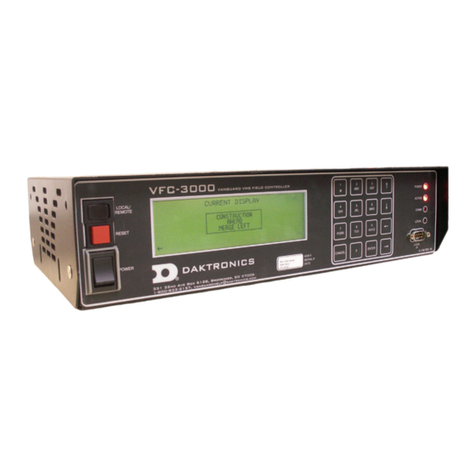
Daktronics VF-24 Series Manuel utilisateur

201 Daktronics Drive
Brookings, SD 57006-5128
www.daktronics.com/support
800.325.8766
GENERIC SERVICE
VF-24XX
DISPLAY MANUAL
8 January 2018
DD3811006
Rev 0

Copyright © 2018
All rights reserved. While every precaution has been taken in the preparation of this manual, the publisher assumes no
responsibility for errors or omissions. No part of this book covered by the copyrights hereon may be reproduced or copied
in any form or by any means—graphic, electronic, or mechanical, including photocopying, taping, or information
storage and retrieval systems—without written permission of the publisher.
Daktronics trademarks are property of Daktronics, Inc. All other trademarks are property of their respective companies.

– i –
Table of Contents
1 Introduction.........................................1
How to Use This Manual ............................1
Theory of Operation ..................................1
Vanguard®Software...............................1
VFC-3000 Controller/Vanguard®Field
Controller.................................................1
2 Components .......................................2
Modules ......................................................2
Power Supplies ...........................................2
Power Supplies .......................................2
Isolation Board........................................2
Vanguard®Control Board......................2
Surge Suppressor ....................................3
Relays ......................................................3
Ventilation and Heater Systems...............3
Intake Fans and Filters ...........................3
Defog Heater Fans..................................3
Beacon(s) ...................................................3
3 Maintenance and Troubleshooting ..4
Getting Started ........................................4
Service and Diagnostics ...........................4
Module Numbering System ......................4
7-Segment Error Codes .............................5
Modules...................................................5
VCB ..........................................................5
Isolation Board........................................5
VCB ..........................................................6
Modules...................................................7
Isolation Board........................................7
VFC-3000 Controller/Vanguard®Field
Controller Replacement...........................7
46/66mm Module Replacement .............8
20mm Module Replacement...................8
Environmental Sensors...............................9
Airow Sensor..........................................9
Light/Temperature/Humidity Sensor.....9
Power Supply Assembly Replacement ...9
Vanguard®Control Board (VCB) ...........10
Ventilation Fan and Filter Maintenance ...
...................................................................10
Filter Replacement ...............................10
Fan Replacement.................................10
Trafc Cabinet Maintenance.................11
Trafc Cabinet Fan and Thermostat
Assembly Replacement ......................11
Trafc Cabinet Light Replacement .....11
Display Maintenance..............................11
Structure ................................................11
Earth Ground Resistance .....................11
Display Cabinet ....................................11
Temperature and Light Sensors...........12
Ventilation Fans ....................................12
Filters ......................................................12
VFC-3000 Controller/Vanguard®Field
Controller...............................................12
Face Panels...........................................12
Wet Outdoor Cleaning Method..........12
Pressure Wash Cleaning Method........13
LED and Electronic Circuitry ................13
Maintenance Checklist ..........................14
Troubleshooting .......................................15
4 Replacement Parts and Exchange
and Repair Programs........................18
Daktronics Part Numbers ........................18
Daktronics Exchange and Repair &
Return Programs ......................................18
Exchange Program ..............................18
Before Contacting Daktronics.............18
Repair & Return Program .....................19
Shipping Address..................................20
Email ......................................................20

– ii –
This page intentionally left blank.

– 1 –
1 Introduction
How to Use This Manual
This manual explains the maintenance and troubleshooting of VF-24X0 series Dynamic
Message Signs (DMS). For information regarding the safety, installation, operation, or
service of this system, refer to the telephone numbers on the cover page of this manual.
Daktronics identies manuals by the ED or DD number located on the cover page of
each manual. For example, this manual is referred to as DD3811006.
The serial and model numbers for the display are on the ID label attached to the display.
This label looks similar to Figure 1. When calling Daktronics Customer Service, please have
this information available to ensure timely response.
Refer to the Daktronics Exchange and Repair & Return Programs (p. 18) if any
component needs replacement or repair.
Theory of Operation
Vanguard®Software
Daktronics Vanguard®software allows the DMS operator to check display status and to
control messages. Refer to the Vanguard®Software Help File [F1] for information about
operating Vanguard®software.
VFC-3000 Controller/Vanguard®Field Controller
The VFC-3000 controller/Vanguard®Field Controller is the communication hub for DMS
management; it may be located in the display or the trafc cabinet.
The central controller creates messages and transmits them to the VFC-3000 controller/
Vanguard®Field Controller for storage. Upon request from the central controller or the
front panel interface, the VFC-3000 controller/Vanguard®Field Controller locates the
message to display and sends it to the display’s modules via the Vanguard®control
board. The modules activate the appropriate pixels to form the message.
The VFC-3000 controller/Vanguard®Field Controller also monitors local sensors (display-
based sensors) like temperature, light level, and door detection. The VFC-3000 controller/
Vanguard®Field Controller interprets sensor data for display control and diagnostic
functions, such as adjusting the display’s intensity for current lighting conditions.
Refer to the controller manual for conguration information.
Figure 1: Display ID Label

– 2 –
2 Components
Modules
A module is a replaceable unit
consisting of a display panel with
clusters of LEDs, called pixels. The pixels
display messages on the display. Refer
to Figure 2 and Figure 3.
Each module contains drive electronics
that receive data packets from the
Vanguard®control board and lights
the appropriate pixels at the correct
dimming level.
Power Supplies
Power Supplies
The power supplies provide voltage to power the modules. Multiple
power supplies provide power redundancy. If one power supply in
the group fails, the other supports the full power load, preventing
power failure to the modules. Power supplies are mounted to panels
on the rear wall of the display.
Isolation Board
One isolation board mounts to each power supply. The isolation
board provides input and output voltage to the power supply.
Figure 4 shows an isolation board. The isolation board receives 120
VAC input voltage from the distribution panel. Output from the power
supply routes through the isolation board. From there, the 24 VDC
output routes to the DC breaker rail.
Isolation board diagnostics include power supply data sent to the
VFC-3000 controller/Vanguard®Field Controller about output voltage.
Vanguard®Control Board
The Vanguard®control board (VCB) receives high-speed serial data
from the VFC-3000 controller/Vanguard®Field Controller through
a ber-optic or Cat-5 cable. It then distributes the signal to the
appropriate modules and sensors. The VCB receives diagnostic data
from the modules, temperature and light sensors, and isolation boards
and transmits the data to the VFC-3000 controller/Vanguard®Field
Controller. The VCB uses an I/O interface to control beacons. The VCB
also monitors door sensors, ventilation fans, defog heaters, and power
supplies.
The VCB uses a protocol that routes signal to each horizontal line of
the display. With this protocol, signal failure to one module in a horizontal line does not
affect other LED modules in that line.
Figure 2: 20 mm Module (Rear
View) Figure 3: 34/66 mm
Module (Rear View)
Figure 4: Isolation
Board

– 3 –
Surge Suppressor
The parallel surge suppressor protects the display from transient voltage spikes.
Relays
Relays are solid-state switches in which the electrical current applied across one port or
terminal controls electrical currents for another terminal, such as a beacon, heater, or
fan. Relays receive signal from the VCB.
Ventilation and Heater Systems
Intake Fans and Filters
Filtered intake fans mount to the lower rear of the display. The VFC-3000 controller/
Vanguard®Field Controller analyzes temperature readings from the temperature sensor
network and adjusts fan usage. Additionally, an internal thermostat activates the fans
if the internal temperature exceeds a set limit. A lter removes dust and debris from the
incoming air to protect the internal display components.
Defog Heater Fans
If equipped, the heater fans mount to the bottom of the display. The heater fans warm
the front face to prevent fogging. The controller analyzes internal temperature readings
from the temperature sensor network and adjusts heater fan usage accordingly.
Beacon(s)
Beacons are turned on and off independently from the rest of the sign by the VCB.
Beacons are at the customer’s discretion.

– 4 –
3 Maintenance and Troubleshooting
Getting Started
1. Before performing any repair or maintenance to the displays:
a. Disconnect utility power.
b. Disable the display UPS system (if equipped) by shutting off the two switches on
the UPS head unit face panel.
2. Only qualied service personnel should access internal display electronics. Contact
Daktronics Customer Service for training needs.
3. Daktronics engineering staff must approve changes made to the displays. If making
modications, submit detailed drawings to the Daktronics engineering staff for
evaluation and approval or the warranty will be void.
Service and Diagnostics
The VF-24X0 series DMS are front accessible — all internal components are accessible
from within the display.
The following tools are required to service the display:
• Hex-head wrench (5/16")
• Stubby Phillips screwdriver
• Small Phillips screwdriver
• Small at-head screwdriver
• Small pliers
• Medium Phillips screwdriver
• Medium at-head screwdriver
• Nut driver (3/8")
• Cable ties
• Multimeter
• Clamp-on ground meter
Module Numbering System
Daktronics uses a module numbering system
to help with troubleshooting; refer to Figure 5.
Figure 5: Module Numbering

– 5 –
7-Segment Error Codes
A 7-segment indicator appears on the following components;
refer to Figure 6. The 7-segment indicator provides codes to
indicate any present errors and their cause. When an error
occurs, the 7-segment will ash the error code. If multiple errors
are present, the 7-segment will ash the errors individually in
succession. If no errors are present, the 7-segment will show a
continuously looping gure-8.
Modules
7-Segment Error Code Error Cause
1 Communications Lost No CAN packets received for
10 seconds
2 Failed Pixel Refer to the Troubleshooting
table.
3 Power Failure Input Voltage has dropped
below 20 VDC
8 (Solid) Lost Packet Diagnostic packet, FIFO full
8 (Looping) No Error
VCB
7- Segment Error Code Error Cause
1 Communications Lost No ber packets for 15
seconds
3 Power Failure
Board voltages below limit:
V-ln, 1 and 2 < 20 VDC
9 V < 8.52 VDC
3.3 V < 3 VDC
2.5 V < 2.37 VDC
1.2 V < 1.1 VDC
8 (Looping) No error
Isolation Board
7-Segment Error Code Error Cause
1 Communications Lost No CAN packets for 10
seconds
2 Input power failure V-In < 21 VDC
5 Output power failure V-In < 21 VDC (with V-ln OK)
8 (Looping) No Error
Figure 6: 7-Segment

– 6 –
Three 7-segment indicators appear on the
following component; refer to Figure 7. The
7-segment indicators provide codes to indicate
normal running conditions as well as any present
errors and their cause. When an error occurs, the
7-segment will ash the error codes individually in
succession. If no errors are present, the 7-segment
will continuously cycle normal running conditions.
VCB
7- Segment Error Code Error Cause
E r r Error
If an error condition exists, the
VCB will display E r r then the
remaining error codes.
i d Hardware ID
Hardware ID (jumpers on
the module) can’t be read
correctly (parity error), or
have changed during runtime
A d r Address ProLink 6 address does not
match rotary switch setting
h r d Hardware
-Errors on PL6 link(s)
-Error on sensor CAN port
On board voltage error
(measurement out of range)
-Invalid or high VCB
temperature reading
-Error reading / writing to serial
FLASH
-Error with EPLD
-7-segment display errors
(bad segment)
-Input voltage out of range
c o d Firmware
-Invalid interrupt occurred
-Micro bootloader FW not
found
-Stack overow
-EEPROM write / erase error
-No EPLD bootloader
program found, or running
EPLD bootload FW when it
shouldn’t be
-Invalid PL6 modify packet
P L 6 ProLink 6 Port A and Port B not in sync
Figure 7: Three 7-Segment Indicators
Table des matières
Autres manuels Daktronics Contrôleurs

Daktronics
Daktronics Venus 7000 Manuel utilisateur

Daktronics
Daktronics All Sport 5000 Manuel utilisateur

Daktronics
Daktronics OMNISPORT 2000 Manuel utilisateur

Daktronics
Daktronics VS-5000 Series Manuel utilisateur

Daktronics
Daktronics ALL SPORT 100 Manuel utilisateur

Daktronics
Daktronics All Sport 1600 Series Manuel utilisateur

Daktronics
Daktronics FLR 1500 Manuel utilisateur

Daktronics
Daktronics SPORTSOUND SSR-200 GEN II Manuel utilisateur

Daktronics
Daktronics ALL-SPORT 5000 Manuel

Daktronics
Daktronics VFC-3000 Manuel utilisateur