
Dakin FTXD50FV2C Manuel utilisateur

REMOVAL
PROCEDURE
SERVICE MANUAL
Indoor Unit
Inverter
Wall Mounted Type
5.0 kW Class
Si04-753

Service Manual
Removal Procedure
Indoor Unit
zHeat Pump
FTXD50FV2C

Si04-753
Removal Procedure 1
Table of Contents
1. Removal of Air Filter / Front Panel ..........................................................2
2. Removal of Front Grille ...........................................................................5
3. Removal of Horizontal Blades / Vertical Blades......................................7
4. Removal of Electrical Box / PCBs / Swing Motor ....................................9
5. Removal of Indoor Heat Exchanger......................................................15
6. Removal of Fan Motor / Fan Rotor........................................................18

Removal of Air Filter / Front Panel Si04-753
2Removal Procedure
1. Removal of Air Filter / Front Panel
Procedure Warning Be sure to wait 10 minutes or more after turning off all power supplies
before disassembling work.
Step Procedure Points
1. Features
Warning
Dangerous: High voltage
A high voltage is applied to all
the electric circuits of this
product including
thermistors.
When the signal receiver
catches a signal from the
remote controller, the
receiving tone sounds and
the operation lamp blinks
immediately to confirm the
signal reception.
When the ON/OFF button is
kept pressed for 5 seconds,
the forced cooling operation
is performed for about 15
minutes.
2. Remove the air filters.
1Hold both sides of the
front panel, and open
the panel to the position
where it stops.
2Slightly push up the
center knob of the air
filter and unfasten the
hooks.
Room temperature sensor
(thermistor) (R2746)
ON/OFF button
Signal
receiver
Operation lamp
TIMER lamp
(R2747)
Front panel
(R2748)
Air filter
(R2749)

Si04-753 Removal of Air Filter / Front Panel
Removal Procedure 3
3Pull out the air filter
downward and remove
it.
The air filter is not marked
for difference between the
right and left sides.
The air filter can be set
easily by inserting it along
the guides.
Insert the air filter with the
"FRONT" mark faced up.
Be sure to insert the hooks
(at 2 lower positions) when
mounting the air filter.
3. Remove the Titanium
apatite photocatalytic air-
purifying filter.
1Push up the bottom of
the Titanium apatite
photocatalytic air-
purifying filter to
unfasten the hooks (2
on lower, 3 on upper)
and take the filter out.
The right and left filters are
interchangeable.
Step Procedure Points
(R5476)
Hooks
"FRONT"
Hooks
Hooks
(R5477)
Titanium apatite photocatalytic
air-purifying filter
(R2752)

Removal of Air Filter / Front Panel Si04-753
4Removal Procedure
4. Remove the front panel.
1While opening the front
panel further than it
stops, release both the
shafts and remove the
front panel.
Slide the front panel from
side to side to release each
shaft.
Align the right and left shafts
with grooves in turn and
insert them to the end when
installing.
Step Procedure Points
(R2753)
(R2754)
(R2755)
Si04-753 Removal of Front Grille
Removal Procedure 5
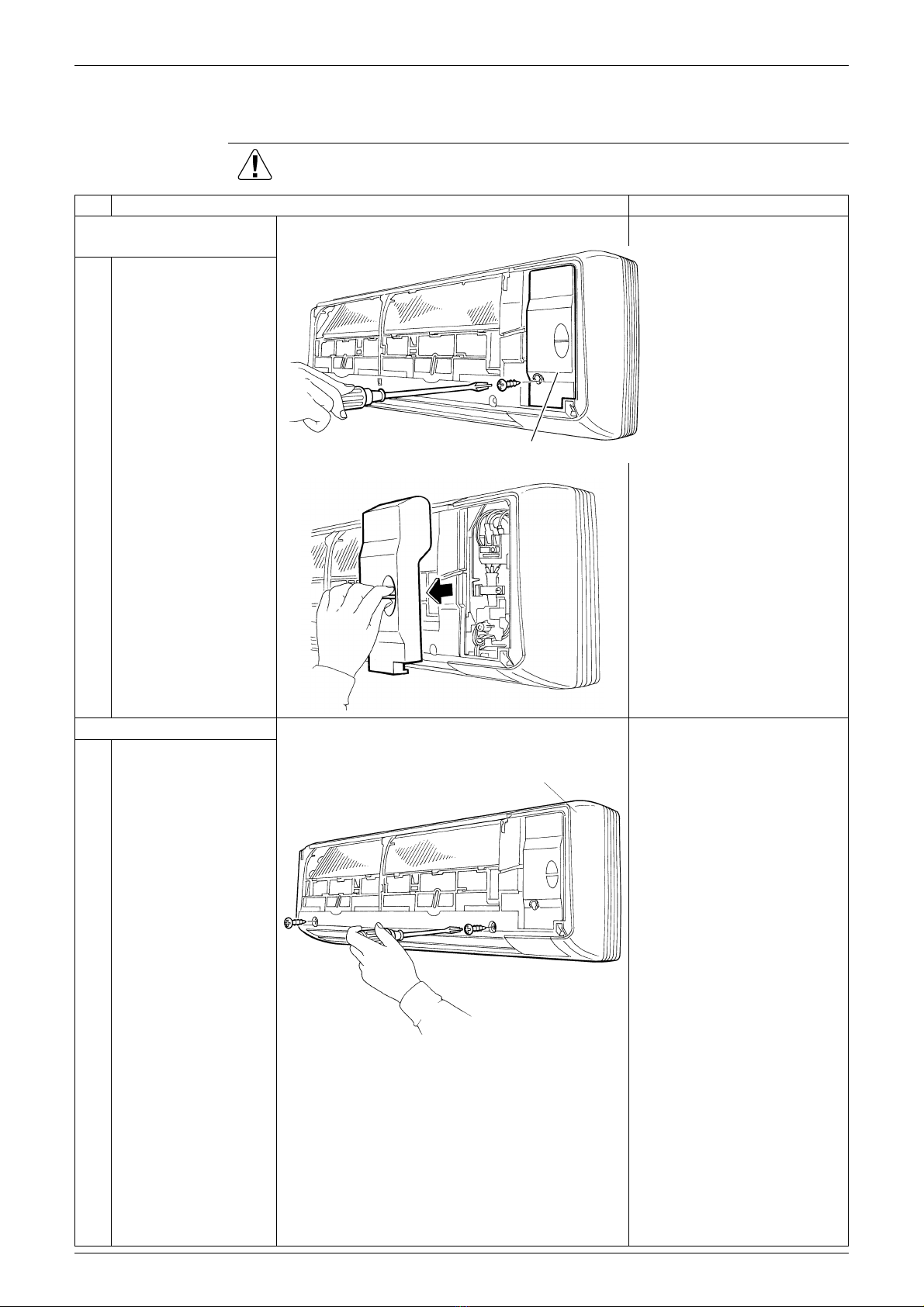
2. Removal of Front Grille
Procedure Warning Be sure to wait 10 minutes or more after turning off all power supplies
before disassembling work.
Step Procedure Points
1. Remove the service
cover.
1Remove the screw and
remove the service
cover.
You can remove the front
grille without detaching the
service cover.
2. Remove the front grille.
1Remove the 2 screws
of the front grille.
Refer to the removal
procedure in a reverse way
when reassembling.
Service cover (R2756)
(R2757)
(R2758)
Front grille

Removal of Front Grille Si04-753
6Removal Procedure
2Unfasten the 3 hooks
on the top of the front
grille.
3Pull the upper part of
the front grille out and
lift the lower part up,
and then remove the
front grille.
Make sure that all the 3
hooks are engaged securely
when reassembling.
Step Procedure Points
Hook
(R2759)
Hook
(R2760)
(R2761)
(R2762)

Si04-753 Removal of Horizontal Blades / Vertical Blades
Removal Procedure 7
3. Removal of Horizontal Blades / Vertical Blades
Procedure Warning Be sure to wait 10 minutes or more after turning off all power supplies
before disassembling work.
Step Procedure Points
1. Remove the horizontal
blades.
1Open the horizontal
blades.
2Release the left shaft of
the horizontal blades.
3Bend the horizontal
blades slightly and
release the center
shaft.
Slide the horizontal
blades to the left and
release the right shaft.
Installation procedure
1. Since the key pattern hook is
provided, rotate the blade
and fit it to the right shaft
first.
2. Fit the blade to the center
and left shafts.
Horizontal blades
(R2763)
Left shaft
(R2764)
(R2765)
Center shaft
Right shaft
(R2766)

Removal of Horizontal Blades / Vertical Blades Si04-753
8Removal Procedure
2. Remove the vertical
blades.
Remove the fan guards
beforehand.
The unit has 2 sets of
vertical blades linked one
another with the interlock
rods.
1Release the right and
left shafts.
2Unfasten the 3 hooks
for each set of vertical
blades.
3Pull the vertical blades
rightward and remove
them.
Step Procedure Points
Vertical blades
(R2767)
Hooks
(R5478)
(R2769)
Table des matières
Autres manuels Dakin Pompe à chaleur


Manuels Pompe à chaleur populaires d'autres marques


Mitsubishi Electric
Mitsubishi Electric PUZ-SWM60VAA Manuel utilisateur

Dimplex
Dimplex LI 16I-TUR Guide de l'utilisateur

Carrier
Carrier WSHP Open v3 Guide de configuration rapide

TGM
TGM CTV14CN018A Manuel utilisateur

Carrier
Carrier 38MGQ Series Manuel utilisateur

Kokido
Kokido K2O K880BX/EU Guide de dépannage


