
D16 Group NEPHETON 2 Manuel utilisateur

User Manual
16 November 2023, 14:00

Requirements
Soware and hardware requirements:
Windows PC
OS version Windows 7 or newer
CPU Intel x86 / AMD x86
Soware VST2/VST3/AAXcompablehostapplicaon(32bitor64bit)
Apple Mac
OS version OS X 10.13 or newer
CPU Intel x86 / Apple Silicon
RAM 8GB(16GBRecommended)
Soware AU/VST2/VST3/AAXcompablehostapplicaon(64bit!)
Hardware requirements / recommendaons are based on esmates performed on available computers at D16 Group HQ,
and therefore cannot cover all possible conguraons available on the market. CPU usage may vary widely depending on the
manner in which the product is used. Factors that may contribute to variance in CPU usage include parcular patch and its
complexity, the global quality seng, project sample rate. In order to form a beer understanding of how a plug-in will behave
within your current setup, we highly recommend downloading the demo and giving it a try.
2
RequiRements •

Preliminary informaon
Thischaptercontainsgeneraladviceforusingtheplug-in’sinterface.
To do a right-click on macOS with single buon mouse:
EitherclickyourmousewhileholdingtheCTRLkeyonyourkeyboardorusetwongersonyourtouchpad.
Checking the value of a parameter
Right-clickonanyparametertocheckitsvalueinitscontextmenu:
A parameter’s context menu
Note: It’s currently not possible to enter a precise value in the input box; it’s just to check the value.
Fine-tuning connuous parameters
Tweakacontrol(knob)whileholdingtheCTRLkey(onWindows)orAppleCMDkey(onmacOS)-thiswillmakethe
tweakingmoreprecisewhilemovingthemousepointerupanddown.
Double-click to reset a connuous parameter’s value
Double-clickingonaparameterrestoresitsvaluetotheinialstate,eitherdefault(rightaerloadingtheplug-in/
loadingitalongwithaprojectle)orfromthemostrecentlyloadedpreset.
Enabling parameters for automaon
Nepheton 2hasthousandsofsoundparametersandVST/AU/AAXhostautomaonallowsonlyahandfulofautomatable
parameters so by default all parameters are disabled for automaon.
Usingtheparameter’scontextmenu(describedabove),youcanenableautomaonforanyparametersyouwishto
controlexternally:
Enabling a parameter for automaon
3
PReliminaRy infoRmation •

Interface overview
Aerloadingtheplug-inintothehostapplicaon,theNepheton graphicalinterfacewillappear:
The Nepheton Graphical User Interface
Nepheton’sinterfaceissplitintotwomainparts:theSound Controlsecon-responsibleforcontrollingNepheton’s
sound-generaonopons…
The Sound Control secon
…andtheInternal Sequencer -responsibleforeding/replayingpaerns.AvailableonlywhileInt Seq mode is
enabled.
4
inteRface oveRview •

The Internal Sequencer
The sound control secon
Thisseconisresponsibleforgenerangandprocessingsound.
The Sound Control secon
Preset browsers
Thetoppartofthe Sound Controlseconcontainsthe Preset Managementsubsecons:
The Preset Management secons
Therearetwotypesofpresetsmanagedfromhere.
• TheScenepresetssecon(tothele)-AScene holdsinformaonformuchoftheplug-instate,includingsound
parameters(intheSound Controlsecon),thestateofInt Seqoponandenrepaernstorage(forinternal
Sequencer).
• TheDrum Kitpresetssecon(totheright)-CoversonlythesoundparametersfromtheSound Controlsecon:
parametersforalldrumsounds,twoeectBuses and Master eects.
Bothsubseconshavethefollowingcontrols:
• Preset display-Opensabrowsertoload,saveandmanagepresets(moreonthatinthePreset Management part
ofthemanual).
• Save buon-Savescurrentsoundsengsasanewpreset.
5
inteRface oveRview • The sound conTrol secTion

Generang drum sounds
Nepheton isadrummachinecomprising17synthesizedpercussioninstruments(theSynth view).Eachoftheinstru-
mentshasitsownindependenteectchain(Stripsview)andcanthenberouted/senttooneoftwoBuseects(inthe
boompartofthe Sound Controlsecon)ordirectlyontotheMastereectchain(Masterview).
ToswitchbetweenallavailableviewsintheSound Controlsecon,usetheView selector:
The View selector in the Sound Control secon
Theparametersforall17instrumentsareavailableintheSynth view:
The Synth view
Theparameterscorrespondwiththefollowingdrumsounds:
• Bass Drum
• Laser Gun
• Snare Drum
• Rim Shot
• Hand Clap
• Low Conga
• Mid Conga
• High Conga
• Low Tom
• Mid Tom
• High Tom
• Closed Hihat
• Open Hihat
• Cymbal
• Claves
• Maracas
• Cow Bell
6
inteRface oveRview • The sound conTrol secTion

Eachoftheseinstrumentshaveacommonparameter:
Level-Setstheoutputvolumeforeachinstrument,placedaeritseectstripintheStrips view.
Andindividualparameters:
• Bass Drum:
• Tone –Volumeoftheinialclick.
• Decay–Amplitudereleaseme.
• Sweep–Releasemeoffrequencyenvelope.
• Snare Drum:
• Tone–Crossfadebetweenaudibleoneandtwooscillators.
• Decay–Noiseamplitudereleaseme.
• Snappy–Crossfadebetweennoisyandmuddysound.
• Low Conga, Mid Conga, High Conga:
• Tunning–Basefrequency.
• Decay–Amplitudereleaseme.
• Low Tom, Mid Tom, High Tom:
• Tunning–Basefrequency.
• Decay–Amplitudereleaseme.
• Snappy–Crossfadebetweendirtyandcleansound.
• Claves:
• Tunning–Basefrequency.
• Decay–Amplitudereleaseme.
• Rim Shot:
• Tunning–Basefrequency.
• Decay–Amplitudereleaseme.
• Maracas:
• Tone – Noise color.
• Hand Clap:
• Tone–Filter’scutofrequency.
• Reverb–Reverb’sdecayme.
• Cow Bell:
• Tunning–Basefrequency.
• Decay–Amplitudereleaseme.
• Laser Gun:
• Depth–Frequencyenvelopemodulaon.
• Decay–Amplitudereleaseme.
• Sweep–Releasemeoffrequencyenvelope.
• Cymbal:
• Tone–Aack.
• Decay–Amplitudereleaseme.
• HH Frq–Basefrequencyforasquareoscillators,whichareusedtogeneratethenoisesound.
• Open Hihat, Closed Hihat:
• Tone–Noisecolour.
• Decay–Amplitudereleaseme.
• HH Frq–Basefrequencyforasquareoscillators,whichareusedtogeneratethenoisesound.
7
inteRface oveRview • The sound conTrol secTion

Mute / solo LEDs
WhenNephetonisplaying,itispossibletoturnindividualinstrumentsOn or OusingtheMute / SoloLEDswitches;
thesestopthetriggeringoftheinstrumentsbutallowthesoundstoplayunltheendoftheenvelope.Thisstopsa
rapidcutinthesound,makingthetransionmorenatural.
The Mute / Solo LED switches
Drum sounds acvity
TheLEDsnexttoeachinstrument’snamelightupwhentheinstrumentistriggeredandstartstoplay:
The acvity LEDs
Thiswayit’seasiertobesurewhichdruminstrumentsareengagedandwhen.
Drum sounds’ individual eect chains
Eachofthe17 drumsoundshasitsowndedicatedchannelstripwhereitcanbefurtherprocessedthroughadedicated
chainofeects.Togetaccesstothedrumsounds’channelstripsweneedtoswitchtoStrips view:
The Strips view
TheInstrument Selectorseconallowsustoselectwhichinstrument’schannelstripweedit:
The Instrument Selector secon
8
inteRface oveRview • The sound conTrol secTion
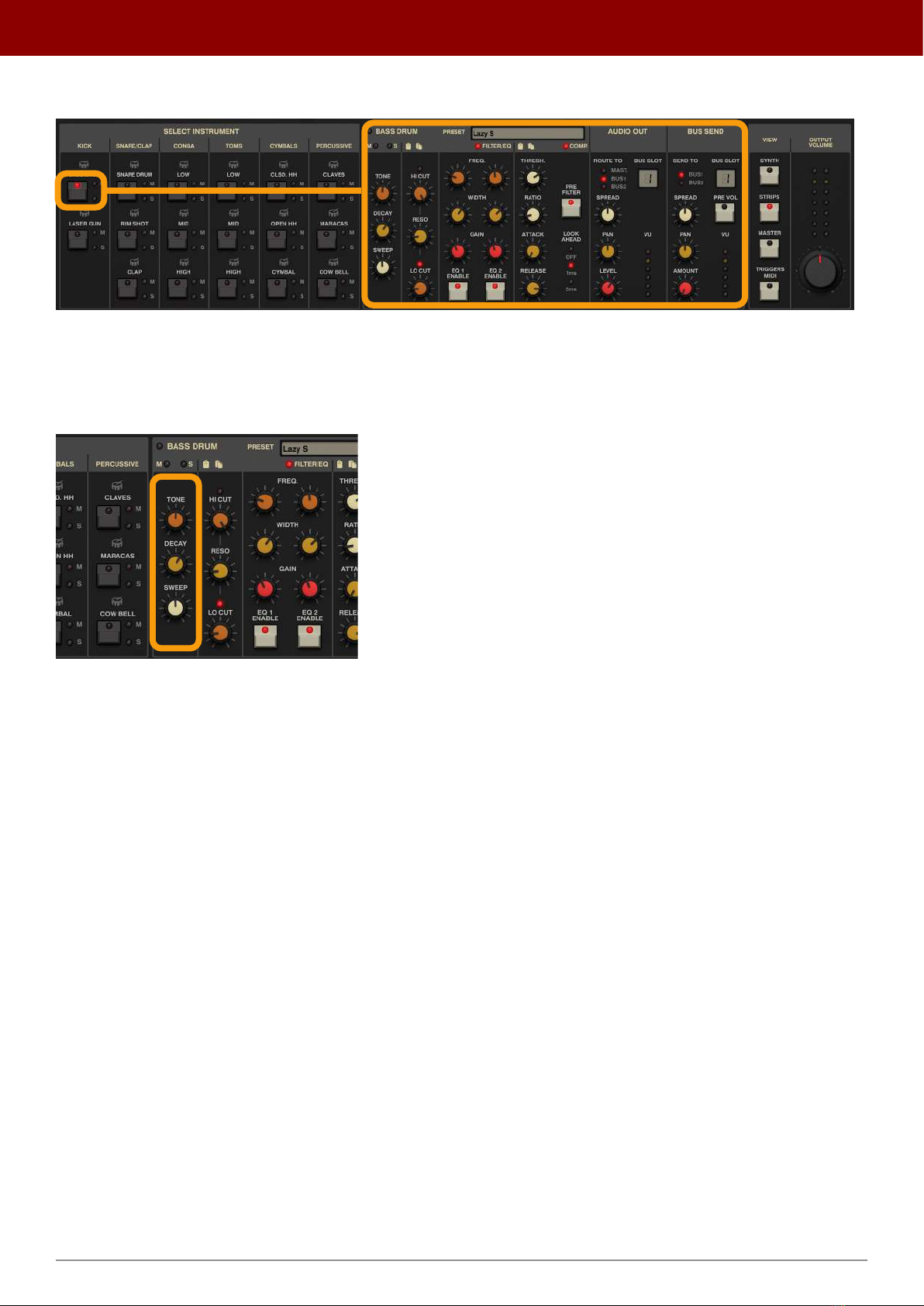
Onceaninstrumentisselected,wegetaccesstoitseectchain:
Selecng a Drum Sound’s eect chain
Drum sound synth parameters
EacheectchainstartswiththesynthparametersfromtheSynthesis view,foreaseofeding:
A drum sound’s parameters
9
inteRface oveRview • The sound conTrol secTion

Filter / EQ
Then,thedrumsoundgoesintotheFilter / EQ:
The Filter / EQ secon
WhichcanbeEnabled / DisabledusingthetoggleLEDintheupper-rightcornerofthesecon:
The LED to enable / disable the Filter / EQ
TherstcolumnofparameterscontrolsLow Cut and High CutlterswithsharedResonance:
The Low Cut / High Cut lters
• Hi Cut -SetstheHigh Cutlter’sfrequency.
• Resonance -SetsthelevelofemphasisforbothLow Cut and High Cutlters.
• Low Cut-SelectstheLow Cutlter’sfrequency.
10
inteRface oveRview • The sound conTrol secTion
Table des matières
Autres manuels D16 Group Tambour


