
Curtis LCDVD198 Manuel utilisateur

ONLY REFERENCES
SPV7050P-America OSD
LCDVD198
USA
F
ED
E
R
A
L
O
M
U
N
I
CA
T
I
O
N
S
C
O
M
I
S
O
N
C
M
M
S
I
ENGLISH
CLASS 1 LASER PRODUCT

ONLY REFERENCES
SPV7050P-America OSD
.
plug

ONLY REFERENCES
SPV7050P-America OSD
LCD TV
LCD TV
power cord
Note This equipment has been tested and found to comply with the limits for:
a Class B digital device, pursuant to Part 15 of the FCC Rules. These limits are
designed to provide reasonable protection against harmful interference in a residential
installation. This equipment generates, uses, and can radiate radio frequency energy and ,
if not installed and used in accordance with the instructions, may cause harmful
interference will not occur in a particular installation. If this equipment does cause harmful
interference to radio or television reception, which can be determined by turning the
equipment off and on,the user is encouraged to try to correct the interference by one or
more of the following measures:
- Reorient or relocate the receiving antenna.
- Increase the separation between the equipment and receiver.
- Connect the equipment into an outlet on a circuit different from that to
is connected.
- Consult the dealer or an experienced radio TV technician for help
Shield cables must be used with this unit to ensure compliance with the
Class B FCC limits.
which the receiver
.

ONLY REFERENCES
SPV7050P-America OSD
CONTENT
MOULD 1............................................
TV MODE 7..........................................
AV AND S-VIDEO MODE 16..........................
YPBPR AND HDMI MODE 17.........................
PC MODE 18........................................
TV TROUBLESHOOTING. 21.........................
DVD OPERATION........... 22.........................
SPECIFICATIONS........... 36.........................
DISPLAY MODE............. 37.........................
ACCESSORIES.............. 39.........................

ONLY REFERENCES
SPV7050P-America OSD
MENU(Enter or exit TV menu )
TOP
POWER(Turns on or off the power supply)
EJECT button
PLAY button
-1-

ONLY REFERENCES
SPV7050P-America OSD
LEFT PANEL
S-Video input
PC-Audio input
Video/Audio L/R input
-2-
Please make sure when inserting the Disc, the unprinted
side of the disc should be facing you When inserting the
Disc incorrectly, you may damage the DVD mechanism.

ONLY REFERENCES
SPV7050P-America OSD
EXTERNAL EQUIPMENT
-3-
DVD or VCR player
HDMI
Video L R S-VIDEO

ONLY REFERENCES
SPV7050P-America OSD
REMOTE CONTROL
MUTE
AUTO
POWER
RECALL
MENU CALL
EXIT
0
9
CC
78
6
5
1234
ENTER
SOURCE
CH-
CH+ VOL-
VOL+
GOTO A-B REPEAT ANGLE
DVD-MENU TITLE AUDIO
DISPLAY ZOOM SUBTITLE
-/--
PMO
DE.SLEEP
SMO
DE.SCALER
1
2
3
4
5
6
7
8
9
10
11
12
13
14
15
16
18
17
20
19
22
21
AUTO
1
Auto adjusting in VGA mode.
MUTE
2Sound mute switch.
SCALER
3.To switch video format
SLEEP
4To setup the sleep timer.
Number button
5
To select program number.
6
To switch between one ,two -digit program number.or three
RECALL
7To swap between a previous program and the current
program in analog TV .
CALL
8
To display the information on screen.
SOURCE
9
To select input source: Analog TV, DVD, AV, S-Video,
YPBPR, HDMI and PC.
10 Left/Right cursor(menu adjustment )
To move leftward/ rightward or adjust the selected
item in the menu, or adjust sound volume (invalid
in DVD).
ENTER button
11
To confirm the selections.
VOL+/-
12
To increase or decrease sound volume.
12
13
To stop playing valid in DVD mode.
CC/
14
TV CC key close Caption Disc in/out ,valid in DVD mode.()/
15
To select the previous chapter or track, valid in DVD mode.
16
To select the next chapter or track in DVD mode.
17 REPEAT
To repeat playback(valid in DVD mode).
18 ANGLE
To change camera angle in DVD mode when playing
DVD disc.
19 PROGRAM
Program playback or select slide effects when playing
JPEG file.
20 AUDIO
To change the audio language and sound
track, valid in DVD mode.
21 SLOW/STEP
slow motion and step by step play mode.
22 SUBTITLE
To select language , valid in DVD .subtitle's
-4-
MTS
DVD-SETUP
PROGRAM
SLOW/STEP
-/--

ONLY REFERENCES
SPV7050P-America OSD
REMOTE CONTROL
MUTE
AUTO
POWER
RECALL
MENU CALL
EXIT
0
9
CC
78
6
5
1234
SOURCE
CH-
CH+ VOL-
VOL+
GOTO A-B REPEAT ANGLE
DVD-MENU TITLE AUDIO
DISPLAY SUBTITLE
-/--
PMO
DE.SLEEP
SMO
DE.SCALER
23
24
25
26
27
28
29
31
32
33
34
35
37
36
30
POWER
23
To switch between standby mode and power-on mode.
P-MODE
24
To select picture mode: PERSONAL, STANDARD,
MOVIE, MILD, GAME (invalid in VGA mode).
S-MODE
25
To select sound field modes: PERSONAL, STANDARD
MUSIC, VOICE, THEATRE.
39
38
EXIT
26
To exit or back previous menu.
MENU
27
Menu button.
UP/DOWN cursor
28
To select upward/downward in the menu or
change the channel, valid in analog TV .
CH+/-
29
To increase or decrease program number
valid in analog TV .
DVD-SETUP MTS/
30
Pause playing/steps playback in pause mode,
valid in DVD mode.
31
32
To fast-forwards DVD playback, valid in DVD mode.
33
To fast backward playback, valid in DVD mode.
A-B
34
To segment repeat(valid in DVD mode).
GOTO
35
To play from a certain time point(valid in DVD
mode).
DVD-MENU
37
To go to the menu of DVD menu ,valid in DVD mode
TITLE
36
To go to the menu of DVD menu ,valid in DVD mode
DISPLAY
39
To display track time in DVD mode.
ZOOM .To zoom into/out to the picture , valid in DVD mode
38
Enter DVD setup menu BTSC mode exchange key,
Exchange among MONO/STEREO/SAP
mode if BTSC available.
/
-5-
ZOOM
MTS
DVD-SETUP
PROGRAM
SLOW/STEP
ENTER
ONLY REFERENCES
SPV7050P-America OSD
REMOTE CONTROL
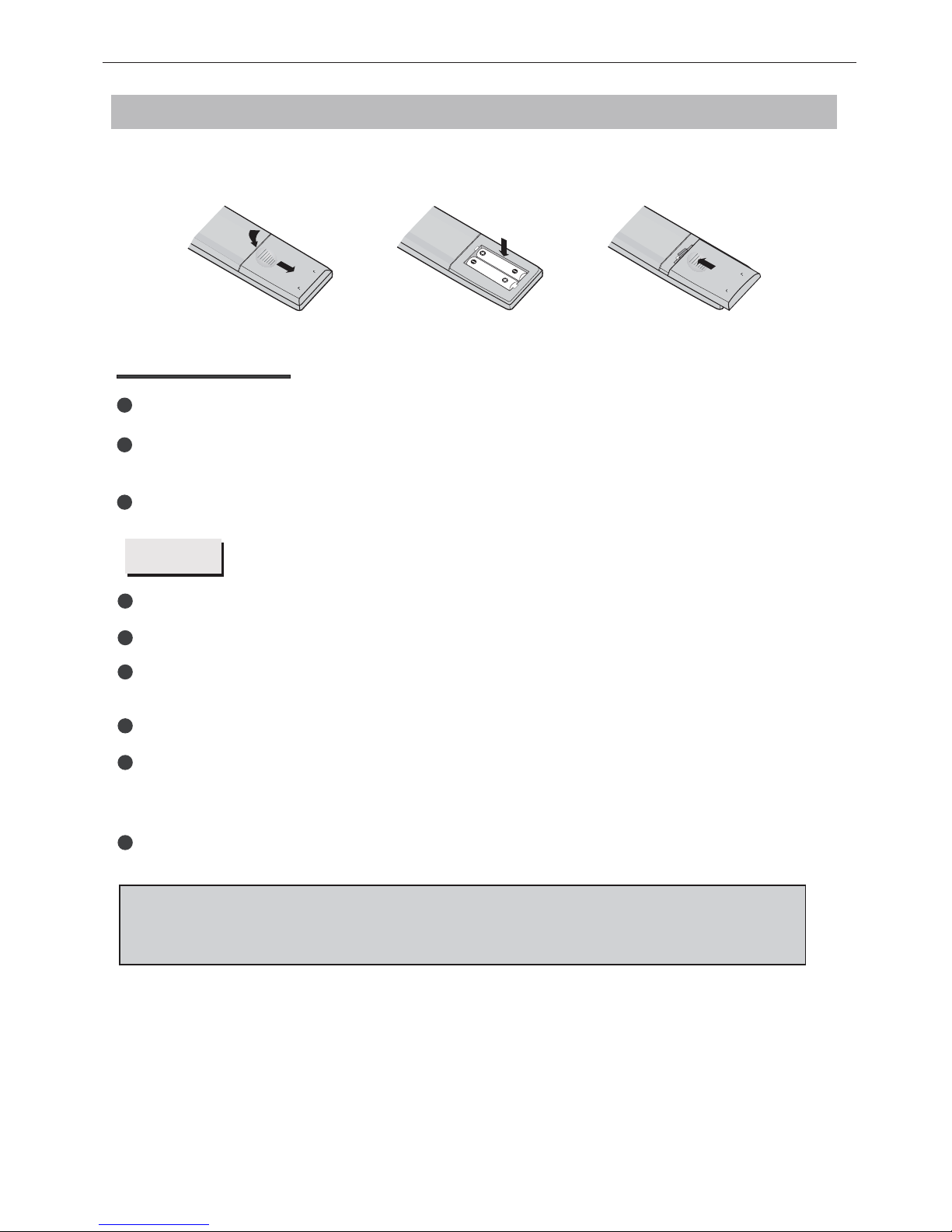
Remove the battery cover. Insert two SUM-4(AAA) batteries matching the -/+ polarities of
the battery to the -/+ marks inside the battery compartment, as follows:
BATTERY LIFE
Normally, battery can be used one year.
If the remote control is still invalid when very near to the TV's remote sensor window,
please use new battery.
Please use SUM-4(AAA) battery.
NOTES
Never use rechargeable battery.
Never charge, short-circuit, disassemble and heat the battery, or throw it into fire.
Pay attention not to fall or knock the remote controller, which will cause damage or
function failure to it.
Do not use new and old battery together.
If electrolyte splashes into body, please clean it with water.
CAUTION:
Please put battery in the place children cannot touch. If swallow by accident, please
contact with the local doctor immediately.
BATTERY INSTALLATION
When not using the remote controller for a long time, please take out battery to avoid
liquid leakage. Before replacing new battery, please clean the electrolyte in the remote
controller.
-6-
Table des matières
Autres manuels Curtis Moniteur


