
CSC FT750-26XP Manuel utilisateur

FT750-26XP and FT750-20XP
Owner’s Manual

FT750-26XP and FT750-20XP Owner’s Manual
1
Contents
A Word From Steve...............................................................................................................................................2
Safety ....................................................................................................................................................................3
Caution and Warning Symbols..............................................................................................................................4
Pre-Ride Safety Checks..........................................................................................................................................4
General Information..............................................................................................................................................5
Operation..............................................................................................................................................................5
Electric Bicycle Components.................................................................................................................................6
LCD Displays and Switch Functions.......................................................................................................................7
Switching On Electric Bicycle ................................................................................................................................8
Turning Headlight and Taillight On and Off...........................................................................................................8
Changing LCD Display Mode .................................................................................................................................8
Illuminating Display Backlight...............................................................................................................................9
Toggling Between Imperial and Metric Units......................................................................................................10
Pedal-Assist System.............................................................................................................................................10
Thumb Throttle...................................................................................................................................................11
Displaying Mileage and Time, and Resetting the Trip Meter..............................................................................11
Maximum Electric Motor Bicycle Speed.............................................................................................................11
Shifting Drive Gears ............................................................................................................................................12
Braking ................................................................................................................................................................12
Charging the Battery...........................................................................................................................................14
Battery Range......................................................................................................................................................15
Battery Status......................................................................................................................................................15
Battery Disposal..................................................................................................................................................15
Front Suspension ................................................................................................................................................16
Adjusting Your Bicycle to Fit You.........................................................................................................................17
Tire Pressure and Tire Maintenance...................................................................................................................19
Assembling Your Electric Bicycle.........................................................................................................................20
Troubleshooting..................................................................................................................................................37
Torque Specifications..........................................................................................................................................38
Bicycle Specifications ..........................................................................................................................................39
Warranty .............................................................................................................................................................41

FT750-26XP and FT750-20XP Owner’s Manual
2
A Word From Steve
Thank you for purchasing your new CSC electric bicycle. Your CSC FT26 or FT20 is a great bicycle and we
are very proud of it. Your CSC electric bicycle is easy to maintain, it’s reliable, and it’s fun. You’ve made a
wise purchase decision.
I want you to know that we value the trust and confidence you have in CSC. Our guiding principle will
always be that our customers come first.
We wish you many miles of safe and enjoyable riding on your new electric bicycle. If there’s anything we
can do to enhance your ownership experience, please let us know.
Thank you again,
Steve Seidner
Founder and CEO
CSC Electric Bicycles, LLC
1331 W. Foothill Boulevard
Azusa, California 91702
909 445 0900
www.CSCMotorycles.com

FT750-26XP and FT750-20XP Owner’s Manual
3
Safety
Read this Owner’s Manual in its entirety before attempting to ride your new electric bike.
Always wear a helmet, gloves, and shoes while riding the bicycle. Wear brightly-colored clothing so other
vehicles can see you.
Make sure there is no less than 1-inch clearance
between the rider’s inseam area and the bicycle top
tube when the rider straddles the bicycle with both feet
flat on the ground.
If the bicycle is too large, the rider may not be able to
reach the pedals or the ground, which may result in loss
of control and a crash.
Adjust the seat height such that you can comfortably reach the pedals when they are at the bottom of
their stroke.
Do not allow others who are unfamiliar with the electric bike’s operation to ride the bike.
Do not ride the bicycle in high wind, rain, ice, or snow conditions. Do not ride the bicycle if the
temperature is below 15 oF or above 95 oF. Exercise caution if riding the bicycle when it is dark outside.
Do not exceed the bicycle’s maximum weight capacity: 330 pounds for the FT750-26XP; 264 pounds for
the FT750-20XP.
Be aware of the battery’s charge state, and do not ride such that the battery power is depleted and you
do not have the ability to make it to your destination.
Make sure the battery is adequately charged before every trip.
Charge the battery at least once monthly if the electric bicycle is in storage.
Do not enter puddles or other bodies of water such that electrical components become wet.

FT750-26XP and FT750-20XP Owner’s Manual
4
Do not attempt to modify the electrical circuits.
Dispose of the battery in accordance with applicable battery disposal regulations.
Always ride with both hands on the handgrips.
Use the charger provided with your electric bicycle. Never attempt to use an unauthorized charger.
Charge the battery in a well-ventilated area.
Do not install a child seat on your electric bicycle.
Caution and Warning Symbols
Caution and warning symbols in this manual are as follows:
The Caution! symbol indicates a condition that may lead to electric bicycle damage.
The Warning! symbol indicates a condition that may lead to injury or death.
Pre-Ride Safety Checks
Prior to every ride, please check the following items to make sure your electric bicycle is ready for you to
ride:
The battery is fully charged.
Both tires are inflated to 20 psi.
Both the front and rear brake are operational.
The front fork skewer is secure.
The rear wheel nuts are secure.
The handlebar is secure.
The seat post clamp is secure.

FT750-26XP and FT750-20XP Owner’s Manual
5
General Information
Your CSC electric bicycle is an electric-motor-assisted bicycle equipped with pedals and an electric motor.
At Level 0, no pedal assist is provided. Levels 1 through 5 provide increasing levels of pedal assist. The
electric motor pedal-assist function is activated by pedaling the bicycle when assist Levels 1 through 5
have been selected (additional motive power is provided when you pedal the bicycle). In Levels 1
through 5, the handlebar-mounted thumb switch engages the electric motor to drive the bicycle even
without pedaling.
Caution! Do not activate the handlebar-mounted thumb switch if you are not on the bicycle and the
pedal-assist function is set to any level, as the electric motor will propel the bicycle forward.
Your electric bicycle includes a frame-mounted battery that should be recharged as required.
The bicycle includes a rear set of sprockets with a derailleur that allow for 7 different gear ratios. You can
shift gears using a handlebar-mounted index shifter like you would do on a regular bicycle.
The bicycle includes front and rear hydraulic disc brakes, which are independently operated by
handlebar-mounted levers.
The bicycle includes a front suspension that is adjustable for spring preload and damping. It can also be
locked to simulate a rigid front suspension.
The bicycle includes a headlight and a taillight that must be manually switched on. These should be
turned on when the bicycle is ridden to provide for optimal rider visibility.
Operation
Readying your bicycle for use involves turning the LCD on after performing the safety checks outlined in
the Pre-Ride Safety Checks in this Owner’s Manual.
Please read this manual in its entirety prior to operating your CSC electric bicycle. Please refer to the
electric bicycle components section (shown on the next page) when reading each section of this Owner’s
Manual.

FT750-26XP and FT750-20XP Owner’s Manual
6
Electric Bicycle Components
1. Frame Top Tube
2. Frame Down Tube
3. Front Fork
4. Headlight
5. Brake Levers
6. Stem
7. Water Bottle Holder
8. Battery
9. Seat
10. Seatpost
11. Taillight
12. Seatpost Clamp
13. Front Tire and Wheel
14. Rear Tire and Wheel
15. Rear Derailleur
16. Chain
17. Kickstand
18. Chainring
19. Crank
20. Pedals
21. Rear Disc Brake
22. Controller
23. Thumb Throttle
24. LCD Instrument Display
25. Front Disc Brake

FT750-26XP and FT750-20XP Owner’s Manual
7
LCD Displays and Switch Functions
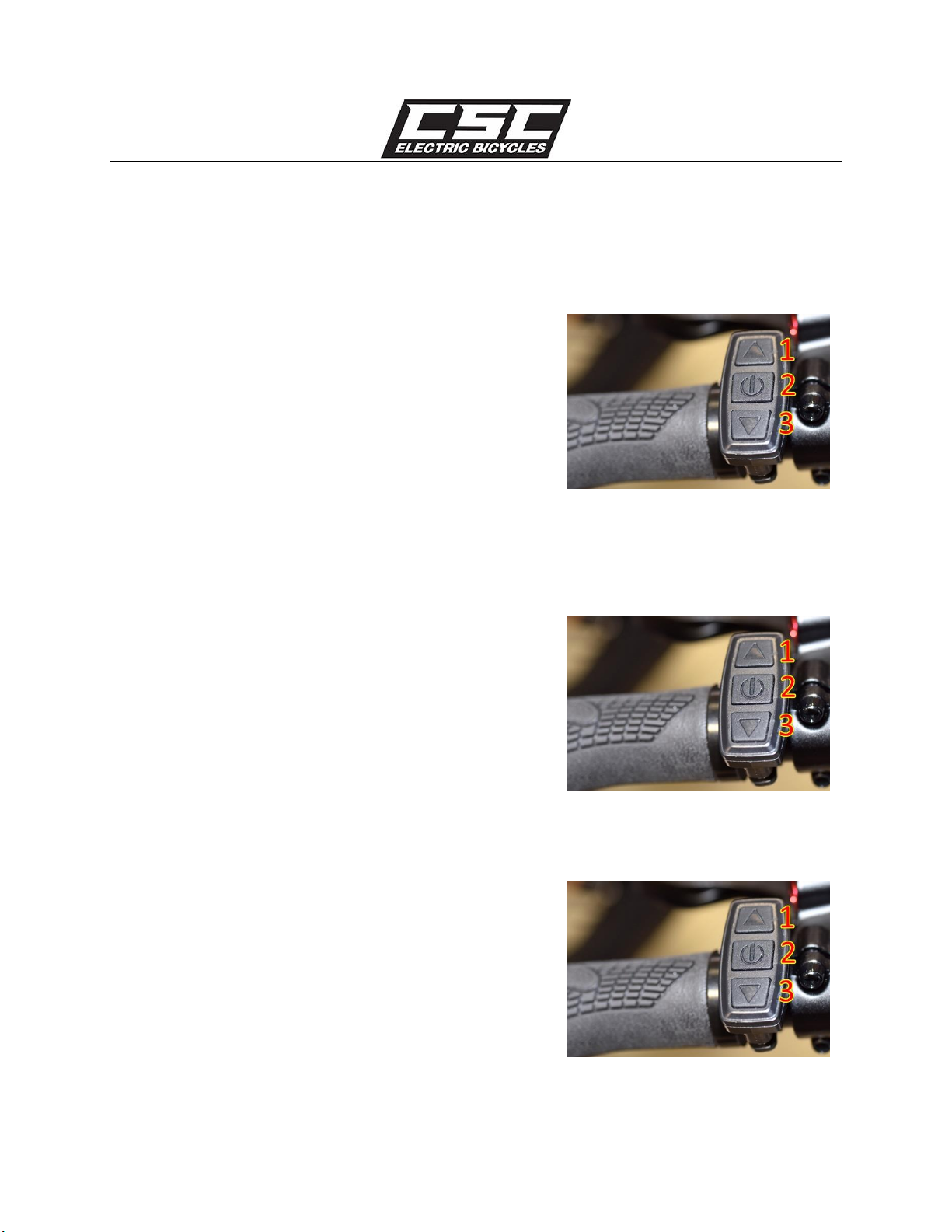
The LCD (mounted in the center handlebar area) provides a
large array of information in several display modes. Turning the
bicycle’s LCD on, making electric motor power available to
drive the bicycle, LCD display information, and numerous
bicycle settings are all controlled by three switches contained
in a switch housing on the left handlebar (shown to the right).
The switches are referred to as Switch 1 (the UP switch),
Switch 2 (the power switch), and Switch 3 (the DOWN switch).
The switch and LCD displays are shown in the illustration below.
Warning! Take care when activating Switches 1, 2, and 3 while riding your electric bicycle. Lack of
FT750-26XP and FT750-20XP Owner’s Manual
8
attention to riding your electric bicycle while actuating the switches may result in a crash.
Switching On Electric Bicycle
Turn on the bicycle by depressing Switch 2 in the photo shown
to the right until the LCD illuminates. Turning off the bicycle
requires depressing Switch 2 and holding it down a second
time.
The bicycle LCD, the electric motor pedal assist functions, and
thumbswitch electric motor actuation will turn off
automatically if the bicycle is not used for 5 minutes.
Turning Headlight and Taillight On and Off
To turn on the headlight and taillight, depress Switch 1 until
the lights illuminate. To turn off the headlight and taillight,
depress Switch 1 until the lights turn off.
Changing LCD Display Mode
The LCD mounted in the center of the handlebars has three
display modes: Display 1, Display 2, and Display 3. You can
cycle through Display 1, Display 2, and Display 3 by pressing
Switch 2 momentarily after the LCD has been turned on. By
default, Display 1 is shown when you first turn on your electric
bicycle.

FT750-26XP and FT750-20XP Owner’s Manual
9
Display 1 shows actual speed, as indicated by the red arrow in
the photo to the right. Display 1 also shows other information
as shown in the photo to the right.
Display 2 shows average speed during the ride, as indicated by
the red arrow in the photo to the right. Display 2 also shows
other information as shown in the photo to the right.
After showing Display 2, the display changes to Display 1 after
riding the bicycle for 5 seconds.
Display 3 shows maximum speed attained during the ride, as
well as other information as shown in the photo to the right.
After showing Display 3, the display changes to Display 1 after
riding the bicycle for 5 seconds.
Illuminating Display Backlight
After the LCD has been turned on, you can illuminate the
backlight on the LCD by holding Switch 1 on continuously for 5
seconds. You can do this from any of the display modes.
To turn the backlight off, hold Switch on 1 continuously for 5
seconds.
Ce manuel convient aux modèles suivants
1
Table des matières
Autres manuels CSC Vélo


