
Crowcon Clip SGD Manuel utilisateur

User manual
M07716
Issue 1
October 2017
Clip SGD
Portable single Gas Detector

⚠WARNING
•ClipSGDisahazardousareacertiedgasdetectorandassuchmustbeoperatedandmaintainedinstrictaccordancewiththeinstructions,warningsandlabelinformationincludedinthemanual.•Beforeoperatingthisdevice,pleasereadcarefullyandunderstandallinstructionsinthemanual.•Understandthescreendisplayandalarmwarningspriortouse.•Beforeuse,pleasechecktheactivationdate,andiftheactivationdatehasexpiredpleasedonotusethedevice.•Beforeuseensurethatthedeviceisingoodconditionandtheenclosure,thedisplaywindow,alarmLEDwindowsandsounderapertureareundamagedandclearfromcontaminants.•Beforeuseperformtheself-testoftheLED’s,sounderandvibrator.•Bumptestthedeviceregularlybyapplyingagasconcentrationexceedingthealarmsetpoint.Itisrecommendedthatabumptestisperformedatleastevery90days.•FortheO2detectorperformacalibrationevery30daysinafreshairenvironment.•Ifthedevicefailsabumptest,calibrationorself-testpleasedonotusethedevice.•Donotdisassembleorsubstitutecomponents,oroperatebeyondtheintendedrangeofuseasthismayimpairintrinsicsafety,invalidatesafetycerticationandwillvoidthewarranty.•DonotattempttoreplacethebatteryorsensorastheClipSGDisdesignedtobemaintenancefreeanddisposable.Changingthebatteryorsensormayimpairintrinsicsafety,invalidatesafetycerticationandwillvoidthewarranty.•UseIRcommunicationsonlyinasafeareathatisfreefromhazardousgases•TopreventthegenerationofstaticelectricitydonotcleanorrubtheLCDscreenofthedevicewithadryclothorhandsinahazardousareaenvironment•Performcleaningandmaintenanceofthedeviceinasafeareaonlythatisfreefromhazardousgases.•TheClipSGDisshippedwithdefaultalarmlevelsettings.Itistheusersresponsibilitytoensurethealarmlevelsettingsareappropriateforthespecicapplication;thesecanbechangedasrequiredviatheIR_Link_PCSoftware.•Gasconcentrationmeasurementsbythesensorcanvarybasedontheenvironment(temperature,pressureandhumidity).ThereforecalibrationofClipSGDshouldbeperformedinthesame(orsimilar)environmentofthedevice’sactualuse.•Severevibrationorshocktothedevicemaycauseasuddengasreadingchange.PleaseuseClipSGDafterthevalueofgasconcentrationhasstabilized.•ExcessiveshocktoClipSGDcancausethedeviceand/orsensortomalfunction.•Ifthetemperaturechangessharplyduringuseofthedevice(forexamplemovingfromindoorstooutdoors),thevalueofthemeasuredgasconcentrationcansuddenlychange.PleaseusetheClipSGDafterthegasconcentrationvaluehasstabilized.•Thedeviceisintendedforuseinnormalatmosphericconditions,pressure80kPa(0.8bar)to110kPa(1.1bar);andairwithnormaloxygencontent,typically21%v/v(volume/volume).

⚠CAUTION
•Thisdeviceisnotameasurementdevice,butagasdetector.•Cleandetectorswithasoftclothanddonotusechemicalsubstancesforcleaning.•Toensurea24monthsbatterylifeisattaineditisimportanttoavoidthefollowingactivitiesasthiswilldepletethebatterylifetimetolessthan24months.1. Allowing the detector to be in gas alarm frequently or for prolonged periods
(Normal Alarm Use: No more than 4 minutes alarm time per day)
2. Operating the detector user button frequently.
3. Connecting the detector with the Clip SGD IR Link frequently, except for regular bump
testing.
•Viewaserialnumberonthelabelatthebacksideofthedevice.(ex,20170101)1. The serial number indicates below.
ex)SG01010012017(Year)01(Months)01(Day)001(ManufactureOrder)


Table of Contents
1.DiagramandLCD...............................................6
2.Activation...........................................................73.Mode..................................................................83.1GasMeasurementMode...........................83.2DisplayDeviseSettings..............................83.3AlarmsandAlerts......................................84.EventLog.........................................................115.Calibration........................................................125.1FreshAirCalibration................................125.2StandardGasCalibration........................135.3ReturntoGasMeasurementMode.........146.Specification.....................................................157.SelfTestandBumpTest....................................167.1Selftest...................................................167.2BumpTest...............................................168.Certificates.......................................................18Appendix1ClipSGDDockingStation...................19Appendix2IRLinkUserGuide...............................26
LimitedWarranty....................................................29

6
Clip SGD
1. Diagram and LCD 1.IRPort2.LCDdisplay3.AlarmLED4.Buzzer5.Button6.Gassensor7.GasTypeLCD display symbols
ALARM AlarmconditionMMonthsremaining1LowalarmDDaysremaining
2
HighalarmTTimeremaining(hours)vTestsuccess
MAX
MaximumpeakvaluexTestfailure
MN
I
MinimumpeakvalueFreshaircalibration
LEL
PPM
VOL
%
%
MeasurementUnitStandardgascalibrationLowbatterylife(Lessthan30days)1
2
4
5
6
7
3
3
3
MAX
LEL
PPM
VOL
%
%
MN
I
ALARM 1V
M
D
T
X
2
7
Clip SGD
2. Activation
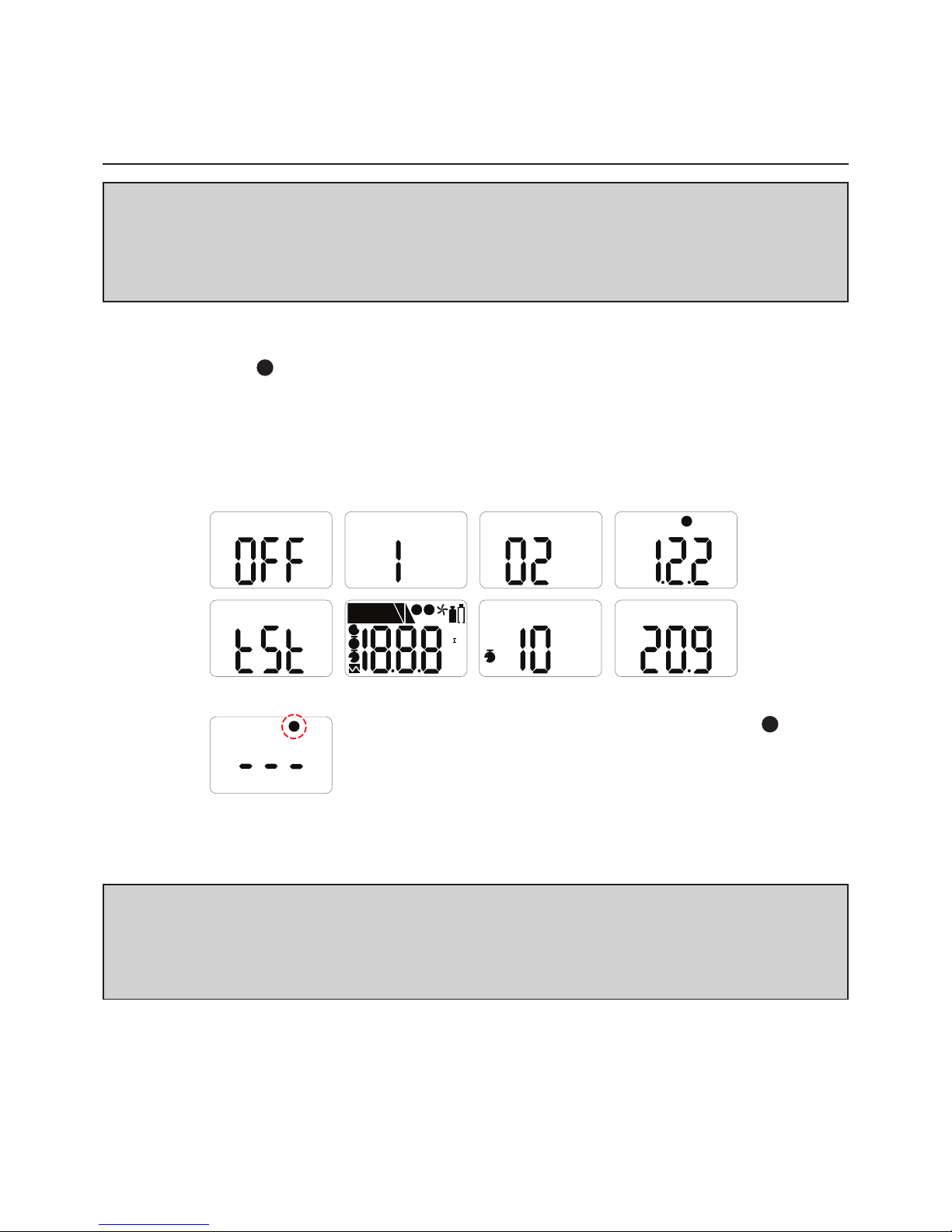
Only activate in a safe environment.Pressthebuttonfor3secs;gastypeandrmwareversion(e.g.v2.2)willbedisplayed.Followingthe10secscountdown,thedevicewillbefullyactivated,theViconwillashonthedisplayscreenandthedevicewillbeinGasMeasurementmode.Afterturningonthedevice,theremaininglifeisdisplayed;23monthsoriginally.Aftertheremaininglifereaches1month,30daysremainingisdisplayed.When1dayisleft,24hours(T)remainingisdisplayed.⚠CAUTION
Beforeuse,checktheactivatebydateonthebox.Iftheactivationdateispast,donotactivatethedevice.ShelfLifewithin6monthsfrommanufacture.V
%
D
X
MAX
LEL
PPM
VOL
%
%
MN
I
ALARM 1V
M
D
T
X
2
%
T
⚠CAUTION
Appropriatecalibrationofthedeviceisrequiredpriortooperation.Alwaysensurethatthedevicerespondscorrectlytotherelevantgas.Verifythatforeignmaterialsthatcouldinterferewiththedetectionofgasarenotblockingthesensor.Intheeventthatactivationofthedevicefails,theXiconwillappearonthedisplayandGasMeasurementmodewillnotbeentered.Inthiscase,performcalibrationorcontactauthorizedresellerorCrowconDetectionInstrumentscustomersupportat+44(0)1235557711forrepair/returninformation.

8
Clip SGD
3. Mode
3.1 Gas Measurement Mode
FollowingactivationthedevicewilloperateinGasMeasurementMode.Theremainingsensorlife(defaultsetting)orgasconcentration(congurableoption)willbedisplayedonthescreen.Oxygenconcentrationisdisplayedinpercentbyvolume(%Vol)andtoxicconcentrationisdisplayedinpartspermillion(PPM).3.2 Display Device Settings
InGasMeasurementModetoviewthedevicesettingspressthebuttontocyclethroughthesettings.Thesettingswillbedisplayedinthefollowingorderuponeachbuttonpress.VOL
%
VOL
%
MN
I
MAX
VOL
%
MAX
VOL
%
MN
I
DetectionmodeMinlevelseen(onlyforoxygen)MaxlevelseenClearmin/maxlevelsM
VOL
%
1
VOL
%
2
V
VOL
%
Remaininglife(T,D,M)1stalarmsetpoint2ndalarmsetpointFirmwareversionCalibrationconcentrationAtthelaststepthedevicewillreturntoGasMeasurementMode.3.3 Alarms and Alerts
Whenagasconcentrationexceedstheconguredalarmsetpoints,1or
2
willbedisplayedonthescreen,thedevicewillvibrate,alarmLEDswillash,andthebuzzerwillsound.Thealarmswillstopwhenthedeviceismovedtoacleanairenvironment.
%
M

9
Clip SGD
Thetablebelowshowsthe‘alarms’and‘alerts’thatmaybeshownonthedisplayduringoperation.AlarmAlarmStandardShownonLCDDisplayAlarmandVibrationDisplayLowAlarmExceeds1stAlarmsetpoint1icon&concentrationBuzzer,LEDVibrationHighAlarmExceeds2ndAlarmsetpoint2icon&concentrationBuzzer,LEDVibrationRemaininglifeBelow30daysiconLifetimeexpirationPast24monthsServicelifeisover(ReplacewithanewClipSGD)TestfailureFailureofsensortest/calibrationDisplayXiconwithbeepingBatterytestLowpowerBumptestBumptestperiodVX PressthepushbuttontoturnoffthealarmCalibrationCalibrationperiodPressthepushbuttontoturnoffthealarm⚠CAUTION
Defaultalarmsetpointsarebasedoncommoninternationalstandards.Itisuserresponsibilitytoensuretheconguredalarmsetpointsareinaccordancewithlocalregulationsandsiteprocedures.

10
Clip SGD
Default Alarm Set Point
Gas Type CO H2S O2
Part
Number CL-C-25CL-C-30CL-C-35CL-H-2CL-H-5CL-H-10CL-O-19CL-O-19.5Lower
Alarm Level 25ppm30ppm35ppm2ppm5ppm10ppm19%19.5%Upper
Alarm Level 50ppm100ppm50ppm5ppm10ppm15ppm23.5%23.5%
Ce manuel convient aux modèles suivants
8
Table des matières
Autres manuels Crowcon Capteur de sécurité

Crowcon
Crowcon Cardinal M07231 Manuel utilisateur

Crowcon
Crowcon Flamgard-Plus Manuel

Crowcon
Crowcon TXgard-IS Plus Instructions de montage

Crowcon
Crowcon T4 Manuel de référence

Crowcon
Crowcon TXgard-Plus Instructions d'installation et d'utilisation

Crowcon
Crowcon Cirrus C01625 Manuel du propriétaire

Crowcon
Crowcon FGard IR3 Manuel utilisateur

Crowcon
Crowcon Detective+ Manuel utilisateur

Crowcon
Crowcon Xgard IR Instructions de montage


