
CoolAutomation CooLinkHub Manuel utilisateur

CoolPlug
CooLinkHub
HVAC Bridge
Quick Installation Guide

3
Warning
Read and understand the following Safety Guidelines and Warnings to ensure a safe installation
This equipment is to be installed by accredited
electrician or similar technical personnel, as per
these installation instructions.
Read the installation instructions before connectin
g
the system to the power source.
All electrical work must be performed by a licensed
technician, according to local regulations.
Ultimate disposal of this product should be handled
according to all national laws and regulations.
Installation of the equipment must comply with local
and national electrical legislation for installation of
electric equipment.
Do not install the devices outdoors or exposed to
direct solar radiation, water, high relative humidity
or dust.
Install the equipment only in a restricted access
location.
When wall mounting, be sure to x rmly on a stable
surface and in accordance to the instructions below.
When DIN rail mount x the devices properly to
the DIN rail following the instructions below.
When mounting on DIN rail inside a metallic cabinet
be sure to properly connected to earth.
Unplug power when connecting the wires.
Pay attention to the polarity of power and
communication cables when connecting them
Disconnect power of any bus or communication
cable before connecting the system
Failure to follow WARNING may result in injury or death.

4
Caution
Failure to follow CAUTION may result in serious
injury,
property damage or in some circumstances, even
death.
Do not allow children to play with the CoolPlug or
CooLinkHub.
Do not disassemble, modify or repair the CoolPlug
or CooLinkHub, contact CoolAutomation support.
Any damage caused by your modication or repair
may result in an electric shock or re.
Do not expose CoolPlug or CooLinkHub to moisture.
Water can damage the CoolPlug or CooLinkHub,
resulting in an electrical components failure, electric
shock or re.
Do not use ammable materials (e.g. hairspray or
insecticide) near the CoolPlug or CooLinkHub.
Do not clean the CoolPlug or CooLinkHub with
organic solvents such as paint thinner.
Use only a dry cloth to wipe if necessary.
The maximum voltage that can be applied to
CooLinkHub directly is 24V DC. Do not apply
AC110V or AC220V to the CooLinkHub or CoolPlug.
DO NOT INSTALL COOLINKHUB or COOLPLUG
IN THE FOLLOWING LOCATIONS:
a) Where mineral oil mist or oil spray or vapor is
produced, for example, in a kitchen. Plastic parts
may deteriorate and fall o.
b) Where corrosive gas, such as sulfurous acid
gas, is produced.
c) Near machinery emitting electromagnetic
waves.
Electromagnetic waves may disturb or damage
the operation of the CooLinkHub.
d) Where ammable gas may leak, where there is
carbon ber or ignitable dust suspensions in the
air,
or where volatile ammable such as thinner or
gasoline are handled.
Operating the CooLinkHub or CoolPlug in such
conditions can cause a re.
e) In high temperature areas or in near any ame.
f) In moist areas, where there is exposure to water.

5
Contents
6 CooLinkHub + CoolPlug
System overview
Network Topology
CoolPlug Models
7 CoolPlug models
8 Connecting CoolPlug
DK (Daikin) – S21
9 Connecting CoolPlug
DK (Daikin) – P1 P2
10 Connecting CoolPlug
DKS (Daikin) – Siesta
11 Connecting CoolPlug
PN/SA/TO (Panasonic |Sanyo |Toshiba)
12 Connecting CoolPlug FJ (Fujitsu)
FJ (Fujistu) - Option 1
13 Connecting CoolPlug
FJ (Fujitsu/General) - Option 2
14 Connecting CoolPlug
ME (Mitsubishi Electric)- CN-105
15 Connecting CoolPlug
ME (Mitsubishi Electric) - 1 2
16 Connecting Home Automation,
BMS & CoolRemote
17 CoolRemote App registration
18 CoolPlug Installation Complete
CoolPlug Indicators
CoolPlug Normal Operation
Determining the CoolPlug UID
Toggling the HVAC ON/OFF
Resetting the CoolPlug
20 Mounting options
CoolPlug
CooLinkHub
6
CooLinkHub + CoolPlug
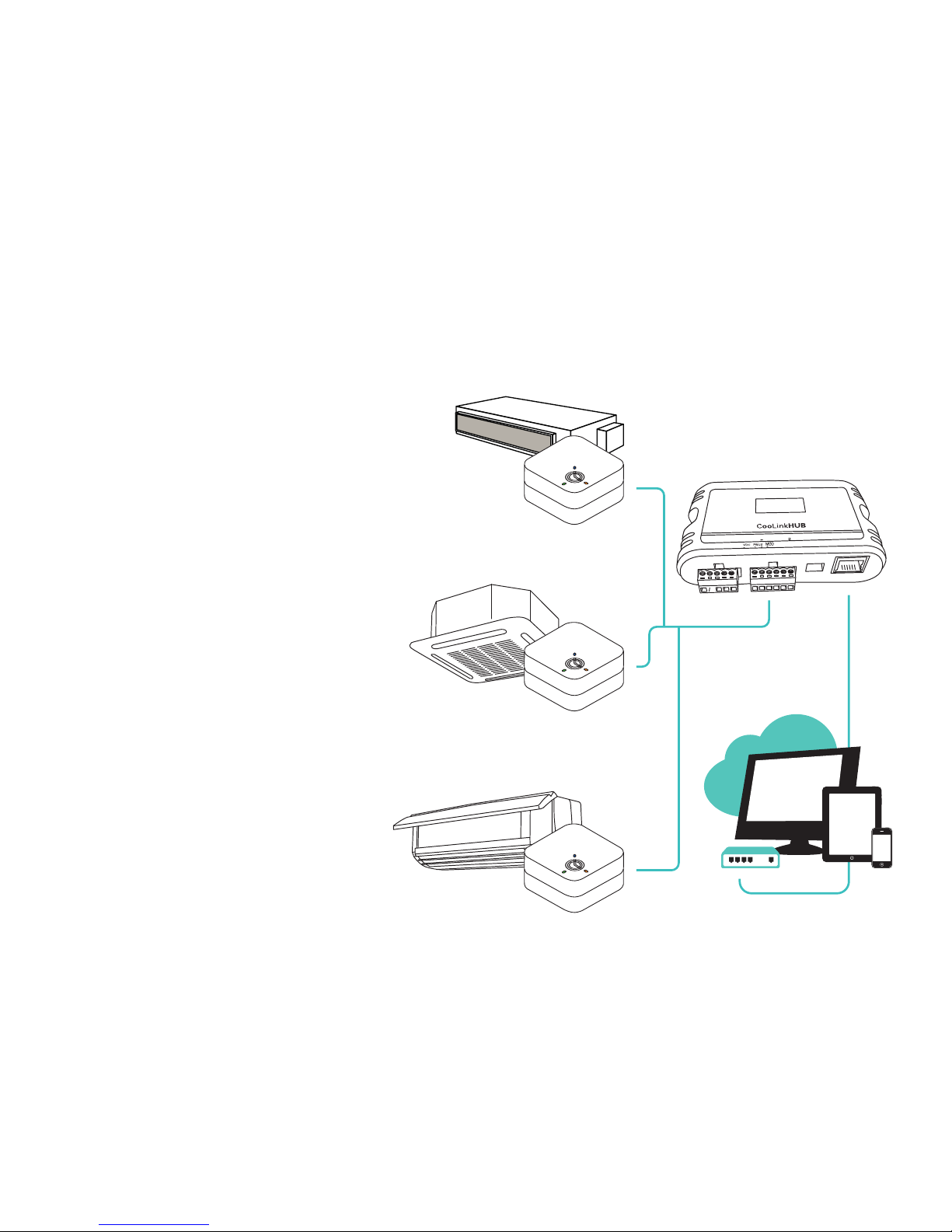
System overview
CooLinkHub + CoolPLugs is a
solution for complete integration of
Multi-Split and Mini-Split HVAC units.
CoolPlug - HVAC designated adapter,
that connects directly to the HVAC
indoor unit on one side, and to
CooLinkHub on the other, by PBUS
Network.
CooLinkHub - protocol converter,
that allows integration to any Home
Automation system.
Casette
Ducted
CoolPlug
CoolPlug
CoolPlug
HVAC Bridge
Ductless
Home Automation / BMS
7
Sticker
HVAC Daikin
HVAC Daikin Siesta Series
HVAC Panasonic | Sanyo | Toshiba
HVAC Fujitsu/General
HVAC Mitsubishi Electric
DK
DKS
ME
FJ
PA SA TO
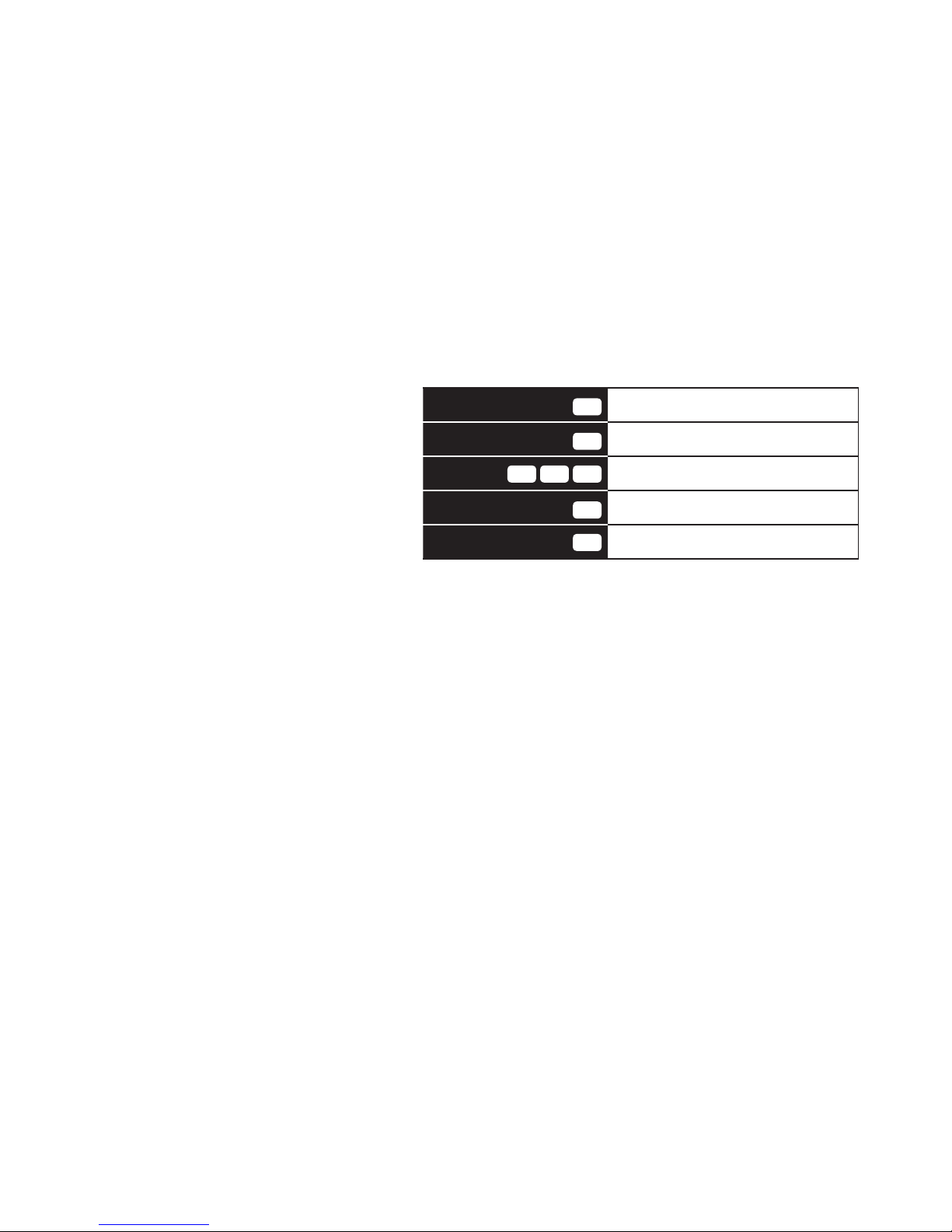
CoolPlug Models
CoolPlug models are HVAC manu-
facturer specic. The letters on the
sticker (DK, DKS, etc.) indicate the
HVAC manufacturer the CoolPlug
relates to.
Network Topology
PBUS is a CoolAutomation’s
proprietary Bus, running on shielded
twisted pair cable (24AWG).
PBUS utilizes free network topology
(‘star’, ‘daisy-chain’, etc.) No loops
allowed.
Up to 10 CoolPlug’s can be
connected in a single PBUS network.
8
Connecting CoolPlug
DK (Daikin) – S21
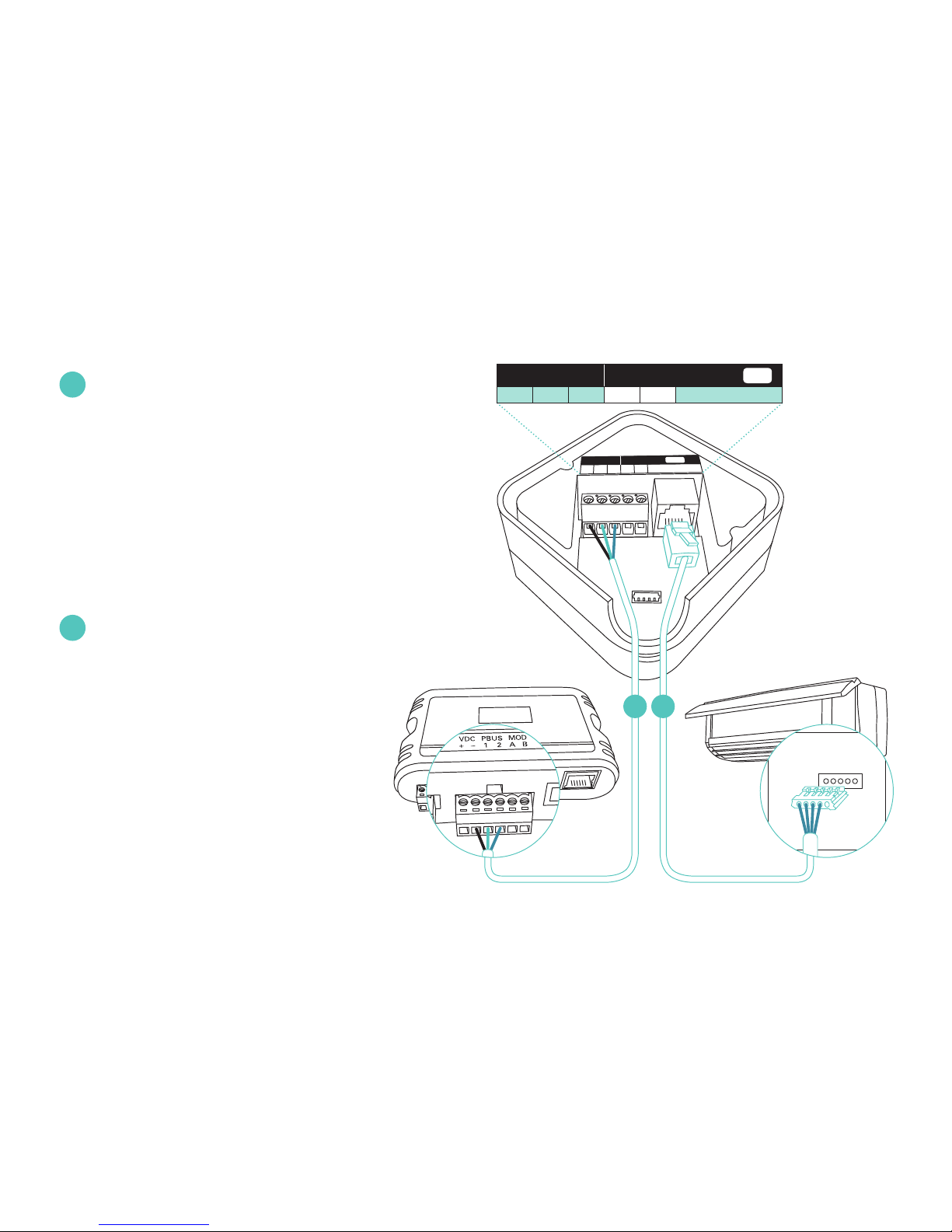
Connecting CoolPlug to Daikin unit
Connect the S21 cable supplied with
the CoolPlug, between the
CoolPlug RJ-11 connector and the
S21 port on the indoor
unit’s PCB. Consult HVAC
manufacturer’s installation manual
for location of S21 on Control Board.
Connecting CoolPlug to CooLinkHub
Connect the signal wires of PBUS
cable between CoolPlug
terminals [-], [1] and [2],
and CooLinkHub
terminals [VDC-], [1] and [2],
respectively.
* See page 6 for system overview, no
point to point connectivity required
1
2
PBUS
HVAC
P
1
1
–
P
2
2
S
21
DK
PBUS cable S21 cable
CoolPlug
Indoor UnitCooLinkHub
S21
PBUS HVAC
- 1 2 P1P2S21
DK
12
9
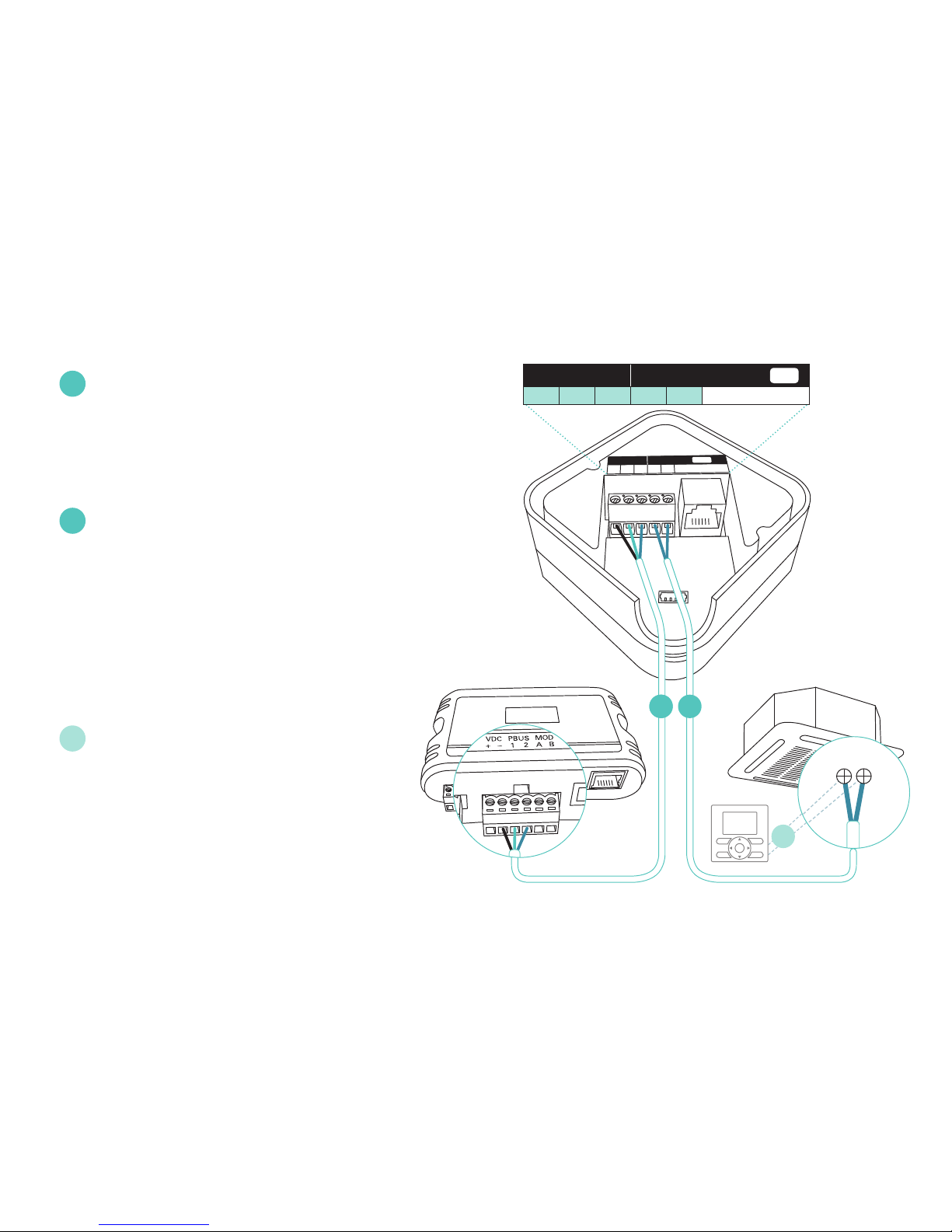
Connecting CoolPlug DK (Daikin)
DK (Daikin) – P1 P2
Connecting CoolPlug to Daikin unit
Connect the CoolPlug’s [P1], [P2]
terminals to [P1], [P2] terminals on
indoor unit.*
Connecting CoolPlug to CooLinkHub
Connect the signal wires of the
PBUS cable coming from the
[VDC-], [1] and [2] terminals on the
CooLinkHub to the corresponding
[-], [1] and [2] terminals on the
CoolPlug, respectively.
Optional: Connect the Wired Remote
Controller (W.R.C.) in parallel mode.
* No polarity requirements
1
2
3
PBUS
HVAC
P
1
1
–
P
2
2
S
21
DK
PBUS network cable
CoolPlug
Indoor UnitCooLinkHub
2
PBUS HVAC
- 1 2 P1P2S21
DK
W.R.C.
2
P1P2
1
3
10
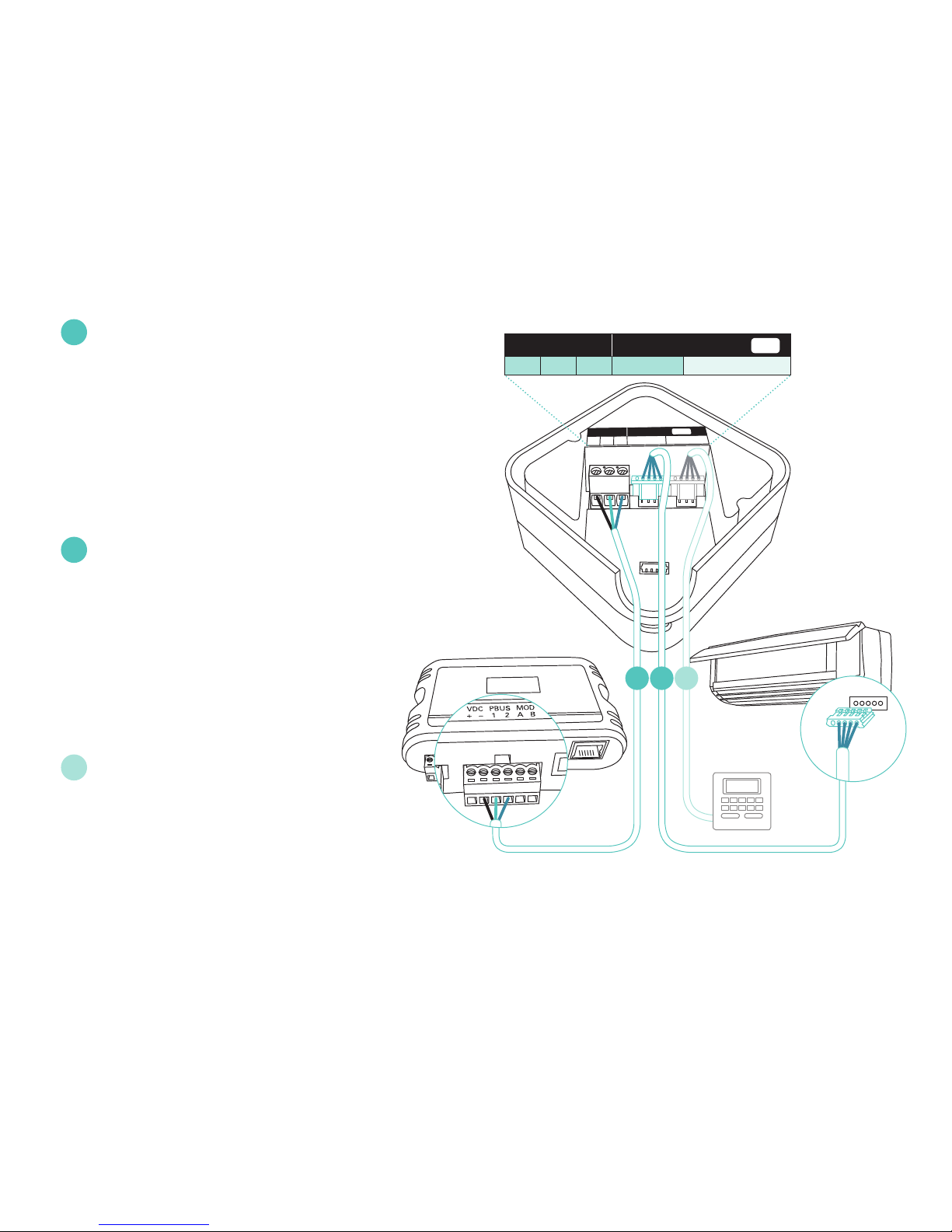
Connecting CoolPlug DKS (Daikin) - Siesta Series
Connecting CoolPlug HVAC Line to
Daikin Siesta Indoor Unit
Connect the cable, supplied with the
CoolPlug, to the port labeled “Indoor” on
CoolPlug and the corresponding connector
on the indoor unit.
Connecting CoolPlug to CooLinkHub
Connect the signal wires of the
PBUS cable, using [VDC-], [1] and [2]
terminals on the CooLinkHub, to the
corresponding [-], [1] and [2] terminals
on the CoolPlug.
Optional: Connect the wired Remote
to the‘W.R.C’ socket on the CooLinkNet.
The Cable is supplied with the wired
remote controller.
1
2
3
PBUS
HVAC
Indoor
1
–
2
W.R.C.
DKS
PBUS network cable
CoolPlug
CooLinkHub
Indoor Unit
PBUS HVAC
- 1 2 Indoor W.R.C.
DKS
3
W.R.C.
12
Autres manuels pour CooLinkHub
1
Ce manuel convient aux modèles suivants
1
Table des matières


