
Contixo Kids Manuel utilisateur

Kids Smart Watch
Manual

Before Starting
Functional Area Diagram
Idle Screen & Functions
Warranty
1
2
4
10
TABLE OF CONTENTS

Check if the watch is the correct model and
includes all accessories in the package.
Make sure the battery is fully charged
before using.
Before starting
1
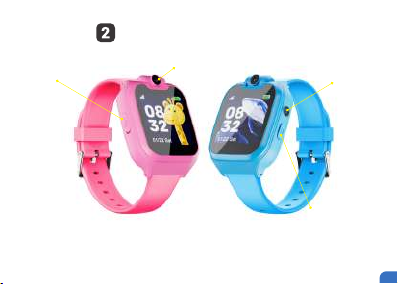
Functional area diagram
How to operate: Swipe left or right on the idle screen
to change the theme. Tap on the screen to enter the
main menu and find applications.
USB charge port Camera
Torch
Power button
2

Press the power button to go into sleep mode and wake up the device.
Long press the power button to turn on or shut down the device.
Note: If the device won’t start up, it may have a low power status.
Please charge the device for several minutes and try again.
Switch on and off
1. Plug the USB charging cable into your own proper USB adapter.
2. Plug the adapter into a power outlet.
3. Plug the USB charging cable into the Charge port of the device.
If the device is charging correctly, you will find the device displays a dynamic
charging icon.
Once the device has completely charged, it will display a “Fully Charged” icon.
Caution: You must use a 5V 1A USB adapter and the power outlet must be in safe
working status.
How to charge the device
3

Idle screen & functions
Time
Date
Battery
Day
4

Touch the camera icon or tap the shutter button on the
device to enter the photo app.
Tap the icon in the upper left-hand corner to switch filters.
Quick press the power button to quit the camera application.
CAMERA
For video recording touch the videotape icon to start. When
the recording is done, touch the back option to quit and save
the recording.
VIDEO
Tap the “Photos” app icon to view saved pictures and photos.
PHOTOS
5

Touch to watch your saved videos.
PLAYER
Touch to start voice recording.
RECORDER
For simple calculations.
CALCULATOR
Touch to play the saved music. (You need to transfer your
media files to the “MyMusic” folder on your SD card for the
device to properly load your files. You can directly connect
the watch to the computer to transfer files after powering off
the watch.)
MUSIC
6

Contains various tools, such as: Alarm, Stopwatch & Timer.
TOOLS
The smartwatch comes with 14 fun and engaging games.
GAMES
Chick on the Torch icon to turn it on/off
TORCH
Set background wallpaper
Theme
7

SETTINGS
Set the date and time of the device.
Time and Date
Set the languages of the device.
Language
Set the Ringtone Volume.
Ringtone Volume
Set the time and Brightness of the device.
LCD backlight
8


