
Concept Pro CVP9328DNIR-AHD2M Manuel utilisateur

AHD CAMERA QUICK START GUIDE
CVP9328DNIR-AHD2M
CVP9328DNIR-AHD2M-G
CVP9328DNIR-AHD5M
CVP9328DNIR-AHD5M-G
AHD External Eyeball Camera
QUICK START GUIDE
Technical Documents
AHD CAMERA QUICK START GUIDE
Packaging Contents
Technical Documents 4-in-1 Analogue Camera x1 Wall Plugs x4
Quick Start Guide x1 Mounting Template x1
Fitting Screws x4 Lens Adjustment Tool x1
Allen Wrench x1
2. INSTALLATION
Important: Ensure all precautionary procedures are observed during installation.
It is recommended that the camera is tested in low light and day light conditions at
the point on installation to ensure continuity of effective CCTV monitoring.
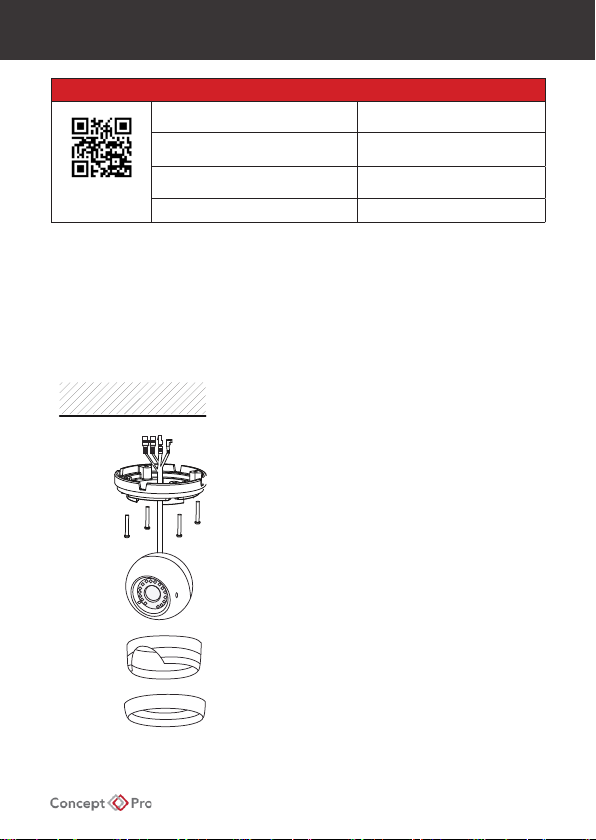
1. Open Packaging
Open packaging, remove camera, and set aside the
included accessories. Use the included allen key to
loosen the security screw on the side of the camera,
then unscrew the base ring to separate the camera
and middle ring from the base.
2. Drill Mounting Holes
Attach the included mounting template on the
mounting surface and drill holes according to the
template. Insert included wall plugs into the holes.
Place the base over the holes and use the supplied
tting screws to secure the base to the surface.
3. Mount the Camera
Insert cables through the mounting hole. Position the
camera, middle ring, and base ring over the base and
screw the base ring to tighten in position.
4. Adjust Camera Positioning
Adjust the camera position as needed and re-tighten
the base locking screw.
1. WHAT’S IN THE BOX?
CAMERA
BASE
RING
MIDDLE
RING
BASE
FIXING TO A WALL

AHD CAMERA QUICK START GUIDE
3. Conguring the Camera
Connection
- Connect the video output to a video cable running to the recorder/monitor.
- Check the power supply is of the correct level and connect the power supply to the
camera power input.
- View the picture on a monitoring device to check the power and video connection is
properly working.
- To assist in installation when using an analogue test monitor, the camera can be switched
to an analogue output by pushing up on the OSD Controller for several seconds.
- The camera can be returned to AHD output by pushing left on the OSD Controller for
several seconds.
On-Screen Display (OSD Controller)
The joystick on the cable ylead can be used
to operate the camera on-screen display
(OSD) menu and change video format.
Press and hold LEFT for 5 seconds to switch
the camera to AHD.
Press and hold RIGHT for 5 seconds to switch
the camera to TVI.
Press and hold UP for 5 seconds to switch the
camera to CVBS or Analogue.
Press and hold DOWN for 5 seconds to switch
the camera to CVI.
PSU
UP
LEFT
RIGHT
DOWN
MENU / ENTER

AHD CAMERA QUICK START GUIDE
4. On-Screen Display
MAIN MENU
AE
WB
DAY-NIGHT
VIDEO SETTING
LANGUAGE:
RESET
SAVE-EXIT
EXIT
ENGLISH, CHINESE, SPANISH, KOREAN, ITALIAN
CONTRAST:
SHARPNESS:
COLOR GAIN:
DNR:
IMAGE SIZE:
FORMAT:
RETURN
1080P, 720P
PAL, NTSC
DAY / NIGHT
MODE:
RETURN
EXT, AUTO, COLOR, B/W
WB
MODE:
RGAIN
(MODE = MWB) :
BGAIN
(MODE = MWB):
RETURN
ATW, MWB
EXPOSURE
BRIGHTNESS:
EXPOSURE MODE:
LV (EXPOSURE
MODE = BLC):
GAIN:
RETURN
1-20
2MP: GLOBE, CENTER, BLC, FLC
5MP: GLOBE, BLC
2MP: 0-8
5MP: 1-9
2MP: 1-16
5MP: 1-127
2MP: 1-16
5MP: 1-127
2MP: 1-50 5MP: 1-16
HD:
5MP20, 5MP12.5, 4MP30, 4MP25, 4MP15,
1080P25, 1080P30, SD (PAL/NTSC)
AHD, TVI, CVI, CVBS
VIDEO STANDARD:
2MP: 1-20 5MP: 1-16
2MP: 1-31 5MP: 1-16
2MP: 1-15 5MP: 1-16
2MP: 1-16
MIRROR: 5MP: DEFAULT, H, V, HV
VIDEO SETTING/IMAGE ENHANCE
VIDEO OUTPUT (5MP MODELS)

AHD CAMERA QUICK START GUIDE
5. Troubleshooting
- Ensure all power and cable connections are correct between the camera and recorder.
- If all power and cable connections are correct and the camera picture does not appear,
contact your supplier for technical support.
- Ensure that the digital video recorder supports the camera’s specied resolution and
format. Try switching the camera to CVBS format with the OSD joystick to conrm the
image appears on the DVR, then switch the camera to a supported format and resolution.
6. Caution
Safety Precautions
1. This installation should be made by qualied service personnel and should adhere to all
local codes.
2. Avoid installation on a surface subjected to frequent vibration or shocks.
3. Do not operate the camera beyond its specied temperature range or power source
ratings.
4. Should any damage or suspected damage occur, shutdown the power source, unplug
the camera, and contact your service provider.
5. Do not install the camera under unstable lighting conditions. Severe lighting change or
icker can cause the camera to work improperly.
6. Never use the camera close to a gas or oil leak.
7. Do not disassemble the camera.
8. Never let the camera directly face a strong light source.
9. Ensure all removable covers are replaced to protect the inner components.
10. Do not install near devices which emit a strong electro-magnetic eld.
11. Use a dry or damp cloth only for cleaning.
12. Do not drop the camera or subject the unit to physical shocks.
CAUTION
PLEASE FOLLOW THE ABOVE PRECAUTIONS – FAILURE TO DO SO MAY INVALIDATE THE
WARRANTY OR CAUSE SERIOUS INJURY.
Note: Changes or modications not expressly approved by the manufacturer can cause the
camera to be damaged and become inoperable. This may invalidate the user warranty.

AHD CAMERA QUICK START GUIDE
7. Dimensions
All measurements are in mm.

AHD CAMERA QUICK START GUIDE
NOTES

Design and specication are subject to change without notice.
Ce manuel convient aux modèles suivants
3
Table des matières
Autres manuels Concept Pro Caméra IP

Concept Pro
Concept Pro AIR701/IRH Manuel utilisateur

Concept Pro
Concept Pro AIR20NPC series Manuel utilisateur

Concept Pro
Concept Pro CVP9328DNIR-AHD Manuel utilisateur

Concept Pro
Concept Pro VHSDIR-870EXT-IP Manuel utilisateur

Concept Pro
Concept Pro AIR701/IRH Manuel utilisateur

Concept Pro
Concept Pro AIR3026-HD Manuel utilisateur

Concept Pro
Concept Pro CVP9314DNIR-AHD Manuel utilisateur

Concept Pro
Concept Pro AIR45 IP4M Series Manuel utilisateur

Concept Pro
Concept Pro AIR2024-AHD Series Manuel utilisateur

Concept Pro
Concept Pro CBP6325EL-AHD2M Manuel utilisateur


