Comverge PowerPortal IHD Manuel utilisateur

Comverge
PowerPortal In-Home Display (IHD)
User Guide for Members of New Hampshire Electric Cooperative

Comverge PowerPortal IHD User Guide
Table of Contents
Comverge PowerPortal IHD User guide 1
Table of Contents
About the Comverge PowerPortal In-Home Display (IHD) .......................................................2
Safety Instructions..................................................................................................................3
IHD Basics..................................................................................................................................4
Your IHD’s Power Modes.........................................................................................................4
Charging Your IHD..................................................................................................................5
Navigating Your IHD Screens...................................................................................................5
Battery Charge Indicator .........................................................................................................6
Signal Strength Indicator.........................................................................................................7
Using Your IHD...........................................................................................................................8
Viewing Your Current Electricity Use.........................................................................................8
Tracking Your Electricity Use Over Time .................................................................................10
Receiving Messages from NHEC.............................................................................................10
Understanding the Lights on Your IHD ...................................................................................10
Troubleshooting and Frequently Asked Questions (FAQ)........................................................12
Joining Your Meter’s Network ................................................................................................12
Energy Savings Tips .................................................................................................................16
Appendix ..................................................................................................................................17
Product Specifications ...........................................................................................................17
FCC Compliance....................................................................................................................17

Comverge PowerPortal IHD User Guide
About the Comverge PowerPortal In-Home Display (IHD)
Comverge PowerPortal IHD User guide 2
About the Comverge PowerPortal
In-Home Display (IHD)
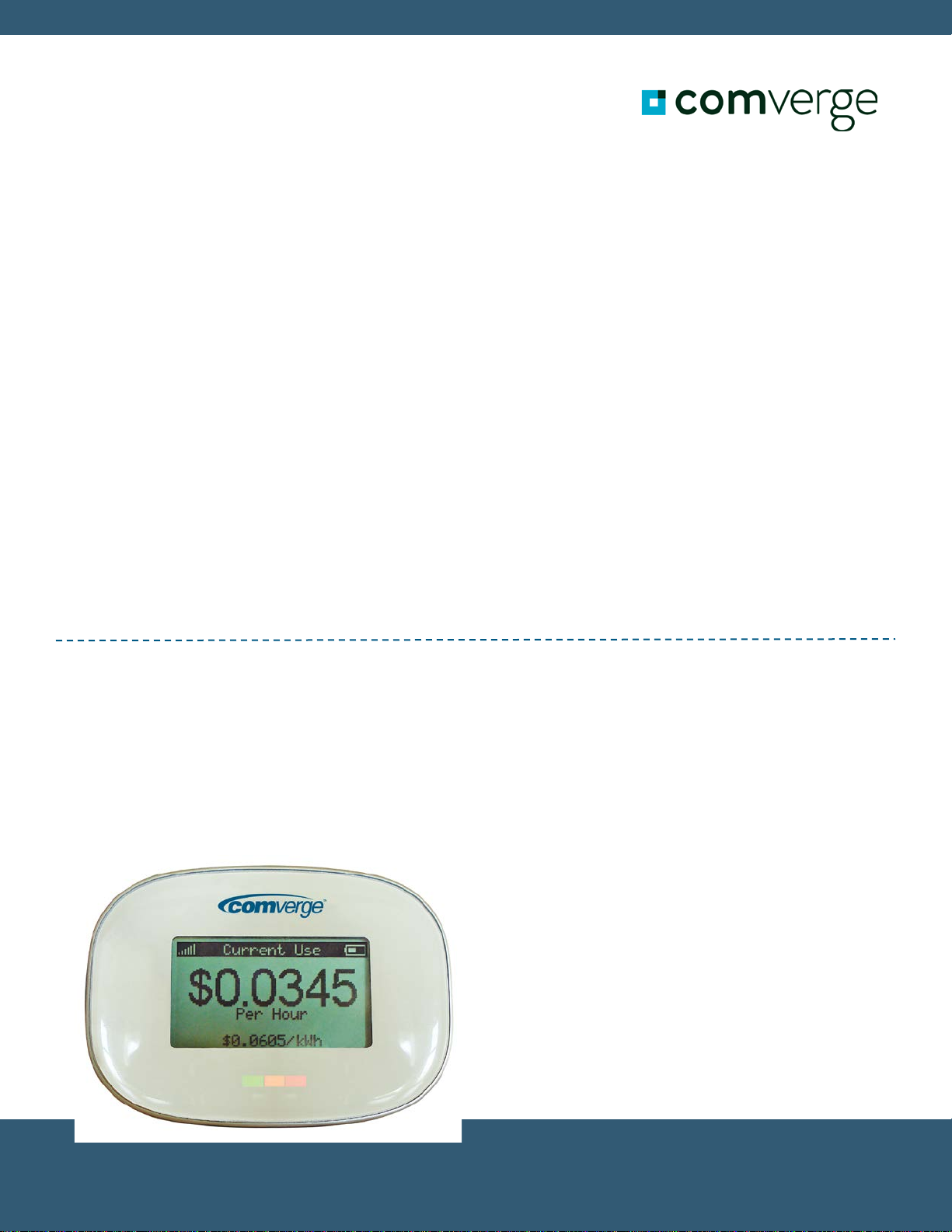
The Comverge PowerPortal®In-Home Display (IHD) is a wireless device that
communicates directly with the electricity meter outside your home. Your IHD allows you
to:
•View your household’s current electricity use.
•Track your electricity consumption and associated costs over time.
•Test consumption and costs of operating individual devices.
•Receive messages from New Hampshire Electric Cooperative, Inc. (NHEC).
The IHD is rechargeable. It has a magnetic backing so you can place it on your
refrigerator, or it can stand upright on a table or countertop.
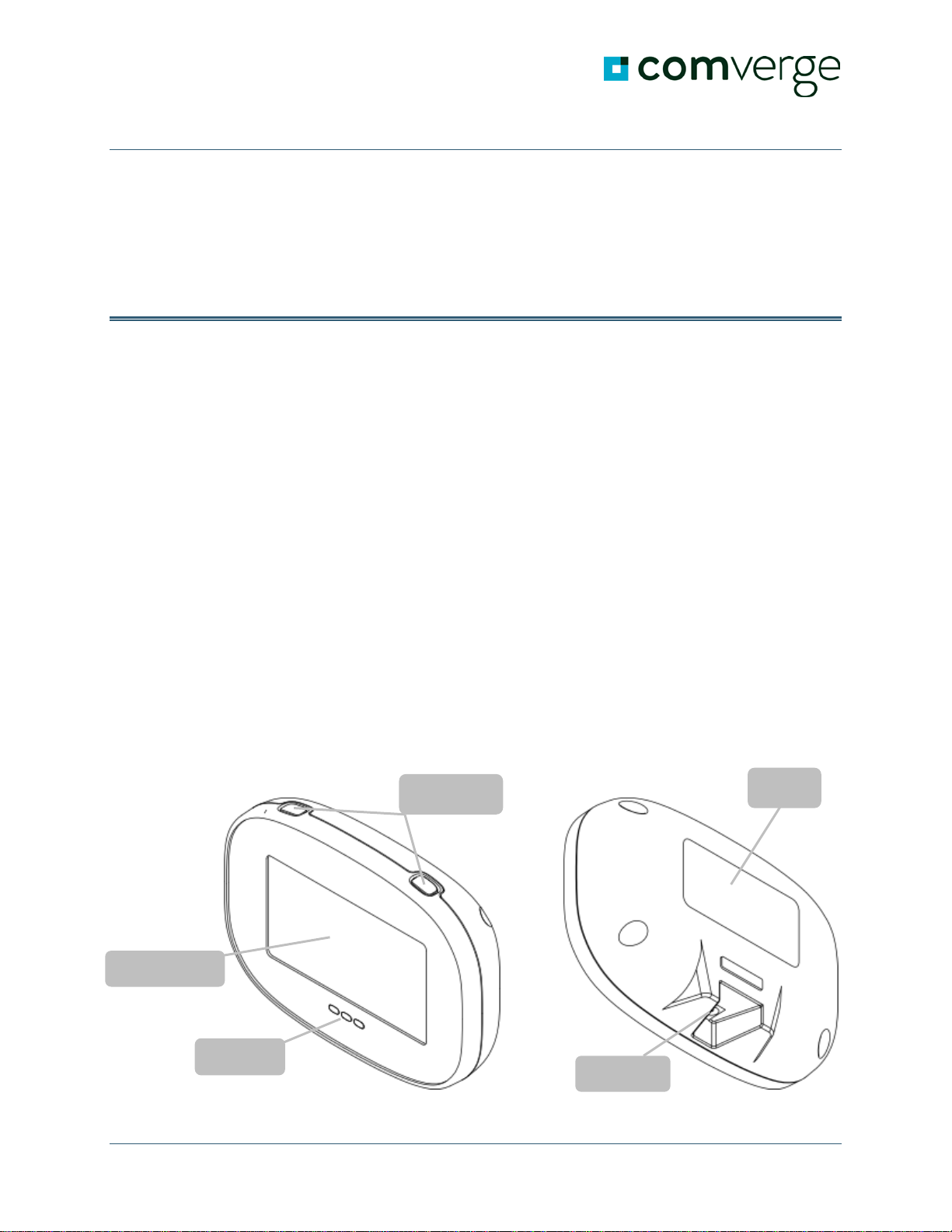
IHD Parts
Your IHD package contains a display unit and a battery charger.
Display Unit
IHD buttons
IHD lights
Display screen
Magnet
Power jack

Comverge PowerPortal IHD User Guide
About the Comverge PowerPortal In-Home Display (IHD)
Comverge PowerPortal IHD User guide 3
Front View Back View
Safety Instructions
Caution: To ensure your IHD is used safely, it is important that you read these
Safety Instructions and the rest of this User Manual thoroughly before using the product.
•The IHD contains a magnet. Do not place the IHD directly on credit cards, computers
or other pieces of electronic equipment, as this may cause damage.
•Do not attempt to repair the In-Home Display or DC Power Adaptor yourself. If you
experience problems with the device, contact Comverge at 1-866-224-5559 for
assistance. Opening the product casings for any reason will void the product
warranty.
•Do not touch any exposed electronic circuitry of the device if it becomes damaged.
•Do not immerse the IHD in water.
•Avoid using the IHD in high moisture areas, such as a bathroom, for extended
periods of time.
•Only use the IHD indoors.
•Keep the IHD away from heat sources such as stoves and heaters.
•Do not drop the IHD or cause any sudden impact to it. The IHD warranty does not
cover drops or impacts.
•Take care when handling a damaged LCD display as the liquid crystals can be
harmful to your health. If the LCD screen of your IHD becomes damaged and begins
leaking fluid, wash the LCD and any surface or material that has come in contact
with the damaged screen. Wash your hands with soap and water after handling the
damaged LCD.
•Do not use this device in aircrafts or hospitals. The use of radio frequency can cause
malfunctions in the control devices of other equipment.

Comverge PowerPortal IHD User Guide
IHD Basics
Comverge PowerPortal IHD User guide 4
IHD Basics
This section provides information on the primary functions of your Comverge
PowerPortal®In-Home Display (IHD).
Your IHD’s Power Modes
Your IHD has three power modes:
1. On
2. Off
3. Sleep
Turn on your IHD
•Press either the Left (<L>) or Right (<R>) button.
Turn off your IHD
1. Press and hold the Left button for three seconds. A message appears, confirming
whether you want to turn off the IHD.
2. Select Yes by pressing the Left button again.
Important:Your IHD is unable to receive text messages from NHEC when it is off.
Sleep Mode
When not connected to external power, your IHD will go to sleep after 5 minutes of
inactivity. If desired you can “wake up” the IHD from Sleep Mode.
Wake up the IHD that is in Sleep Mode
•Press the Left or Right button.
Or
•Plug it in.

Comverge PowerPortal IHD User Guide
IHD Basics
Comverge PowerPortal IHD User guide 5
Charging Your IHD
You must charge your IHD before you can start using it.
Charge your IHD
1. Connect the power adapter to the power adapter jack on the bottom of the IHD.
2. Plug the other end of the power adapter into a power outlet.
Important:Leaving your IHD plugged in for extended periods of time will adversely
affect your battery life. To maximize battery life:
•Unplug your IHD when it has finished charging.
•Allow it to fully discharge before recharging.
Navigating Your IHD Screens
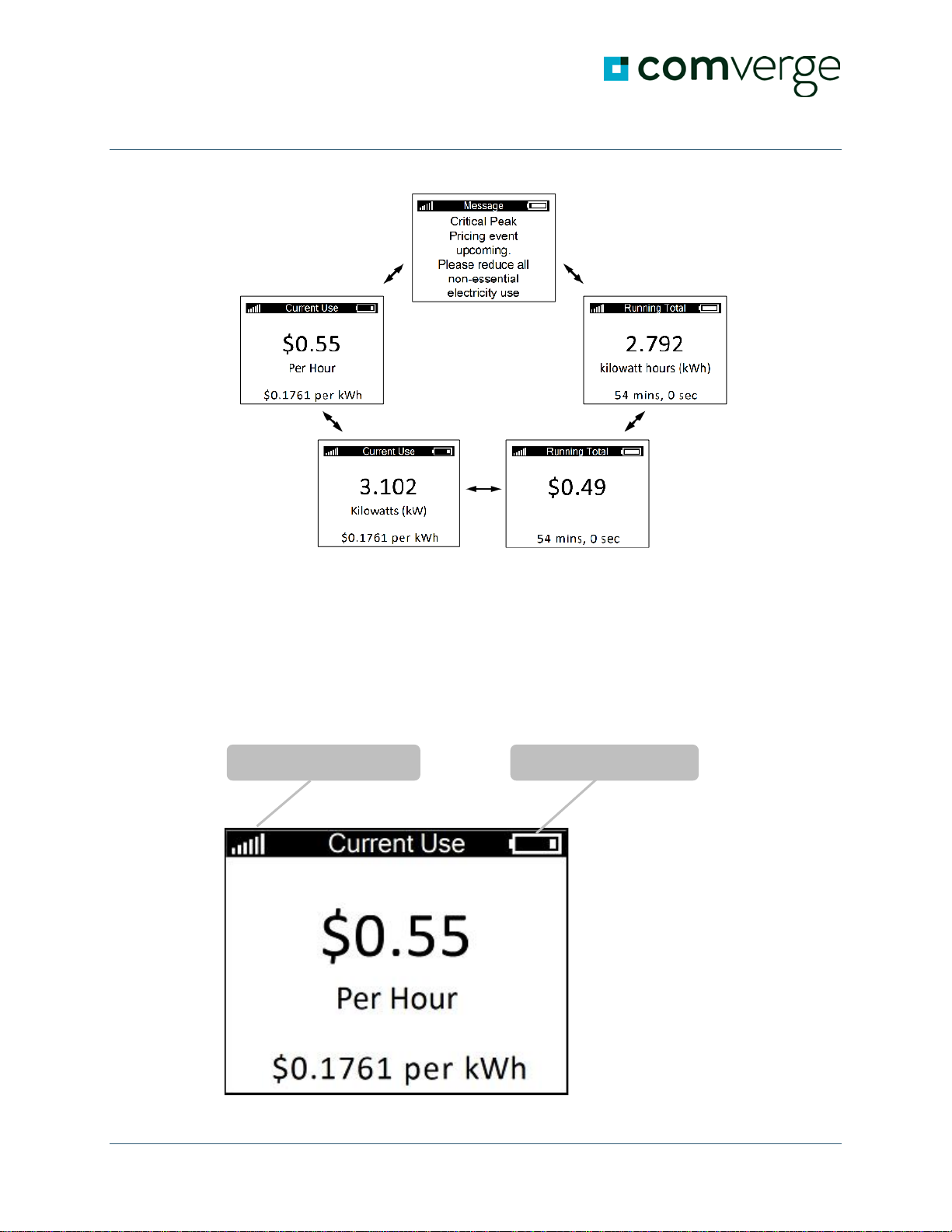
The main screens of your IHD are displayed in a sequential loop.
The Message screen, which appears at the top of the diagram below, is only available
when there is at least one message available from NHEC. Additional message screens are
included in the loop when there are multiple messages available.
Move from one screen to the next
•Press the Left or Right button to move through the screens in the sequence.

Comverge PowerPortal IHD User Guide
IHD Basics
Comverge PowerPortal IHD User guide 6
Battery Charge Indicator
The battery icon in the top right corner of your IHD screen indicates the IHD's remaining
charge. When connected to external power, the battery icon animates to show that your
IHD is charging. When the animation stops, charging has finished.
Signal Strength Indicator Battery Charge Indicator

Comverge PowerPortal IHD User Guide
IHD Basics
Comverge PowerPortal IHD User guide 7
Signal Strength Indicator
The vertical bars in the top left corner of your IHD screen show the strength of your
IHD's connection to the network. A full six bars indicates the highest signal strength,
while one bar indicates that your IHD is nearly outside the network's range.

Comverge PowerPortal IHD User Guide
Using Your IHD
Comverge PowerPortal IHD User guide 8
Using Your IHD
Your IHD provides you with feedback to help you better understand your electricity bills
and manage your consumption. This section covers the ways in which you can use your
IHD.
Viewing Your Current Electricity Use
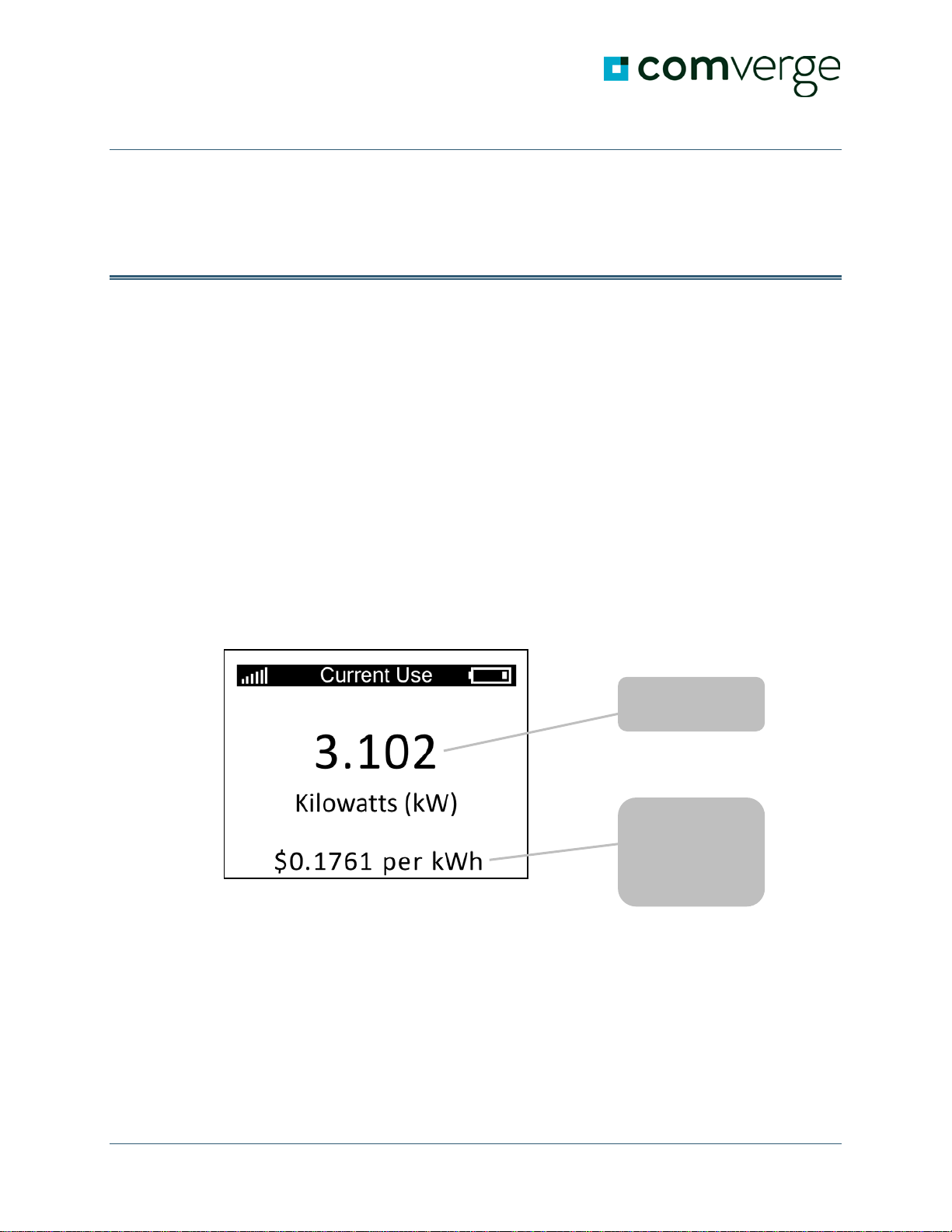
The Current Use screens on your IHD display information about your home's current
electricity consumption. There are two Current Use screens:
•One screen shows your consumption in kilowatts.
•The other screen shows the associated cost of your consumption in dollars per hour.
The smaller number at the bottom of both screens shows the current rate you are being
charged for each kilowatt-hour of electricity consumed.
Your consumption
in kilowatts.
Current rate you
are being charged
for each kilowatt-
hour of electricity
you consume.

Comverge PowerPortal IHD User Guide
Using Your IHD
Comverge PowerPortal IHD User guide 9
Cost of your
consumption in $
per hour.
Table des matières