
Comfort Digisystem DE10 Manuel utilisateur
Comfort Digisystem User Manual
Earset
DE-10
English

2Earset DE-10
User Manual
Table of Contents Page
Introduction of the Comfort Digisystem 3
Presenting the Earset DE-10 3
Functions of the Earset DE-10 4
Getting Started 5
First Time Use 6
Settings 8
Pair 10
More Functions 12
Radio Range and Channels 13
Attached Accessories 14
Other Original Accessories 14
Trouble Shooting 15
Service and Warranty 16
Technical Data 16
Important Safety Instructions 17

3
Earset DE-10
Introduction of the Comfort Digisystem
Thank you for choosing the Comfort Digisystem. The
products are easy to use, with or without hearing aid.
Before using the product, please read this manual care-
fully.
The receiver Earset DE-10 receives signals digitally which
results in crystal clear sound.
The Comfort Digisystem is tted with SecureStream
Technology – a special kind of digital technology allowing
eavesdrop-secure radio transfer in real time.
Presenting the Earset DE-10
The Earset DE-10 is a small, exible receiver which is
attached directly to the ear, usable with or without all-in-
the-ear – hearing aids. The receiver can be used on both
right and left ear.
It suits users with high demands for nicely designed and
discreet products. Furthermore, the radio signal is en-
crypted, making it impossible to overhear what is being
said.

4Earset DE-10
Functions - Earset DE-10
Volume button +
Volume button -
Function indicator
Pairing button
On / Off
Charging socket
Adjustable earloop
Loudspeaker

5
Earset DE-10
Getting started
Charging
The Earset DE-10 is chargeable. Charge the DE-10 at least
2 hours before you use it for the rst time. An empty battery is
fully charged within 2 hours.
During charging, the function indicator shows red. When the func-
tion indicator shows green, the unit is fully charged and switches
to automatic oat charging. The unit is automatically switched off
during charging.
A fully charged battery has an operating time of up to six hours.
Battery lifetime is up to ve years. You must not change the battery
yourself; please contact your point of purchase.
INPUT 5V 220mA
Only use the Comfort Audio charger
Please note!
Only use the charger supplied by Comfort Audio AB.
Connecting charger to the
Earset DE-10

6Earset DE-10
First Time Use
Switch on the receiver by pressing the On/Off-button for
around 2 seconds until the function indicator’s green light
switches off.
The DE-10 is attached to the ear with the earloop.
Please note! Do not have the volume too high; too high a
volume can seriously damage your hearing.
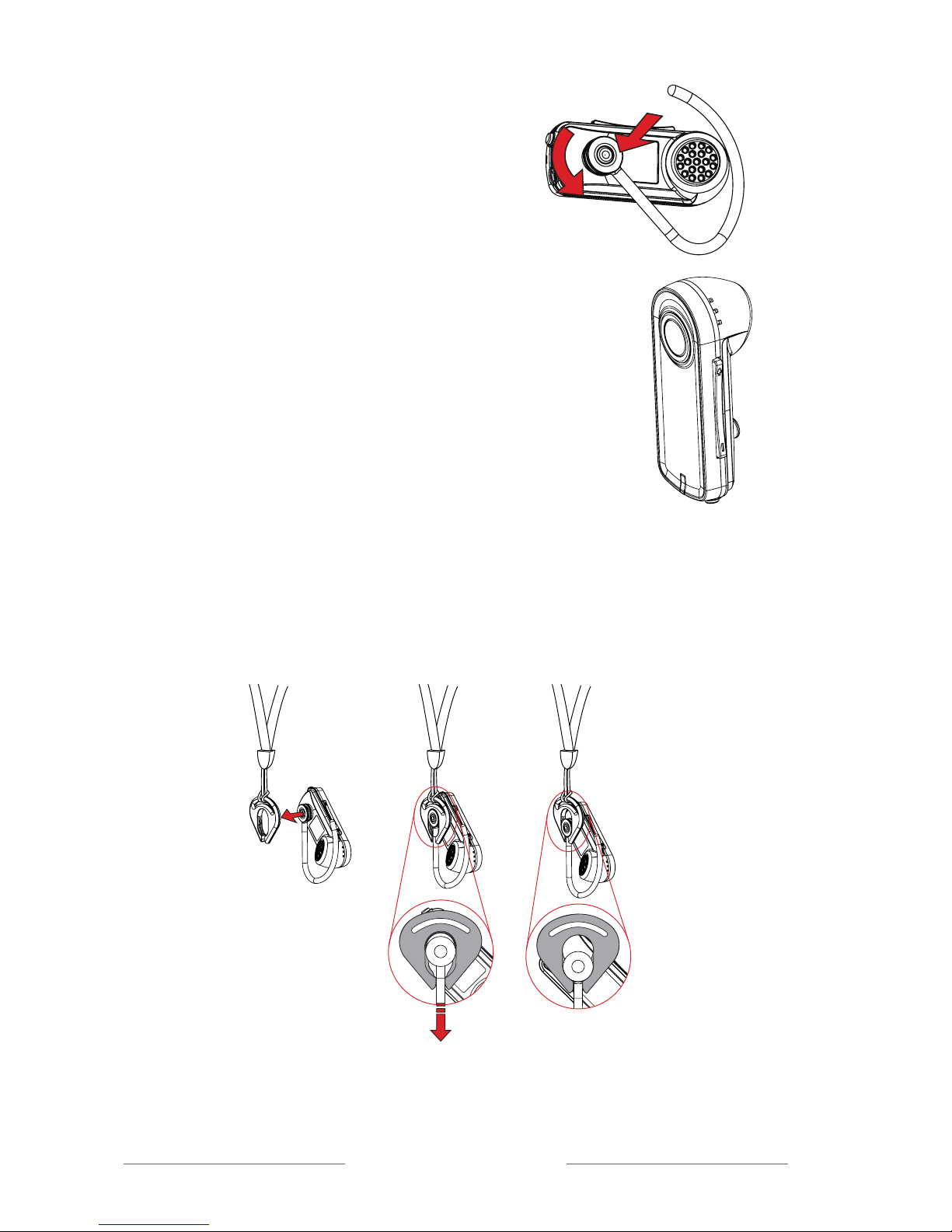
DE-10’s earloop can be turned around its fastening so
that the loudspeaker can be brought to the ear canal. The
earloop should not be bent.
The illustration shows the ideal
setting of the DE-10 at the ear
At delivery, the DE-10 is ready to use at the right ear, but
by turning around the earloop it can be used at the left
ear.
1. Bend the earloop carefully
away from the DE-10.
2. Loosen the earloop and turn it
around
180˚
180˚
7
Earset DE-10
Adjust the volume to a comfortable level with
the volume buttons (+ and -) at the long side
of the unit.
+
-
3. Press the earloop back on until it
is rmly attached and turn it
slightly while you mount it.
Switch off the DE-10 by pressing the On/Off-button for around
2 seconds until the indicator’s red light switches off.
The necklace can be used as shown in the following illustration
180˚
WARNING!
The necklace should not be used if there is a risk of getting stuck,
e.g. in a machine or other objects.

8Earset DE-10
Settings
As the DE-10 does not have a display/menu, the unit’s
functions are controlled by means of the pairing button.
The current function is shown by the function indicator.
In addition to the pairing functions (see section Pairing),
three other functions can be activated.
To do this, press the pairing button and hold it immedi-
ately after starting up the unit for 2 seconds.
A selected function can always be cancelled by switching
of the DE-10 and starting it up again.
Change channel
When the pairing button is pressed for ve seconds, the
function indicator shows a constant green light. Now re-
lease the pairing button, the function Change channel is
activated.
10 channels can be selected (see chapter
Radio Range
and Channels
). To choose a channel, press the pairing
button briey the number of times corresponding to the
desired channel (1x for channel 1, 2x for channel 2 etc.)
After 2 seconds, the selected channel is shown by the
same number of green ashes of the function indicator.
Change
code
Change
code
Factory
reset
0 sec 5 sec 10 sec 15 sec 20 sec

9
Earset DE-10
Change code
When the pairing button is pressed for 10 seconds, the
function indicator shows a constant red light. Now re-
lease the pairing button, the function
Change code
is
activated.
Press the pairing button quickly 2 times to generate a
new code; at the same time the pairing information is
transmitted (make sure that the other Digisystem units
which should be paired are activated to receive pairing
information).
The function indicator ashes red 5 times, pairing infor-
mation (code and channel) has been sent
Factory Reset
When the pairing button is pressed for 20 seconds, the
function indicator will switch to alternating red and green
light. The
Factory Reset
function is activated.
To perform a factory reset, press the pairing button
quickly one time. The function indicator ashes the
number of times corresponding to the channel; see chap-
ter
Radio Range and Channels.
The channel and the code are now reset to the factory
settings.
Activating max volume
Choose your max volume with the volume buttons; then
press the pairing button and shortly after the volume [-]
button. Keep both buttons pressed for about 10 seconds
until the function indicator ashes green 5 times. Now
the volume cannot be raised above the installed max vol-
ume.

10 Earset DE-10
Deactivating max volume
Press the pairing button and shortly after the volume [+]
button. Keep both buttons pressed for about 10 seconds
until the function indicator ashes red 5 times. Now the
volume can be raised as much as you want.
Factory reset deactivates max volume
Pair
Earset DE-10 must be paired using the pairing button,
see section
Pairing (via pairing button)
.
Pairing
To use a receiver and transmitter together, they must be
paired. All transmitters and receivers are default paired
at the factory and will work together.
NB! To prevent eavesdropping, a new code key must be
generated and transmitted between the units by pairing.
Transmitting/receiving of pairing information along with a
new code can be performed from any Comfort Digisystem
unit with a display.
To pair units without a display, see sections
Pairing (via
pairing button)
and
Pairing (Connector DT-10)
. Pairing
information or a new code key can be received by several
activated units.
Pairing (via menu)
1. Choose Communication - Pair
2. Select Receive info on one unit. Ready to receive
pairing info is shown in the display.
3. Select New code on the other unit; select Yes.
4. Generate new code and send info? is shown in the
display. Select Yes (Now both the channel and the
coding information have been sent, and sound
transfer is eavesdrop-secure).
5. To pair another unit into your coded system, select
Send info instead on one of your paired units.
Table des matières
Autres manuels Comfort Digisystem Récepteur

Comfort Digisystem
Comfort Digisystem DT20 Manuel utilisateur

Comfort Digisystem
Comfort Digisystem DT10 Manuel utilisateur

Comfort Digisystem
Comfort Digisystem DT10 Manuel utilisateur

Comfort Digisystem
Comfort Digisystem DT10 Manuel utilisateur

Comfort Digisystem
Comfort Digisystem DH10 Manuel utilisateur


