
Clear View Audio clio Manuel utilisateur

Owner’s Guide
Important Product Information
Clear Sounds Beautiful

2
This document contains information that is subject to change without notice.
ClearView™, Clio™ and Edge Motion™ are trademarks or registered trademarks of ClearView Audio.
ClearView™ Audio products may be protected by one or more patents.
The Bluetooth® word mark and logos are registered trademarks owned by Bluetooth SIG, Inc., and any use of such marks by
ClearView Audio is under license.
iPhone®, iPad®, iPod®, iTunes® and iOS® are trademarks of Apple Inc., registered in the U.S. and other countries.
Windows® is a registered trademark of Microsoft Corporation in the United States and other countries.
Android® is a trademark of Google Inc.
All other products and services mentioned may be trademarks or service marks of their respective owners.
© 2014 by ClearView Audio. All rights reserved.

3
Technical Support
Website
Visit our website at www.clearviewaudio.com/support
There you can browse our Frequently Asked
Questions (FAQ) pages or request assistance.
Email
clearviewsatisfaction@clearviewaudio.com
If you did not buy this product in the USA then please
support contact information for your country.

4
Regulation Information
Please read this Owner’s Guide and take the time to follow the instructions in this owner’s guide carefully. It will help you to
properly use your new ClearView™ product and enjoy its features. Please save this owner’s guide for future reference.
Caution: To prevent the risk of electric shock do not remove any screws or the bottom cover.
Do not treat this product as household waste. Instead please deliver it to the applicable
collection point for the recycling of electrical and electronic equipment. For more detailed information about
recycling of this product, please contact your local governmental authority, your household waste disposal service or
the dealer where you purchased the product.
This equipment is a Class II or a double insulated electrical appliance. It has been designed in such a way that it does
not require a safety connection to electrical earth.
Information about products that generate electrical noise
USA
This equipment has been tested and found to comply with the limits for a Class B digital device, pursuant to part 15 of the FCC
rules. These limits are designed to provide reasonable protection against harmful interference in a residential installation.
This equipment generates, uses, and can radiate radio frequency energy and, if not installed and used in accordance with the
instructions, may cause harmful interference to radio communications. However, this is no guarantee that interference will not
occur in a particular installation. If this equipment does cause harmful interference to radio or television reception, which can be
determined by turning the equipment off and on, you are encouraged to try to correct the interference by one of the following
measures: 1) Increase the separation between equipment and receiver. 2) Connect the equipment into an outlet on a circuit
different from that to which the receiver is connected.
Caution: All ClearView Audio devices have in-product antennas. Users cannot reorient or relocate the receiving antenna without
equipment under FCC rules.
Canada
This Class B digital apparatus complies with Canadian ICES-003 and RSS-210. Operation is subject to the following two
conditions: (1) this device may not cause interference, and (2) this device must accept any interference, including interference
that may cause undesired operation of the device.
must not be collocated or operating in conjunction with any other antennas or transmitters.
!
Risk Of Electric Shock: Do Not Open
Risque De Choc Electrique: Ne Pas Ouvrir

5
Important Safety Instructions
1. Read these instructions.
2. Keep these instructions.
3. Heed all warnings.
4. Follow all instructions.
5. Do not use this apparatus near water.
6. Clean only with a dry cloth.
7. Do not block any ventilation openings. Install in accordance with the manufacturer’s instructions.
8.
that produce heat.
9. Protect the power cord from being walked on or pinched, particularly at plugs, convenience receptacles, and the point
10.
11. Unplug this apparatus during lightning storms or when unused for long periods of time.
12.
way, such as power supply cable or plug is damaged, liquid has been spilled or objects have fallen into the apparatus, the
13. The mains plug should be readily available to disconnect the equipment.
14.
15.
the apparatus.
State of California Proposition 65 Warnings:
WARNING: This product contains one or more chemicals
known to the State of California to cause cancer and/
or birth defects or other reproductive harm.
This product meets all applicable state and federal
product safety standards.

6
Contents
7 Introduction
7 Meet Clio™
8 Package Contents and Unpacking
11 Getting Started
11 Powering Up Clio
12 Playing Audio Wirelessly with Bluetooth Devices
15 Playing Audio with a Wired Connection
16 Setting Up Two Clio Speakers as a Stereo System
16 Volume Control and Mute Function
17 Standby Mode
18 Clearing the Memory / Factory Reset
18 It’s Time to Experience Clio!
18 Troubleshooting
21 Maintenance & Care
24 Limited Warranty Information (USA)

7
Introduction
Meet Clio™
Congratulations on your purchase of Clio. Use this Owner’s
Guide to begin enjoying panoramic sound and the freedom of
wireless connectivity with the first invisible speaker.
Features
The First Invisible Speaker
Fits Any Room. Any style.
Panoramic Room-Filling Sound
From Both Sides of a Stereo Speaker
Enhances Music, Movies and Games
Wireless Bluetooth Connectivity

8
Package Contents and Unpacking
ClearView Clio
AC power adapter
Power cord
3.5 mm audio cable
Quick Start Guide
Owner’s Guide (this document)
Carefully unpack the ClearView Clio speaker and power supply.
Place Clio on a hard surface. Remove the protective foam bag
by pulling it gently upwards. Remove the transparent protective
peeling it off. Save the carton and packing material in the
event that they are needed to ship the product. If any part of
the product appears to be damaged, do not attempt to use
it. Contact your authorized ClearView Audio dealer or contact
ClearView Audio at clearviewsatisfaction@clearviewaudio.com.

9
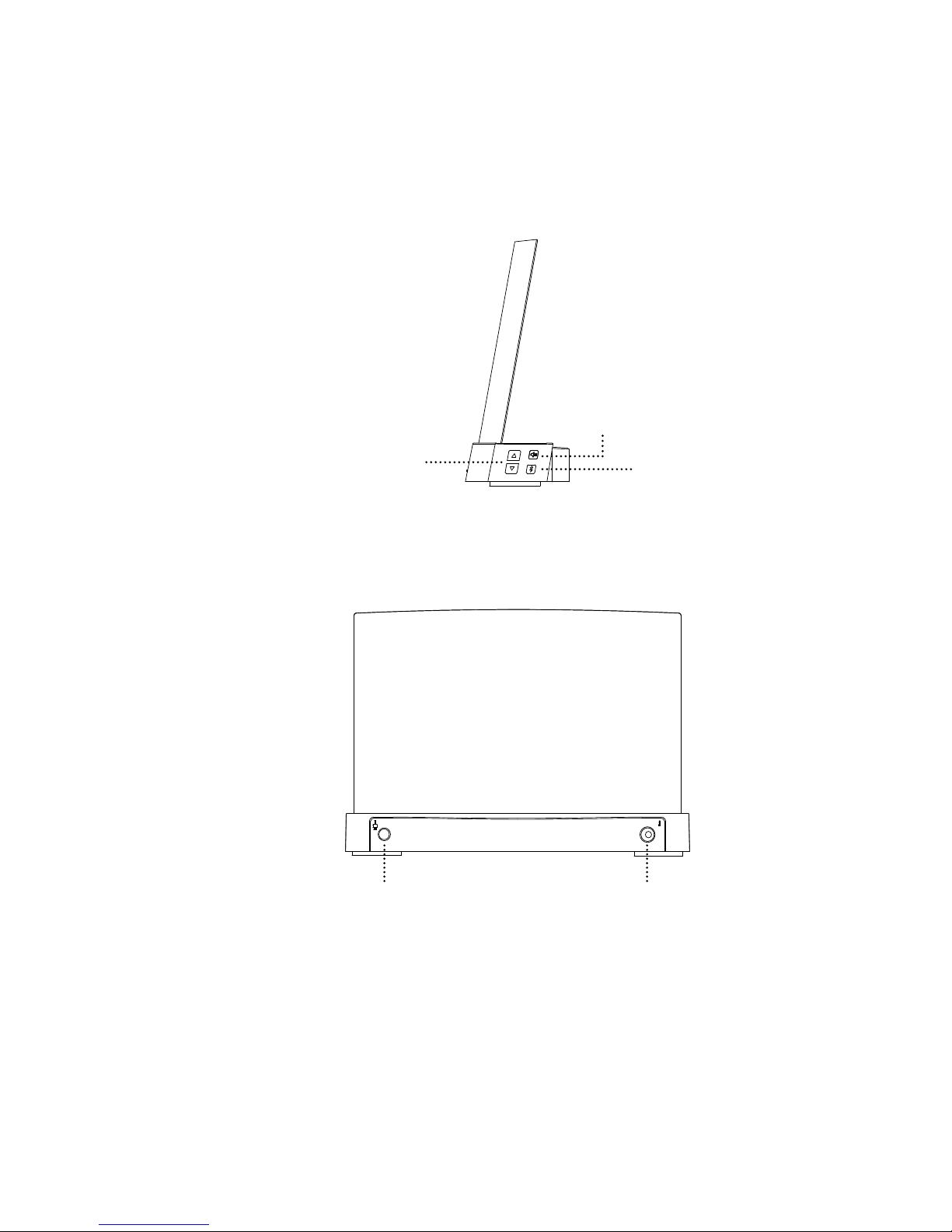
Speaker Controls and Connections
Front Side
Status Light
Blue Blinking Indicates Clio is available for Bluetooth pairing
Blue Solid Indicates Clio is in Bluetooth wireless mode
Red Indicates Clio is in wired audio mode
White Solid Indicates Clio is in standby mode
White Blinking Indicates Clio has been muted
10
Right Side
Volume
Up/Down
Mute
Source Selection
Wireless/Wired
Back side
3.5 mm Audio
Cable Jack
DC Power (power
cord) Supply Jack
Autres manuels pour clio
1
Table des matières
Autres manuels Clear View Audio Intervenants

Manuels Intervenants populaires d'autres marques


Bowers & Wilkins
Bowers & Wilkins 4 Manuel utilisateur

Sonance
Sonance SONOS OUTDOOR Series Manuel utilisateur

Electro-Voice
Electro-Voice EVID FM4.2 Manuel utilisateur

Pioneer
Pioneer XW-HTD630 Manuel utilisateur

Onn
Onn BWA16AA002 Manuel utilisateur

HP
HP GL313AA - USB Speakers PC Multimedia Manuel utilisateur