
CityGrow CG100HHB-SKY Manuel utilisateur
CG100H-SKY SERIES
SKYNET 2000 CONTROL PANEL
USER MANUAL
VERSION 01
11 SEPT,2014
Disclaimers and Copyright
Nothing contained in this publication is to be construed as granting any right, by implication or otherwise, for the
manufacture, sale, or use in connection with any method, apparatus, or product covered by letters patent, or as insuring
anyone against liability for infringement of letters patent.
Efforts have been made to ensure the accuracy and reliability of the data contained in this publication; however, Citygrow
Energy Systems Limited. makes no representation, warranty, or guarantee in connection with this publication and hereby
expressly disclaims any liability or responsibility for loss or damage resulting from its use or from the use of any product
or methodology described herein; for any violation of any federal, state, or municipal regulation with which this
publication may conflict; or for the infringement of any patent from the use of this publication. Nothing contained in this
publication should be viewed as an endorsement by Citygrow Energy Systems Limited. of any particular manufacturer’s
products.
Copyright © 2012 Citygrow Energy Systems Limited, All Rights Reserved
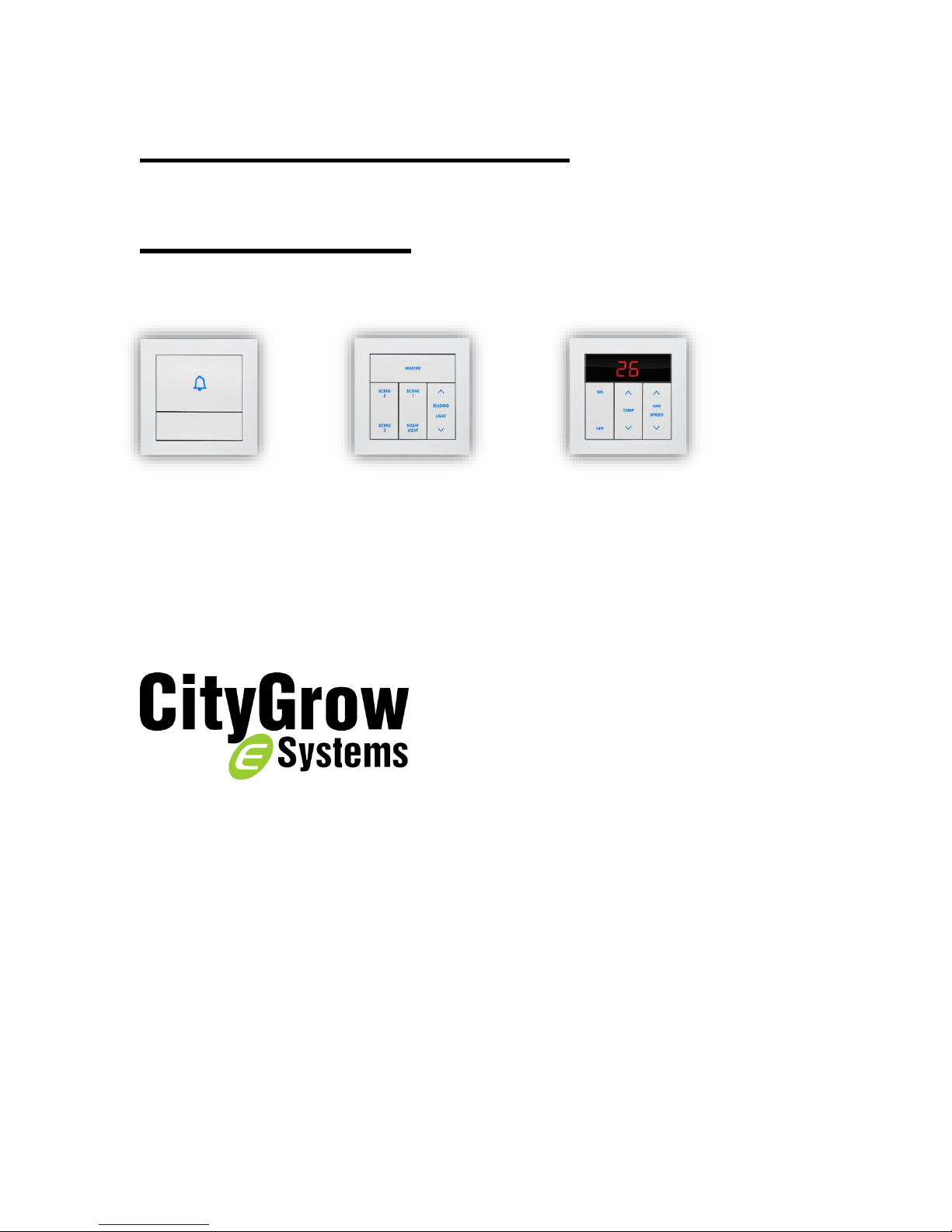
CG100H4-SKY
4 Button Mood Control Panel
CG100HTH-SKY
Thermostat
CG100HHB-SKY
Doorbell Switch
CAUTION
RISK OF ELECTRIC SHOCK DO NOT OPEN
CAUTION: TO REDUCE THE RISK OF ELECTRIC SHOCK,
DO NOT REMOVE COVER (OR BACK) NO USER-SERVICEABLE
PARTS INSIDE REFER SERVICING TO QUALIFIED SERVICE PERSONNEL
The lightning flash with arrowhead symbol within an equilateral triangle is intended to alert the user
to the presence of uninsulated “dangerous voltage” within the product’s enclosure that may be of
sufficient magnitude to constitute a risk of electric shock to persons.
The exclamation point within an equilateral triangle is intended to alert the user to the presence of
important operating and maintenance (servicing) instructions in the literature accompanying the
product.
IMPORTANT SAFETY INSTRUCTIONS
READ BEFORE OPERATING EQUIPMENT
This product was designed and manufactured to meet strict quality and safety standards.
There are, however, some installation and operation precautions which you should be particularly aware of.
1. Read these instructions.
2. Keep these instructions.
3. Heed all warnings.
4. Follow all instructions.
5. Do not use this apparatus near water.
6. Clean only with dry cloth.
7. Do not block any ventilation openings. Install in accordance with the manufacturer’s instructions.
8. Do not install near any heat sources such as radiators, heat registers, stoves, or other apparatus that produce heat.
9. Do not defeat the safety purpose of the polarized or grounding-type plug. If the provided plug does not fit into your
outlet, consult an electrician for replacement of the outlet.
10. Protect the power cord from being walked on or pinched particularly at plugs, convenience receptacles, and the point
where they exit from the apparatus.
11. Only use attachments/accessories specified by the manufacturer.
12. Use only with the cart, stand, tripod, bracket, or table specified by the manufacturer, or sold with the apparatus. When
a cart is used, use caution when moving the cart/apparatus combination to avoid injury from tip-over.
13. Unplug this apparatus during lightning storms.
14. Refer all servicing to qualified service personnel. Servicing is required when the apparatus has been damaged in any
way, such as power-supply cord or plug is damaged, liquid has been spilled or objects have fallen into the apparatus,
the apparatus has been exposed to rain or moisture, does not operate normally, or has been dropped.

Table of Content
1. Introduction ........................................................................................................ 1
2. Understanding of the product-CG100H4-SKY.......................................................... 2
3. Understanding of the product-CG100HTH-SKY........................................................ 3
4. Understanding of the product-CG100HHB-SKY........................................................ 4
5. Dimensions ......................................................................................................... 5
6. Wiring................................................................................................................. 6
7. Installation.......................................................................................................... 8
8. Operation instruction.......................................................................................... 11
8.1 CG100H4-SKY, 4 Button Mood Control Panel ...................................................... 11
8.2 CG100HHB-SKY, Doorbell switch ....................................................................... 12
8.3 CG100HTH-SKY, Thermostat............................................................................. 13
9.Programming the SkyNET system......................................................................... 14
10. Specification .................................................................................................... 15

1
1. Introduction
Thank you for buying Citygrow’s product. CG100H-SKY Series is both powerful and easy
to use and install.
Description
1. Wall mount control panel for SkyNET2000
2. Data communicates through RS485 bus and running on Citygrow’s SmartBus protocols.
3. LED indicator for on/off status.
4. CG100H4-SKY main function is to preset lighting scenes for SkyNET 2000.
5. CG100HTH-SKY is a thermostat to preset room temperature and send signals to SkyNET
2000 to control A/C.
6. Control button can be configured to become two way function.
7. Control button can be configured to become scene function.
8. Control button graphics can be tailor-made per customer requirement.
9. Mounted in a standard UK wall box.
10. Easy to install.
11. Power supply by external DC12V. (powered by SkyNET 2000 system power supply)
2
2. Understanding of the product-CG100H4-SKY
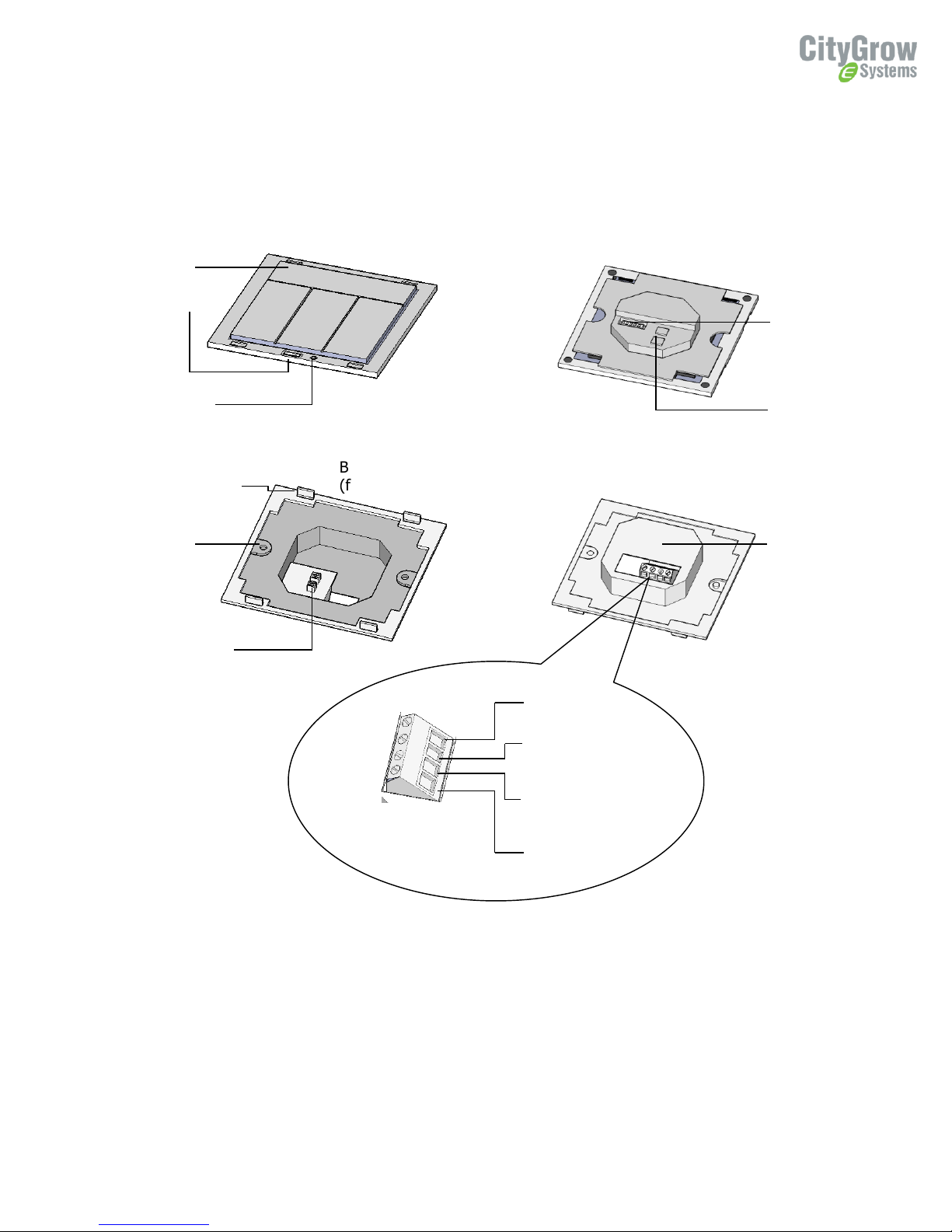
Button panel (front
view)
Button panel
(bottom view)
Bracket
(bottom view)
Bracket
(front view)
Control
button
Programming
port
Reset button
Metal clip to fix
the button panel
Mounting
hole
Connector to
button panel
12V -
DC 12V from
SkyNET system
power supply
12V +
RS485B
To SkyNET control
panel RS485 port
RS485A
Model number
plate
Connector to
Bracket
Dip Switch (for
address setting)
3
3. Understanding of the product-CG100HTH-SKY
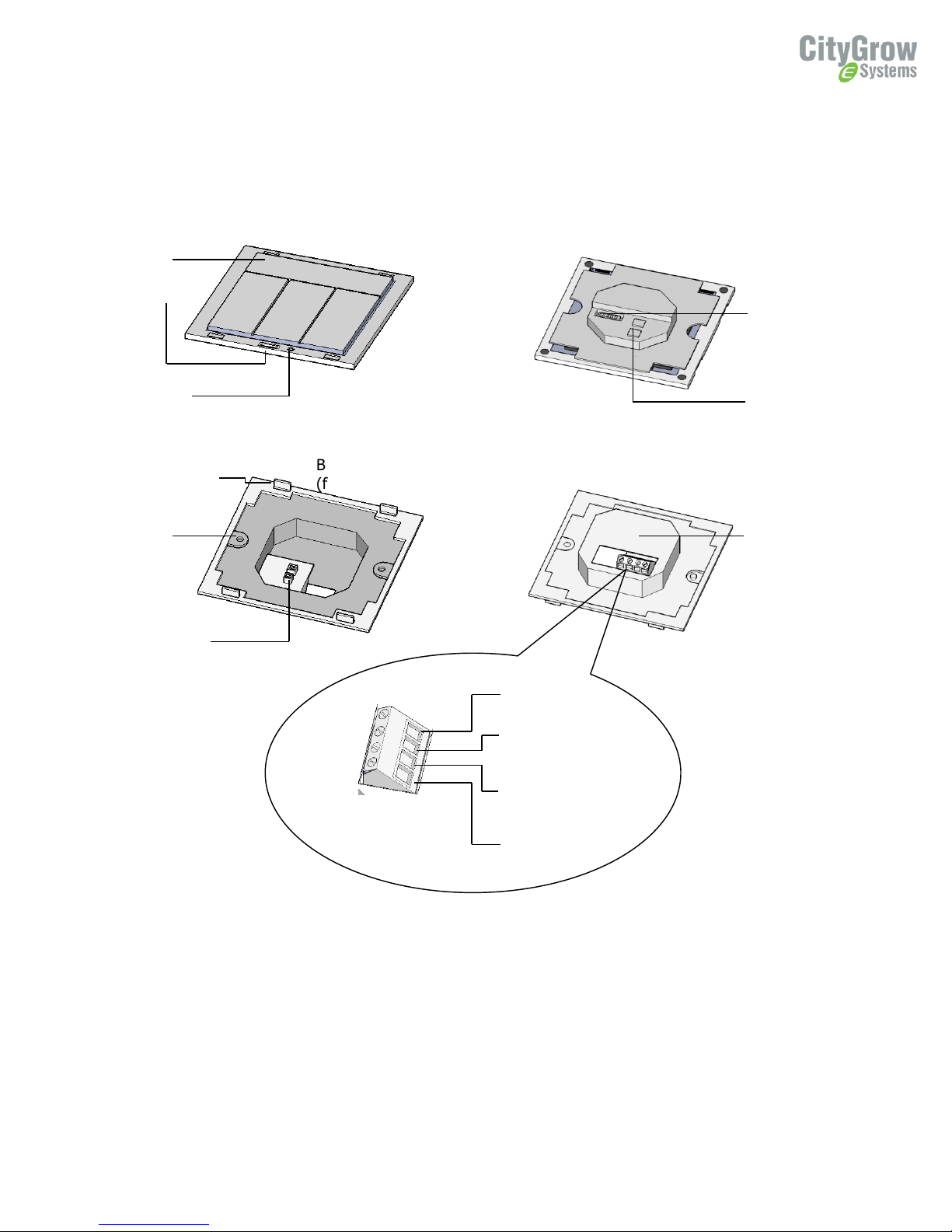
Button panel (front
view)
Button panel
(bottom view)
Bracket
(bottom view)
Bracket
(front view)
Control
button
Programming
port
Reset button
Metal clip to fix
the button panel
Mounting
hole
Connector to
button panel
12V -
DC 12V from
SkyNET system
power supply
12V +
RS485B
To SkyNET control
panel RS485 port
RS485A
Model number
plate
Connector to
Bracket
Dip Switch (for
address setting)
4
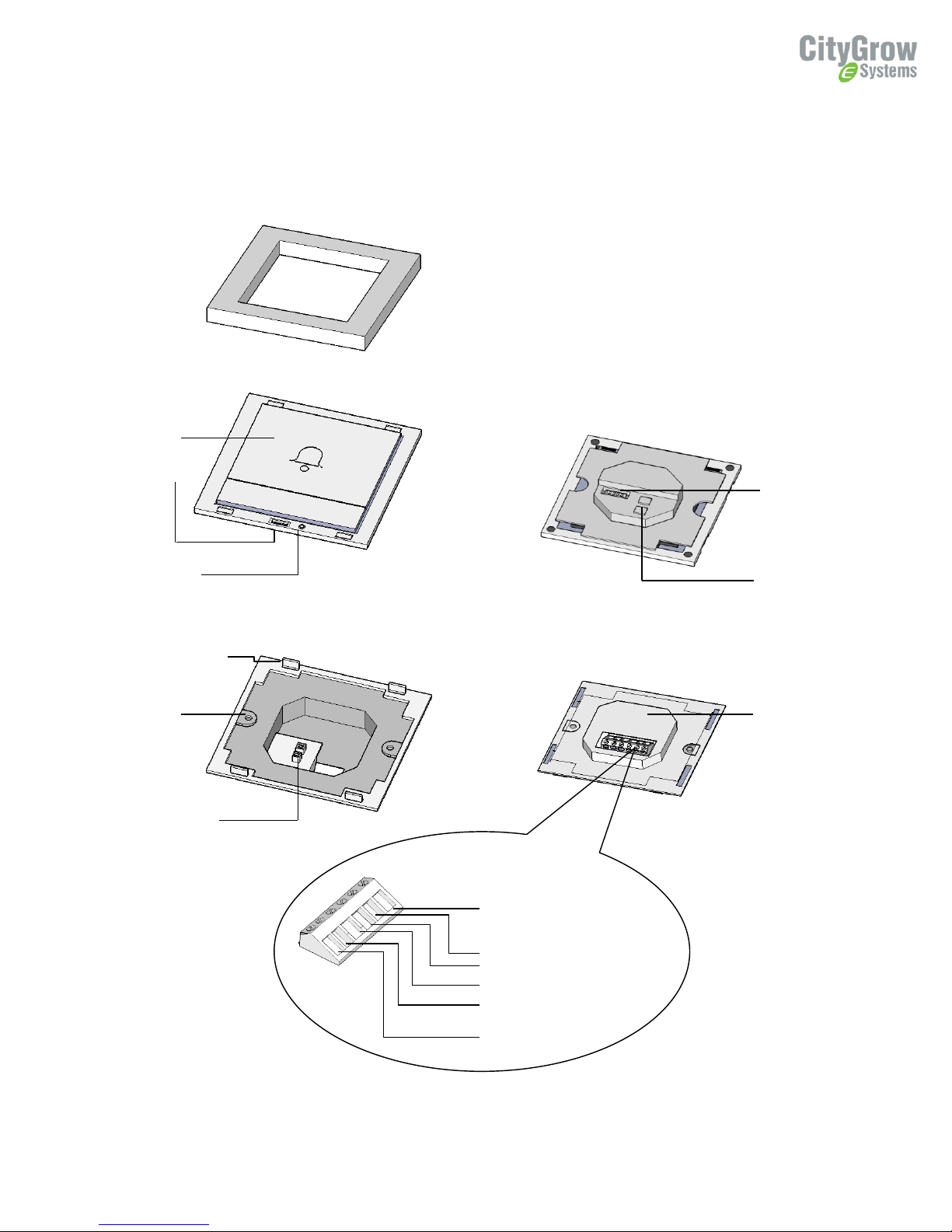
4. Understanding of the product-CG100HHB-SKY
Dip Switch (for
address setting)
Frame
Button panel (front
view)
Button panel
(bottom view)
Bracket
(bottom view)
Bracket
(front view)
Doorbell
button
Programming
port
Reset button
Metal clip to fix
the button panel
Mounting
hole
Connector to
button panel
Model number
plate
Connector to
Bracket
12V -
12V +
RS485B
RS485A
BELL-
BELL+
5
5. Dimensions
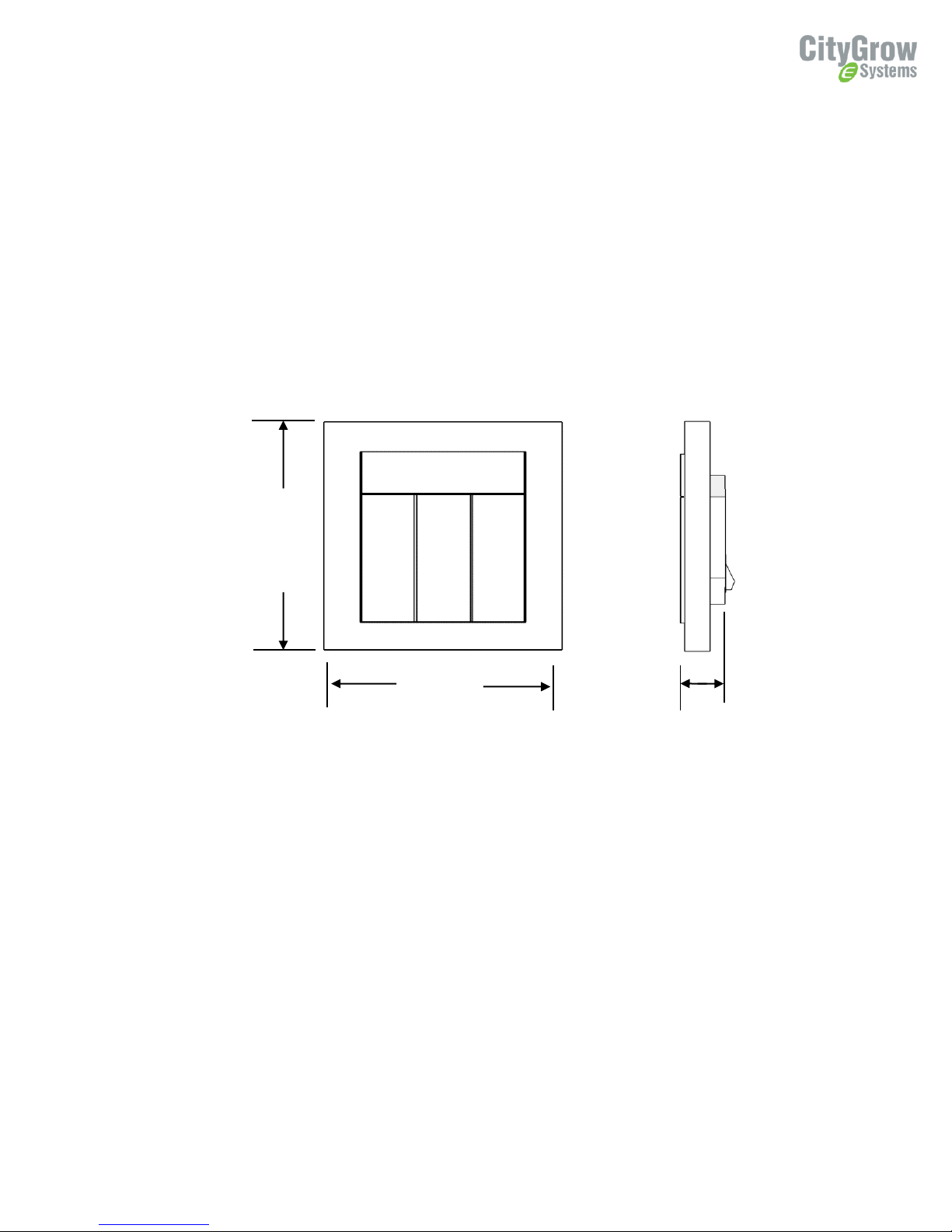
85mm
85mm
28mm
CG100H4-SKY, CG100HTH-SKY, CG100HHB-SKY
6
6. Wiring
Before getting started
WARNING! It must be installed by a qualified electrician in accordance with all applicable regulations
and building codes. Improper wiring can result in personal injury or damage to control units or other
equipment. Always turn off circuit breaker or remove main fuse from power line before doing any work.
To avoid overheating and possible damage to equipment.
WARNING! Do not operate when any lamps removed or burned out; replace any burned out lamps
immediately; use only transformers that incorporate thermal protection or fused primary windings. !This
product is designed for residential and commercial use, for indoor use only.
WARNING! Install in accordance with all national and local electrical codes.
IMPORTANT! Citygrow® is not liable for any damage incurred with the misuse of this
product.
7
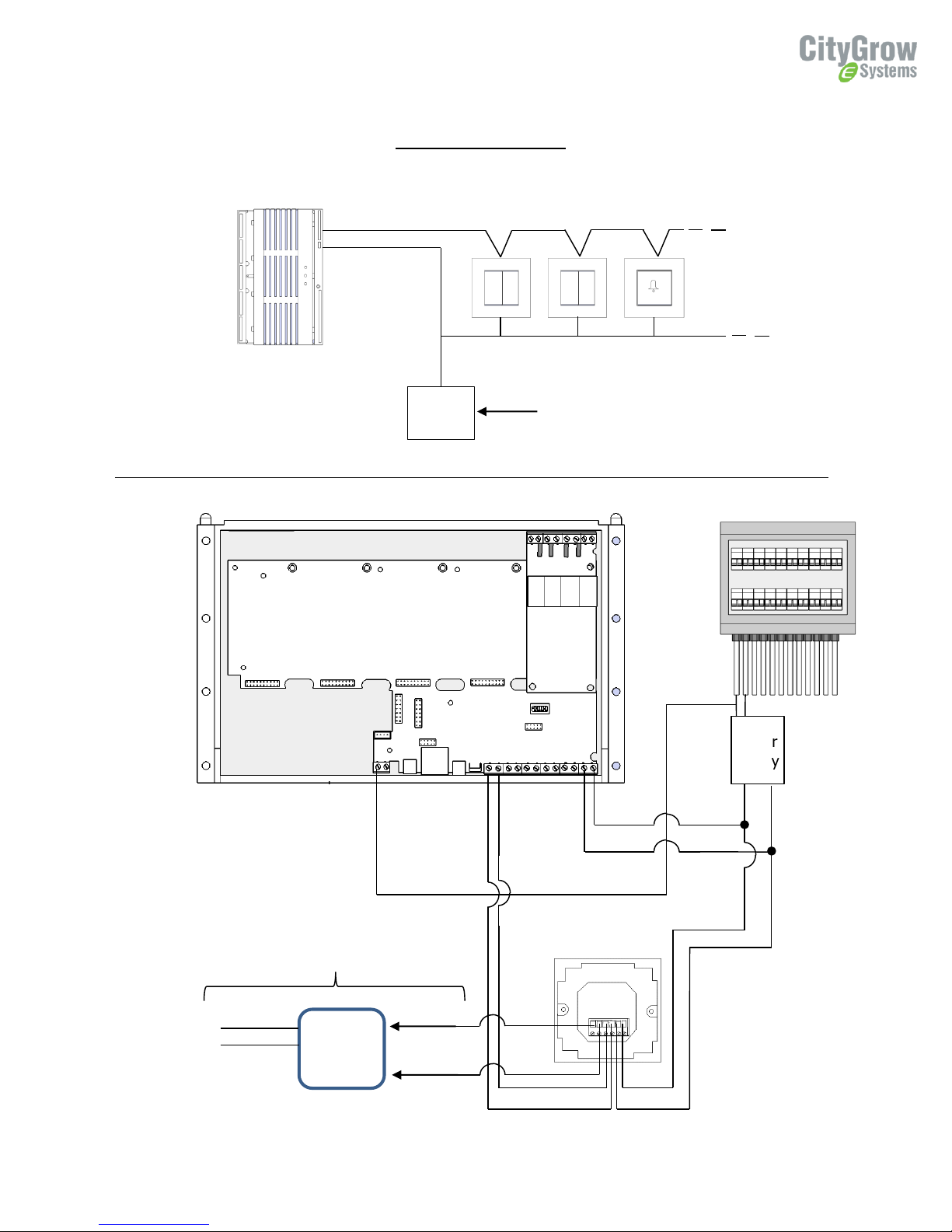
Distribution board
Power
supply
Live
Neutral
Neutral
(System)
RS485B
RS485A
12V +
0V
RS485
bus
Power
supply
AC 220V
DC 12V
DC 12V
Wall
mount
control
panels
Daisy chain
CG801SKN-M
SkyNET 2000
Main Unit
Door
Bell
AC Live
Neutral
Dry contact
control
For CG100HHB-SKY only
Wiring Diagram
Autres manuels pour CG100HHB-SKY
1
Ce manuel convient aux modèles suivants
2
Table des matières
Autres manuels CityGrow Panneau de contrôle


