
Chesskin GEUKBA11 Manuel utilisateur

Power Bank Bluetooth keyboard user manual
Bedienungsanleitung Bluetooth abnehmbare Tastatur
Mode d’emploi pour clavier à accumulation d’énergie Bluetooth
Gebruikershandleiding Power Bank Bluetooth-toetsenbord
Manuale d’istruzioni per l’accumulatore
di energia per tastiera Bluetooth
GEUKBA11
UK
Keyboard
Manual-GExxBA11-Powerbank keyboard-iPAD2 1 2/26/12 11:47 PM

English
Main Screen/Esc Brightness- Brightness+ Virtual Keyboard
Next Track
Preview Photo
Prev Track Play/Pause
Mute
Lock Screen
Alt Copy
Paste Cut Volume- Volume+
Rotate
Contents:
1 x Wireless keyboard leather portfolio
1 x 5000mAh power bank Bluetooth keyboard
1 x Micro USB cable
1 x Micro USB to stander USB cable
1 x User manual
Product Layout:
1 - Cutout for iPad2 camera
2 - Leather case portfolio
3 - Keyboard
4 - Power bank button
5 - Charge light
6 - Pair light
7 - Power indication light
8 - Pair button
9 - Bluetooth Power on/off
10 - Micro USB charging port
Specifications:
Compatibility: designed for iPad2
Built-in Lithium rechargeable polymer
battery capacity: 5000mah
Voltage: 3.7V
Power charge connector
Input: Micro USB charge 5V, 1A
Operating temperature: -200C - 550C
Storage temperature: -400C - 700C
Working distance: <10 meters
Keyboard dimension:
W26cm x D18cm x H0.8cm
Keyboard weight: 380g
Charging time: output4.5hrs – 5hrs.
Input: 5.5-6hrs
Manual-GExxBA11-Powerbank keyboard-iPAD2 2 2/26/12 11:47 PM

English
Bluetooth pairing Instruction:
1. Turn the keyboard power on.
1. Press the pairing button, the Blue LED light will flash,
which indicates that the keyboard is in pairing mode.
2. Tap the SETTINGS icon on the iPad screen to open
Bluetooth. The iPad is now in pairing mode.
Tap the iPad SETTINGS icon
Tap to open Bluetooth
iPad is in pairing mode. It will search
for compatible Bluetooth devices
The iPad and Dexim Keyboard will pair, please
enter a password using the keyboard
Successful pairing of the devices
3. When the connection has been successfully
established, the pairing LED light will turn off.
On/Off
Power On
Manual-GExxBA11-Powerbank keyboard-iPAD2 3 2/26/12 11:47 PM

English
Key combination
Command-Space: If multiple languages are
installed, may rotate by pressing Space
This product is distributed by: SSP, Distributieweg 13, 2742 RB Waddinxveen, The Netherlands, +31-182-685666
Charging Battery:
Plug your USB cable into the keyboard charging port.
Use your smart phone’s, laptop’s or PC’s power to
charge it.
While the battery is charging, the left LED light will
illuminate. When the battery is fully charged, the LED
light will turn off.
Charging time: 5.5-6 hrs
Note:
1. Do not charge your keyboard when it is in output
status.
2. Specified charger(power adapter output 5VDC, 1A)
3. It is prohibited under any circumstance for adjacent
keys to touch during normal operation.
(Power adapter
not included)
5000mAh Power Bank Instruction:
Charging your iPad 2
1. Connect the micro usb to stander usb cable to keyboard
2. Connect your iPad cable to power bank’s stander usb
port
3. Press power bank button for 3 seconds. The Led with
flash from left to right. It means the power bank is ready
to charge your device.
4. Connect your iPad cable to iPad.
5. Press the battery button to know the percentage of
power left; 1 light: 10-25%, 2 lights: 50%, 3 lights: 75%,
4 lights 100%.
Manual-GExxBA11-Powerbank keyboard-iPAD2 4 2/26/12 11:47 PM

Power Bank Bluetooth keyboard user manual
Bedienungsanleitung Bluetooth abnehmbare Tastatur
Mode d’emploi pour clavier à accumulation d’énergie Bluetooth
Gebruikershandleiding Power Bank Bluetooth-toetsenbord
Manuale d’istruzioni per l’accumulatore
di energia per tastiera Bluetooth
GEGEBA11
DE
Tastatur
Manual-GExxBA11-Powerbank keyboard-iPAD2 5 2/26/12 11:47 PM

Deutsch
Eigenschaften:
Kompatibel zu iPad2
Eingebaute wiederaufladbare Li-
Polymer Batterie mit 5.000mAh
Spannung: 3.7V
Anschluss für Ladekabel
Arbeitstemperatur: -20°C - +55°C
Lagertemperatur: -40°C - +70°C
Reichweite: < 10 Meter
Maße Keyboard: B 26,0cm x T 18,0cm x H 0,8cm
Gewicht Keyboard: 380g
Ladezeit (Ausgang): 4,5 Std. – 5,0 Std.
Ladedauer (Eingang): 5,5 Std. – 6,0 Std.
Home-Bildschirm/Esc Helligkeit - Helligkeit + Virtuelle Tastatur
Nächster Titel
Fotovorschau
Vorherigter Titel Play/Pause
Stumm
Verriegeln
Alt Kopieren
Einfügen Ausschneiden Lautstärke - Lautstärke +
Umkehren
Inhalt:
1 x Drahtlose Bluetooth Tastatur mit Reservebatterie
1 x Ledertasche
1 x Micro-USB-USB-Ladekabel
1 x Micro-USB-USB-Verlängerung
1 x Bedienungsanleitung
Produktlayout:
1 - Ausschnitt für iPad2 Kamera
2 - Ledertasche
3 - Tastatur
4 - Schalter für Reservebatterie
5 - Ladeanzeige
6 - Verbindungsanzeige
7 - Anzeige für Reservestrom
8 - Verbindungsknopf
9 - An/Aus-Schalter
10 - Micro-USB Ladeanschluß
Manual-GExxBA11-Powerbank keyboard-iPAD2 6 2/26/12 11:47 PM

Deutsch
Bedienungsanleitung:
1. Schalten Sie das Keyboard ein.
1. Drücken Sie den Verbindungsknopf, die blaue
LED beginnt zu blinken und signalisiert damit
die Verbindungsbereitschaft der Tastatur.
2. Öffnen Sie die EINSTELLUNGEN auf Ihrem iPad um im
Bluetooth-Menü einen Verbindungsaufbau zu starten.
Wählen Sie den EINSTELLUNGEN-Icon
Öffnen Sie BLUETOOTH
Das iPad geht nun in den Verbindungs-Modus
und sucht nach kompatiblen Geräten
Das iPad und das Chesskin Keyboard werden
sich nun finden, bitte geben Sie auf dem
Keyboard das angegebene Passwort ein
Die Verbindung der Geräte ist erfolgt
3. Sobald die Verbindung erfolgreich
hergestellt wurde, erlischt die blaue LED.
Ein/Aus
Schalter
Manual-GExxBA11-Powerbank keyboard-iPAD2 7 2/26/12 11:47 PM
Deutsch
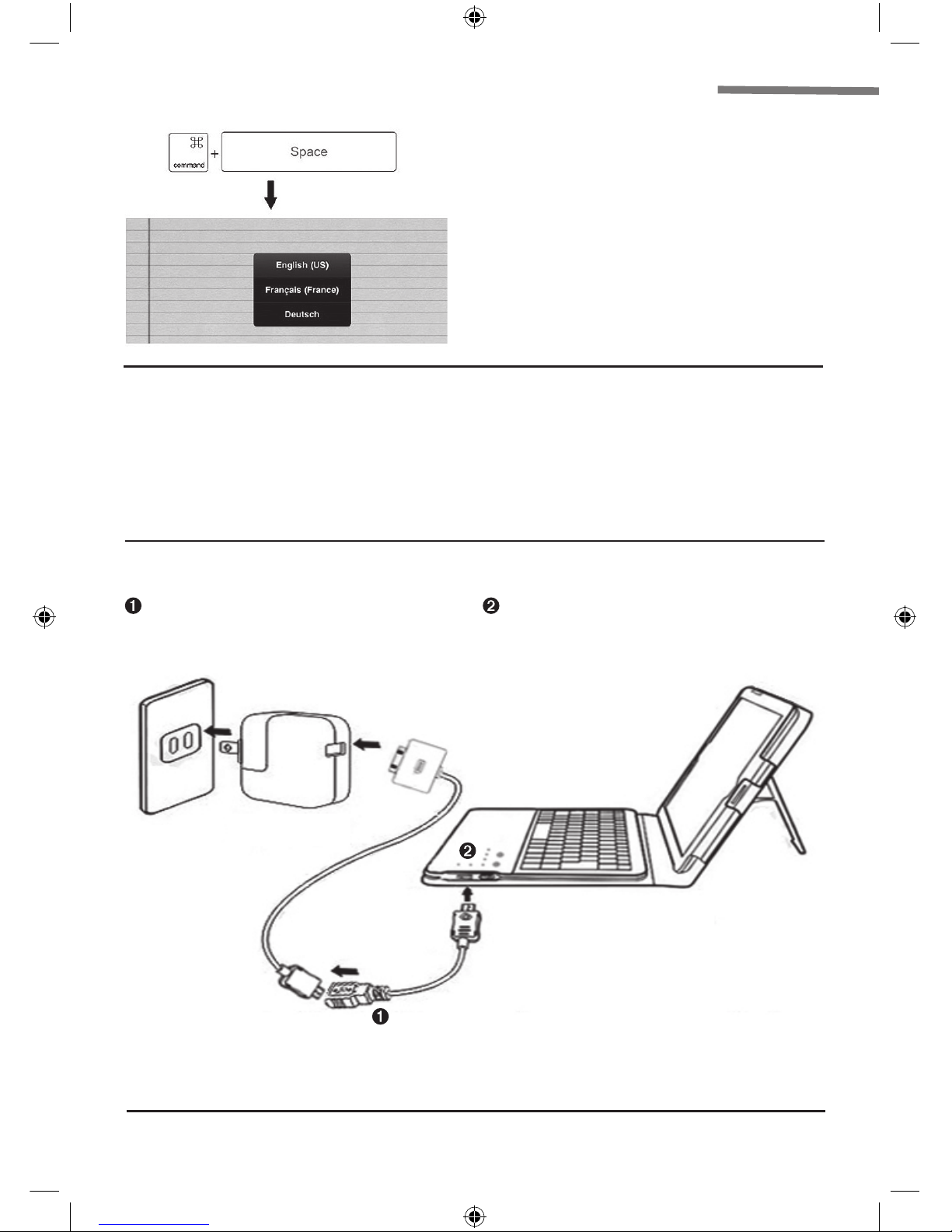
Tastenkombination
Command+Leertaste: sollten verschiedene
Sprachen installiert sein, können Sie diese
mit der Leertaste durchwechseln.
So laden Sie die eingebaute Reservebatterie 5.000 mAh:
Verbinden Sie das Keyboard mit dem mitgelieferten Micro-
USB-Kabel mit einem Standard-USB- Anschluß an Ihrem PC,
Laptop oder Smartphone.
Während die Batterie lädt, leuchtet die linke LED
kontinuierlich. Sobald der Ladevorgang beendet ist, erlischt
diese LED.
Ladedauer etwa 5,5 – 6,0 Stunden.
Anmerkung:
1. Laden Sie das Keyboard keinesfalls, wenn Sie es auf
„Ladestrom abgeben“ eingestellt ist.
2. Verwenden Sie nur eine Apple USB-Ladeadapter
oder einen von Apple freigegebenes Ladegerät
(Ladespannung: 5V DC, 1A).
Achtung!
Bei Verwendung dieses Gerätes beachten Sie bitte die
notwendigen Sicherheitsaspekte zur Bewahrung Ihrer
eigenen und der Sicherheit der Allgemeinheit!
(Netzadapter nicht
enthalten)
So laden Sie Ihr iPad2 mit der eingebauten
Reservebatterie 5.000 mAh:
1. Verbinden Sie die Micro-USB- USB-Verlängerung mit
Ihrem Keyboard
2. Verbinden Sie Ihr iPad2 Ladekabel mit dieser USB-
Verlängerung.
3. Drücken Sie den Schalter der Reservebatterie für 3
Sekunden. Die LED wir daraufhin von links nach rechts
blinken. Dies bedeutet, dass die Reservebatterie bereit
ist, ein externes Gerät zu laden.
4. Verbinden Sie Ihr iPad-Ladekabel nun mit Ihrem iPad.
5. Drücken Sie den Schalter der Reservebatterie um die
verfügbare Energie angezeigt zu bekommen. 1 LED =
10-25%, 2 LEDs = 50%, 3 LEDs = 75%, 4 LEDs = 100%
Ladekapazität.
This product is distributed by: SSP, Distributieweg 13, 2742 RB Waddinxveen, The Netherlands, +31-182-685666
Manual-GExxBA11-Powerbank keyboard-iPAD2 8 2/26/12 11:47 PM

Power Bank Bluetooth keyboard user manual
Bedienungsanleitung Bluetooth abnehmbare Tastatur
Mode d’emploi pour clavier à accumulation d’énergie Bluetooth
Gebruikershandleiding Power Bank Bluetooth-toetsenbord
Manuale d’istruzioni per l’accumulatore
di energia per tastiera Bluetooth
GEFRBA11
FR
Clavier
Manual-GExxBA11-Powerbank keyboard-iPAD2 9 2/26/12 11:47 PM

Francais
Caractéristiques techniques :
Compatibilité : conçu pour iPad2
Capacité de la pile polymère Lithium
rechargeable intégrée : 5000 mAh
Tension : 3,7 V
Connecteur de charge
Entrée : Charge micro USB 5 V, 1 A
Température de fonctionnement : -200C - 550C
Température de stockage : -400C - 700C
Distance d’utilisation : < 10 mètres
Dimensions du clavier : L 26 cm x l 18 cm
x H 0,8 cm
Poids du clavier : 380 g
Temps de charge : sortie 4,5 h – 5 h.
Entrée : 5,5 - 6 h
Écran principal/Échap Luminosité- Luminosité+ Clavier virtuel
Piste suiv.
Aperçu photo
Piste préc. Lecture/Pause
Muet
Verrouillage écran
Alt Copier
Coller Couper Volume- Volume+
Rotation
Contenu :
1 x porte-documents cuir pour clavier sans fil
1 x clavier à accumulation d’énergie Bluetooth 5000 mAh
1 x micro câble USB
1 x micro câble USB vers support USB
1 x mode d’emploi
Présentation du produit :
1 - Découpe pour appareil photo iPad2
2 - Porte-documents en cuir
3 - Clavier
4 - Bouton de l’accumulateur d’énergie
5 - Témoin de charge
6 - Témoin de connexion
7 - Témoin d’indication d’alimentation
8 - Bouton de connexion
9 - Alimentation Bluetooth on/off
10 - Port de charge micro USB
Manual-GExxBA11-Powerbank keyboard-iPAD2 10 2/26/12 11:47 PM
Table des matières


