
CHCNAV D270 Manuel utilisateur

D270_User_Manual

Preface
Purpose of this instructions
This paper is the user manual of D270 depth sounder of Shanghai Huace
Navigation Technology Co., LTD.
About the instructions
This user manual describes in detail how to install, configure and use the D270
sounder.
Experience requirements
In order to better use the D270 sounder, Shanghai Huace Navigation Technology
Co., Ltd. recommends that you read the user manual carefully before using it.If you
are not familiar with the principle of the depth sounder, please contact us for technical
advice and training.
Liability exemption
Before using this product, please read this manual carefully. The information, data
and illustrations contained in this manual only represent the technology we currently
know. Our company will not be responsible for any direct or indirect economic losses
caused by users' wrong understanding or use of this product.We reserve the right to
change the functions, performance, technical specifications and manufacturing
process of our products without prior notice. For more information about our
products, please visit our official website (www.huace.cn).
Technology and Service

Shanghai Huace Navigation Technology Co., LTD. Website opened the "service
and download" section, if you have questions can leave a message through the
"feedback", or directly call the technical consultation telephone: 4006206818, we will
timely answer your questions.

Directory
Preface...............................................................................................................................................1
1.Introduction and installation of depth sounder ..........................................................2
2 .Introduction to data link of depth sounder ....................................................................4
3. Depth finder web page introduction.................................................................................5
3.2 Storage and Download ................................................................................................7
3.3 The map.............................................................................................................................8
3.4 System Settings ..............................................................................................................9
4. Supporting Software Introduction(HydroSurvey)...................................................9
4.1、Create a new project..................................................................................................9
4.2、Data access................................................................................................................. 10
4.3、Data records............................................................................................................... 13
4.4、Measure Mode.......................................................................................................... 14
4.5、Post data processing............................................................................................... 16
4.6、Depth Sample............................................................................................................ 17
4.7、Export data................................................................................................................. 19

1.Introduction and installation of depth sounder
1.1Introduction to depth sounder
The D270 sounding instrument can be used with the unmanned vessel series of
APACHE series of CHCNAV, and can also be installed separately on the manned boat,
rubber boat and other floating platforms.
The left interface of the soundsinometer Transducer is the transducer interface;
Power is the power supply and serial port communication interface;
The left button at the bottom of the screen is the function button. Press it to
switch the screen to display data (sound speed/draft/water temperature).;

On the right is the screen power button, long press to close/open the screen
display;
The depth sounder has no switch button of the whole machine. It will start
automatically when powered on and shut down when powered off.
Screen Information Description
1.2 Installation Instructions for depth sounder (shipborne
platform)

(1)Precautions for using the sensor probe
1)The sensor probe must be mounted perpendicular to the water surface.
2)There should be no other solid shielding between the sensor probe and the bottom of the pool, otherwise
interference signals will be generated.
3)The sensor probe should be protected from the impact of floating objects in the water. If the suspended objects in
the water easily adhere to the probe surface, please clean it in time to keep the probe surface clean.
4)The immersion depth of the sensor probe is recommended to be about 50cm (this distance can be increased or
decreased according to the flow speed of the river).
2 .Introduction to data link of depth sounder
D270 sounder interacts with external devices in three ways: wifi, Bluetooth, serial
port;
Bluetooth:The sounder receives GPGGA and other position data of RTK through
Bluetooth connection;
WIFI:: The laptop can access the web page of the sounding instrument through
wifi connection to view real-time waveform, set sounding parameters and set data
recording;It can also be connected via wifi, using Hydrosurvey for bathymetry control

and data post-processing;
Serial port:The sounder outputs the bathymetric data in SDDPT format through
the serial port.
3. Depth finder web page introduction
After connecting the computer to WIFI: D270-XXXXxxx, you can enter
192.168.53.27 in the browser to enter the web page of the D270.
3.1 Parameter Settings

Communication Settings:
The D270 can be set up to connect to an external WIFI hotspot to provide network
to load the satellite map function;
It can also be set to connect to RTK Bluetooth, obtain positioning data, and set
parameters of RTK antenna to water surface and transducer.
Parameter Settings:Can set the sounder parameters (range, gain, draft, frame
rate, data format, working mode, water temperature, salinity, sound speed, etc).
The depth of the water filter:Set filter clutter.
Ford set:Shoal alarm to avoid damage to transducer or floating platform.
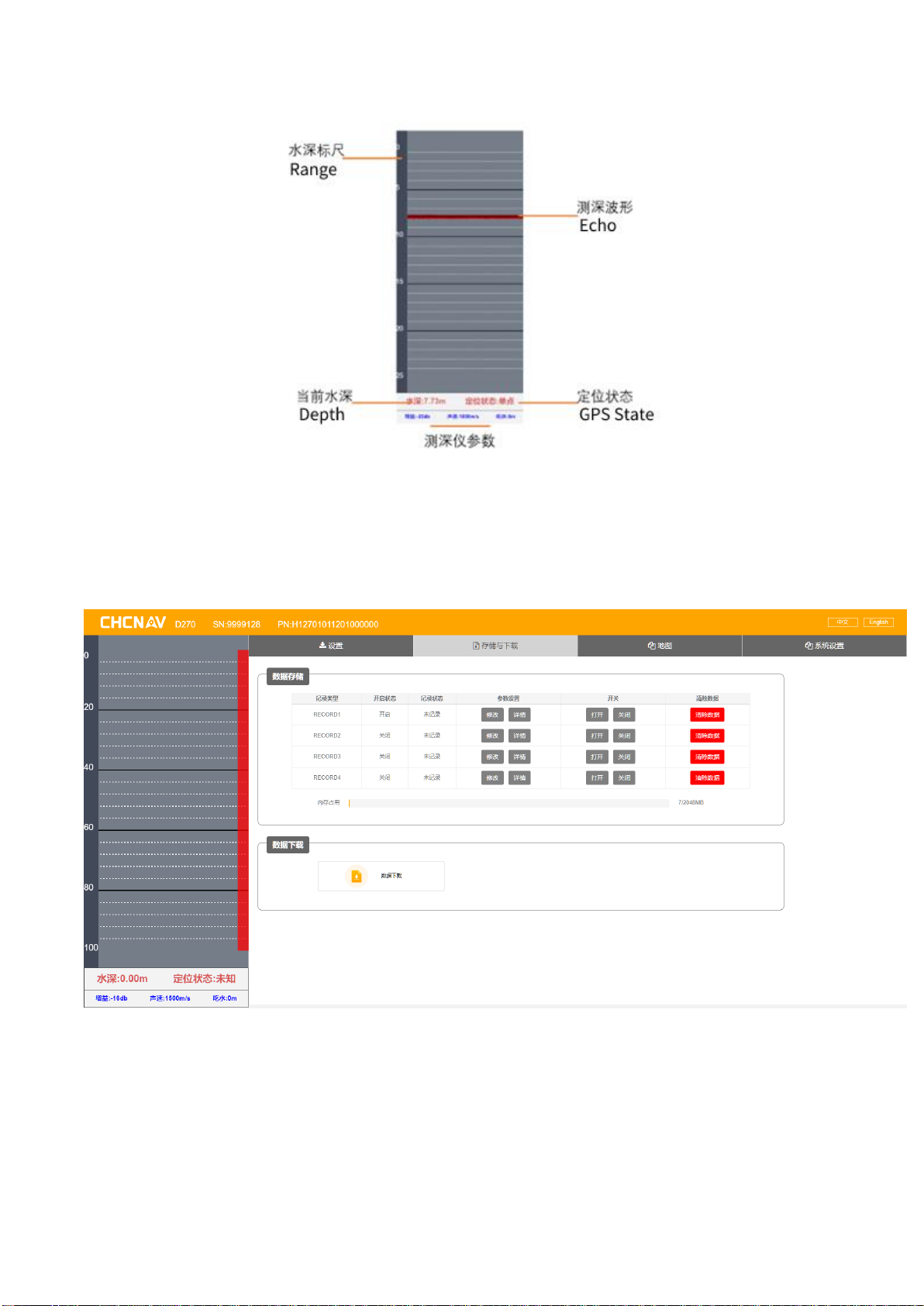
Left Status Bar:
3.2 Storage and Download
Data Storage:
Record1 starts automatically upon startup by default, and starts recording
automatically when water depth data and GNSS data are detected;
Table des matières
Manuels Équipement marin populaires d'autres marques


Clarion
Clarion GR10BT Manuel de réparation

Raymarine
Raymarine Maxiview ST80 Guide de l'utilisateur

GUIDANCE MARINE
GUIDANCE MARINE 20- Series Instructions de montage

Raymarine
Raymarine ST60 Tridata Guide de l'utilisateur

olympia electronics
olympia electronics ΒS-531/1/MAR Manuel utilisateur

Sonic
Sonic 2024 Manuel utilisateur