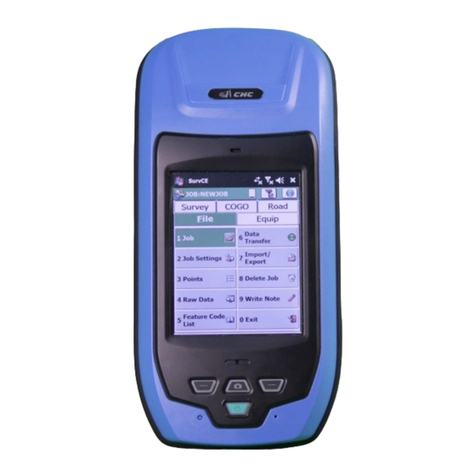
CHC LT500 Series Manuel utilisateur

il
LT500 |GETTING STARTED GUIDE
GNSS/GIS HANDHELD RECEIVER

Copyright
Copyright 2014 CHC Shanghai HuaCe Navigation
Technology Ltd. All rights reserved. The CHC is
trademark of Shanghai Huace Navigation
Technology Limited. All other trademarks are the
property of their respective owners.
Trademarks
All product and brand names mentioned in this
publication are trademarks of their respective
holders.
Safety Warnings
The Global Positioning System (GPS) is operated by
the U.S. Government, which is solely responsible for
the accuracy and maintenance of the GPS network.
Accuracy can also be affected by poor satellite
geometry and obstructions, like buildings and heavy
canopy.
FCC interference statement
This equipment has been designed to comply with
the limits for a class B digital device, pursuant to
part 15 of the FCC Rules in the Portable Mode.
These limits are designed to provide reasonable
protection against harmful interference in a
residential installation.
Operation is subject to the following two conditions:
(1) this device may not cause harmful interference
and (2) this device must accept any interference
received, including interference that may cause
undesired operation.
LT500 Getting Started Guide –Revision 1.0 Sep 2014

Changes or modifications made to this equipment not expressly approved by
Shanghai Huace Navigation Technology Ltd. may void the FCC authorization to
operate this equipment.
NOTE: This equipment has been tested and found to comply with the limits for a Class B digital device,
pursuant to Part 15 of the FCC Rules. These limits are designed to provide reasonable protection
against harmful interference in a residential installation. This equipment generates, uses and can
radiate radio frequency energy and, if not installed and used in accordance with the instructions, may
cause harmful interference to radio communications. However, there is no guarantee that interference
will not occur in a particular installation. If this equipment does cause harmful interference to radio or
television reception, which can be determined by turning the equipment off and on, the user is
encouraged to try to correct the interference by one or more of the following measures:
Reorient or relocate the receiving antenna.
Increase the separation between the equipment and receiver.
Connect the equipment into an outlet on a circuit different from that to which the receiver is
connected.
Consult the dealer or an experienced radio/TV technician for help.
The SAR limit adopted by USA (FCC) is 1.6 Watts/kilogram (W/kg) averaged over one gram of tissue.
Device types (FCC ID: SY4-B01004) has also been tested against this SAR limit. The highest SAR
value reported under this standard during product certification for 2G/3G mode is 0.227 W/kg. The
highest SAR value reported under this standard during product certification for 2.4GHz WLAN mode is
0.956 W/kg. The highest SAR value reported under this standard during product certification for
simultaneous mode is 1.183 W/kg. This device was tested for typical body-worn operations with the
back of the handset kept 0 cm from the body.
To maintain compliance with FCC RF exposure requirements, use accessories that maintain a 0 cm
separation distance between the user’s body and the back of handset. The use of belt clips, holsters
and similar accessories should not contain metallic components in its assembly. The use of
accessories that do not satisfy these requirements may not comply with FCC RF exposure
requirements, and should be avoided.

Table of Contents
1. Introduction ..................................................................................................................................... 1
1.1. Technical Assistance........................................................................................................... 1
1.2. Your Comments.................................................................................................................. 1
2. Overview.......................................................................................................................................... 2
2.1. Features.............................................................................................................................. 2
2.2. Specifications ..................................................................................................................... 2
3. Description....................................................................................................................................... 4
4. First-Time Use .................................................................................................................................. 6
4.1. Inserting the Battery, Storage card and SIM card .............................................................. 6
4.2. Charging the Battery .......................................................................................................... 6
4.3. Turning the device on/off or standby ................................................................................ 7
4.4. Connect to Office Computer .............................................................................................. 7
4.5. Installing Software.............................................................................................................. 8
4.6. Using GNSS Positioning ...................................................................................................... 8
4.7. Using GNSSViewer.............................................................................................................. 8
4.8. Using the camera ............................................................................................................. 10
4.9. Establishing Wireless connection (Bluetooth /Wi-Fi)....................................................... 10
5. Getting started with SurvCE 3........................................................................................................ 11
6. Getting started with DigiTerra explorer 7...................................................................................... 12
7. Outputting NMEA 0183 data from the 9-pin port ......................................................................... 13
8. Frequent Settings........................................................................................................................... 14

Page 1
1. INTRODUCTION
Thank you for choosing LT500 GNSS Handheld Receiver.
This Getting Started Guide will provide useful information about your
receiver. It will also guide you through your first steps of using LT500 in the
field.
1.1. TECHNICAL ASSISTANCE
If you have a problem and cannot find the information you need in the
product documentation, contact your local dealer from which you
purchased the LT500. Alternatively, please request technical support
using the CHC Website at (www.chcnav.com) or CHC technical support
email [email protected]
1.2. YOUR COMMENTS
Your feedback about this Getting Started Guide will help us to improve
it in future revision. Please e-mail your comments to

Page 2
2. OVERVIEW
2.1. FEATURES
LT500 is a handheld GNSS RTK receiver and a precision GIS data
collector that incorporate a survey-grade professional L1/L2 GNSS core
engine as well as Microsoft Windows Mobile® WEHH operating system.
LT500 comes in a rugged design suitable for all your demanding survey
and construction environment as well as numerous mapping
applications. LT500 is optimized to run with Carlson SurvCE® 3 field
survey software and/or DigiTerra Explorer 7 GIS data collection
software.
2.2. SPECIFICATIONS
GNSS characteristics
-120-channel professional NovAtel OEM6 core
-GPS+GLONASS+BeiDou, L1/L2
-SBAS support (WAAS, MSAS and EGNOS)
-Update Rate: 1Hz, or higher
-Time to first fix : < 50 s typical
-Initialization time in Network RTK mode: <30 s typical
-External Antenna support
Performance specifications (1)
-Autonomous: < 2 m RMS
--time accuracy: < 1 m HRMS typical
-
Horizontal (External Antenna): 2 cm + 1 ppm
Horizontal (Internal Antenna): < 10 cm + 2 ppm
Initialization time: < 30 s typical
Initialization reliability: > 99.9%
System configuration
-Windows Mobile WEHH operating systems
-4.3” VGA sunlight readable screen
-806 MHz Intel PXA processor
-Internal memory : 512MB RAM and 256 MB internal flash storage
-Micro SD card slot up to 32 GB
-5.0 megapixel camera with autofocus
Communications

Page 3
-GSM/GPRS (850/900/1800/1900 MHz) phone and data
transmission
-Bluetooth V2.1 Class 3
-802.11 b/g/n wireless LAN
-Built-in 4G modem microphone and speaker
-RTCM and NMEA 0183 protocol support
Physical
-Size (L x W x H): 236 mm x 97 mm x 77mm
-Weight: 0.897 Kg with battery
-Working Temperature: -30 °C to +70 °C
-Storage Temperature: -40 °C to +80°C
-Dust proof: IP67
-Shock : survive a 1.5 meters drop onto concrete
Electrical
-Li-ion battery capacity : 6800 mAh
-Battery life : up to 12 hours
Package content
-1x LT500 Handheld GNSS Receiver
-1x Li-Ion battery
-1x AC Adapter
-1x Stylus
-1x 16GB memory card
-1x USB Data Cable

Page 4
3. DESCRIPTION
Front view
Function Keys
GNSS Antenna
Speaker
Touch Screen
Indicator Light
Power Button
Reboot Button
Microphone
External Antenna Connector

Page 5
Rear view
Camera
Battery
Data cable Connector
Touch pen
Laser alignment
SD card slot

Page 6
4. FIRST-TIME USE
4.1. INSERTING THE BATTERY,STORAGE CARD AND SIM CARD
Use two finger pressing on the buttom and detach the battery
from the device. See Figure 1.
Figure 1
SIM card slots are located at the battery compartment. Please
insert the SIM card and SD card.
Insert the Li-Ion battery onto the battery compartment.
Note: When new all devices have been protected by
protective film. Please remove the protecting film before
the first time use.
4.2. CHARGING THE BATTERY
Fix the appropriate plug to the AC Adapter and connect the USB
cable.
Connect the AC adapter to a power plug.
Connect data cable to the LT500 to start charging the battery.
-If the receiver is off, a charging icon will display on the screen.
-If the receiver is on, a charging icon will show on the top right
corner of the screen.
Table des matières
Autres manuels CHC Récepteur

CHC
CHC P3E Manuel utilisateur

CHC
CHC LT500H Manuel utilisateur

CHC
CHC i80 GNSS Manuel utilisateur

CHC
CHC i80 GNSS Manuel utilisateur

CHC
CHC i80 GNSS Manuel utilisateur

CHC
CHC LT400HS Manuel utilisateur

CHC
CHC i80 GNSS Manuel utilisateur

CHC
CHC i80 GNSS Manuel utilisateur

CHC
CHC i80 GNSS Manuel utilisateur

CHC
CHC i80 GNSS Manuel utilisateur

CHC
CHC i80 GNSS Manuel utilisateur

CHC
CHC LT500T Manuel utilisateur

CHC
CHC i80 GNSS Manuel de l'opérateur

CHC
CHC X20+GPS Manuel utilisateur

CHC
CHC X360 Manuel utilisateur

CHC
CHC i80 GNSS Manuel de l'opérateur

CHC
CHC i80 GNSS Manuel de l'opérateur

CHC
CHC i80 GNSS Manuel utilisateur

CHC
CHC P3DT Manuel utilisateur

CHC
CHC M6 Manuel utilisateur