
Charge COMFORT 2 Manuel utilisateur
Quick sta guide
COMFORT 2

2
Ready to Ride in 10 Minutes
Not only are Charge e-bikes easy to store
and maintain, they’re also easy to put together.
With just a few simple steps, you can have your
bike assembled and on the road in about 10
minutes flat.
Want to make the process even easier? Grab a
friend. This guide will walk you through the steps it
takes to get your bike ready for riding.
If you’d rather follow along with a video as you build
your bike visit: help.chargebikes.com
Still have questions?
Don’t hesitate to call us at 833-482-3822.
This is a Quick Start Guide, not an Owner’s manual.
Bicycling is an active sport with inherent risk. A wide range of injuries are
possible. Due to the nature of bicycle riding, the situations you encounter
while riding, you will be exposed to the risk of serious injury, paralysis or
death. This risk cannot be eliminated. You can minimize the risk in many
ways. Begin by reading the complete Charge Bicycle Owner’s manual
accompanying this bike and available online at .chargebikes.com,
particularly Section “IMPORTANT SAFETY INFORMATION”.
Scan me with your
phone to view online

3
The 4 Major Steps to Geing
Your Bike Ready to Ride:
1. Install Handlebars 2. Install Front Wheel
3. Flip Down Pedals 4. Adjust Seat Height

4
1. Remove and set
aside items:
Parts box ❶
Stem cover ❷
Rack block ❸
Front wheel ❹
2. Lay the back side of the bike
box down to create a clear work
space or slide the bike out of the
box to an open area where you
can complete assembly.
3. Remove the red string around
the chain and chainwheel.
4. Open the parts box.
❹
❺
❻
❼
❽
❶ Batery Charger
❷ Axle Rod and Nut
❸ Tire Pressure Sensors
❹ Charging Cord
❺ Batery Keys
❻ Torque Wrench with
4mm Bit
❼ 5mm Bit
❽ Stem Faceplate with
four, 4mm Bolts
Geing Your Bike Ready for Assembly
2
1
3
4
❶
❷
❸
Important: Some parts of the
bike packaging function as a bike
stand and facilitate the assembly
process. In order to ensure an
easy assembly, only remove
packaging when told to do so in
the following instructions.
❶❷❸
❹
5
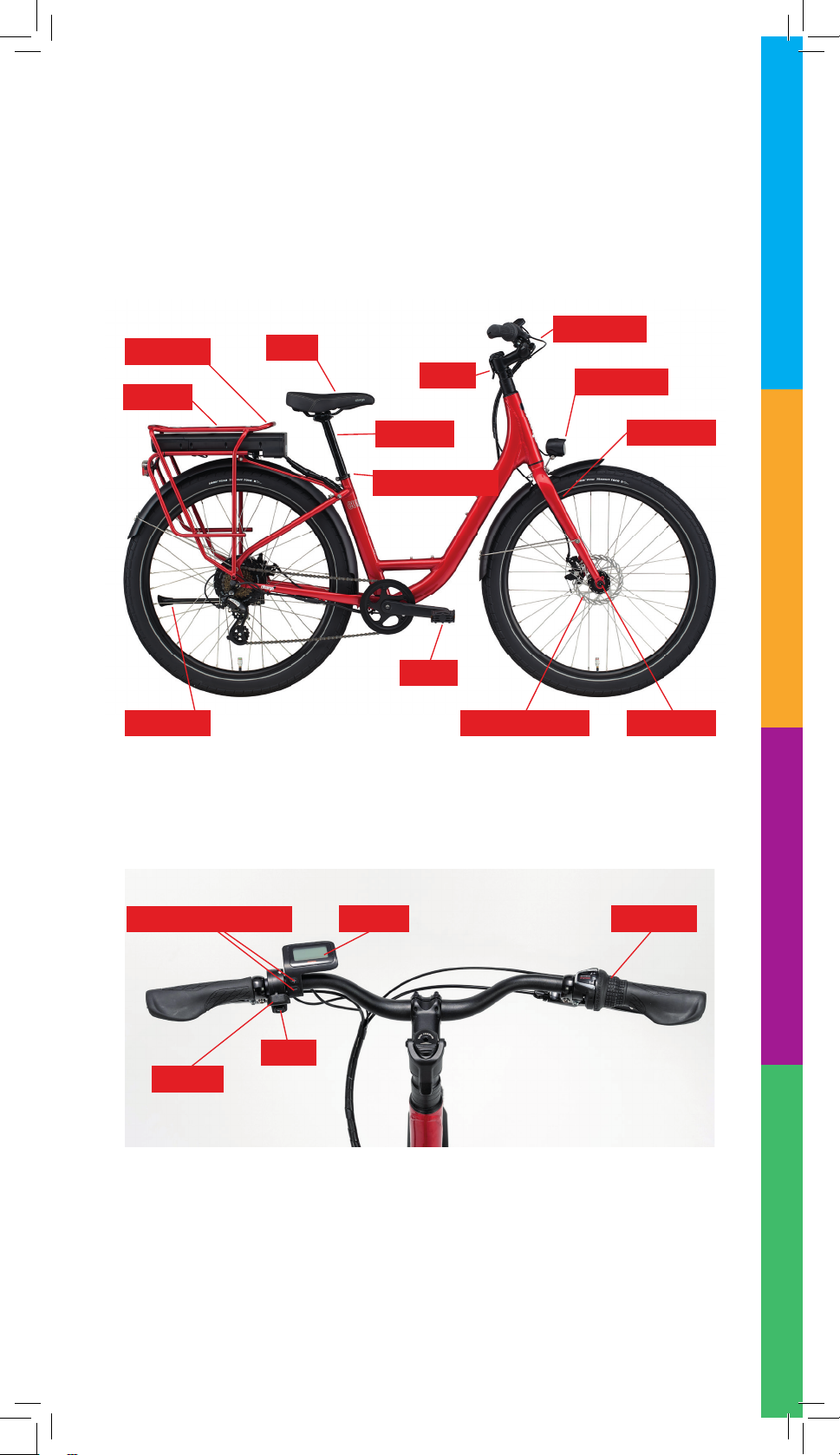
Key Pas of the Bike Referenced
in This Guide
Seat
Stem
Handlebars
Pedal
Batery
Front Light
Front Fork
Front AxleBrake Disc Rotor
Rear Rack
Seatpost
Kickstand
Pedal Assist Selectors Display Gear Shit
Horn
Throtle
Seatpost Binder
6
OFF (ready for Assembly)
This step is particularly important
to your safety. Please see the
assembly video at
help.chargebikes.com as well as
ADJUSTMENT INSTRUCTIONS:
Adjustable Stem Instructions,
in your Charge Bicycle Owner’s
Manual.
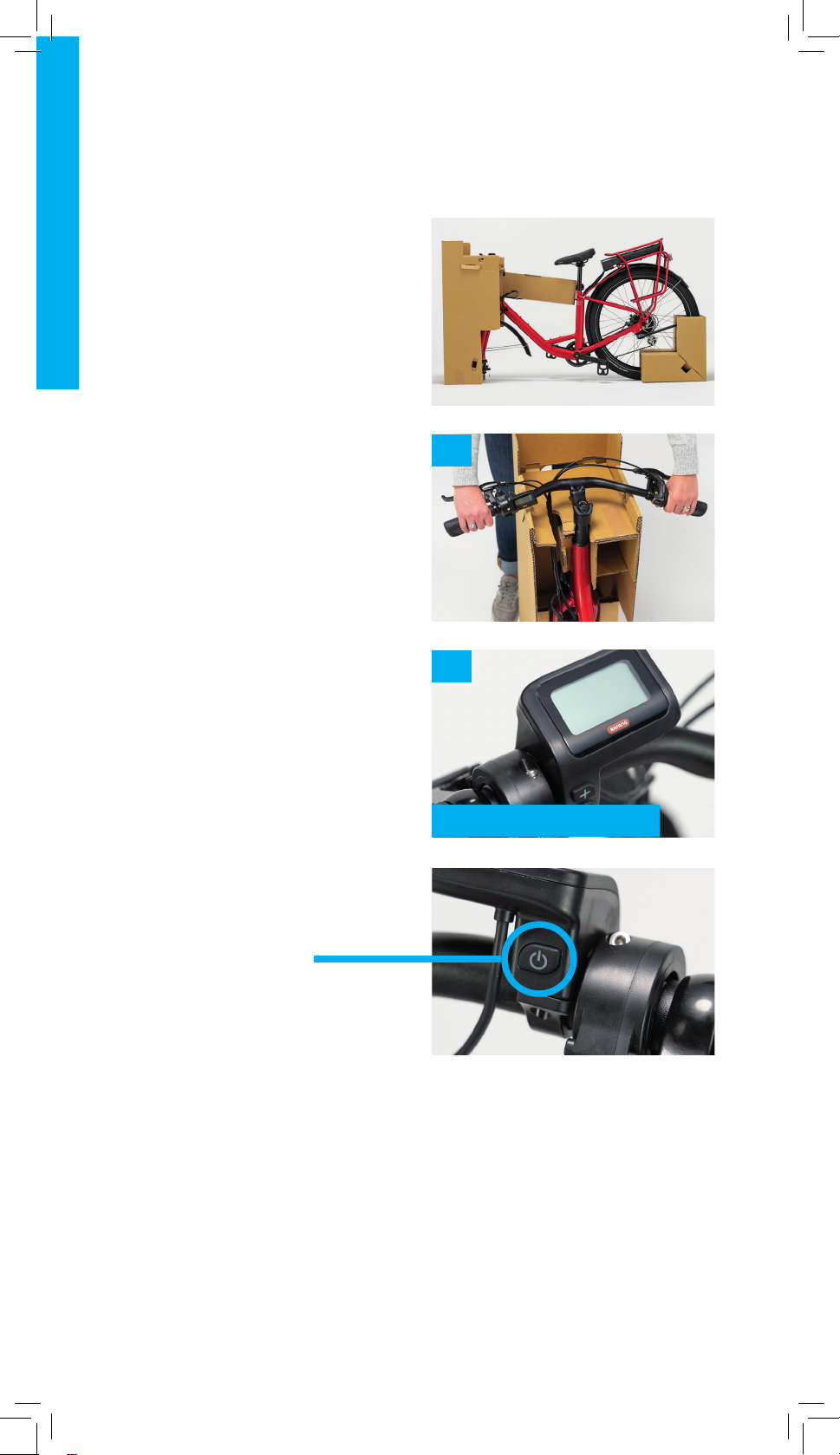
1. The handlebars are located
in a cardboard sleeve on the
right side of the bike. Slide the
handlebars out of the sleeve and
place them on the tray made by
the top of the cardboard shroud.
Make sure the wires and cables
running from the handlebars to
the bike frame aren’t twisted.
2. Ensure the power is OFF
before continuing assembly by
confirming the handlebar display
is blank. (If power is on, press
and hold the power buton until
the display shuts of.)
3. Find the stem faceplate and the
four, 4mm stem bolts located in
the parts box.
Step 1: Install the Handlebars
1
2
Power buton

7
4
4. Slide the handlebars so they
are tight against the bike stem.
5. While holding the bars against
the stem, place the faceplate
on the opposite side of the
handlebars and loosely thread
the four, 4mm bolts into the four
holes on the stem (two above
the handlebars and two below).
6. Move to the back of the bike and
slide the cardboard wheel block
of the rear wheel, then put the
kickstand down.
7. Move to the front of the bike and
remove the cardboard shroud
from around the front of the bike.
The kickstand will keep the bike
from falling over.
5
6
7

8
8. Grab the torque wrench from the
parts box.
9. Use the positioning guide sticker
to center the handlebars. When
looking at the bike from the front,
the sticker should be just to the
let of the stem and the “Center”
mark should be in-line with the
gap between the stem and
faceplate. No part of the sticker
should be under the stem.
10. If you prefer the handlebars to be
a bit closer or a bit farther away,
you can rotate them forward or
backward to the desired position,
using the face of the stem and
the positioning guide sticker as
reference.
11. Once the handlebars are in the
desired position, turn the two
top faceplate bolts clockwise,
tightening them just until the
rubber O-ring makes contact
with both the stem and stem
faceplate.
Step 1: Continued
8
11
9
10

9
12. Use the torque wrench, turn the
two botom stem faceplate bolts
clockwise, tightening them until
you hear and feel the torque
wrench click indicating the
bolts have reached the required
torque.
13. Ensure all faceplate bolts have
reached required torque by using
the torque wrench to turn the
bolts clockwise, tightening them
until you hear and feel the torque
wrench click, following the
patern in Diagram A.
Step 1: Continued
12
14
❶❸
❷❹
DIAGRAM A

10
Step 2: Install the Front Wheel
2
1
3
NOTE: The front wheel should
now stay upright on its own in the
temporary stand.
4
5
This step is particularly important
to your safety. Please see the
assembly video at
help.chargebikes.com as well as
this Quick Start Guide.
1. Use the cardboard block that
says, “Save this block” and lay it
flat on the ground with the side
that says, “This side down” flat
on the floor.
2. Insert the front wheel into the
block. Verify the disc brake rotor
is on the side marked “Brake Disc
This Side”.
3. Place the front wheel and the
wheel stand in front of the bike.
Verify the front wheel disc brake
rotor is on the same side as the
kickstand.
4. Locate the front fork spacer
and place your foot on top.
5. Holding the handlebars, lit the
bike up to remove the spacer.
Table des matières


