
CenterVue drs plus Manuel utilisateur

DRSplus –Operating Manual
1/58
Operating Manual

DRSplus –Operating Manual
2/58
MANUAL INFORMATION
Date of release:
December 14, 2019
Revision Number:
4
Reference software version:
1.4
Manufacturer:
CenterVue S.p.A.
Via San Marco 9h, 35129 Padova –ITALY
Tel. +39 049 501 8399
Fax +39 049 501 8398
The information in this manual are correct at the date of issue of the manual. The device configuration
can change as product improvement are incorporated and this manual may not exactly depict your
device. Please contact the customer service if you have any questions about differences.

DRSplus –Operating Manual
3/58
CONTENTS
1. Introduction ................................................................................................................................................... 5
2. Symbols.......................................................................................................................................................... 6
2.1 Symbols used on the device.................................................................................................................. 6
2.2 Other symbols found in this manual..................................................................................................... 6
3. Product description........................................................................................................................................ 8
4. Labels ........................................................................................................................................................... 11
5. WARNINGS AND PRECAUTIONS................................................................................................................... 12
6. Notes for the operator................................................................................................................................. 14
6.1 Definitions........................................................................................................................................... 14
7. Preparation of device................................................................................................................................... 15
7.1 First usage ........................................................................................................................................... 15
7.2 Initial configuration wizard ................................................................................................................. 16
7.3 Login.................................................................................................................................................... 18
7.4 Patient list ........................................................................................................................................... 19
7.5 Navigation Bar..................................................................................................................................... 20
8. Preparation of the patient ........................................................................................................................... 21
9. Acquisition of retinal images ....................................................................................................................... 22
9.1 Configuration of Exam Parameters ..................................................................................................... 23
9.2 Automatic acquisition of images......................................................................................................... 24
9.3 “Fast” exam......................................................................................................................................... 25
9.4 “External eye” examination ................................................................................................................ 26
9.5 Stereo modality (available under license only) ................................................................................... 26
10. Patients Database ........................................................................................................................................ 27
10.1 Adding a new patient .......................................................................................................................... 27
10.2 Editing an existing patient................................................................................................................... 27
10.3 Single and multiple selection of patients ............................................................................................ 27
10.4 Deletion of patients ............................................................................................................................ 28
10.5 Export of all patients’ images.............................................................................................................. 28
11. Image review................................................................................................................................................ 29
11.1 Patient Details screen ......................................................................................................................... 29
11.2 Image review....................................................................................................................................... 31
11.3 Side-by-side image review .................................................................................................................. 32
11.4 Visual flickering of images................................................................................................................... 33
11.5 Mosaic................................................................................................................................................. 33
11.6 Remote Viewer.................................................................................................................................... 35
12. Exporting images.......................................................................................................................................... 36
13. Configuring the device................................................................................................................................. 37
13.1 Account ............................................................................................................................................... 37
13.2 Users ................................................................................................................................................... 37
13.3 Network .............................................................................................................................................. 38
13.4 Date and time...................................................................................................................................... 39
13.5 Security ............................................................................................................................................... 39
13.6 Export.................................................................................................................................................. 40
13.7 Printers................................................................................................................................................ 41
14. Utilities......................................................................................................................................................... 42
14.1 Assistance............................................................................................................................................ 42
14.2 Backup................................................................................................................................................. 43

DRSplus –Operating Manual
4/58
14.3 Restore................................................................................................................................................ 44
14.4 Reset ................................................................................................................................................... 45
14.5 Licenses ............................................................................................................................................... 45
14.6 Update................................................................................................................................................. 46
14.7 More.................................................................................................................................................... 46
14.8 Demo dataset...................................................................................................................................... 47
14.9 Optical head position .......................................................................................................................... 47
15. Power-off ..................................................................................................................................................... 48
16. Cleaning ....................................................................................................................................................... 49
17. Maintenance................................................................................................................................................ 50
18. Electromagnetic Compatibility..................................................................................................................... 51
18.1 Manufacturers EMC Declaration according to ISO 60601-1-2............................................................ 51
18.2 Guidance and manufacturer declaration –electromagnetic immunity.............................................. 52
18.3 Immunity tests performance criteria .................................................................................................. 54
18.4 Wi-Fi specifications ............................................................................................................................. 55
18.5 FCC (USA) and IC (Canada) radio certification..................................................................................... 56
19. Technical Specifications ............................................................................................................................... 57
20. Disposal........................................................................................................................................................ 58
20.1 Separate collection for electrical and electronic equipment .............................................................. 58

DRSplus –Operating Manual
5/58
1. Introduction
Congratulations for choosing drsplus and its color confocal retinal imaging capabilities.
The drsplus is intended for the acquisition of colored images of the retina without the use of a
mydriatic agent. More specifically, the drsplus provides colored images of the retina with a field of
view of 45° x 40°, in fully automatic mode. The device includes a dedicated software application and
operates as a stand-alone unit.
The clinical interpretation of images acquired by the drsplus must be carried out
exclusively by ophthalmologists.
The ophthalmologist is responsible for any diagnosis based on drsplus results.
Use of the device is strictly limited to suitably trained operators.

DRSplus –Operating Manual
6/58
2. Symbols
2.1 Symbols used on the device
The meaning of the symbols adopted in the device labels is as follows:
Symbol
Explanation
Information about the Manufacturer.
Manufacturing date (year/week).
Electrical and electronic waste is destined for separate recycling.
Refer to the Operating Manual.
CE mark: the device complies with the essential requirements of the European
Medical Devices Directive 93/42/EC.
Type B Applied Part.
Non-ionizing radiation - ME EQUIPMENT that includes RF transmitters.
Direct current.
Power button. See the device back panel (Fig. 7).
2.2 Other symbols found in this manual
Symbol
Explanation
Important Information.

DRSplus –Operating Manual
7/58
General Warning, read carefully.

DRSplus –Operating Manual
8/58
3. Product description
The drsplus consists of:
❖The device (with a lens cap for shipping only) (Fig. 1);
❖Cables protection shell (Fig. 2);
❖Device stand (Fig. 3);
❖Headrest with silicon cushion (Fig. 4);
❖External power supply (Fig. 5) which includes a country-specific power cable.
Fig. 1 –drsplus device
Fig. 2 –Cables protection shell
Fig. 3 –Device stand
Fig. 4 –Headrest
Fig. 5 –External power supply

DRSplus –Operating Manual
9/58
Fig. 6 –drsplus
Fig. 7 –Back Panel
Headrest
Patient side
Operator side
Touch screen
USB ports
Ethernet port
Power button
Power supply
connector
LED
Device power status
Back panel
(with shell)
DisplayPort
(version 1.0)
DRSplus –Operating Manual
10/58
The drsplus can be equipped with:
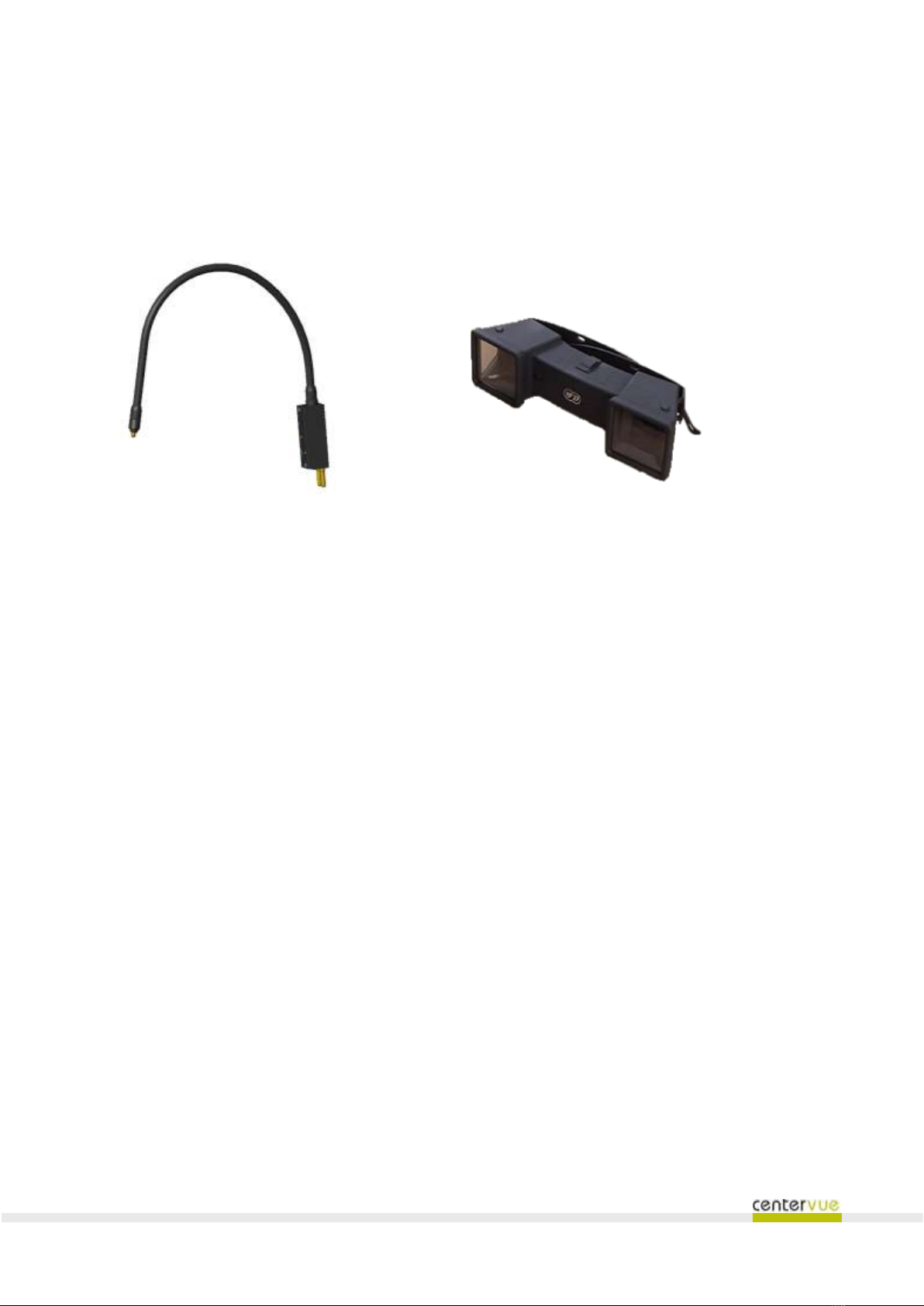
❖External fixation light (Fig. 8);
❖Prismatic goggles for stereo view (Fig. 9).
Fig. 8 –External fixation light
Fig. 9 - Stereo goggles
The drsplus is provided with:
❖This operating manual;
❖Contents list;
❖Unpacking, packing and setup manual;
❖Climatic preconditioning instructions;
❖Electrical test report.
Table des matières
Autres manuels CenterVue Équipement médical


