
Cayin SMP-PROPLUS Manuel utilisateur

User Manual
CAYIN TECHNOLOGY
CAYIN TECHNOLOGY CO., LTD.
8F, No. 577, Linsen N. Rd.
Taipei City 104, Taiwan
TEL: +886-2-25951005
FAX: +886-2-25951050
2009 ® CAYIN TECHNOLOGY CO., LTD.
All Rights Reserved
MPPO00/EN/090706
SIGNAGE MEDIA PLAYER: SMP-PRO SERIES
SMP-PROPLUS
Version 1.0
SMP-PRO3/ PRO3N
Version 2.5
Version 3.0

About CAYIN
CAYIN Technology offers a complete portfolio of digital signage solutions, including media
players, servers, and software, for various commercial applications, such as education,
transportation, retail, hospitality, corporate use, and nancial and public institutions. CAYIN
is committed to being a reliable partner to its clients worldwide, and has successfully set
up various application references internationally. In order to best facilitate the deployment
of CAYIN products, the Company also provides tailored services to satisfy the ascending
market demand for almost limitless applications.
Copyright Notice
Copyright © 2009 CAYIN TECHNOLOGY CO., LTD. All Rights Reserved.
All the contents in this manual are the intellectual property of CAYIN Technology Co., Ltd.
(“CAYIN”). No part of this manual, including the products and software described in it, shall
be reproduced, transferred, distributed, stored in any form, or translated into any language
without the prior written permission of CAYIN. Specications and information in this manual
are subject to change at any time without obligation to notify any person of such revision or
changes.
This product adopts Arphic's "iFont" technology and fonts.
Trademark Notice
All brand names, icons, and trademarks appeared in this manual are the sole property of
their respective holders.
Disclaimers
THE CONTENTS OF THIS MANUAL ARE PROVIDED “AS IS.” CAYIN MAKES NO OTHER
REPRESENTATION OR WARRANTIES, EITHER EXPRESSED OR IMPLIED WITH
RESPECT TO THE CONTENTS HEREOF AND SPECIFICALLY DISCLAIMS THE IMPLIED
WARRANTIES OF MERCHANTABILITY OR FITNESS FOR A PARTICUAL PURPOSE. IN
NO EVENT SHALL CAYIN, ITS DIRECTORS, OFFICERS, EMPLOYEES OR AGENTS BE
LIABLE FOR ANY INDIRECT, SPECIAL, INCIDENTAL, OR CONSEQUENTIAL DAMAGES
(INCLUDING DAMAGES FOR LOSS OF PROFITS, LOSS OF USE OR DATA, AND THE
LIKE), EVEN IF CAYIN HAS BEEN ADVISED OF THE POSSIBILITY OF SUCH DAMAGES
ARISING FROM ANY DEFECT OR ERROR IN THIS MANUAL OR PRODUCT.

SMP-PRO SERIES USER MANUAL
I
Contents
About CAYIN ..................................................................................... i
Copyright Notice .............................................................................. i
Trademark Notice ............................................................................. i
Disclaimers ....................................................................................... i
1. SMP-PRO Series Overview......................................................... 1
1-1 SMP-PROPLUS Appearance......................................................... 2
1-1-1 Front View (P/N: LB-300)...................................................................2
1-1-2 Rear View (P/N: LB-300)....................................................................2
1-1-3 Rear View (P/N: LB-500)....................................................................3
1-1-4 Rear View (P/N: LB-500)....................................................................3
1-2 SMP-PRO3/SMP-PRO3N Appearance.......................................... 4
1-2-1 Front View – SMP-PRO3/SMP-PRO3N (P/N: LB-400, LB-400N)......4
1-2-2 Rear View – SMP-PRO3 (P/N: LB-400).............................................4
1-2-3 Rear View – SMP-PRO3N (P/N: LB-400N)........................................4
1-3 Hardware Specications............................................................... 5
1-4 System Specications .................................................................. 6
1-5 Install SMP-PRO Series................................................................. 7
1-5-1 Install Hardware .................................................................................7
1-5-2 Login on SMP-PRO Series ...............................................................8
1-5-3 Remote PC Login.............................................................................10
2. Conguration in Wizard Mode ................................................. 11
2-1 Upload Files to SMP Player ........................................................ 12
2-2 Wizard Mode Introduction .......................................................... 14

II
SMP-PRO SERIES
USER MANUAL
2-3 Network Wizard............................................................................ 15
2-3-1 Step1: Ethernet Conguration..........................................................15
2-3-2 Step2: Wi Conguration (Optional).................................................16
2-3-3 Step3: Ping Gateway .......................................................................17
2-4 System Wizard ............................................................................. 18
2-4-1 Step1: Time & Language Settings ...................................................18
2-4-2 Step2: Display Settings....................................................................19
2-4-3 Step3: Media Folder Security Settings.............................................22
2-5 Content Update Wizard ............................................................... 23
2-5-1 Content Update Settings..................................................................23
2-6 Playback Wizard .......................................................................... 24
2-6-1 Step1: Skin.......................................................................................24
2-6-2 Step2: Multimedia 1 .........................................................................25
2-6-3 Step3: Multimedia 2 .........................................................................26
2-6-4 Step4: Image Slideshow 1 ...............................................................26
2-6-5 Step5: Image Slideshow 2 ...............................................................26
2-6-6 Step6: Ticker Text.............................................................................27
3. Multimedia Contents Playback and Management.................. 28
3-1 Upload Multimedia Contents ...................................................... 29
3-2 Choose your Skin ........................................................................ 31
3-3 Choose Media Source and Set Playlist .................................... 32
3-3-1 Play Files in Media Folder................................................................32
3-3-2 Play Files in USB Storage Device ...................................................35
3-3-3 Central Scheduling (by CMS Server) ..............................................35
3-3-4 RTB/RTP Streaming........................................................................36

SMP-PRO SERIES USER MANUAL
III
3-3-5 HTTP/MMS Streaming ....................................................................37
3-3-6 Video Input (SMP-PRO3 Only) ........................................................37
3-3-7 Image Slide Show ............................................................................37
3-3-8 Mute Function ..................................................................................38
3-4 Image Slide Show Settings......................................................... 38
3-5 Ticker ............................................................................................ 40
3-5-1 Dene Font Format .........................................................................41
3-5-2 Set Background Color .....................................................................42
3-5-3 Scrolling Effect ................................................................................43
3-6 Volume.......................................................................................... 44
4. Edit Schedule on SMP Player (Local Schedule)..................... 45
4-1 Skin ............................................................................................... 46
4-2 Multimedia Zone .......................................................................... 48
4-3 Image Slide Show Zone .............................................................. 50
4-4 Ticker Zone .................................................................................. 52
4-5 Volume.......................................................................................... 54
5. Skin Management...................................................................... 55
5-1 Create Your Own Skin ................................................................. 56
5-1-1 Install Skin Editor .............................................................................56
5-1-2 Create a new skin le (.csk).............................................................57
5-1-3 Re-adjust a skin le (.csk)................................................................63
5-1-4 Upload Clock (.clk)...........................................................................64
5-2 Upload the CAYIN Skin File into SMP........................................ 65
5-3 Apply Skin .................................................................................... 66

IV
SMP-PRO SERIES
USER MANUAL
6. Content Update and Media Folder Management.................... 67
6-1 Update Media Folder ................................................................... 68
6-2 Manage Media Folder .................................................................. 72
7. System Status and Settings..................................................... 73
7-1 System Status.............................................................................. 74
7-1-1 Basic Information .............................................................................75
7-1-2 Advanced Information ......................................................................75
7-1-3 Firmware Information .......................................................................76
7-2 System Settings........................................................................... 77
7-2-1 Set System Time..............................................................................77
7-2-2 NTP Service .....................................................................................78
7-2-3 Change Web Administrator’s Password...........................................79
7-2-4 Change Service Port of Web Manager ............................................79
7-2-5 Choose Web Manager Language ....................................................80
7-2-6 Set System Reboot ..........................................................................80
7-2-7 Frequency of Server Communication...............................................81
7-3 System Maintenance................................................................... 82
7-3-1 Upload Firmware..............................................................................82
7-3-2 Export/Import/Restore System Settings...........................................83
7-3-3 System Recovery.............................................................................83
7-4 Display Settings........................................................................... 84
7-4-1 Congure Display Properties (SMP-PROPLUS)..............................84
7-4-2 Congure Display Properties (SMP-PRO3/PRO3N)........................86
7-4-3 Turn On / Off Display........................................................................87

SMP-PRO SERIES USER MANUAL
V
8. Network Settings....................................................................... 88
8-1 Ethernet ........................................................................................ 89
8-2 Wireless Network......................................................................... 90
9. Log Management....................................................................... 91
9-1 Enable Syslog ............................................................................. 92
9-2 View Logs.................................................................................... 93
9-3 Export Log File ........................................................................... 94
10. SMP Console ........................................................................... 95
11. System Recovery .................................................................... 97
Appendix........................................................................................ 99
Use “log_rcv” to collect syslog from clients ................................ 100

SMP-PRO Series Overview
1.
1-1 SMP-PROPLUS Appearance..................................... 2
1-1-1 Front View (P/N: LB-300)............................................. 2
1-1-2 Rear View (P/N: LB-300).............................................. 2
1-1-3 Rear View (P/N: LB-500).............................................. 3
1-1-4 Rear View (P/N: LB-500).............................................. 3
1-2 SMP-PRO3/SMP-PRO3N Appearance...................... 4
1-2-1 Front View – SMP-PRO3/SMP-PRO3N (P/N: LB-400, LB-
400N)..................................................................................... 4
1-2-2 Rear View – SMP-PRO3 (P/N: LB-400)....................... 4
1-2-3 Rear View – SMP-PRO3N (P/N: LB-400N).................. 4
1-3 Hardware Specications........................................... 5
1-4 System Specications .............................................. 6
1-5 Install SMP-PRO Series............................................. 7
1-5-1 Install Hardware ........................................................... 7
1-5-2 Login on SMP-PRO Series ......................................... 8
1-5-3 Remote PC Login....................................................... 10
2
SMP-PRO SERIES
USER MANUAL
SMP-PRO Series, the dedicated digital signage media player, is a powerful zone-type
display engine for marketing and communication professionals to communicate with target
audiences in designated locations by high-quality videos, audios, graphics, and texts. SMP-
PRO Series provides an easy-to-use platform where they can promote, inform, educate,
and entertain specic audiences in a variety of commercial applications.
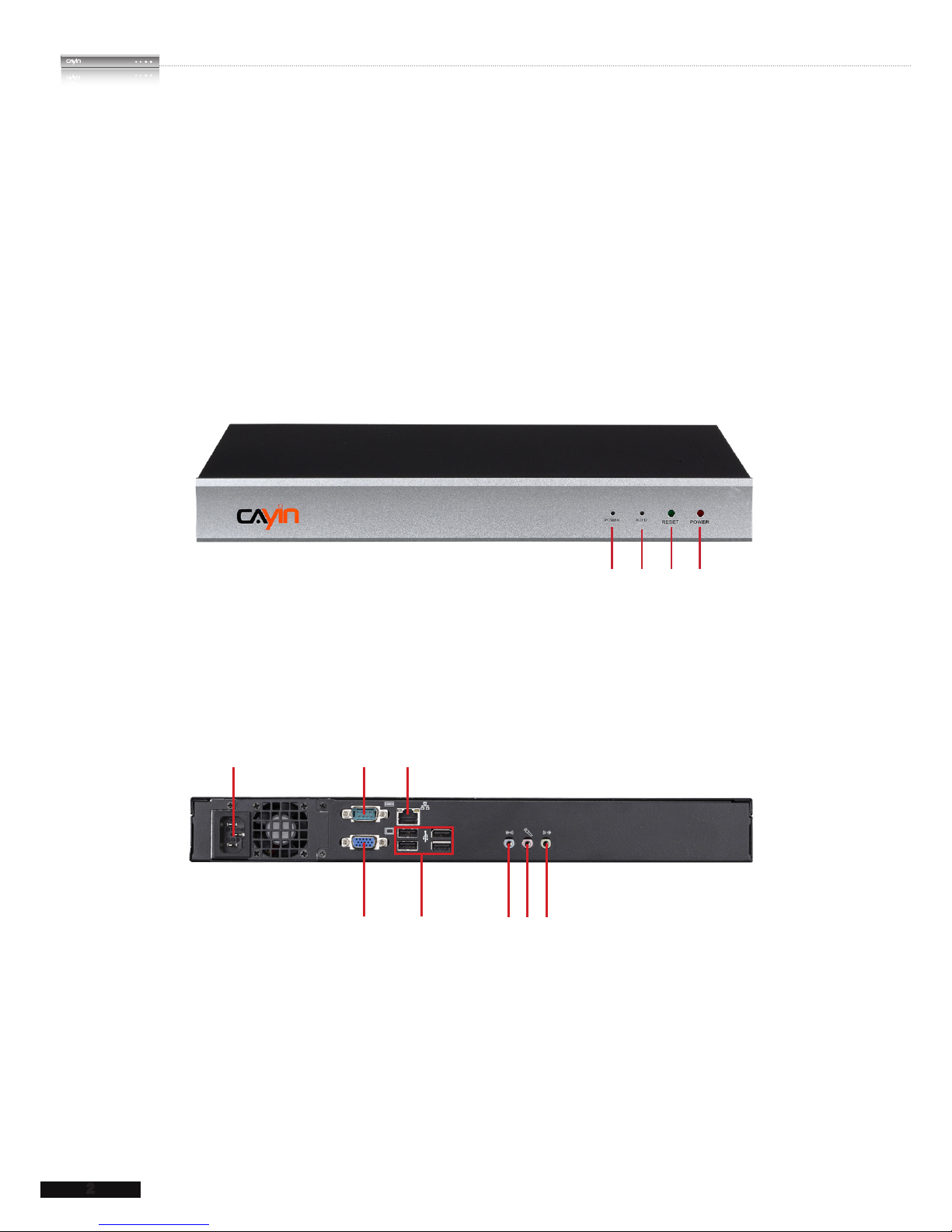
1-1 SMP-PROPLUS Appearance
1-1-1 Front View (P/N: LB-300)
1. Power Indicator 2. Hard Disk Indicator 3. Reset 4. Power
12 3 4
1-1-2 Rear View (P/N: LB-300)
1 2 3
4 5 6 7 8
1. Power Connector 2. RS-232 3. Ethernet 4. VGA
5. USB×4 6. Line-In (reserve for future use) 7. Mic-In (reserve for future use)
8. Audio-Out

SMP-PRO SERIES USER MANUAL
3
1-1-3 Rear View (P/N: LB-500)
1-1-4 Rear View (P/N: LB-500)
1. RS-232 x 2 2. VGA Connector 3. Ethernet LAN
4. USB x 4 5. PS/2 6. Power Connector
1 2 3 4 5 6
1. Power Button 2. DVI Connector 3. MIC-IN (Reserved) 4. Audio-out 5. PWR/HDD Indicator
1234 5
Autres manuels pour SMP-PROPLUS
1
Ce manuel convient aux modèles suivants
2
Table des matières
Autres manuels Cayin Lecteur multimédia

Cayin
Cayin SMP-2200 Manuel utilisateur

Cayin
Cayin N8 Manuel utilisateur

Cayin
Cayin SMP-WEB4 Manuel utilisateur

Cayin
Cayin SMP-WEBPLUS Manuel utilisateur

Cayin
Cayin SMP-8100 Manuel utilisateur

Cayin
Cayin SMP-WEB4 Manuel utilisateur

Cayin
Cayin SMP-PRO2 Manuel utilisateur

Cayin
Cayin SMP-WEB Series Instructions d'utilisation d'origine

Cayin
Cayin SMP-PROPLUS Manuel utilisateur

Cayin
Cayin SMP-PRO4 Manuel utilisateur


