captel 800 Guide de l'administrateur

305-016903 7/10
CapTel 800®
How-to Guide

CapTel is the latest innovation from
Ultratec, Inc.
450 Science Drive
Madison, WI 53711
(888) 269-7477 V/TTY
(866) 670-9134 (Spanish CapTel Customer Service)
Email: CapTel@CapTel.com
Fax: (608) 204-6167
Web: www.CapTel.com
©2010 Ultratec, Inc. All rights reserved.
Ultratec and CapTel are registered trademarks of Ultratec, Inc.
IMPORTANT! Dialing 911 in an Emergency in 1-Line Mode
To reach help as quickly as possible in an emergency, all 1-Line CapTel
calls placed to 911 connect directly to Emergency 911 Services. 911 calls
are not routed through the Captioning Service. This means:
• Emergency 911 calls are not captioned in the same manner as
regular CapTel calls.
• Emergency 911 calls are treated as Voice Carry Over (VCO) calls during
which the 911 call-taker can hear everything you say, and then types
his/her response which appears on the CapTel display screen.
• You speak directly into the handset, as you would with any other
CapTel call. The 911 call-taker will hear everything you say. You may
not be able to hear the call-taker, but he/she can type instructions
to you, which will appear on the CapTel display screen.
• Watch the CapTel display screen for information.
Dialing 911 in 2-Line Mode
If you use CapTel in 2-Line mode, calls to 911 are handled exactly the same
as if you called from any other phone connected to your telephone service.
Plus, you get captions of the call directly from the Captioning Service.
Please familiarize yourself with Dialing 911 in an Emergency on page 26.

Customer Service: 888-269-7477 CONGRATULATIONS •1
Congratulations on Choosing CapTel!
Welcome to the Captioned Telephone – CapTel! With CapTel, you can see
captions of everything people say over the phone, letting you enjoy calls
with confidence.
Please take a moment to read this guide and learn:
• How to start using your CapTel phone
• How your CapTel phone works
• How to get help when you have questions
We want the CapTel phone to be enjoyable and convenient for you.
As you use your new phone, we welcome your questions and comments.
If we can help, please call – you can even call using your new CapTel phone!
Sincerely,
CapTel Customer Service • 1-888-269-7477 • www.CapTel.com
Toll-Free Captioning Service Voice Number
Give people who call you the appropriate Captioning Service Voice Number
in order to get captions when they call you (1-Line CapTel users only).
See directions on page 19 to get captions on incoming calls.
Captioning Service Voice Number ..................1-877-243-2823
Exceptions:
Federal Relay CapTel Calls .................................1-888-801-7210
Spanish-to-Spanish Captioning Calls ....................1-866-217-3362
California Residents Only (Non-Federal) ...............1-866-399-9050
California Spanish-to-Spanish Only......................1-866-399-9090
Texas Residents Only (Non-Federal) .....................1-800-933-5129
Texas Spanish-to-Spanish Only ............................1-800-933-5417

Toll-Free Captioning Service Numbers .....................1
Overview – How CapTel Works..................................4
Section 1: Getting Started ........................................5
What is in the box.................................................................................5
Overview of CapTel 800 phone.............................................................6
Using a headset or neckloop (optional) ..............................................11
Setting up your CapTel 800 .................................................................12
Section 2: Making and Answering Calls ..................15
Placing a call with captions ................................................................16
Placing a call without captions...........................................................18
Answering a call with captions (1-Line mode) ....................................19
Answering a call without captions......................................................21
Adjusting the volume .........................................................................22
Adjusting the sound – TONE...............................................................23
Knowing when sounds are on the line ...............................................24
Using assistive devices with CapTel ....................................................25
Dialing 911 (1-Line Mode)...................................................................26
Section 3: Viewing Captions ...................................27
Reviewing captions during a call........................................................28
Reviewing captions after hanging up .................................................29
Saving conversations ..........................................................................30
Deleting all conversations ..................................................................31
Changing the caption font size ...........................................................33
Setting the color of the captions ........................................................35
Adjusting the brightness of the display screen ...................................37
Section 4: Call History ............................................39
Using Call History to view recent calls ................................................40
Clearing all Caller ID entries ...............................................................42
Section 5: Using the Phone Book ...........................43
Adding a new contact to your Phone Book ........................................44
Calling a phone number in the Phone Book ......................................46
Editing an existing contact in your Phone Book .................................47
Removing a contact from your Phone Book.......................................49
2•TABLE OF CONTENTS Customer Service: 888-269-7477
TABLE OF CONTENTS

Customer Service: 888-269-7477 TABLE OF CONTENTS •3
Section 6: Using Speed Dial Buttons.......................50
About the Speed Dial buttons.............................................................50
Saving phone numbers in the Speed Dial buttons..............................51
Editing phone numbers in Speed Dial buttons...................................52
Calling with the Speed Dial buttons ...................................................53
Section 7: Seeing Captions of Your Answering
Machine and Voice Mail Messages .........54
Seeing captions of your answering machine messages.......................55
Connecting an external answering machine.......................................56
Seeing captions of your voice mail messages .....................................57
Section 8: Settings ..................................................59
Setting the Captions Default to on/off ................................................60
Turning Spanish Captions on/off ........................................................62
Dialing a number to get an outside line.............................................64
Setting a Call Waiting block ................................................................66
Turning the ringer switch on/off ........................................................68
Changing the volume of the ringer.....................................................69
Setting the pitch of the ringer ............................................................70
Turning keypad lights on/off ..............................................................71
Using Tone or Pulse dialing ................................................................73
Updating your CapTel phone ..............................................................74
Section 9: Using CapTel in 2-Line Mode (Optional) ......76
About 2-Line mode.............................................................................77
Turning 2-Line mode on/off ...............................................................80
Turning Captions on/off in 2-Line mode ............................................82
Answering an incoming call in 2-Line mode.......................................83
Using Call Waiting in 2-Line mode......................................................84
2-Line CapTel Tips and Hints ..............................................................85
Problem Solving .....................................................86
Care & Safety Instructions ......................................89
Index ......................................................................90
Specifications .........................................................92
Getting Help..............................................Back Cover

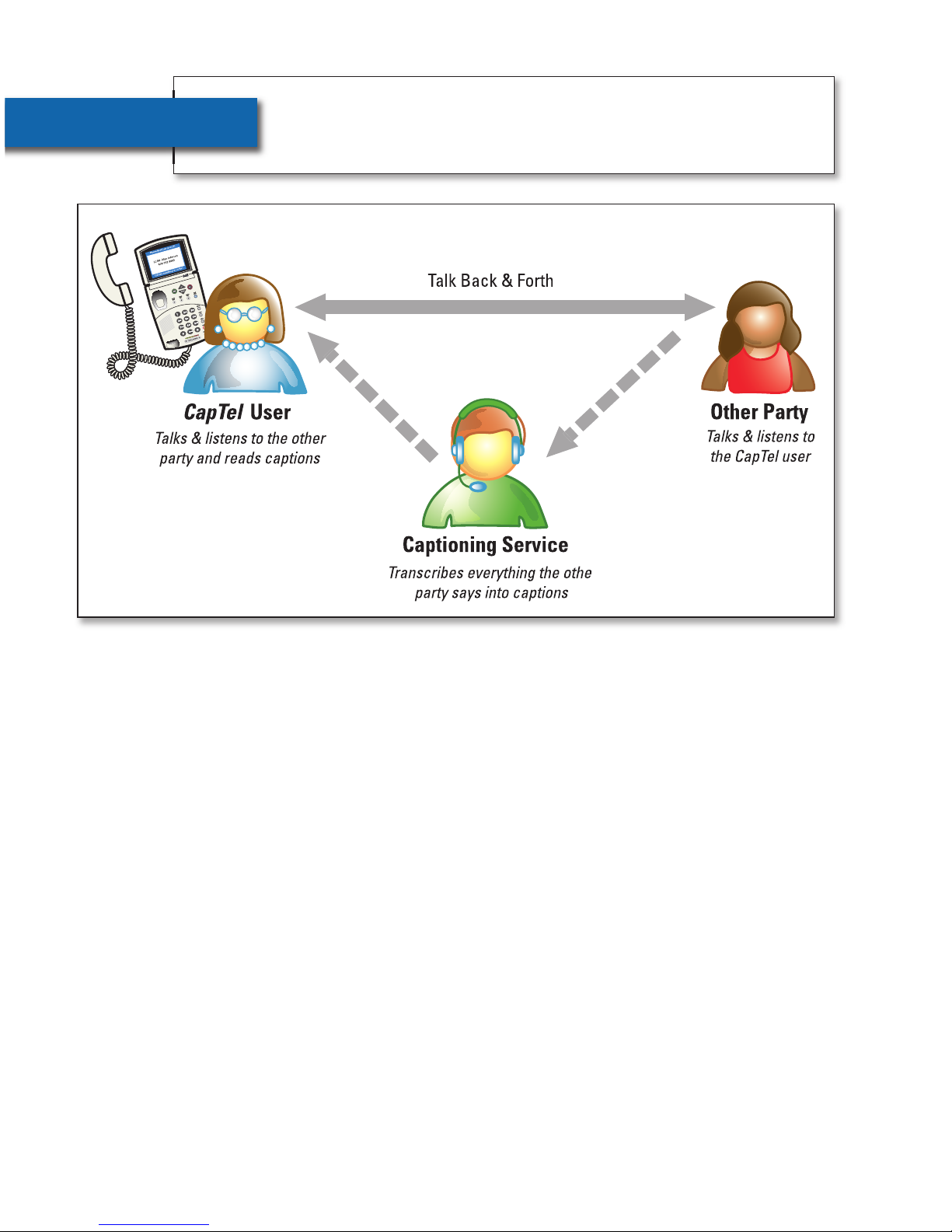
CapTel works like any other telephone, with one important difference:
it also displays written captions during your call. The captions are
provided by a free service that connects to your calls. The service
transcribes everything the other party says into captions for you to
read on the CapTel display. Captions are treated with absolute
confidentiality.
NOTE: The CapTel 800 phone does not generate captions by itself.
The phone works with the Captioning Service to display captions
during your call.
OVERVIEW How CapTel Works
4•HOW CAPTEL WORKS Customer Service: 888-269-7477

• CapTel 800 Phone
• Telephone Cord
• Power Adapter –
to plug into a
wall outlet
• User Instructions
• Warranty Card
Customer Service: 888-269-7477 GETTING STARTED •5
SECTION 1 Getting Started
This section explains how to start using your
new CapTel 800 phone.
TOPICS:
쏋What is in the Box
쏋Overview of CapTel 800 Phone
쏋Using a Headset or Neckloop (Optional)
쏋Setting up your CapTel 800
What is in the Box?
Your CapTel 800 includes the following parts:

Overview of CapTel 800 Phone
1
2
3
4
5
6
7
8
9
10
11
12
6Customer Service: 888-269-7477

Customer Service: 888-269-7477 GETTING STARTED •7
1. Display Screen
Shows captions, Caller ID, Phone Book entries and more.
2. YES Button
Allows you to access and select items in the Options list and
respond “Yes” to questions or commands on the display screen.
3. NO (Exit) Button
Allows you to respond “No” to questions or commands on the
display screen and to Exit out of the Options list.
4. UP (Back) Button
Allows you to move up through items in the Options list and move
through entries in your Phone Book or Call History. Also lets you
go back to review captions that have already scrolled off the
display screen.
4. DOWN (More) Button
Allows you to move down through items in the Options list and
move through entries in your Phone Book or Call History. Also lets
you scroll down through captions when reviewing calls.
5. CUSTOMER SERVICE Button
Our helpful Customer Service team is happy to help you set up and
use your CapTel 800 telephone – we’re only a button push away.
Pressing the CUST SERV button will automatically dial the CapTel
help line. In an office, you may need to dial 9 first.
NOTE: On-demand help is available during standard business hours,
Monday through Friday, from 8:00am – 5:00pm CST. Help materials are
also available online anytime at www.CapTel.com.

8•GETTING STARTED Customer Service: 888-269-7477
6. SPEED DIAL Buttons
You can quickly dial up to three frequently-called phone numbers
by pressing a Speed Dial button.
7. REDIAL Button
Lets you dial any of the 10 most-recently called phone numbers.
Lift the handset and press the REDIAL button to dial the last phone
number called. Leave the handset down and press the REDIAL
button to review/dial any of the last 10 numbers called.
8. FLASH Button
Some telephone service features like Call Waiting require a “hook
flash.” The hook flash is a very brief interruption of the connection
like hanging up the phone for one second. There is a brief click or
silence on the line.
9. MUTE Button
Silences the sound from your end of the conversation. When the
MUTE button is pressed (red light around the button is ON), the
person on the other end of your call will not be able to hear you.
You will still be able to hear the caller and see captions of everything
they say. To turn the Mute feature off, press the MUTE button again
(red light around the button is OFF).
Table des matières
Autres manuels captel Téléphone IP