
Callpod ONYX Manuel utilisateur

User Manual (English)

General Safety Information...........................................................................................3
Warning - Volume Levels: Always Protect Your Hearing..........................................4
About Bluetooth®Technology......................................................................................5
Headset Components..................................................................................................6
MicAlignment................................................................................................................7
Charging.....................................................................................................................8
Turning the Headset On and Off................................................................................10
Pairing the Headset & Auto Pairing.............................................................................11
Disconnecting the Headset........................................................................................12
Reconnecting the Headset.........................................................................................13
Operation.....................................................................................................................14
Adjusting The Earwrap.........................................................................................14
Placing/Answering a Call...................................................................................15
Muting The Microphone....................................................................................15
Ending/Rejecting a Call.......................................................................................15
Adjusting The Speaker Volume..........................................................................15
Advanced Features.....................................................................................................16
Walkie-Talkie Two-Way Communications...............................................................17
Table of Contents
Copyright © 2009. Patents & Trademarks Issued & Pending
callpod®1

Copyright © 2009. Patents & Trademarks Issued & Pending
callpod®2
Technical Specications.............................................................................................18
Care and Maintenance..............................................................................................19
Battery Information......................................................................................................20
Callpod®Limited Warranty..........................................................................................21
Exclusions...............................................................................................................21
Who Is Covered?.................................................................................................23
What Will Callpod Do?......................................................................................23
What Other Limitations Are There?.....................................................................25
Export Law Assurances...............................................................................................26
Approved Accessories................................................................................................26
Notice to International Users.......................................................................................27
Copyright Notice..........................................................................................................27
Product Registration....................................................................................................28
Certication...................................................................................................................29
Table of Contents
FOR THE SAFE AND SUCCESSFUL OPERATION AND USE OF THIS PRODUCT, PLEASE
READ AND FOLLOW THE INFORMATION CONTAINED IN THIS USER MANUAL BEFORE
USE.
General Safety Information
callpod®3
Copyright © 2009. Patents & Trademarks Issued & Pending
Do not open the Onyx headset as contents may cause electric shock.
Only use approved Callpod®- branded accessories and components
as well as specied compatible electronic devices to ensure proper
operation.
Please use the Onyx headset responsibly while traveling.

The successive and long-term use of any headset or speakers at high volumes
can potentially affect a user’s hearing capacity. This can result in Noise Induced
Hearing Loss (“NIHL”). NIHL may occur if a headset is used at maximum or high
volumes for more than ve (5) minutes per day and if medium volumes are used
for more than one (1) hour per day. The human ear will typically adapt to a
constant volume level set on a headset speaker. If this volume is changed to
a higher level, it may, over time, result in damage to the ear even though no
discomfort is felt. Exposure to sound at a close range, even at lower levels, could
potentially result in hearing loss. The Onyx headset can reach a maximum volume
of approximately 100 decibels. This volume is controlled by the user through both
the headset volume control as well as via the mobile device that it is paired to
(e.g. cell phone).
Like stereos and other sound emitting products that use speakers, please exercise
personal care to select a comfortable volume. Please do not use this product at
high volume levels.
WARNING - Volume Levels: Always Protect Your Hearing
callpod®4
Copyright © 2009. Patents & Trademarks Issued & Pending

Bluetooth®technology allows devices to communicate without wires over a short range. The Onyx
is compliant with Bluetooth® Specication 2.0, which supports the Headset Prole 1.1 and Hands-
free Prole 1.5.
To learn more about Bluetooth®and the applications of the technology, please visit,
www.bluetooth.com
Bluetooth is a registered trademark of Bluetooth SIG, Inc.
About Bluetooth® Technology
callpod®5
Copyright © 2009. Patents & Trademarks Issued & Pending
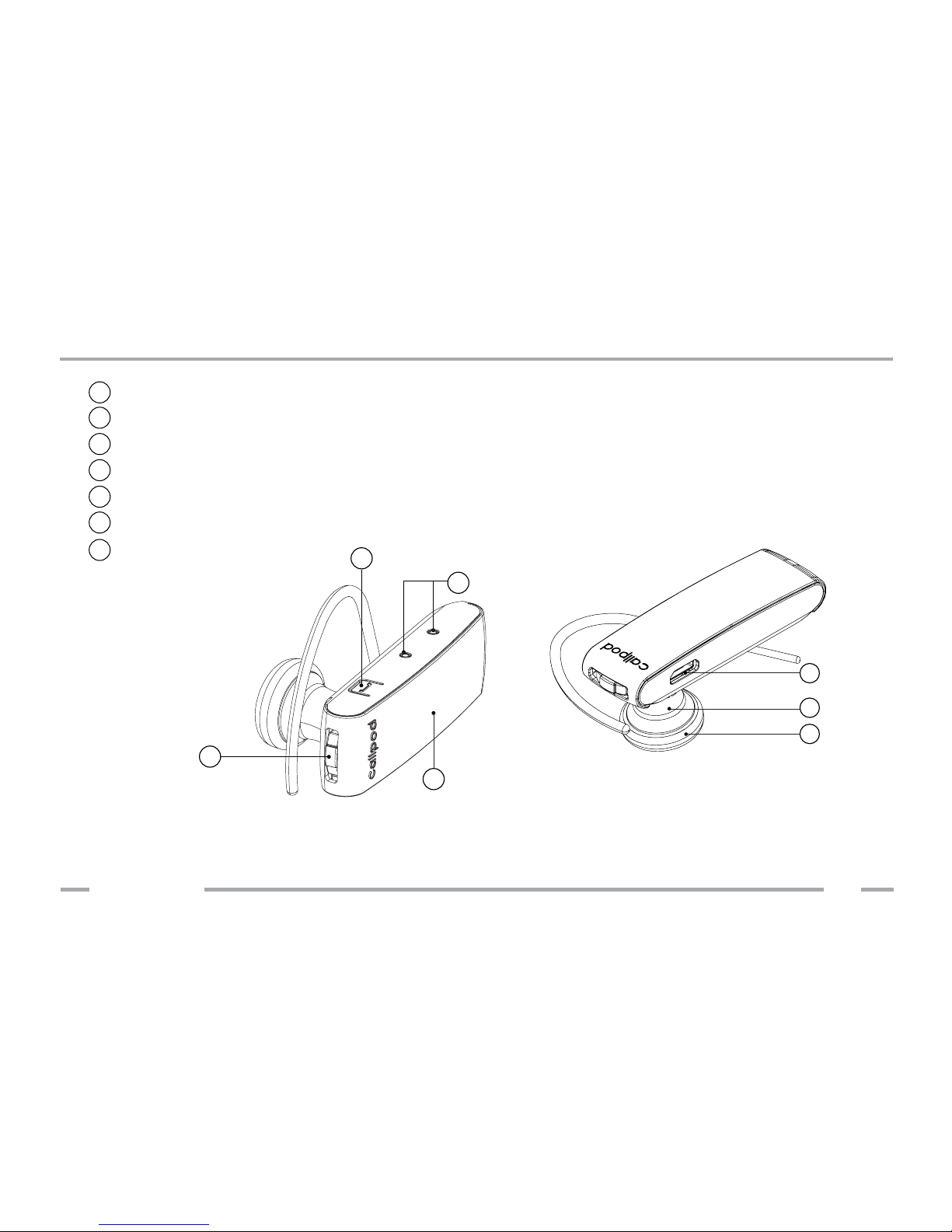
Headset Components
a Power & volume control button
b Dual microphones
cMultifunction button
d Red & ice blue LED
eCharging port
Ear bud
gSpeaker
f
g
f
e
a
d
c
b
callpod®6
Copyright © 2009. Patents & Trademarks Issued & Pending

Mic Alignment
callpod®7
Copyright © 2009. Patents & Trademarks Issued & Pending
The Onyx uses advanced Dual-mic Noise Suppression™that is always “ON.” In order
for the headset to function properly, the two microphones must be positioned
towards your mouth. This is easy to do. Once the headset is put on your ear,
simply rotate the headset towards your mouth until the ear bud is compressed
comfortably against your ear. The microphones will align automatically towards
your mouth as shown below:
30°

Before using your Callpod®Onyx headset, you must fully charge the headset.
Charge the Onyx using the included wall adapter, car charger (sold separately),
USB cable or with the Chargepod®(sold separately). The Onyx is powered by
an internal lithium-ion rechargeable battery. Please do not attempt to remove
the battery from the case, as damage will occur to the headset and void your
warranty.
The red indicator light will turn on during charging. It may take a moment before
charging starts, and it may take up to 2 hours to fully charge the battery. When
charging is complete, the red LED will turn off.
If the battery becomes low on power while the headset is in use, you will hear a
short beep every 20 seconds.
Charging
callpod®8
Copyright © 2009. Patents & Trademarks Issued & Pending

Charging
callpod®9
The charging components that are included with the Onyx allow you to charge
via USB port on your computer, AC/DC wall adapter or car charger (sold
separately).
Copyright © 2009. Patents & Trademarks Issued & Pending
car charger
AC/DC
wall adapter
computer
Table des matières


