Cabletech ANT0556 Manuel utilisateur

outdoor/indoor antenna for
digital terrestrial dVB-t2 tV
Bedienungsanleitung
Owner’s manual
instrukcja OBsługi
manual de utilizare
DE
EN
PL
RO
ant0556


Bedienungsanleitung
3
DE
Neues konzept digitale innen / aussen TV Antenne
Verstärkerversion
EINLEITUNG:
Dies ist eine speziell entwickelte Antenne für analogen und digitalen terrestrischen
HDTV-Empfang im Innenbereich oder Außenbereich. Es ist die beste Lösung
für Heim-Empfang und digitalen tragbaren TV-Empfang. Die Antenne ist
eine aktive Antenne, die mit TV- oder Set-Top-Box verwendet werden kann,
unterstützt Stromversorgung über Koaxialkabel oder über ein Netzteil für externe
Stromversorgung. Komplettes Zubehör für Wand- oder Polmontage ist im
Liefrumfang enthalten. Dank des wasserdichten und UV resistentem Gehäuse
kann die Antenne sowohl im Innenbereich sowie im Außenbereich benutzt werden.
TECHNISCHE DATEN:
• Frequenzbereich: VHF 87,5-230 MHz; UHF: 470-790 MHz
• Verstärkung: 28 dB
• Max. Ausgangspegel: 100 dBµV
• Impedanz:75Ω
• Rauschmaß:≤3dB
• Anschluss: F-Buchse
• Frequenzband: FM/VHF/UHF
• Stromversorgung: über separates AC/DC Netzgerät (DC 12 V, 50 mA) oder
über DTV Set-Top Box (DC 5 V, 40 mA)
PACKUNGSINHALT:
Bevor Sie die Installation beginnen, überprüfen Sie bitte den Packungsinhalt.
1. Antenne Hauptgerät
2. Wandmontagezubehör
3. Polmontagezubehör
4. Standfuß
5. AC/DC Netzgerät
6. DC-Strom-Versorgungseinheit
7. Koaxialkabel
PRODUKTEIGENSCHAFTEN:
SMD - Schaltungstechnik Design Tragbar für den mobilen Einsatz (Camping)
Abgeschirmt für minimale
Interferenzen
Stromversorgung über DTV-Set-Top-Box
oder separates Netzteil
Wasserdichtes und UV
resistentes Gehäuse
Elegantes und kompaktes Design
Eingebauter hoher gewinn und
rauscharmer Verstärker
Kompatibel mit DVB-T2, ISDB-T, DMB-
T/H, ATSC und DAB-Radios
Eingebauten LTE Filter
BEDIENUNGSANLEITUNG:
Hinweis: Für besten Empfang beachten Sie folgendes:
1. Halten Sie die Antenne entfernt von Störquellen: Halten Sie die Antenne entfernt von
großen Stromverbrauch Geräten, wie Klimaanlage, Aufzug, Fön, Mikrowelle, usw.
2. Stellen Sie die Antenne in der Nähe von Fenstern auf, wenn Sie die Antenne
in geschlossenen Räumen verwenden.Polebefestigungskitt Standfuß für
Innenbetrieb Koaxialkabel.
3. Installieren Sie dieAntenne so hoch wie möglich: im digitalen terrestrischen Empfang,
wennsicheinigeHindernissezwischenAntenneundSendeturmbenden,wirdes

Bedienungsanleitung
4
DEi
ANTENNENMONTAGE:
Die Antenne kann sowohl im Innenbereich sowie im Außenbereich benutzt werden,
durch das Zubehör kann die Antenne an der Wand oder Pol montiert werden.
(Abb. 1) Benutzung des Polmontagezubehörs für Polmontage.
(Abb. 2) Benutzung des Wandmontagezubehörs für Wandmontage.
(Abb. 3) „F“ Stecker des Koaxialkabels
mit der „F“ Buchse der Antenne verbinden
und Wasserschutzkappe auf das Ende der
Steckverbindung aufsetzen.
Hinweis: Nachdem die Antennenmontage und
Installation beendet ist, bitte richten Sie die Antenne
in die beste Position, für klaren TV-Bild-Empfang,
danach xieren Sie die Antenne, richten Sie das
Koaxialkabel sauber, ordentlich und für Sicherheit.
Beachten Sie bitte folgende Methoden um die
Position der Antenne einzustellen:
Antenne
Koaxialkabel
Polebefestigungskit
Standfuß für
Innenbetrieb
Wasserschutzkappe
zu vorübergehenden Signalverlust führen. Also, wenn die Antenne so hoch wie
möglich installiert wird, müssen diese Störungen reduziert werden.

Bedienungsanleitung
5
DE
(Abb. 4) Mit den Befestigungsschrauben A die Antenne in vertikaler Position
ausrichten
(Abb. 5) Mit den Befestigungsschrauben B die Antenne links - rechts in horizontaler
Position ausrichten
INSTALLATION 1: STROMVERSORGUNG ÜBER DTV SET-TOP-BOX (ABB.6)
Bitte beachten Sie, in dieser Installation müssen Sie sicherstellen, dass Ihre Set-
Top-Box 5 V DC Koaxialkabel Stromversorgung Einschalten kann über den IEC-
oder F- Antennenstecker.
Schritt 1: Verbinden Sie das Koaxialkabel mit der Antenne und DTV Set-Top-Box
Schritt 2: Verbinden Sie die DTV Set-Top-Box mit Ihrem TV. Bitte stellen Sie
sicher dass die Stromversorgung über Koaxialkabel auf Ihrer STB
eingeschaltet ist. (Bitte im Handbuch der STB Funktion Koaxialkabel
Stromversorgung nachschlagen)
Schritt 3:AntenneausrichteninderbestenPositionfürTV-Empfangundxieren.
Schritt 4: Koaxialkabel sauber, ordentlich und für Sicherheit ausrichten.
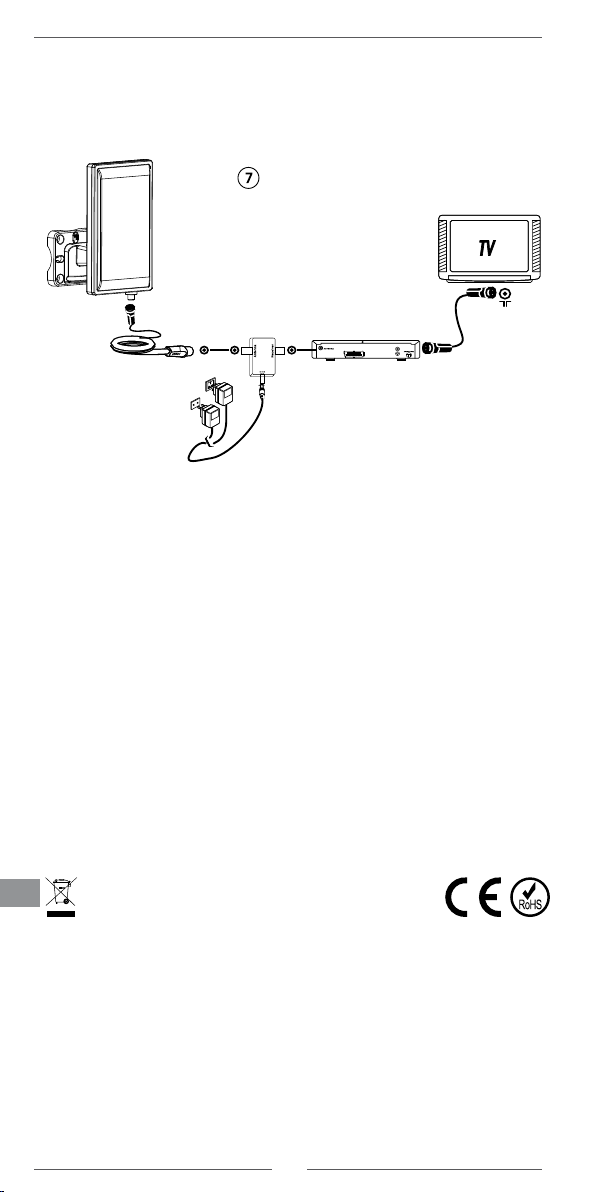
INSTALLATION 2: STROMVERSORGUNG ÜBER AC/DC NETZGERÄT (ABB.7)
Schritt 1: Verbinden Sie das Koaxialkabel mit der Antenne und DC-
Stromversorgungseinheit Seit mit „Antenne“ Beschriftet).
Schritt 2: Verbinden Sie die andere Seite der DC-Stromversorgungseinheit mit
Ihrer DTV Set-Top-Box.
Schritt 3: Verbinden Sie die DTV Set-Top-Box mit Ihrem TV.
Befestigungsschrauben A
Befestigungsschrauben B

Bedienungsanleitung
6
DEi Deutsch
Korrekte Entsorgung dieses Produkts
(Elektromüll)
(Anzuwenden in den Ländern der Europäischen Union und anderen europäischen Ländern mit
einem separaten Sammelsystem)
Die Kennzeichnung auf dem Produkt bzw. auf der dazugehörigen Literatur gibt an, dass es
nach seiner Lebensdauer nicht zusammen mit dam normalen Haushaltsmüll entsorgt werden
darf. Entsorgen Sie dieses Gerät bitte getrennt von anderen Abfällen, um der Umwelt bzw. der
menschilchen Gesundheit nicht durch unkontrollierte Müllbeseitigung zu schaden. Recyceln
Siedas Gerät,umdienachhaltige WiederverwertungvonstofichenRessourcen zufördern.
Private Nutzer sollten den Händler, bei dem das Produkt gekauft wurde, oder die zuständigen
Behörden kontaktieren, um in Erfahrung zu bringen, wie sie das Gerät auf umweltfreundliche
Weise recyceln können. Gewerbliche Nutzer sollten sich an Ihren Lieferanten wenden und die
Bedingungen des Verkaufsvertrags konsultieren. Dieses Produkt darf nicht zusammen mit
anderem Gewerbemüll entsorgt werden.
Hergestellt in China für LECHPOL ELECTRONICS Sp. z o.o. Sp.k., ul. Garwolińska 1,
08-400Miętne.
“Hiermit erklär die Firma LECHPOL ELECTRONICS Sp. z o.o. Sp.k. dass sich das Gerät
ANT0556 im Einklang mit den grundlegenden Anforderungen und anderen relevanten.
BestimmungenderRichtlinie2014/53/UEbendet.KonformitätserklärungzumDownload auf
www.lechpol.eu”
Schritt 4: Schließen Sie den Netzgerät DC-Ausgang mit dem DC-Eingang der
Stromversorgungseinheit und stecken Sie das AC/DC Netzgerät in die
220 V AC Steckdose.
Schritt 5:AntenneausrichteninderbestenPositionfürTV-Empfangundxieren.
Schritt 6: Koaxialkabel sauber, ordentlich und für Sicherheit ausrichten.

Owner’s manual
7
EN
Outdoor/indoor antenna for digital terrestrial DVB-T2 TV
Ampliedversion
INTRODUCTION:
This is an antenna for digital terrestrial TV broadcasting reception. It is the best
solution for home reception and digital portable TV reception. This is an active
antenna that can be used with TV or Set-top-box which can be powered by coaxial
cable or external power adaptor. Complete accessories are included for wall or
pole mounting. With the anti-UV and water proof housing, it can be used both
indoor and outdoor.
TECHNICAL DATE:
• Frequency range: VHF: 87,5-230 MHz; UHF: 470-790 MHz
• Gain: 28 dB
• Max. output level: 100 dBµV
• Impedance:75Ω
• Noisefactor:≤3dB
• Connector: F connector
• Receiving range: FM/VHF/UHF
• Power supply: by DTV set-top box (DC 5 V, 40 mA) or via AC/DC adapter (DC
12 V, 50 mA)
INCLUDED IN PACKAGE:
Before start your installation, please check the contents.
1. Antenna main unit
2. Wall mounting accessories
3. Pole mounting accessories
4. Support indoor use
5. AC/DC power adaptor
6. DC power insert
7. Coaxial cable
PRODUCT FEATURES:
SMD circuit technology design Stylish and compact size design
Shielded for minimum interference Built-in high gain and low noise
amplier
Portable for mobile use (camping,
boating, etc)
Anti-UV coating and waterproof
design for durability
Powered by DTV set-top box or
included separate power adapter.
Compatible with DVB-T2, ISDB-T,
DMB-T/H, ATSC and DAB radios
Built-inLTElter
OPERATION INSTRUCTION:
Note: For the best reception, please check the following conditions
1. Keep the antenna away from the sources of interference: keep the antenna
away from those big power consumption devices, such as air conditioner,
elevator, hair dryer and microwave oven...ect.
2. Place the antenna near windows when use the antenna in indoor environment.
3. Install the antenna as high as possible: in digital terrestrial reception, if there
are some interceptions between antenna and transmission tower, it will
cause the signal loss temporary. So if the antenna is installed as high as
possible, those interceptions will be reduced.

Owner’s manual
8
ENi
MOUNTING THE ANTENNA:
This antenna can be used outdoor, with the included mounting accessories,it can
be mounted on the wall or the pole.
(Fig.1)usethepolemountingaccessoriestoxtheantennaonthepole.
(Fig.2)usethewallmountingaccessoriestoxtheantennaonthewall
(Fig.3) connect the “F” male connector of the
coaxial cable to the “F” female connector of the
antenna, and wear the water-proof cap to the end
of the connected “F” connector.
Note: After the antenna mounting is nished,
please move the antenna to a best reception
positionandthenxit.Pleasetakereferenceof
following 2 different positioning way to adjust the
antenna position.

Owner’s manual
9
EN
(Fig.4)adjustthexingscrewAtoadjusttheantennapositioninverticaldirection
(Fig.5) adjust the xing screw B to adjust the antenna position left or right in
horizontal direction
INSTALLATION1 : POWERED BY DTV SET-TOP-BOX (FIG.6)
Please be noticed, in this installation, you need to make sure that your set-top-box
can support coaxial cable 5V DC powering via the IEC or F connector to antenna.
Step 1: Connect the coaxial cable with antenna and DTV set-top-box
Step 2: Connect the DTV set-top-box to your TV. Please make sure the coaxial
cable powering function of your STB is ON. (Please check The operational
manual of your STB for coaxial cable powering function)
Step 3: Adjust the antenna in the best position that can get clear TV picture, then
xtheantenna
Step 4: Organize the Coaxial Cable for neat, tidy and safety.
INSTALLATION 2: POWERED BY AC/DC ADAPTOR (FIG.7)
Step 1: Connect the coaxial cable with antenna and the power insert (the side with
“antenna” text mark).
Step 2: Connect the other side of power insert to DTV set-top-box.
Step 3: Connect the DTV set-top-box to your TV
Step 4: Connect the power adapter DC output jack to the DC input connector of
the Power insert, and then plug the AC/DC power adapter into the AC
power socket.

Owner’s manual
10
ENi English
Correct Disposal of This Product
(Waste Electrical & Electronic Equipment)
(Applicable in the European Union and other European countries with separate collection
systems) This marking shown on the product or its literature, indicates that it should not be
disposed with other household wastes at the end of its working life. To prevent possible harm
to the environment or human health from uncontrolled waste disposal, please separate this
from other types of wastes and recycle it responsibly to promote the sustainable reuse of
material resources. Household users should contact either the retailer where they purchased
thisproduct,ortheirlocalgovernmentofce,fordetailsofwhereandhowtheycantakethis
item for environmentally safe recycling. Business users should contact their supplier and check
the terms and conditions of the purchase contract. This product should not be mixed with other
commercial wastes for disposal.
MadeinChinaforLECHPOLELECTRONICSSp.zo.o.Sp.k.,ul.Garwolińska1,08-400Miętne.
“The LECHPOL ELECTRONICS Sp. z o.o. Sp.k. company declares that product ANT0556 is
consistent with the essential requirements and other relevant provisions of directive 2014/53/UE.
The proper declaration for download from www.lechpol.eu”
Step 5: Adjust the antenna in the best position that can get clear TV picture, then
xtheantenna.
Step 6: Organize the Coaxial cable for neat, tidy and safety.
Table des matières
Langues :
Autres manuels Cabletech Antenne TV

Cabletech
Cabletech ANT0690 Manuel utilisateur

Cabletech
Cabletech ANT0633 Manuel utilisateur

Cabletech
Cabletech ANT0634-W Manuel utilisateur

Cabletech
Cabletech ANT0574 Manuel utilisateur

Cabletech
Cabletech ANT0640 Manuel utilisateur

Cabletech
Cabletech ANT0573 Manuel utilisateur

Cabletech
Cabletech ANT0670 Manuel utilisateur

Cabletech
Cabletech ANT0558 Manuel utilisateur