CAB Hermes+ Applicator 1000 Manuel utilisateur

Applicator
Operator's Manual
1000

2 2
Family Type
Applicator 1000
Edition:12/2010 - Part No. 9008937
Copyright
This documentation as well as translation hereof are property of cab Produkttechnik GmbH & Co. KG.
The replication, conversion, duplication or divulgement of the whole manual or parts of it for other intentions than its original
intended purpose demand the previous written authorization by cab.
Trademark
Centronics® is a registered trademark of the Data Computer Corporation.
Microsoft® is a registered trademark of the Microsoft Corporation.
Windows 2000®, 2003®, XP® are registered trademarks of the Microsoft Corporation.
TrueTypeTM is a registered trademark of Apple Computer, Inc.
Editor
Regarding questions or comments please contact cab Produkttechnik GmbH & Co. KG.
Topicality
Due to the constant further development of our products discrepancies between documentation and product can occur.
Please check www.cab.de for the latest update.
Terms and conditions
Deliveries and performances are effected under the General conditions of sale of cab.
Operator's Manual - Translation of the Original Version
for the following products
Germany
cab Produkttechnik
GmbH & Co KG
Postfach 1904
D-76007 Karlsruhe
Wilhelm-Schickard-Str. 14
D-76131 Karlsruhe
Telefon +49 721 6626-0
Telefax +49 721 6626-249
www.cab.de
France
cab technologies s.a.r.l.
F-67350 Niedermodern
Téléphone +33 388 722 501
www.cab.de
España
cab España S.L.
E-08304 Montaró (Barcelona)
Teléfono +34 937 414 605
www.cab.de
USA
cab Technology Inc.
Tyngsboro MA, 01879
Phone +1 978 649 0293
www.cabtechn.com
South Afrika
cab Technology (Pty.) Ltd.
2125 Randburg
Phone +27 11-886-3580
www.cab.de
Phone +86 21 6236-3161
2299 11C60
www.cabasia.net
cab (Shanghai) Trading Co.,Ltd
cab Technology Co, Ltd.
Junghe 23552, Taipei, Taiwan
Phone +886 2 8227 3966
Asia
Representatives in other countries on request.

2
3
Table of Contents
1 Introduction ............................................................................................................................................ 4
1.1 Instructions ............................................................................................................................................... 4
1.2 Intended Use ............................................................................................................................................ 4
1.3 Safety Instructions .................................................................................................................................... 4
1.4 Safety Marking ......................................................................................................................................... 5
1.5 Environment ............................................................................................................................................. 5
2 Product Description ............................................................................................................................... 6
2.1 Function ................................................................................................................................................... 6
2.2 Important Features ................................................................................................................................... 6
2.3 Technical Data .......................................................................................................................................... 6
2.4 Device Overview ...................................................................................................................................... 7
2.5 Pads ......................................................................................................................................................... 9
2.5.1 Tamp Pads.......................................................................................................................................... 9
2.5.2 Roll-on Pads ....................................................................................................................................... 9
2.5.3 Blow Pads........................................................................................................................................... 9
3 Installation ............................................................................................................................................ 10
3.1 Contents of Delivery ............................................................................................................................... 10
3.2 Piercing the Universal Tamp Pad ........................................................................................................... 10
3.3 Preparing the Applicator for Using a Tamp Pad Type 1321 ....................................................................11
3.4 Mounting the Applicator to the Printer .................................................................................................... 12
3.5 Mounting the Pad ................................................................................................................................... 13
3.6 Mounting the Stopper for the Application Mode "Blow" .......................................................................... 13
4 Conguration ........................................................................................................................................ 14
4.1 Method for Changing the Printer Setup .................................................................................................. 14
4.2 Quick Mode for Setting the Delay Times ................................................................................................ 14
4.3 Conguration Parameters of the Applicator ........................................................................................... 15
5 Adjustments ......................................................................................................................................... 16
5.1 Mechanical Adjustments ....................................................................................................................... 16
5.1.1 Moving the Pad................................................................................................................................. 16
5.1.2 Adjusting the Parallelism between Pad and Dispense Edge ............................................................ 17
5.1.3 Aligning the Blow Tube ..................................................................................................................... 17
5.1.4 Opening the Holes on the Blow Tube ............................................................................................... 18
5.1.5 Adjusting the Stopper ....................................................................................................................... 18
5.2 Pneumatic Adjustments .......................................................................................................................... 19
5.2.1 Adjusting the Pad Movement Speed ................................................................................................ 19
5.2.2 Adjusting Vacuum and Supporting Air .............................................................................................. 20
6 Operation .............................................................................................................................................. 21
6.1 Activation of Peel-off Mode .................................................................................................................... 21
6.2 Setting the Peel Position ........................................................................................................................ 21
6.3 Test Mode without Print Job ................................................................................................................... 22
6.4 Test Mode with Print Job ........................................................................................................................ 22
6.5 Standard Operation ................................................................................................................................ 23
7 Error Messages .................................................................................................................................... 24
7.1 Error Messages of the Printer ................................................................................................................ 24
7.2 Error Messages of the Applicator ........................................................................................................... 24
8 Licences ................................................................................................................................................ 25
8.1 EC Declaration of Incorporation ............................................................................................................. 25
8.2 EC Declaration of Conformity ................................................................................................................. 26
9 Index ...................................................................................................................................................... 27

4 4
1.1 Instructions
Important information and instructions in this documentation are designated as follows:
Danger!
Draws your attention to an exceptionally grave, impending danger to your health or life.
!
Warning!
Indicates a hazardous situation that could lead to injuries or material damage.
!
Attention!
Draws attention to possible dangers, material damage or loss of quality.
i
Notice!
Gives you tips. They make a working sequence easier or draw attention to important working processes.
Environment!
Gives you tips on protecting the environment.
Handling instruction
Reference to section, position, illustration number or document.
Option (accessories, peripheral equipment, special ttings).
Time Information in the display.
1.2 Intended Use
• The device is manufactured in accordance with the current technological status and the recognized safety rules.
However, danger to the life and limb of the user or third parties and/or damage to the device and other tangible
assets can arise during use.
• The device may only be used for its intended purpose and if it is in perfect working order, and it must be used with
regard to safety and dangers as stated in the operating manual.
• The device applicator mounted on a cab printer of the Hermes+ series is intended exclusively for applying suitable
materials that have been approved by the manufacturer. Any other use or use going beyond this shall be regarded
as improper use. The manufacturer/supplier shall not be liable for damage resulting from unauthorized use; the
user shall bear the risk alone.
• Usage for the intended purpose also includes complying with the operating manual, including the manufacturer‘s
maintenance recommendations and specications.
i
Notice!
The complete documentation can currently be found in the Internet.
1.3 Safety Instructions
• Before mounting the delivered components disconnect the printer from the power supply and close the shutoff
valve at the applicator.
• Only connect the device to other devices which have a protective low voltage.
• Switch off all affected devices (computer, printer, accessories) before connecting or disconnecting.
• In operation, moving parts are easily accessible.
This applies especially for the zone, where the pad is moved between the starting and the labelling position.
During operation do not reach into that zone and keep long hair, loose clothes, and jewelry distant. Before any
manipulations in those areas, close the shutoff valve.
• The device may only be used in a dry environment, do not expose it to moisture (sprays of water, mists, etc.).
1 Introduction

4
5
• Do not use the device in an explosive atmosphere.
• Do not use the device close to high-voltage power lines.
• Perform only those actions described in this operating manual.
Work going beyond this may only be performed by trained personnel or service technicians.
• Unauthorized interference with electronic modules or their software can cause malfunctions.
• Other unauthorized work on or modications to the device can also endanger operational safety.
• Always have service work done in a qualied workshop, where the personnel have the technical knowledge and
tools required to do the necessary work.
• There are various warning stickers on the device. They draw your attention to dangers.
Warning stickers must therefore not be removed, as then you and other people cannot be aware of dangers and
may be injured.
1.4 Safety Marking
2
1
1: Warning to damages by moving
parts !
2: Danger of crushing to hand and
ngers by the moving pad !
Fig. 1 Safety marking
1.5 Environment
Obsolete devices contain valuable recyclable materials that should be sent for recycling.
Send to suitable collection points, separately from residual waste.
The modular construction of the print module enables it to be easily disassembled into its component parts.
Send the parts for recycling.
1 Introduction

6 6
2 Product Description
2.1 Function
The Applicator 1000 is an optional device to use with cab printers of the Hermes + series for automatically applying
the printed label onto the product. The labels are transferred with a pad, which moves between the two positions,
starting position and labelling position, by a compressed-air driven pneumatic cylinder.
• In the starting position, the label is picked up from the printer.
• A sensor at the cylinder signals when the pad is in the starting position.
• The label is removed from the carrier ribbon directly at the dispense edge of the printer. It is sucked on the pad by
a vacuum via drillings at the bottom of the pad.
• For support, the label is also blown against the pad with an air current coming from a blow tube.
• The correct transfer of the label is controlled by a vacuum sensor.
• Next, the pad is moved down into the labelling position.
• Reaching the labelling position is conrmed by another sensor (labelling position sensor).
• In the labelling position the label is transferred onto the product.
• While the pad is moving back into the starting position, the vacuum sensor checks whether the label has been
removed from the pad.
The label can be applied with three different methods :
• Stamp on
The label is pressed directly onto the product.
• Blow on
The pad moves to a pre-adjusted position approximately 10mm away from the product. The label is blown onto
the product by an air stream.
• Roll on
In the starting position the label is forwarded until touching the roller of the roll on pad. At the labelling position the
roller is pressed onto the product. Then the label is applied and rolled on by the movement of the product.
2.2 Important Features
• The supporting air and the vacuum as well as the speed of the cylinder are adjustable. That way the applicator
can be adapted to different label materials and sizes.
• The operating pressure for the cylinder is reduced in comparison to the main pressure of the applicator. So the
risk of injury is reduced as far as possible.
• To avoid contamination within the vacuum channels they are cleaned by air pressure impulse at the end of each
application.
• For operation in a system the I/O interface of the printer can be used.
2.3 Technical Data
Label transfer method Stamp on Roll on Blow on
Label width in mm 25 - 116
Label height in mm 25 - 200 80 - 250 25 - 100
Cylinder stroke in mm 220 / 300 / 400
Pad stroke below printer in mm 136 / 236 / 336 136 / 236 / 336 120 / 220 / 320
Compressed air pressure 0,4-0,45 MPa (4-4,5 bar)
Sound pressure level max. 74 dB(A)
Product surface at
Product height variable ¢ ¢ -
xed - - ¢
Product xed ¢-¢
linear movement - ¢ ¢
Table 1 Technical Data

6
7
2.4 Device Overview
1
2
3
4
5
6
7
8
9
10
7
6
11
12
5
1 Stopper for the operation mode "Blow
on"
2 Upper cylinder throttle valve
3 Knurled screw for attaching the appli-
cator to the printer
4 Setting screw to adjust the angle
between applicator and printer
5 Compressed air connector
6 Shutoff valve
7 Setting screw for vertical adjustment
8 Lower cylinder throttle valve
9 Pad (application specic)
10 Blow tube for supporting air
11 Vacuum throttle valve
12 Supporting air throttle valve
Fig. 2 Front view
2 Product Description

8 8
2 Product Description
2
13
14
1
15
8
17
10
16
1 Stopper for the operation mode "Blow
on"
2 Upper cylinder throttle valve
8 Lower cylinder throttle valve
10 Blow tube for supporting air
13 Sensor "Start Position"
14 Pneumatic cylinder
15 Interface to the printer
16 Sensor labeling position
17 Rings to reduce supporting air
Fig. 3 Rear view

8
9
2 Product Description
2.5 Pads
2.5.1 Tamp Pads
Universal tamp pad A1021 Universal tamp pad A1321
Standard sizes : 70x60, 90x90 Standard sizes : 116x102, 116x152
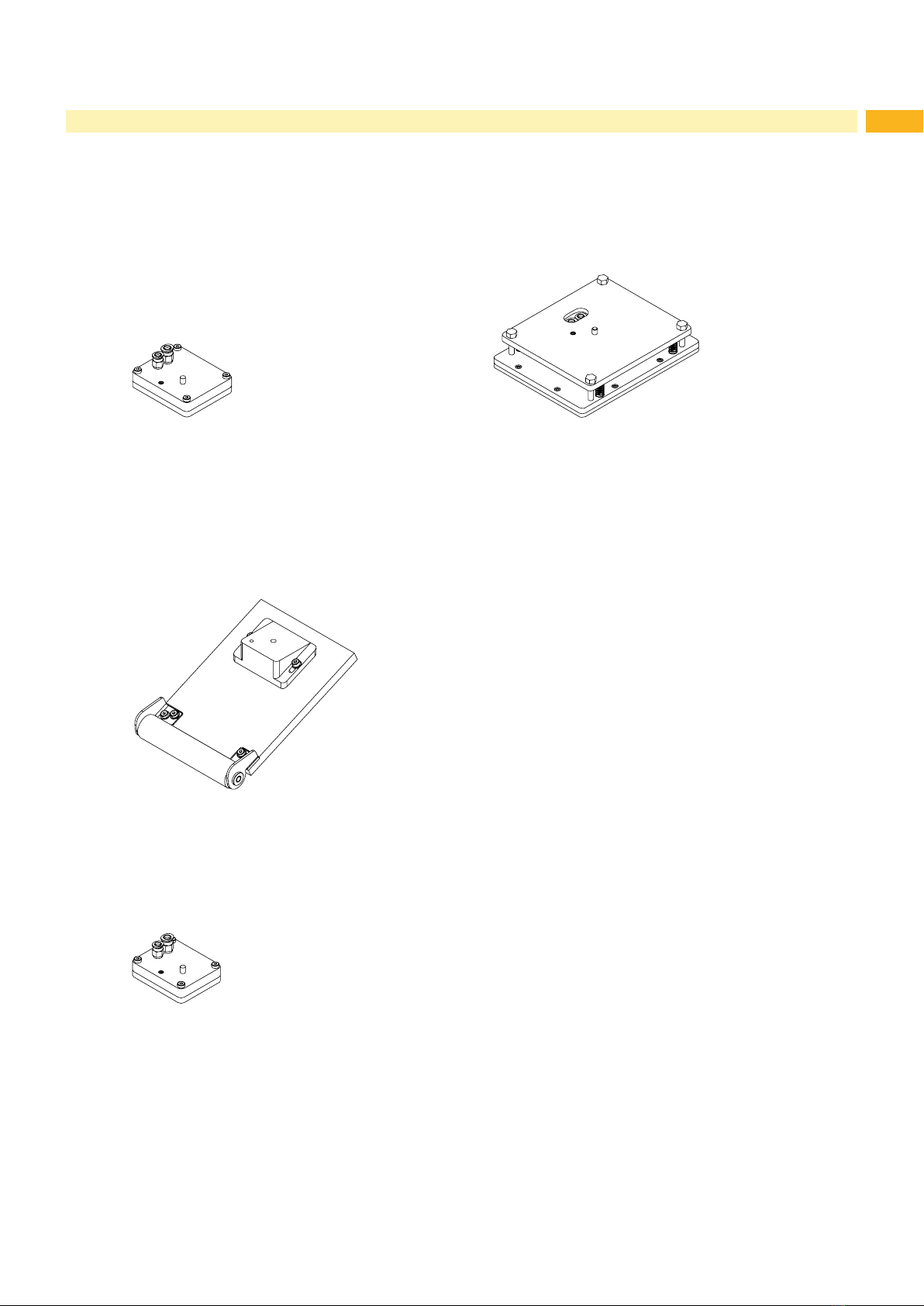
Fig. 4 Universal tamp pad A1021 70x60 Fig. 5 Universal tamp pad A1321 116x152
Universal tamp pads (Type A1112 or Type A1312) are available in different standard sizes. According to the size
of the label the holes may be pierced by the customer. For that purpose a piercing pin is included in the delivery
contents.
On request, tamp pads customized to the label sized are delivered.
2.5.2 Roll-on Pads
Fig. 6 Roll-on pad A1411 bxh
Roll-on pads (Type A1411) are only produced on request customized to the label size.
2.5.3 Blow Pads
Fig. 7 Blow pad A2021 bxh
Blow pads (Type A2111) are only produced on request customized to the label size.

10 10
3.1 Contents of Delivery
2
4
3
1
1 Applicator with lift cylinder
2 Screw
(part of the pad)
3 Pad (as ordered)
4 Piercing pin
(at universal tamp pads only)
5 Documentation
Fig. 8 Contents of delivery
iNotice!
Please keep the original packaging in case the applicator must be returned.
!
Attention!
The device and printing materials will be damaged by moisture and wetness.
Set up label printer with applicator only in dry locations protected from splash water.
3.2 Piercing the Universal Tamp Pad
On the bottom of the pads there are holes for sucking and holding the labels by vacuum. When an universal tamp
pad is delivered these holes are covered by the sliding foil and must be opened according to the label size. For that
purpose a piercing pin is included in the contents of delivery.
!
Attention!
Danger of stab injury in case of inappropriate use.
1 2 3
4
2 mm
Fig. 9 Piercing the universal tamp pad
1. Place a label (1) to be operated on the bottom side of the pad (2). Note the position of the slanted edge (3).
2. Align the label to the side edge in such a way that it reaches over the rear edge of the pad by 2 mm.
3. Open all the holes, which are certainly covered by the label. Open the holes completely by turning the piercing pin
(4) inside the holes
!
Attention!
Do not open holes, which are located less than 1 mm from a label edge.
3 Installation
Table des matières
Autres manuels CAB Accessoires pour imprimantes