
BZB Gear BG-AMPC40 Manuel utilisateur
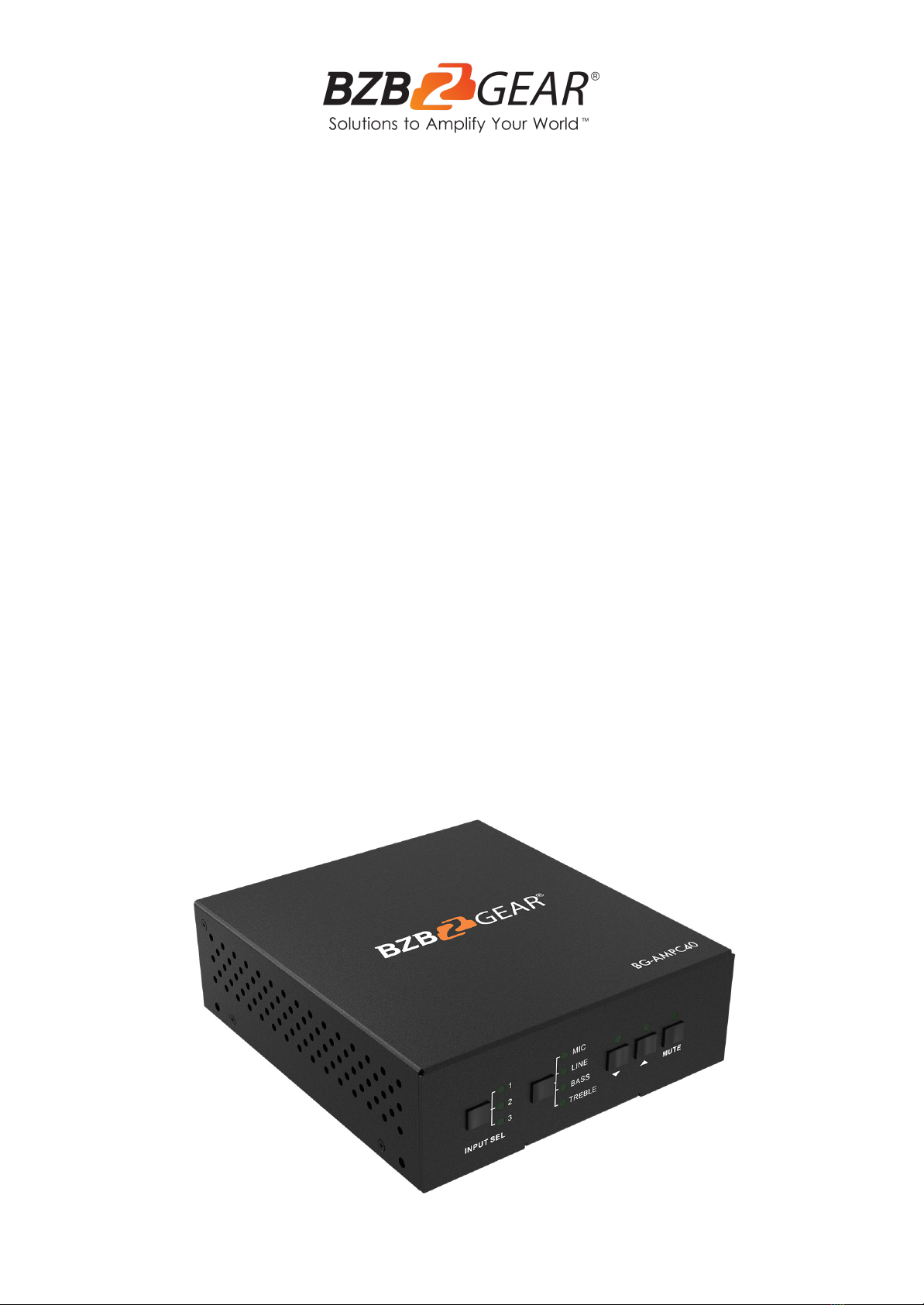
BG-AMPC40
40 Watt 70V/100V Stereo/Mono 2-Channel Audio Amplifier
with 3 Inputs
User Manual

BZBGEAR BG-AMPC40 PRODUCT MANUAL
Address: 830 National Drive #140, Sacramento, CA 95834, USA ·Tel: +1(888)499-9906 ·Email: support@bzbgear.com 2

BZBGEAR BG-AMPC40 PRODUCT MANUAL
TABLE OF CONTENTS
Statement 4
Safety Precaution 4
Introduction 5
Features 5
Packing List 5
Technical Specifications 6
Operation Controls and Functions 7
System Operation 11
RS232 13
Communication Protocol and Command Codes 14
Troubleshooting and Maintenance 16
Application Example 17
Tech Support 18
Warranty 18
Mission Statement 19
Copyright 20
Address: 830 National Drive #140, Sacramento, CA 95834, USA ·Tel: +1(888)499-9906 ·Email: support@bzbgear.com 3

BZBGEAR BG-AMPC40 PRODUCT MANUAL
Statement
Please read these instructions carefully before connecting, operating, or configuring this
product. Please save this manual for future reference.
Safety Precaution
●To prevent damaging this product, avoid heavy pressure, strong vibration, or immersion
during transportation, storage, and installation.
●The housing of this product is made of organic materials. Do not expose to any liquid,
gas, or solids which may corrode the shell.
●Do not expose the product to rain or moisture.
●Unplug this device during lightning storms
●Clean only with a soft dry microfiber cloth.
●To prevent the risk of electric shock, do not open the case. Installation and maintenance
should only be carried out by qualified technicians.
●Do not use the product beyond the specified temperature, humidity, or power supply
specifications.
●This product does not contain parts that can be maintained or repaired by users.
Damage caused by dismantling the product without authorization from BZBGEAR is not
covered under the warranty policy.
●Installation and use of this product must strictly comply with local electrical safety
standards.
●Only use accessories specified by the manufacture
●Product specifications may be subject to technical upgrades without further notice
●Do not twist or pull by force ends of the optical cable. It can cause malfunction.
●Do not hot plug when it is working.
●Information on disposal for scrapped devices: do not burn or mix with general
household waste, please treat them as normal electrical wastes.
Address: 830 National Drive #140, Sacramento, CA 95834, USA ·Tel: +1(888)499-9906 ·Email: support@bzbgear.com 4

BZBGEAR BG-AMPC40 PRODUCT MANUAL
Introduction
The BG-AMPC40 is a 40 Watt amplifier (Class-D) with alternative outputs of 70V or 100V. It
has 2 stereo inputs (1x 3.5mm stereo mini, 1x L/R RCA pair), 1 digital input, and 1 balanced
MIC. It is integrated with a ducking function, EQ control, MIC mixer, and more. The MIC
input supports 3 different connection types which are with a condenser MIC, a dynamic
MIC, and line audio input.
Features
●Mono audio output at 40 Watt.
●Switchable between 70V and 100V.
●Ducking function.
●16 ID codes for controlling multiple amplifiers.
●3-level MIC input, supports condenser microphone, dynamic microphone, and
wireless microphone.
●MIC port can support balance/unbalance signal as well as external noise
suppression.
●Two stereo audio inputs and one digital audio input. Selectable by button, IR remote,
and RS232.
●Volume/Bass/Treble controlled by buttons, IR remote, and RS232.
●Fast switching speed for good performance.
●Convection cooler; fan is not needed.
●LED indicator for power and working status.
●Antistatic case design to provide protection for long-term and stable performance.
Packing List
●1x 40 Watt Power Amplifier
●2x Mounting ears with 4 Screws
●4x Plastic Cushions
●2x Pluggable Terminal Blocks
●1x RS232 Cable
●1x Power Adapter (DC 24V 2.71A)
●1x User Manual
●1х Quick Start Guide
Address: 830 National Drive #140, Sacramento, CA 95834, USA ·Tel: +1(888)499-9906 ·Email: support@bzbgear.com 5
BZBGEAR BG-AMPC40 PRODUCT MANUAL
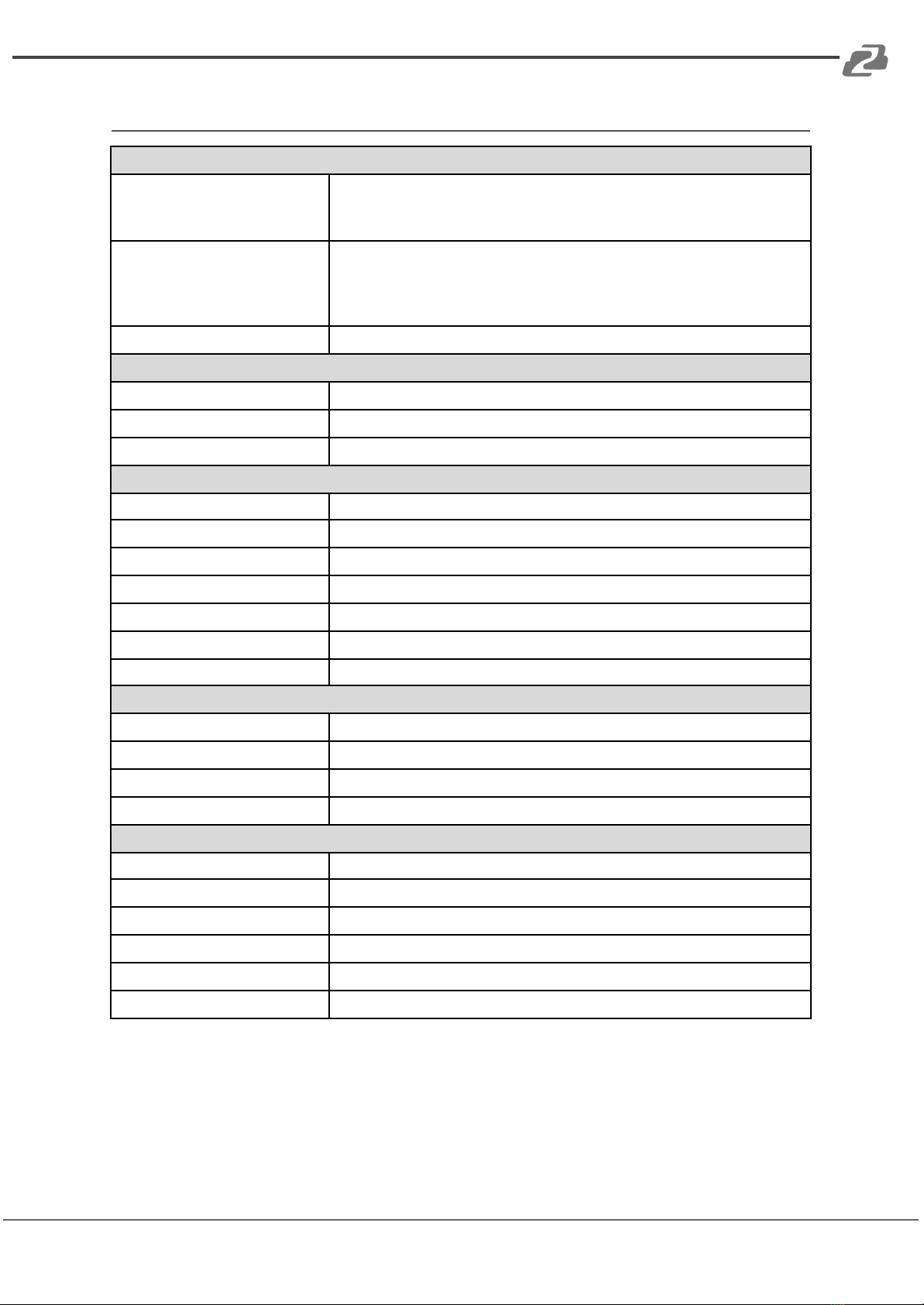
Technical Specifications
Audio Input
Input
(2) Stereo Audio
(1) MIC
(1) Digital Fiber Audio
Input Connector
(2) RCA
(1) 3.5mm Jack
(1) 3-pole 3.81mm Captive Screw Connector
(1) SPF Fiber Connector
Input Impedance
>10KΩ
Audio Output
Output
(1) Mono Amplifier
Output Connector
(1) 3-pole 3.81mm Captive Screw Connector
Output Type
Constant voltage 70V or 100V.
Audio General
Frequency Response
120Hz ~ 20KHz
CMRR
>70dB@20Hz~20KHz
SNR
80 dB (Max)
Bandwidth
120Hz ~ 20KHz
Rated Power Output
40Watt
THD + Noise
1%@1KHz, 0.3%@20KHz at nominal level
Voltage Gain
26dB
Control Function
RS232 Control
(1) 3-pole 3.81mm Captive Screw Connector
Front Panel Control
Buttons
ID Code Control
16 ID Codes for control.
Optional
IR Remote & TCP/IP controlled by programmable interface
General
Temperature
-10 ~ +40°C
Humidity
10% ~ 90%
Power Supply
DC 24V 2.71A Power Adapter
Standby Power Consumption
5W
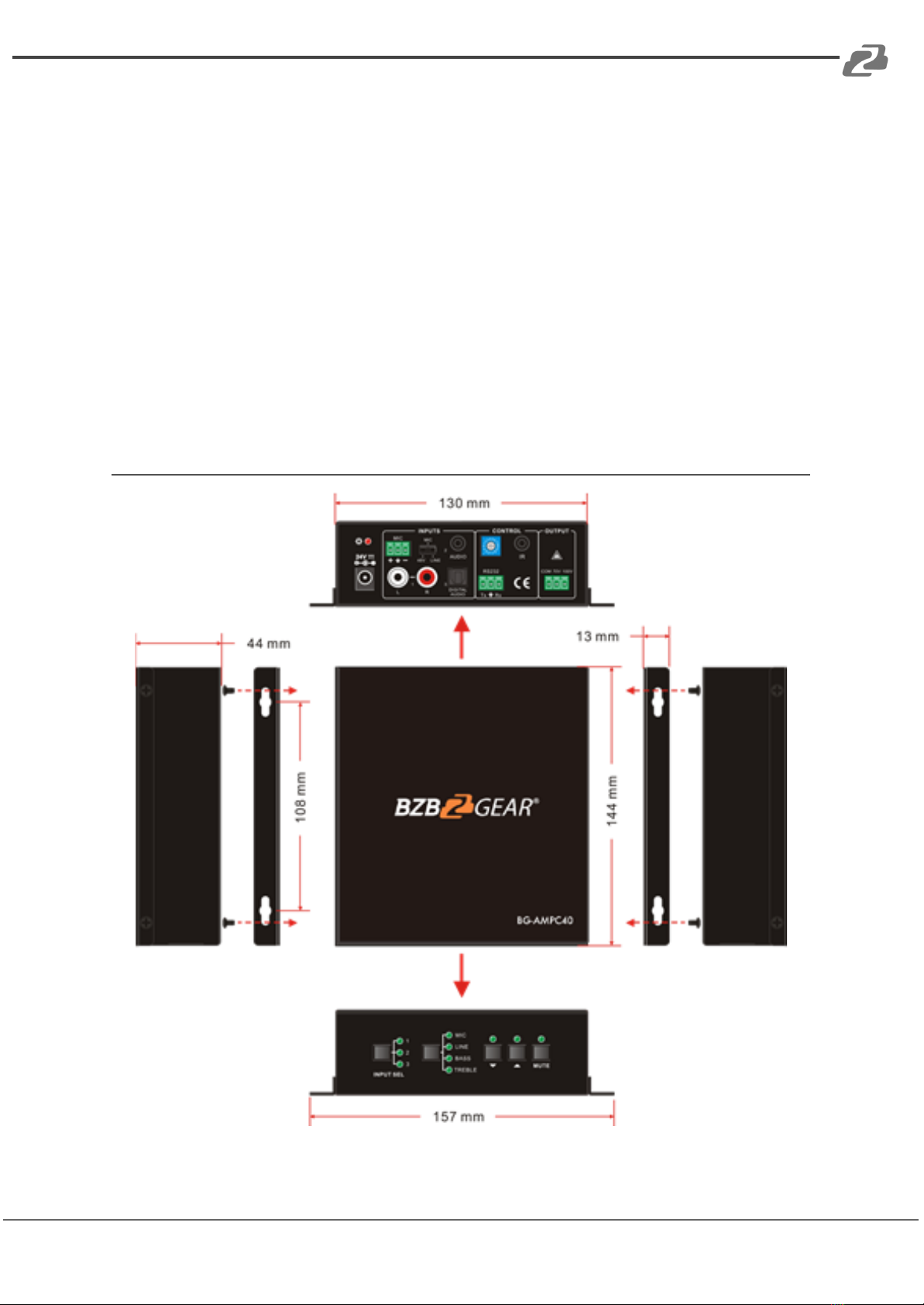
Case Dimension
W130 x H44 x D144mm (1U high)
Product Weight
860g
Address: 830 National Drive #140, Sacramento, CA 95834, USA ·Tel: +1(888)499-9906 ·Email: support@bzbgear.com 6
BZBGEAR BG-AMPC40 PRODUCT MANUAL
Operation Controls and Functions
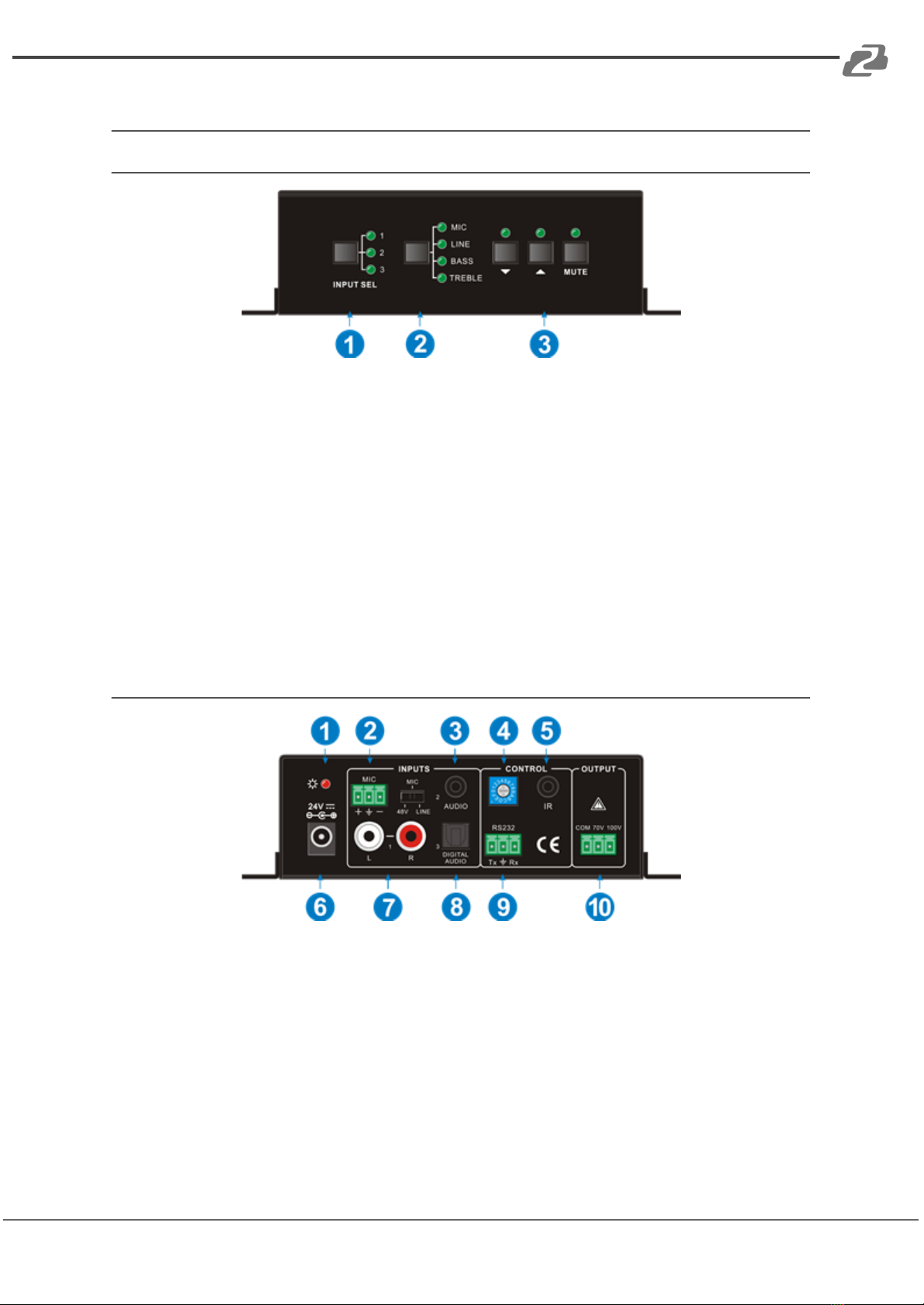
Front Panel
1. Audio Input Selection: Press the INPUT SEL button to select an input audio source,
After choosing an audio source, the corresponding LED indicator will illuminate.
No.1 is for dual mono audio input (2 RCA connectors for L&R), No.2 is for stereo
audio input (3.5mm mini jack), and No.3 is for digital fiber audio input.
2. Audio Control: Select the MIC, Line, Bass, or Treble with this button to then be able
to control their volume levels.
3. Volume Adjustment: To turn up, down, or mute the selected audio.
▽: Turn down the volume
△: Turn up the volume
MUTE: Mute the output
Rear Panel
1. Power Indicator: Illuminates red when power is connected.
2. Microphone input port: 3-pin phoenix connector for microphone input. The switch
on the right side is used to select the input type: 48V (for condenser microphone),
MIC (for dynamic microphone), and LINE (for line audio).
3. Audio Inputs: 3.5mm mini jack for stereo audio input. It can be connected with
audio source devices (e.g., DVD player).
4. ID Code: Turn the dial to select 1 of 16 codes which range from 0 to F
(hexadecimal). It is used to manage multiple units with PC control software.
Address: 830 National Drive #140, Sacramento, CA 95834, USA ·Tel: +1(888)499-9906 ·Email: support@bzbgear.com 7
BZBGEAR BG-AMPC40 PRODUCT MANUAL
5. IR: To connect with the IR receiver. Increases the range of the IR remote if the main
unit is out of line of sight.
6. Power Port: Connect with the power adapter (DC24V).
7. L+R RCA: Dual-mono audio input.
8. Digital Audio Input: Fiber connector for digital audio input (PCM format only).
9. RS232: 3-phoenix connector for serial control. It can be connected with a PC to
control the amplifier.
10. Audio Output: To connect with audio output devices such as speakers (to select
70V or 100V depends on the input voltage of the speakers). COM is for grounding
(GND).
Drawing
Address: 830 National Drive #140, Sacramento, CA 95834, USA ·Tel: +1(888)499-9906 ·Email: support@bzbgear.com 8
BZBGEAR BG-AMPC40 PRODUCT MANUAL
Audio Output
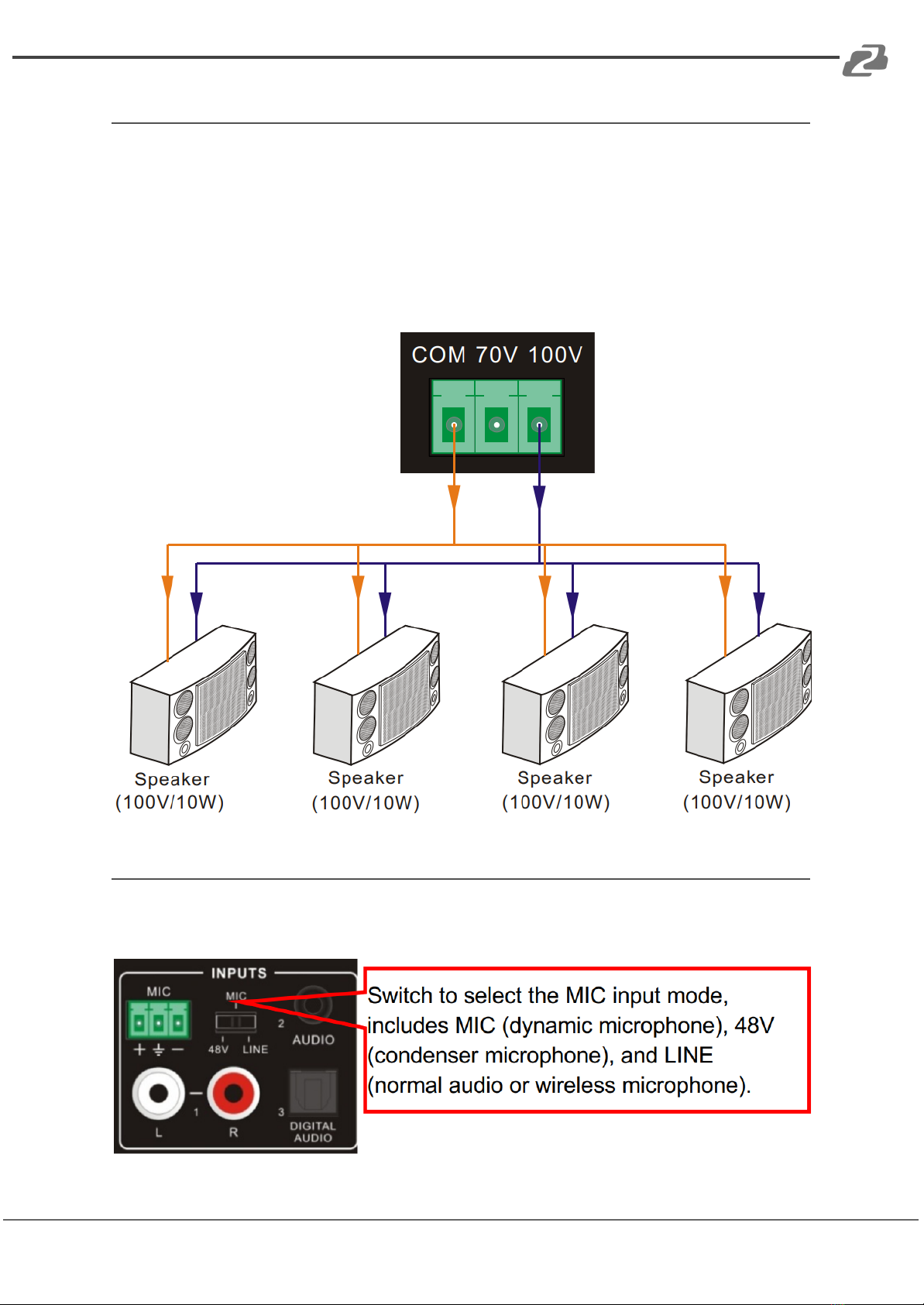
The amplifier supports mono audio output, and the output voltage is 70V or 100V. With its
dual-purpose design, it can be applied in different areas. The end COM port is for ground\.
The amplifier outputs a mono audio signal with a rated power at 40 Watts and can be
connected with several speakers in parallel wiring. Total power must not be more than 40
Watt.
The following figure shows how to connect with the speakers. Here we take the 100V/10W
speakers for each as an example.
Audio Input
The amplifier provides 2 stereo audio inputs: one microphone input and one digital fiber
audio input. The following figure shows the audio input ports.
Address: 830 National Drive #140, Sacramento, CA 95834, USA ·Tel: +1(888)499-9906 ·Email: support@bzbgear.com 9

BZBGEAR BG-AMPC40 PRODUCT MANUAL
●48V phantom power input
When the switch turns to “48V” (it has high input impedance and high sensitivity in this
mode), the MIC input will provide a 48V phantom power. This is usually used for powering
condenser microphones. Connection is: “+” connects to positive, “-” connects to negative,
and “ ” to ground.
Note: In this mode, only condenser microphones can be connected.
●MIC input
When the switch turns to “MIC” (it has a wide frequency response in this mode), the
microphone input is used for connecting dynamic microphones. There are two different
connections:
a) Unbalanced connection:
“+” and “ ” connect to ground and “-” connects to signal.
“-” and “ ” connect to ground and “+” connects to signal.
b) Balanced connection: “+” connects to positive, “-” connects to negative, and “ ”
connects to the ground.
●LINE input
When the switch turns to “LINE” (it has wide frequency response in this mode), the
microphone input is used for connecting normal audio or wireless microphone outputs.
There are two different connections:
a) Unbalanced connection:
“+” and “ ” connect to ground and “-” connects to signal.
“-” and “ ” connect to ground and “+” connects to signal.
b) Balanced connection: “+” connects to positive, “-” connects to negative, and “ ”
connects to the ground.
●Digital Audio Input
The amplifier features a TOSLINK input to connect with a digital audio source device. With
this connection the audio signal can be transmitted more reliably and can be transmitted
over a long distance without distortion.
Note: This digital audio input can support/decode PCM format signal only.
System Applications
The amplifier can be applied in different settings such as classrooms, small meeting rooms,
lecture halls, bars, and hotels.
Address: 830 National Drive #140, Sacramento, CA 95834, USA ·Tel: +1(888)499-9906 ·Email: support@bzbgear.com 10
Autres manuels pour BG-AMPC40
1
Table des matières
Autres manuels BZB Gear Amplificateur

BZB Gear
BZB Gear BG-UDAIC-E14 Manuel utilisateur

BZB Gear
BZB Gear BG-AMP2X20 Manuel utilisateur

BZB Gear
BZB Gear BG-UDA-E18 Manuel utilisateur

BZB Gear
BZB Gear BG-HDA-E14 Manuel utilisateur

BZB Gear
BZB Gear BG-DA-12GS1X2 Manuel utilisateur

BZB Gear
BZB Gear BG-AMP2X50 Manuel utilisateur

BZB Gear
BZB Gear BG-AMPC40 Manuel utilisateur

BZB Gear
BZB Gear BG-UDA-E14 Manuel utilisateur

BZB Gear
BZB Gear BG-DA-12GS1X4 Manuel utilisateur

BZB Gear
BZB Gear BG-HDA-E18 Manuel utilisateur


