Bresser T-16 Manuel utilisateur

T-16
Remote Trigger Set
Draadloze Flitstrigger Set
Funkauslöser-Set
Art. No. F004656
F004657
F004658
GB
INSTRUCTION MANUAL
NL
HANDLEIDING
DE
BEDIENUNGSANLEITUNG
Manual_F004656-F004657-F004658_T16-Trigger-Set_en-nl-de_BRESSER_v112022a.indb 1
02.11.2022 09:05:16

2
DE
Besuchen Sie unsere Website über den folgenden QR Code oder
Weblink um weitere Informationen zu diesem Produkt oder die
verfügbaren Übersetzungen dieser Anleitung zu nden.
GB
Visit our website via the following QR Code or web link to nd further
information on this product or the available translations of these
instructions.
FR
Si vous souhaitez obtenir plus d’informations concernant ce produit
ou rechercher ce mode d’emploi en d’autres langues, rendez-
vous sur notre site Internet en utilisant le code QR ou le lien
correspondant.
NL
Bezoek onze internetpagina via de volgende QR-code of weblink,
voor meer informatie over dit product of de beschikbare vertalingen
van deze gebruiksaanwijzing.
ES
¿Desearía recibir unas instrucciones de uso completas sobre este
producto en un idioma determinado? Entonces visite nuestra
página web utilizando el siguiente enlace (código QR) para ver las
versiones disponibles.
IT
Desidera ricevere informazioni esaustive su questo prodotto in una
lingua specica? Venga a visitare il nostro sito Web al seguente link
(codice QR Code) per conoscere le versioni disponibili.
www.bresser.de/PF004656
Manual_F004656-F004657-F004658_T16-Trigger-Set_en-nl-de_BRESSER_v112022a.indb 2
02.11.2022 09:05:17

3
GB
INSTRUCTION MANUAL................ 5
NL
HANDLEIDING.............................12
DE
BEDIENUNGSANLEITUNG .......... 19
www.bresser.de/warranty_terms
GARANTIE · WARRANTY · GARANTÍA · GARANZIA
RECYCLAGE (TRIMAN/FRANCE)
Manual_F004656-F004657-F004658_T16-Trigger-Set_en-nl-de_BRESSER_v112022a.indb 3
02.11.2022 09:05:20

4
A
Fig. 1
Fig. 2
B C
Fig. 3
Art. No.
F004656
F004657
Art. No.
F004656
F004657
Art. No.
F004656
F004658
Manual_F004656-F004657-F004658_T16-Trigger-Set_en-nl-de_BRESSER_v112022a.indb 4
02.11.2022 09:05:21

5
About this instruction manual
These operating instructions are to be regarded as part of the device.
Read the safety instructions and the instruction manual carefully
before using this device. Keep this instruction manual in a safe place for
future reference. When the device is sold or given to someone else, the
instruction manual must be provided to the new owner/user of the product.
Intended use
This device is for personal and private use only.
The device is intended only for indoor use.
General safety instructions
DANGER OF SUFFOCATION!
Keep packaging materials (plastic bags, rubber bands, etc.) away from
children! There is a DANGER OF CHOKING!
DANGER OF AN ELECTRIC SHOCK!
This unit contains electronic parts that are powered by a power source
(AC adapter or batteries). Only use the device as described in the
manual. Otherwise, you run the DANGER of an ELECTRIC SHOCK.
Never bend, squeeze or pull power cables, connecting cables, extensions
or connectors. Protect cables from sharp edges and heat. Check this
device, cables and connections for damage before use.
Never attempt to operate a damaged device, or a device with damaged
electrical parts! Damaged parts must be replaced immediately by an
authorized service agent.
Operate the device only in a completely dry environment and do not
touch the device with wet or damp body parts.
Never operate the device with defective or damaged components (e.g.
housing, cable, lamp or similar).
RISK OF BURNS!
Batteries do not belong in children's hands! Pay attention to the correct
polarity when inserting the batteries.
Leaking battery acid can lead to chemical burns. Avoid contact of battery
acid with skin, eyes and mucous membranes. In the event of contact
Manual_F004656-F004657-F004658_T16-Trigger-Set_en-nl-de_BRESSER_v112022a.indb 5
02.11.2022 09:05:21

6
with acid, rinse the aected areas immediately with plenty of clean water
and seek medical attention.
FIRE/EXPLOSION HAZARD!
Do not expose the device to high temperatures. Use only the supplied
AC adapter or the recommended batteries. Do not short-circuit the
device or batteries or dispose of in re! Excessive heat and improper
handling can cause short circuits, res and even explosions!
Do not subject the device to excessive vibrations.
NOTE!
Do not disassemble the device! In the event of a defect, please contact
your dealer. They will contact the Service Centre and can arrange the
return of this device for repair if necessary.
Only carry out cleaning and maintenance work on the device as
described in the Instruction manual.
Only use accessories and spare parts for this device that comply with the
technical specications.
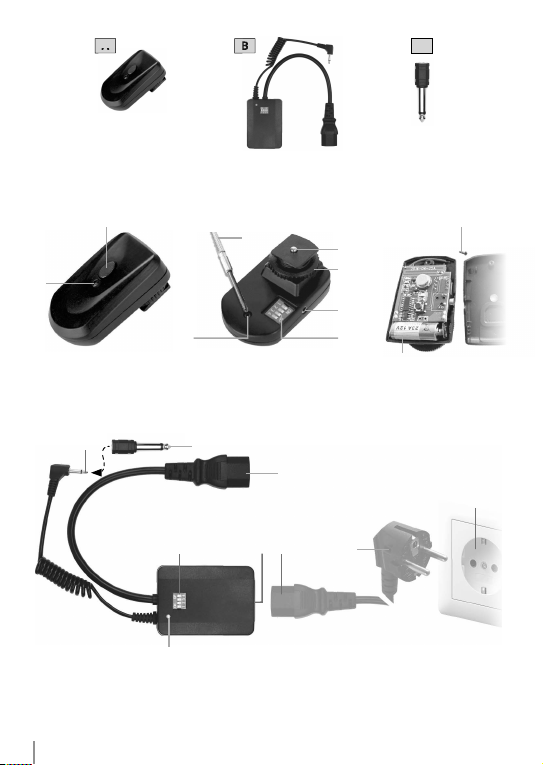
SCOPE OF DELIVERY (Fig. 1)
Transmitter (A), receiver (B), jack plug adapter (3.5 to 6.3 mm) (C), 1 x
type 23A battery (for transmitter)
Also required (not included):
Small Phillips screwdriver (X), 2 x AAA/LR03 batteries (for receiver), power
cable (from ash unit)
Overview components
Transmitter (Fig. 2)
1. Flash test button
2. Function light (transmission)
3. Cruciform screw
4. Flash contact
5. Locking wheel
6. PC connection socket
7. DIP switches (channel selection)
8. Battery holder (with battery type 23A, pre-installed)
*not included with the purchase
Manual_F004656-F004657-F004658_T16-Trigger-Set_en-nl-de_BRESSER_v112022a.indb 6
02.11.2022 09:05:21

7
Receiver (Fig. 3)
9. Jack plug 3.5mm (Sync)
10. Jack plug adapter
11. C14 IEC connector
12. DIP switches (channel selection)
13. Function light (reception)
14. C13 power socket (AC 110V - 220V)
External parts* (Fig. 3)
15. C14 IEC connector
16. Euro power plug
17. Power outlet
Assembly and power supply
Assembly and power supply of the transmitter (Fig. 2)
The transmitter is powered by a battery.
1. The transmitter is already equipped with a suitable battery at the
factory. To change the battery, use a small Phillips screwdriver* (Fig. 2,
X) to unscrew the screw (Fig. 2, 3) on the underside of the transmitter
(Fig 1, A) and open the housing.
2. Insert a 12V battery, type 23A, in the holder (Fig. 2, 8).
3. Bring the two housing parts back together and screw them together.
4. Turn the locking wheel (Fig. 2, 5) on the transmitter all the way up.
5. Slide the transmitter (Fig. 1, A) with its lightning contact (Fig. 2, 4) into
the hot shoe of the camera*.
6. Turn the locking wheel (Fig. 2, 5) downwards and hand-tighten it.
Assembly and power supply of the receiver (Fig. 3)
The receiver is powered by mains power.
IMPORTANT NOTE!
A ash unit with a C13 power socket (for C14 IEC connector) is required
for the connection.
1. Put the jack plug (Fig. 3, 9) – if necessary with attached adapter (Fig. 3,
10) – into the connection socket (sync port) on the ash unit*.
2. Put the C14 IEC connector (Fig. 3, 11) into the C13 power socket on
the ash unit*.
3. Put the C14 IEC connector (Fig. 3, 15) of the power cord* from the
ash unit* into the C13 power socket (Fig. 3, 14) on the receiver.
4. Put Euro power plug (Fig. 3, 16) of the power cord* into the mains
socket (Fig. 3, 16, A).
*not included with the purchase
Manual_F004656-F004657-F004658_T16-Trigger-Set_en-nl-de_BRESSER_v112022a.indb 7
02.11.2022 09:05:21

8
Commissioning/switching on
Channel settings using DIP switches
NOTE!
In order to enable synchronous ashing of several ash units, all
aected receivers and transmitters must be set to the same channel
using DIP switches.
Make channel settings according to the table below.
Channel Receiver Trigger/Transmitter
1
12
ON
12
ON
2
12
ON
12
ON
3
12
ON
12
ON
4
12
ON
12
ON
*not included with the purchase
Manual_F004656-F004657-F004658_T16-Trigger-Set_en-nl-de_BRESSER_v112022a.indb 8
02.11.2022 09:05:22

9
Commissioning of the remote trigger set
1. At the transmitter (Fig. 1, A) and on the receiver(s) (Fig. 1, B) set the
same channel.
2. Turn on the camera*. The function light (transmission / Fig. 2, 2)
lights up. Make the following camera settings: Recording mode 'M'
(manual), shutter speed 1/125 sec.
3. Switch on the ash unit with the receiver installed. The function light
(receipt / Fig. 3, 13) lights up.
4. Flash test button (Fig. 2, 1) to trigger a test ash. If a ash is triggered,
the connection is established and a ash can also be triggered using
the camera's* shutter release button.
Troubleshooting
Fault Possible cause Solution
After connecting the
receiver to the ash unit
and turning on the ash
unit, neither the receiver
nor the ash unit work
a) Flash unit is not on
b) Receiver is not properly
connected
a) Turn on the ash unit
b) Check connection of
the receiver to the ash
unit
After connecting the
receiver to the ash unit,
the ash unit is ready
and works normally but
the remote trigger does
not work
Remote trigger set is
defective
Contact a dealer to
arrange repair or
replacement
The receiver is operational
but the ash unit is not
a) Flash unit is not on
b) The receiver and ash
unit are not connected
properly
a) Turn on the ash unit
b) Check connection of
the receiver to the ash
unit
After pressing the ash
test button, neither
the transmitter nor the
receiver work
a) Low/No battery power
b) Flash test button is
defective
a) Replace the battery
b) Contact a dealer to
arrange repair or
replacement
*not included with the purchase
Manual_F004656-F004657-F004658_T16-Trigger-Set_en-nl-de_BRESSER_v112022a.indb 9
02.11.2022 09:05:22

10
Fault Possible cause Solution
After pressing the ash
test button, the transmitter
works but the receiver
does not
a) The channel settings on
the transmitter and the
receiver are incorrect
Set the same channels on
the transmitter and the
receiver
After pressing the ash
test button, the transmitter
works but the ash unit
does not
a) Sync connection
between the receiver
and the ash unit is not
correct
b) Flash unit is not on
a) Check the sync
connection between
receiver and ash unit
b) Turn on the ash unit
and press ash test
button to test ash
function
Cleaning and maintenance
Before cleaning, remove the transmitter from the camera and the
receiver from the ash unit. Disconnect the power supply for the
transmitter and receiver (remove the battery and pull out the mains
plug).
Clean the device only on the outside with a dry cloth. To avoid damage
to the electronics do not use cleaning uids.
Protect all components from dust and moisture!
Store all parts in the supplied packaging in a dry and dust-free place.
Remove the batteries from the device if it will not be used for a long time!
Disposal
Dispose of the packaging materials properly, according to their
type, such as paper or cardboard. Contact your local waste-
disposal service or environmental authority for information about the
proper disposal.
Do not dispose of electronic devices in the household waste!
According to the European Directive 2012/19/EU on Waste Electrical
and Electronic Equipment and its transposition into national law, used
electrical equipment must be collected separately and recycled in an
environmentally sound manner.
Batteries and rechargeable batteries must not be disposed of with
Manual_F004656-F004657-F004658_T16-Trigger-Set_en-nl-de_BRESSER_v112022a.indb 10
02.11.2022 09:05:22
Ce manuel convient aux modèles suivants
3
Table des matières
Langues :
Autres manuels Bresser Télécommande
Manuels Télécommande populaires d'autres marques

Panasonic
Panasonic EUR7622KB0 Manuel utilisateur

Bang & Olufsen
Bang & Olufsen Beo4 Manuel utilisateur

Sunwave Tech.
Sunwave Tech. RemoteComm SRC-7000 Manuel utilisateur

Multiplex
Multiplex PROFI TX 9 Manuel utilisateur

One Remote
One Remote RMB4 Manuel utilisateur

FUTABA
FUTABA 9ZAP - PART2 Manuel utilisateur