BC363-OperationGuide-v1 9
Configuration and setup options
BC363 cards have movable, internal PCB jumpers (“links”), whose positions modify the
interface’s operation. There are no other user adjustments.
There are two different versions of BC363 PCB: Issue 1 and Issue 2.
On Issue 1 cards, only one of the SFPs can be monitored at a time, and this selection is made
by the links LK2 and LK3. The SFP that is NOT to be monitored should not have a jumper fitted
to its associated link (LK2 for the INPUT SFP and LK3 for the OUTPUT SFP).
The SFP that is to be monitored should have a jumper fitted to its associated link, according to
the SFP type as indicated in the table below. If jumpers are fitted to both links (appropriate to
the type of SFP), then whether one or neither of the SFPs is reported correctly will depend on
the particular SFPs fitted. The default is that the input SFP will be monitored and so LK3 will
be set unlinked at the factory.
Issue 2 cards are able to read both SFPs separately, so both links LK2 and LK3 should have a
jumper fitted to select the type of SFP as indicated in the table below.
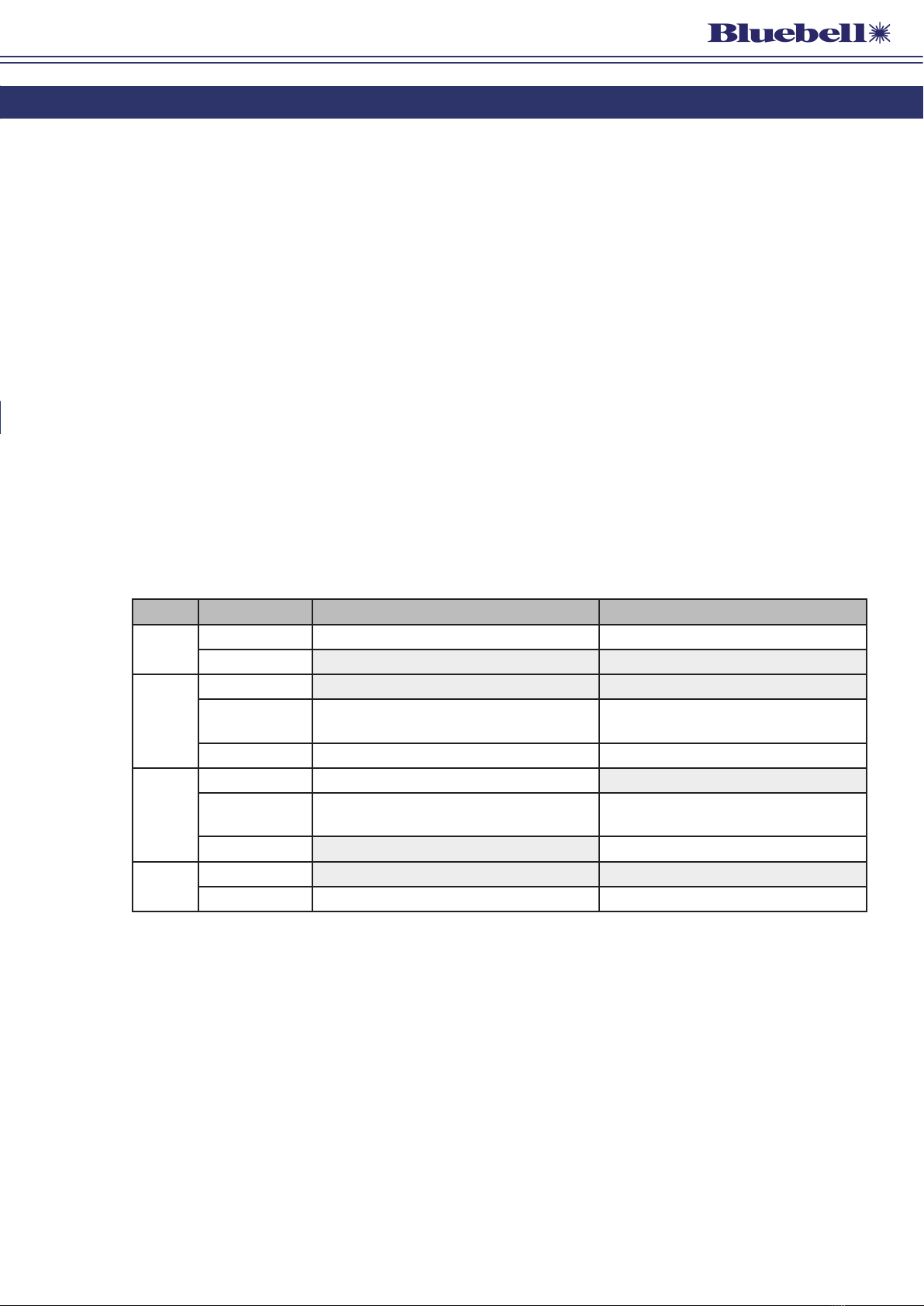
The table below summarises the jumper settings for both Issues of card. Factory default
settings are shown in Bold.
Jumper Setting Issue 1 PCBs Issue 2 PCBs
LK1 Pins 1, 2 linked Reclocking disabled* Reclocking disabled*
Pins 2, 3 linked Reclocking enabled Reclocking enabled
LK2
Pins 1, 2 linked When INPUT SFP is data type (MSA) When INPUT SFP is data type (MSA)
Pins 2, 3 linked When INPUT SFP is video type (non-MSA) When INPUT SFP is video type (non-
MSA)
No link fitted Disable INPUT SFP monitoring n/a
LK3
Pins 1, 2 linked When OUTPUT SFP is data type (MSA) When OUTPUT SFP is data type (MSA)
Pins 2, 3 linked When OUTPUT SFP is video type
(non-MSA)
When OUTPUT SFP is video type
(non-MSA)
No link fitted Disable OUTPUT SFP monitoring n/a
LK4 Pins 1, 2 linked (or no link) – EEPROM protected (or no link) – EEPROM protected
Pins 2, 3 linked For factory use only For factory use only
* When Reclocking is disabled, the S/L LED will permanently display red, indicating “not locked”.