Status Codes
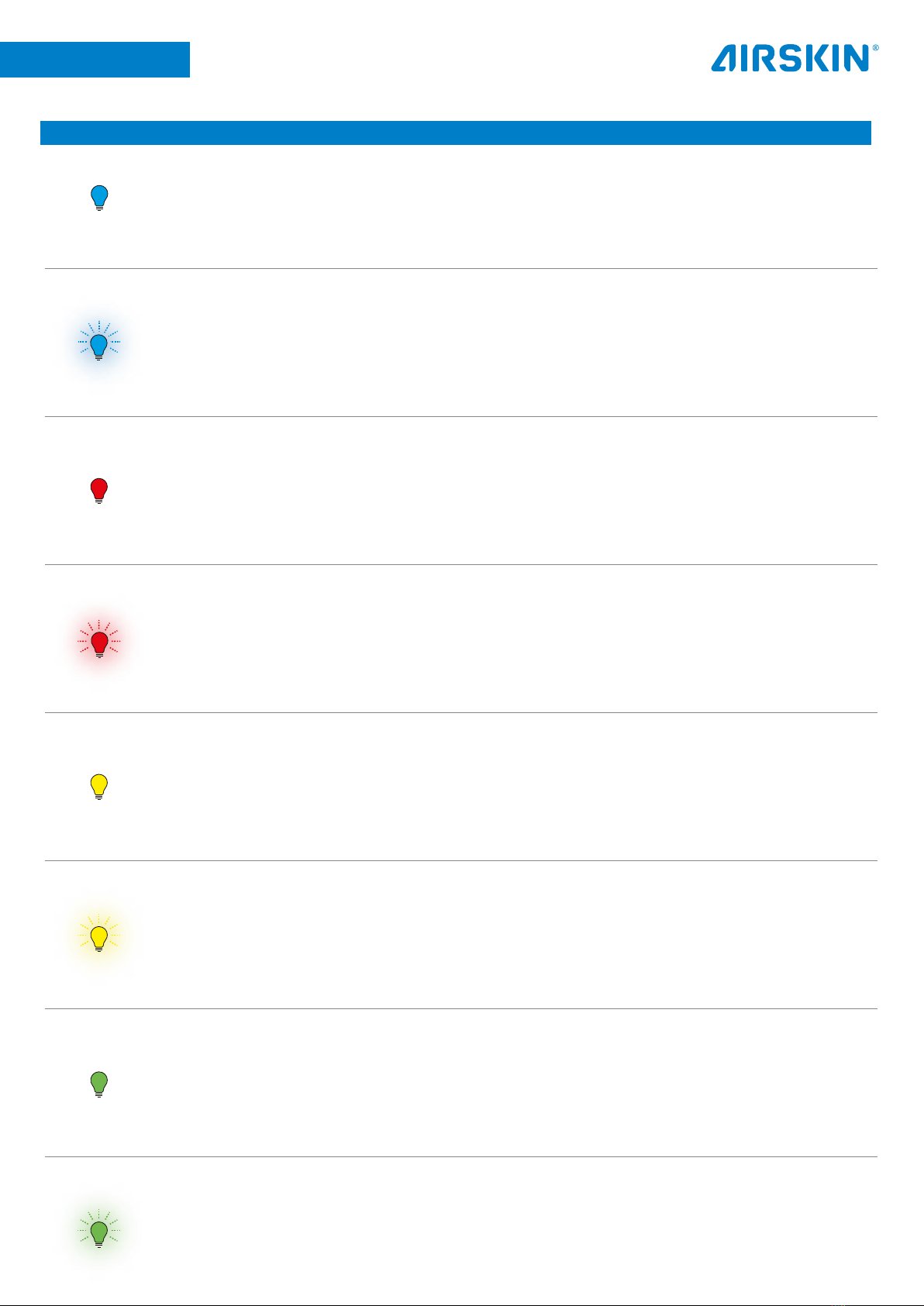
Code Meaning Action required
Blue solid AIRSKIN operational.
Red solid AIRSKIN pad is in collision Move robot out of collision.
Red blinking ERROR: AIRSKIN pad is leaking or
general error.
• Look for visual punctures or damage
- Internal precautional measures can trigger a
safe shutoff.
- Press the black button on the - AIRSKIN
Connection Module to reset.
- AIRSKIN pad is damaged, please replace
AIRSKIN pad.
Yellow solid Safety channels open.
- One pad is in collision and has red light on, see
“red solid code”.
- Magnetic connectors/cables unplugged.
- End connector not attached.
- Not all pads connected together.
Yellow blinking Safety disagreement, robot
controller is shutting down.
- Channel A or B open. Check cabling and
connection to robot controller.
- Unplug/plug external magnetic cables.
- Turn on UR controller and look for LED signals.
Green solid AIRSKIN pads are now linked
together.
Green blinking Configuration error: Number of
pads has changed.
Use AIRSKIN configurator to newly link all pads
together.
Blue blinking
Airskin pad was in collision or
had an error before powering on
and needs acknowledgement.
Press pad to acknowledge.