
Blimo Elite Manuel utilisateur

Simple User Manual
-www.blimo.se/dk/no/fi-
Before using the Blimo Elite series electric wheelchair, please read
this user manual carefully and save it for future use. If need
detailed user manual, please contact with your local distributor.
Version 1.3 January 10, 2022
MD
Portable & Foldable
wheelchair
Elite / Elite XL
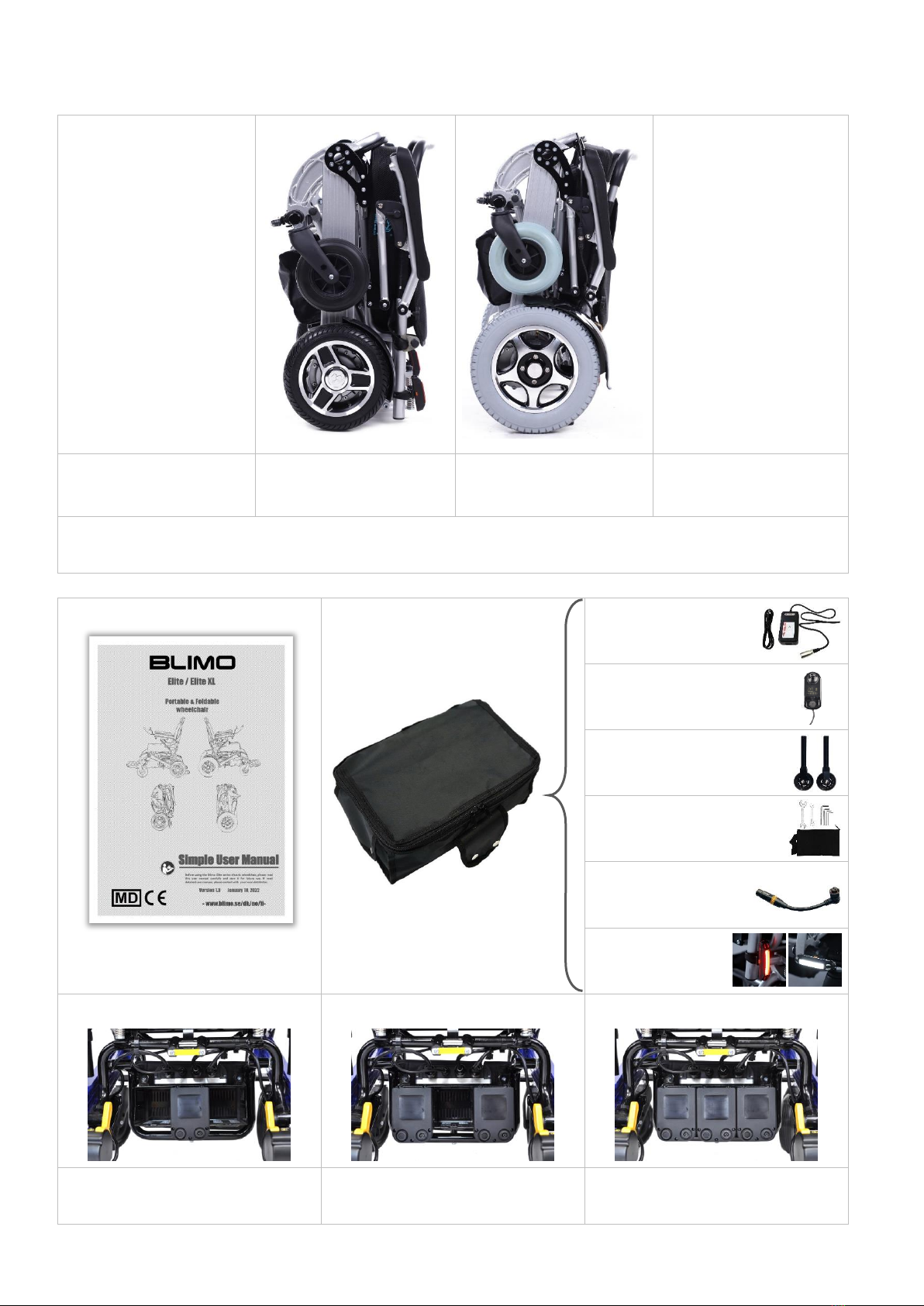
CHAPTER 1 Packing list of standard electric wheelchair
Elite
(Silver)
Elite XL
(Silver)
The image shown here is indicative only. If there is inconsistency between the image and the actual
product, the actual product shall govern.
Simple User Manual
Accessories Bag
Charger
Joystick
Anti-Tipper
Tools Bag with tools
Charging Cable
(need to buy)
Caution Lights
(need to buy)
Lithium Battery * 1pc (standard)
Lithium Battery * 2pcs (option)
Lithium Battery * 3pcs (option)

The technical improvements of products will be compiled into new version of user manual without notice.
If need detailed user manual, please contact with local distributor, digital version could be offered free.
Gösvägen 28
76141 Norrtälje,
Sweden
CHAPTER 2 Main structure and Label
Consult instructions for use
Medical Device
Caution: read instructions (warnings) carefully
Medical Device compliant with Regulation (EU)
2017/745
CHAPTER 3 Open or Fold wheelchair
Method 1 to open the wheelchair
Backrest
Front wheel
Footplate
Joystick
Lithium battery
Rear wheel
Brushless motor
Frame
Safety belt
Armrest
Please note to lock
Seat cushion
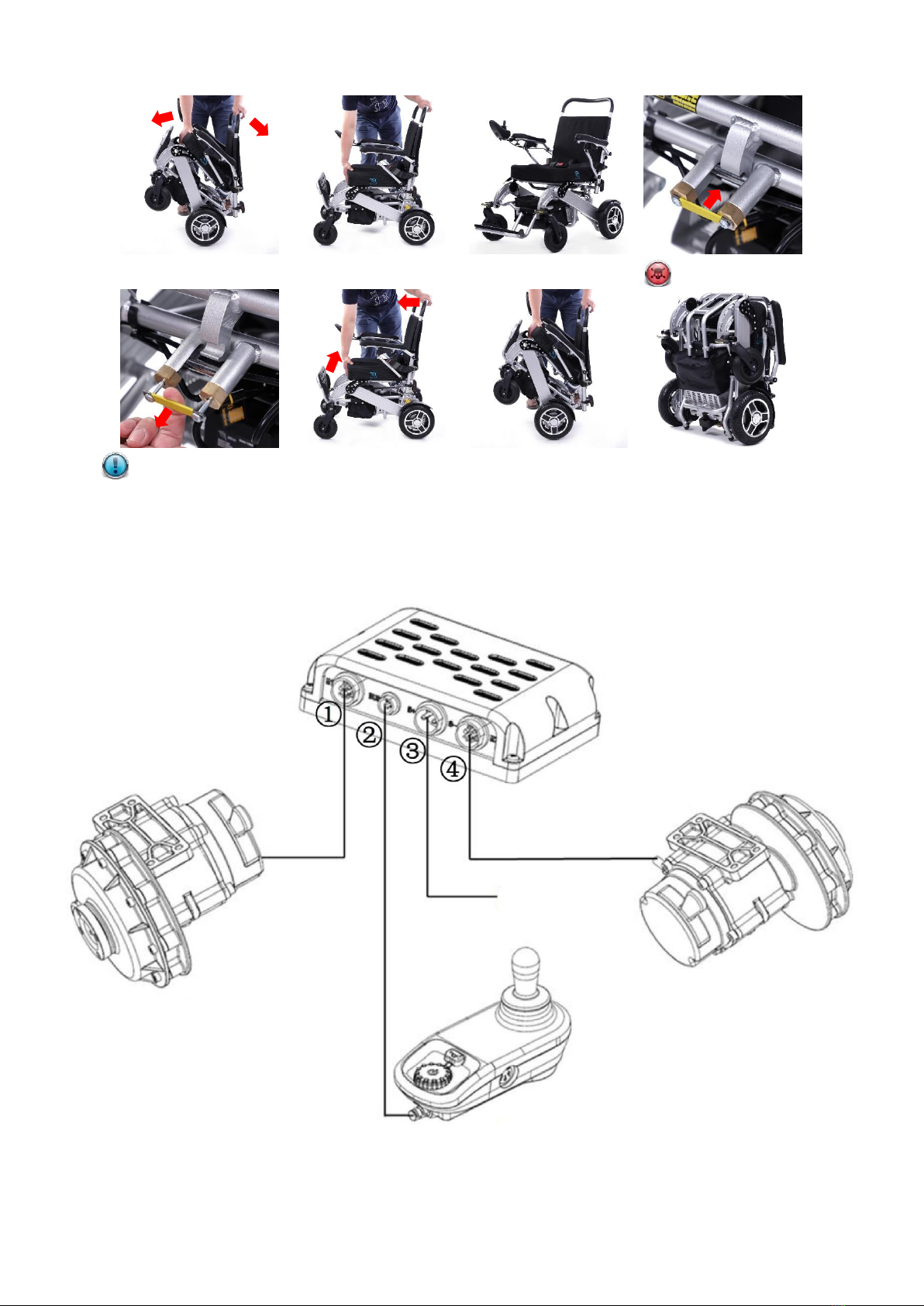
Method 2 to open the wheelchair
Fold the wheelchair
CHAPTER 4 Electrical principle diagram
Please note to lock
Please note to unlock
Right Motor
Left Motor
Controller - Joystick
Controller - Host
Lithium Battery
Voltage: 24V

CHAPTER 5 Install joystick and connect
CHAPTER 6 Install lithium battery and remove
Tighten the Knob
Loosen the Knob
CHAPTER 7 Drive and Controller Turn ON or Turn OFF
Install
Remove
LCD Brushless controller
SY-C10
Switch between
Manual & Drive
LCD Sine Wave
Brushless Motors and Controller

Function instructions of LCD brushless controller (SY-C10)
CHAPTER 8 More functions
Flip-Up armrest
Foldable footrest
Unlock
Lock
Rocker (or Joystick)
Battery energy display
Real-time display of driving speed
Adjusting of max. speed by rotation
& Power button
Display of max. speed
Horn
SY-C10
Charging & Communication port
on the right side
SY-C10 Electronic Lock Function:
Press and hold the power button 5 seconds to enter the
locking state, and the screen displays the letter LC; To
unlock, press the horn button for 5 seconds.

Height adjustable backrest
CHAPTER 9 Charging for lithium battery (Charging time usually is 2-8 hours)
Method 1 to charge by joystick (①Connect charger → ②Connect joystick → ③Connect socket)
Method 2 to charge by cable (Directly charge for lithium battery)
CHAPTER 10 Limited warranty
Warranty Items
Warranty Period
Remarks
Wheelchair frame
36 Months
This warranty does not cover
device failure due to owner
misuse or negligence, or
normal wear and tear.
Brushless motor
24 Months
Lithium battery
12 Months
Controller
12 Months
Charger
12 Months
Non-Durable parts
6 Months
1) Please confirm with your wholesaler or distributor about the starting date of warranty period.
2) User need to take the warranty card and invoice if need to repair during the warranty period. It will have to be
charged fee without warranty evidence.
3) We have to charge for labor cost and materials cost due to the expiration of warranty period, freight cost will be
paid by user.
4) Artificially damaged products and free gifts are not covered by warranty.
5) Non-Durable parts such as: plastic parts, rubber or PU parts, wheels, casters, textile parts.
Indicator light of Charger:
1) Red light on: Power on,
disconnect with the battery
2) Orange light on: Charging
3) Green light on: Full-Charged
Cautions of Charging:
1) Only for indoor use, don’t
expose to rain.
2) Please switch off the power
supply before removing the
charger from the battery.
3) Do not get closed to
explosive gases or sparks
and put the charger in a
well ventilated area during
charging.
4) Use the charger only with
24V lithium batteries.
5) Charge for battery every 3
months if don’t use the
battery for a long time.
① ② ③

CHAPTER 11 Problem diagnosis of controller SY-C10
When the fault code is displayed on the display screen of the controller, it indicates the electric wheelchair is in
abnormal condition. The meaning of the display and the recommended disposal method are shown in the table below.
Fault
Code
Flashing
State
Alarm Sound
Fault & Warning Definition
Disposal Method
C1
Long flicker
Long time alarm
Communication failure
Check if the wiring harness is
correctly installed and connected.
C2
Long flicker
Long time alarm
Joystick is not at the initial position
Turn off the power, release the
joystick back to the center
position, and then turn on.
C3
Long flicker
Long time alarm
Conflict of control
(If your wheelchair with front and
rear controllers)
Turn off the power of the front
and rear controllers, and select
one to turn on.
C4
Long flicker
Long time alarm
Brake handle not switched to electric
state
Check if the motor is switched to
drive state.
C5
Long flicker
Long time alarm
Overload warning (The first stage)
Reduce the wheelchair load or
the joystick is released to the
center position, it is restored.
C5
Short flicker
Short time alarm
Overload warning (The second stage)
C5
Long flicker
Long time alarm
Overload warning (The third stage)
C6
Long flicker
Long time alarm
Power on failure
Restart.
C7
Long flicker
Long time alarm
Left and right wheel overvoltage
warning
The joystick returns to the center
position until the over-voltage
warning is eliminated.
C8
Long flicker
Long time alarm
Left and right wheel under voltage
warning
Please charge the battery in time.
CE
Long flicker
Long time alarm
System parameter fault
Restart or contact after sales
service.
L1
Long flicker
Long time alarm
Left wheel over current fault
L2
Long flicker
Long time alarm
Excessive deviation of left wheel
current
L3
Long flicker
Long time alarm
Left wheel circuit overheat warning
Turn off the power, restart after
the driving wheel is cooling.
L6
Long flicker
Long time alarm
Left wheel encoder failure
Restart or contact after sales
service.
L7
Long flicker
Long time alarm
Left wheel brake failure
L8
Long flicker
Long time alarm
Phase failure of left wheel
R1
Long flicker
Long time alarm
Right wheel over current fault
R2
Long flicker
Long time alarm
Excessive deviation of right wheel
current
R3
Long flicker
Long time alarm
Right wheel circuit overheat warning
Turn off the power, restart after
the driving wheel is cooling.
R6
Long flicker
Long time alarm
Right wheel encoder failure
Restart or contact after sales
service.
R7
Long flicker
Long time alarm
Right wheel brake failure
R8
Long flicker
Long time alarm
Phase failure of right wheel
If above problems cannot be solved, please do not disassemble the wheelchair parts by yourself.
Please contact the after-sales service in time.

Elite / Elite XL
Parameters
Item No.
Parameter Name
Elite Elite XL
Brushless motor:
250W*2, DC24V
250W*2, DC24V
Max. speed:
8.0 km/h
8.5 km/h
Braking distance:
≤ 1.0 m
≤ 1.0 m
Max. grade ability:
12°
15°
Turning radius:
80 cm
85 cm
Rear wheel:
10 inch
(Non-Pneumatic tire)
12 inch
(Pneumatic tire)
(Tire pressure max. 2.5
Bar)
Front wheel:
8 inch
8 inch
N.W. (without battery):
24.6 kg
24.8 kg
Max. safe weight capacity:
120 kg
120 kg
Lithium battery:
24V10Ah
24V10Ah
N.W. of battery:
1.7 kg/pc
1.7 kg/pc
Max. driving distance:
17 km/1 battery
17 km/1 battery
34 km/2 batteries
34 km/2 batteries
51 km/3 batteries
51 km/3 batteries
Charger DC output:
24V2A
24V2A
Charger AC input:
100 – 240V, 50/60Hz
100 – 240V, 50/60Hz
Measurements
Elite Elite XL
Seat width:
450 mm
450 mm
Seat depth:
440 mm
440 mm
Seat to floor:
480 mm
500 mm
Backrest width:
440 mm
440 mm
Width between armrest:
470 mm
470 mm
Armrest to seat:
210 mm
210 mm
Ground clearance:
60 mm
65 mm
Wheelbase:
550 mm
600 mm
Total length:
920 mm
1040 mm
Total width:
600 mm
640 mm
Total height:
890 – 1040 mm
(Height adjustable)
910 – 1060 mm
(Height adjustable)
Folding size:
600 x 340 x 670 mm
(L*W*H=0.14 m3)
640 x 340 x 740 mm
(L*W*H=0.16 m3)
Carton size:
720 x 400 x 770 mm
(L*W*H=0.22 m3)
730 x 420 x 840 mm
(L*W*H=0.26 m3)
NORDBUTIKER AB
Ce manuel convient aux modèles suivants
1
Table des matières


