
blackloud I.C.E 360 Manuel utilisateur

Quick Guide - 1
Quick Guide
Quick Guide
Quick Guide - 2
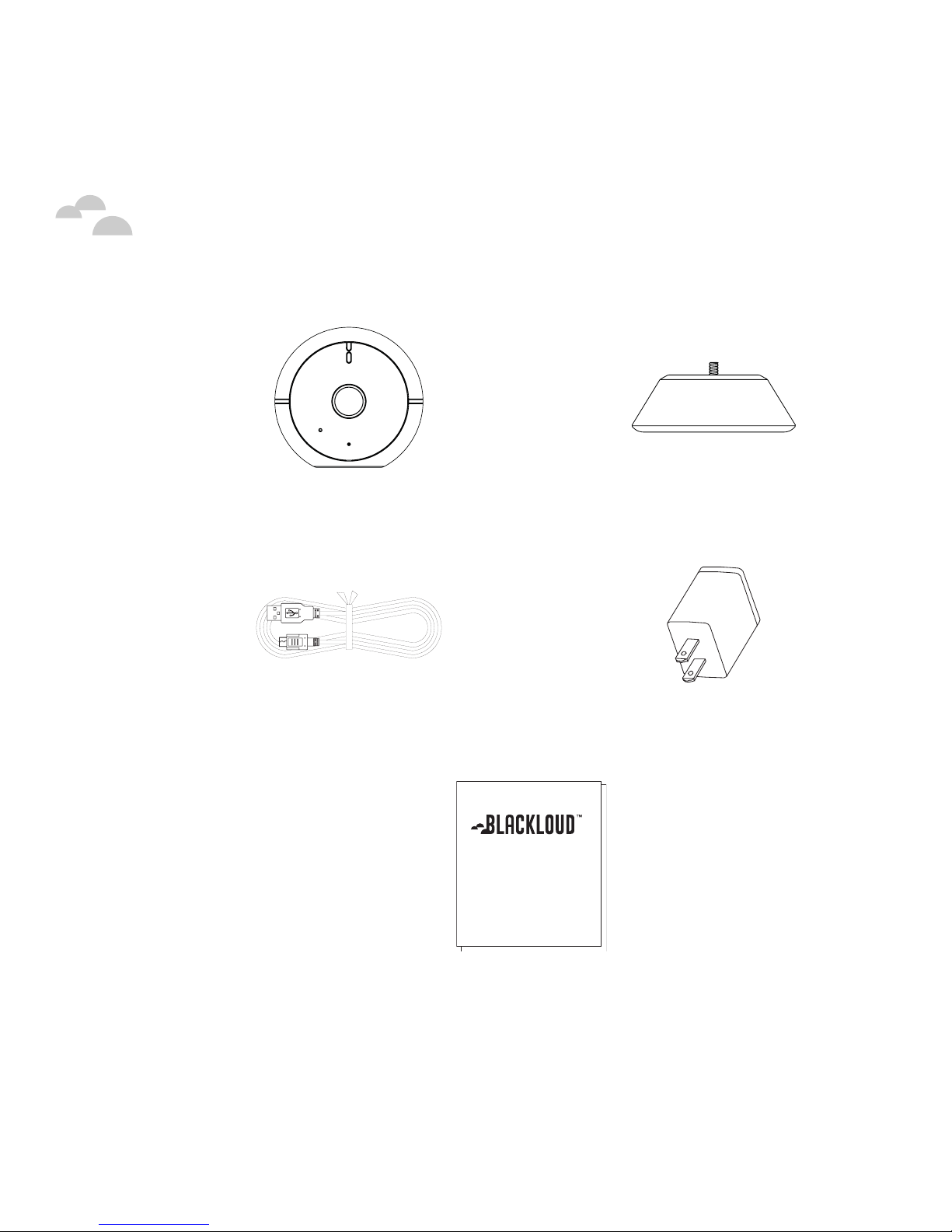
Package Contents
I.C.E 360 Camera Stand
Power Cord Power Adapter
Quick Guide
This Quick Guide
Quick Guide - 3
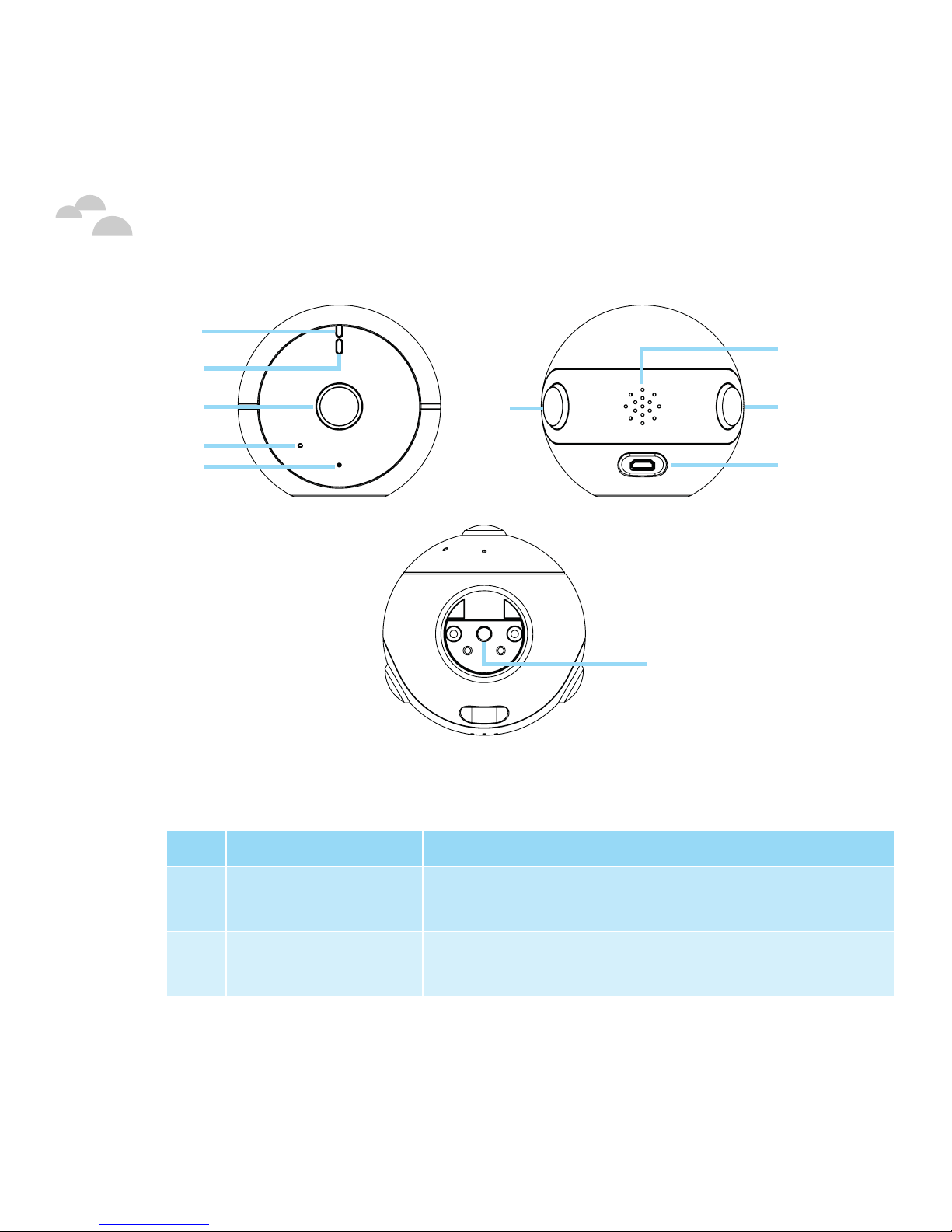
Your I.C.E
No. Item Description
1Blue LED
Indicator
See the “LED Indicators” section below.
2Red/Green LED
Indicator
See the “LED Indicators” section below.
1
2
3
4
5
6
7
8
9
10

Quick Guide - 4
Your I.C.E
3Front-Facing
(Main) Camera
The main camera for your I.C.E 360. New
video streams start broadcasting from this
camera.
4Reset Button Resets your I.C.E 360 to default factory
settings. Press and hold with a small pin for
5 seconds to perform a reset.
5Microphone Captures and transmits audio to your
mobile device.
6Rear-Facing
(Left) Camera
Captures video from the rear of your I.C.E 360.
7Speaker Broadcasts audio from your mobile device
during two-way talk.
8Rear-Facing
(Right) Camera
Captures video from the rear of your
I.C.E 360.
9Power Port Provides power to your I.C.E 360 when
connected to the power cable and adapter.
NOTE:The power port only provides power to your I.C.E
360. It does not transmit any data/information.
10 Camera Stand
Screw Hole
Secures your I.C.E 360 to the camera stand.
NOTE: Your I.C.E 360 can be installed on any standard
camera stand/tripod featuring a 1/4”-20 screw.

Quick Guide - 5
LED Indicators
The front of your I.C.E 360 features two LED indicators that notify you
of the connection status of the camera when it is powered on. The
following table describes the various statuses:
Blue
Indicator
Red/Green
Indicator Status
On Green LED On Your I.C.E 360 is booting up.
Off Red LED On Your I.C.E 360 is not connected to the
internet.
Off Red LED
Blinking
Your I.C.E 360 is configuring its
settings.
On Off Your I.C.E 360 is connected to the
internet but not transmitting any data.
Off Green LED On Your I.C.E 360 is connected to the
internet and is transmitting data.
Quick Guide - 6
Getting Started
Powering On Your I.C.E 360
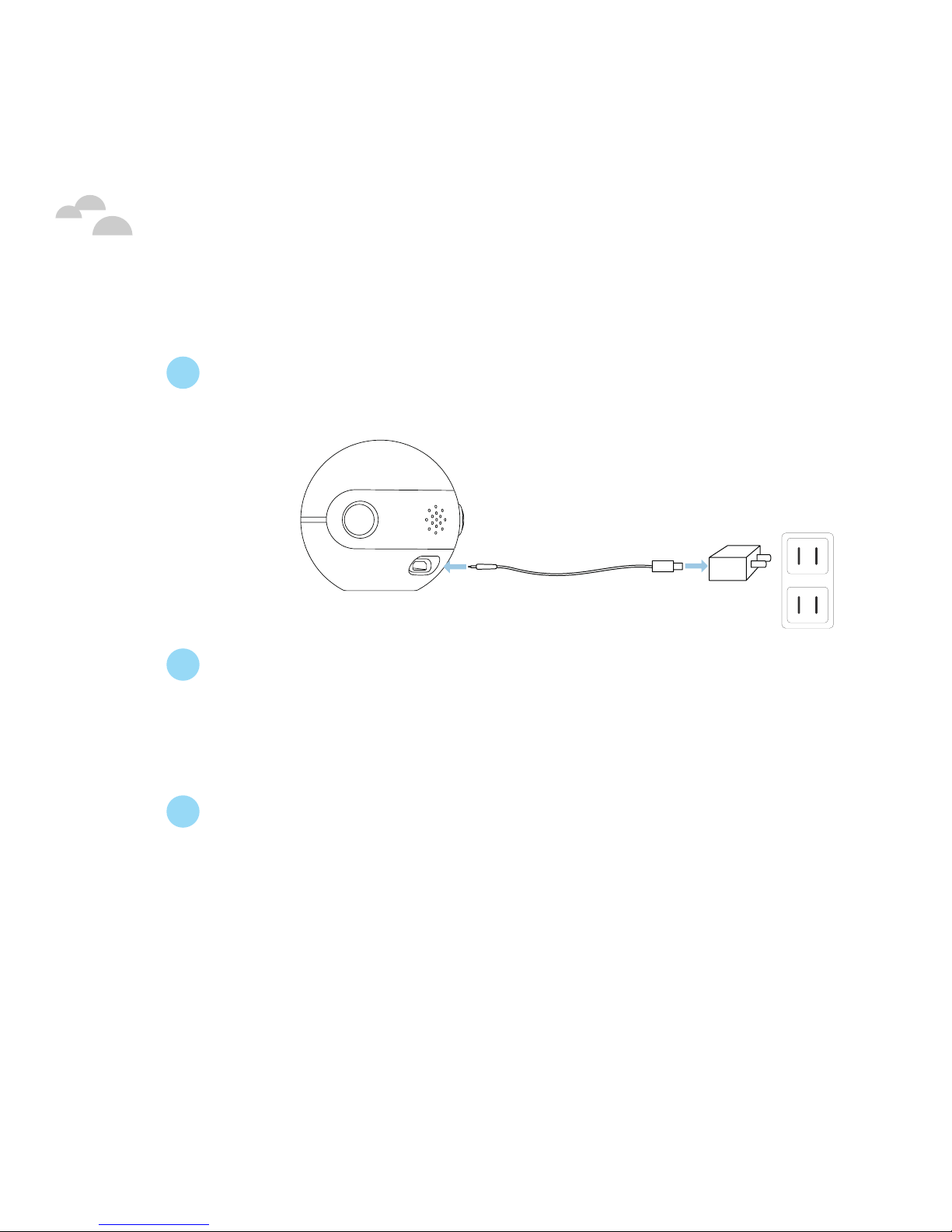
1 Plug your I.C.E 360 into a power socket using the USB power
cord and power adapter.
2 Once your I.C.E 360 is plugged into the power socket the blue
and green LED indicators will light up indicating that your I.C.E
360 is booting up. If you are powering on your I.C.E 360 for the
first time, this process will take about 1 minute.
3 Once your I.C.E 360 has finished booting up the red LED
indicator will light up (indicating that your I.C.E 360 is not
connected to the internet), your I.C.E 360 is now powered on
and ready to be connected.
Quick Guide - 7
Getting Started
Setting Up Your I.C.E 360
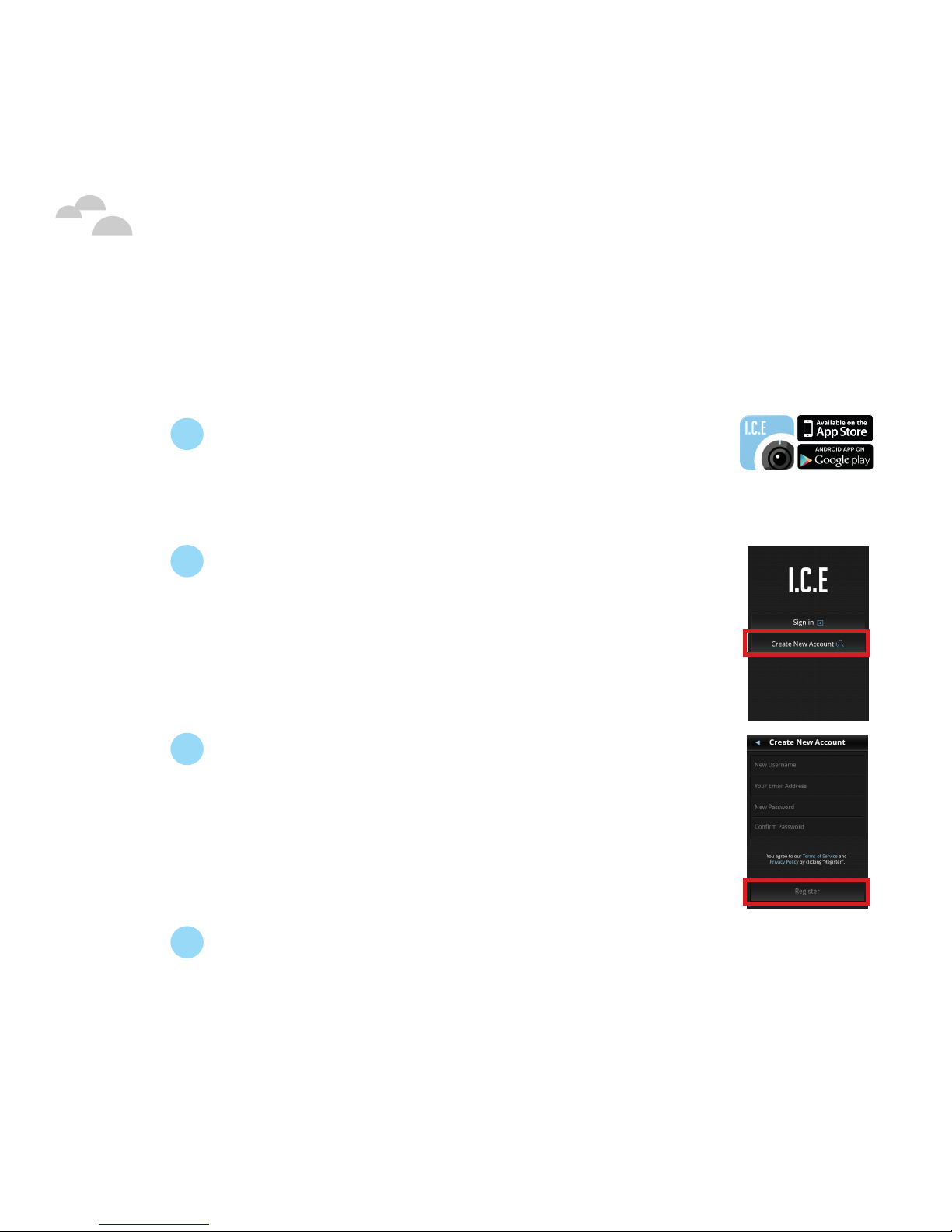
Installing the I.C.E App
1On your mobile device, download and install
the I.C.E app from either the Google Play
Store or the iOS App Store by searching for
the keyword “BLACKLOUD”.
2From the I.C.E app sign in screen touch
Create New Account.
NOTE: If you have already created a BLACKLOUD
account from a previously purchased BLACKLOUD
product skip to “Connecting Your I.C.E 360”.
3Enter a user name, email address, and
password for your new account then touch
Register.You will receive a verification email
at the email address you entered for your
account.
NOTE: Your password must be 8 to 15 characters long.
4Confirm your account registration from the
verification email.
Quick Guide - 8
Connecting Your I.C.E 360
Once you have successfully installed the I.C.E app and created an
account you will need to set up a connection to your I.C.E 360. To
connect to your I.C.E 360:
1Enable Wi-Fi on your mobile device and
launch the I.C.E app.
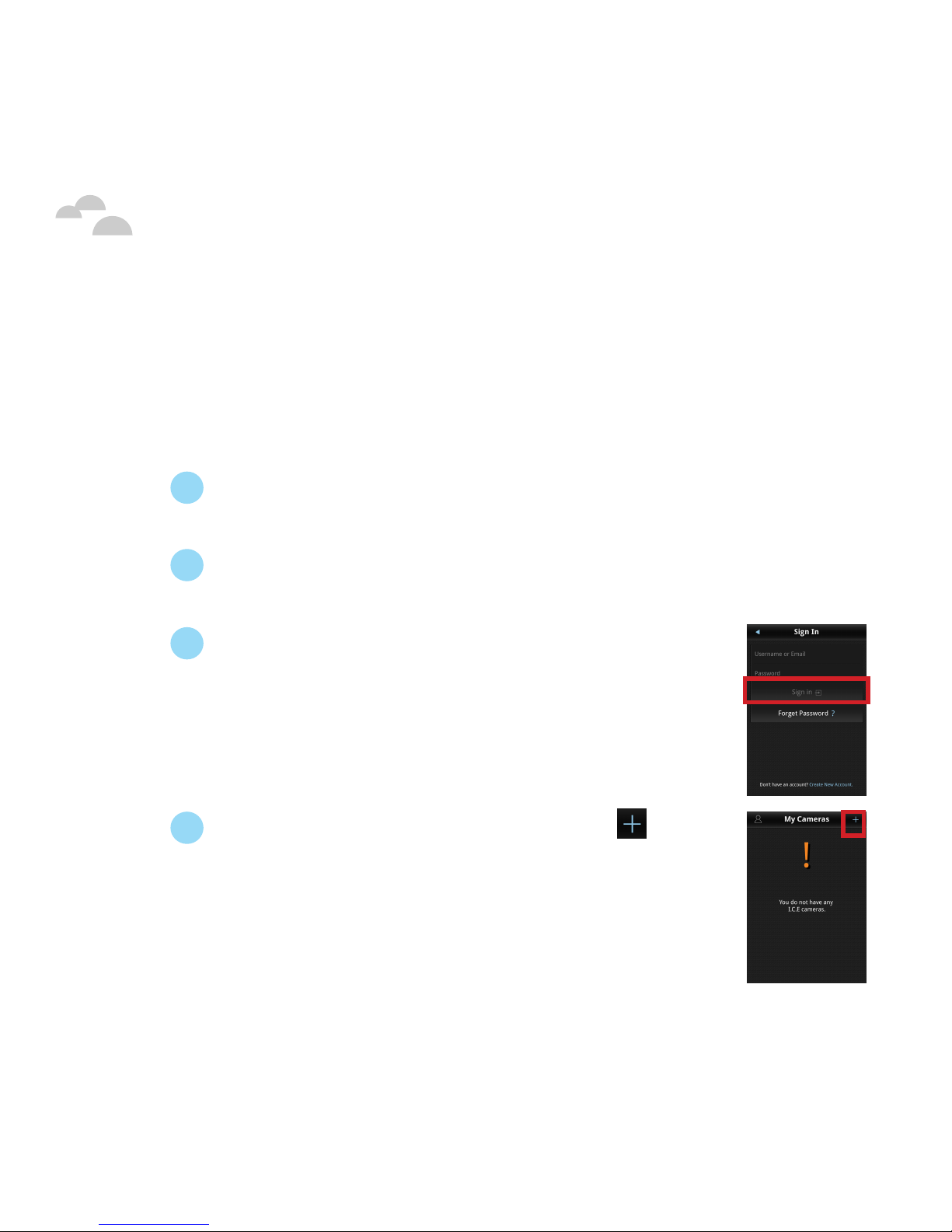
2From the I.C.E app sign in screen touch
Sign In.
3Enter your user name and password and
touch Sign In.
4From the My Cameras screen touch at the
top right corner.
NOTE: Ensure that your I.C.E 360 is within 20 feet of
your mobile device.
Getting Started

Quick Guide - 9
Getting Started
5Touch Set up by Wi-Fi in the pop-up window
that appears. The I.C.E app will begin
searching for your I.C.E 360.
NOTE: For iOS devices the I.C.E app is also able to search
for your I.C.E 360 via Bluetooth, for more information
see “Connecting Your I.C.E 360 via Bluetooth”.
6Once the I.C.E app has successfully found
your I.C.E 360, the I.C.E app will enter the
Add Camera screen to connect your I.C.E
360 to a Wi-Fi network. Ensure that your I.C.E
360 is within range of a Wi-Fi router that is
connected to the internet and then from the
Add Camera screen touch the Wi-Fi network/
router you want your I.C.E 360 to connect to.
NOTE: Swipe down to refresh/update the list of Wi-Fi
networks/routers.
7[If required] Enter a password for the
selected Wi-Fi network, and then touch
at the top right corner. The I.C.E app
will begin connecting your I.C.E 360 to
the selected Wi-Fi network.
Quick Guide - 10
Getting Started
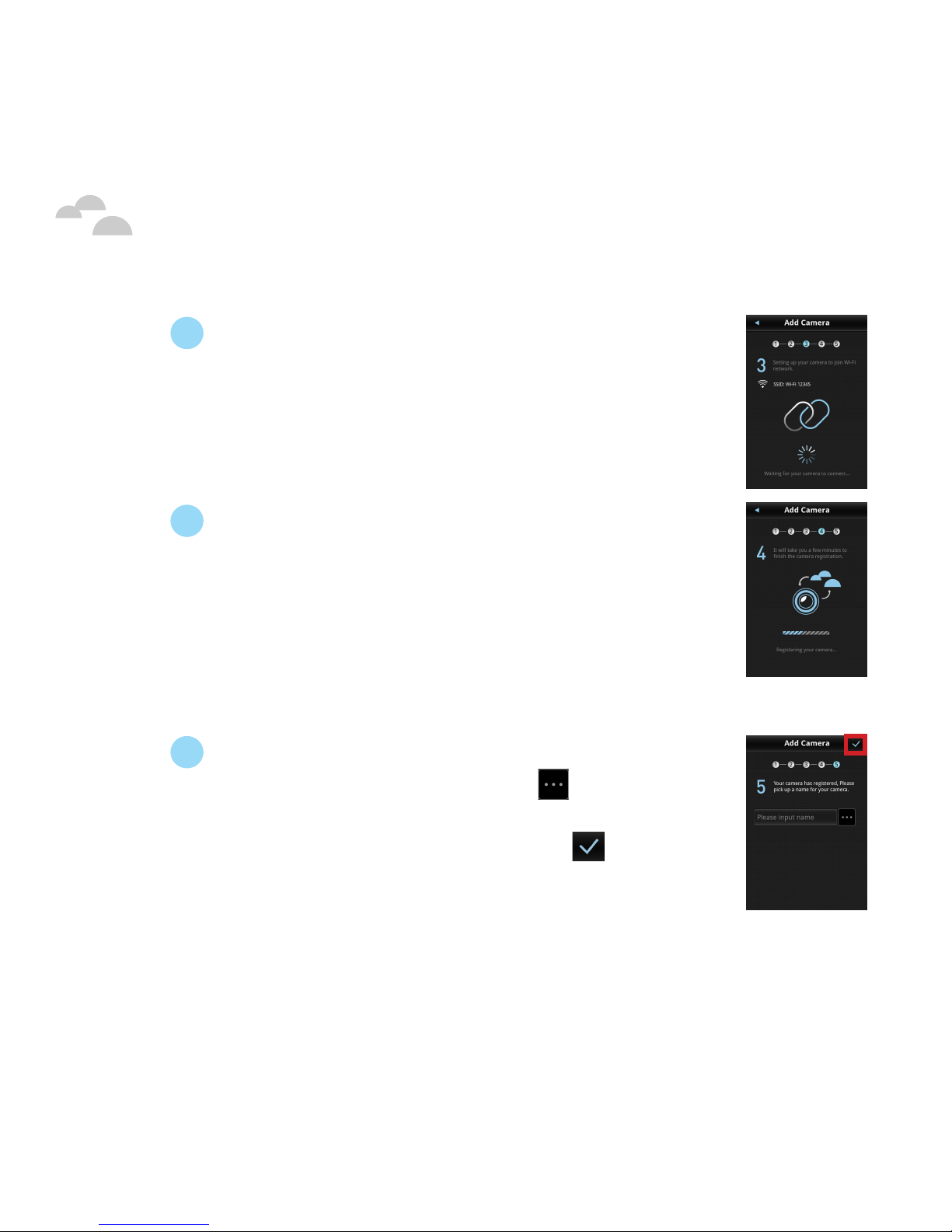
8During the connection process the red LED
indicator on your I.C.E 360 will start flashing,
indicating that your I.C.E 360 is configuring itself.
Do not disconnect your I.C.E 360 from the power
source during the configuration process.
9 When your I.C.E 360 has finished the
configuration process the blue LED indicator
will light up for a few seconds and then turn
off while the green LED indicator will light
up. Once the green LED indicator is lit the
connection process has been completed and
the I.C.E app will enter the naming screen.
10 Enter a name for your I.C.E 360 which will
help you identify it, or touch to choose
from a list of preset names. Once you have
created/selected a name, touch to finish
the naming process.
NOTE: It is suggested that you choose a unique name for your
I.C.E 360 to help distinguish it from other I.C.E 360 cameras
that may be added to the network and listed in the I.C.E app.
Your I.C.E 360 is now connected and you are able to view live
video streams.
Table des matières


