
Blackbe;rry HS-250 Instructions originales

BlackBerry Universal Headset
HS-250
User Guide and Safety Information

MAT-53173-001 | PRINTSPEC-021
SWD-2019636-1030095234-001 |

Contents
Getting started................................................................................................................................................................................................... 2
Components....................................................................................................................................................................................................... 2
Safety information.............................................................................................................................................................................................. 2
Pairing the headset............................................................................................................................................................................................. 3
Using the headset............................................................................................................................................................................................... 3
LED notifications................................................................................................................................................................................................. 5
Troubleshooting................................................................................................................................................................................................. 6
Safety and product information......................................................................................................................................................................... 8
Important safety information............................................................................................................................................................................. 8
Electrical safety.................................................................................................................................................................................................. 9
Battery safety and disposal................................................................................................................................................................................ 9
Audio safety guidelines...................................................................................................................................................................................... 10
Device disposal................................................................................................................................................................................................... 10
Safe use guidelines............................................................................................................................................................................................. 10
Drive safely!........................................................................................................................................................................................................ 11
Accessories......................................................................................................................................................................................................... 11
Antenna care...................................................................................................................................................................................................... 11
Operating and storage temperatures................................................................................................................................................................. 11
Interference with electronic equipment............................................................................................................................................................ 12
Dangerous areas................................................................................................................................................................................................. 12
US Information Concerning the Federal Communications Commission ("FCC") Requirements for Hearing Aid Compatibility with Wireless
Devices............................................................................................................................................................................................................... 13
Service................................................................................................................................................................................................................ 13
Additional safety guidelines............................................................................................................................................................................... 14
Compliance information..................................................................................................................................................................................... 14
Product information........................................................................................................................................................................................... 17
Legal notice........................................................................................................................................................................................................ 18
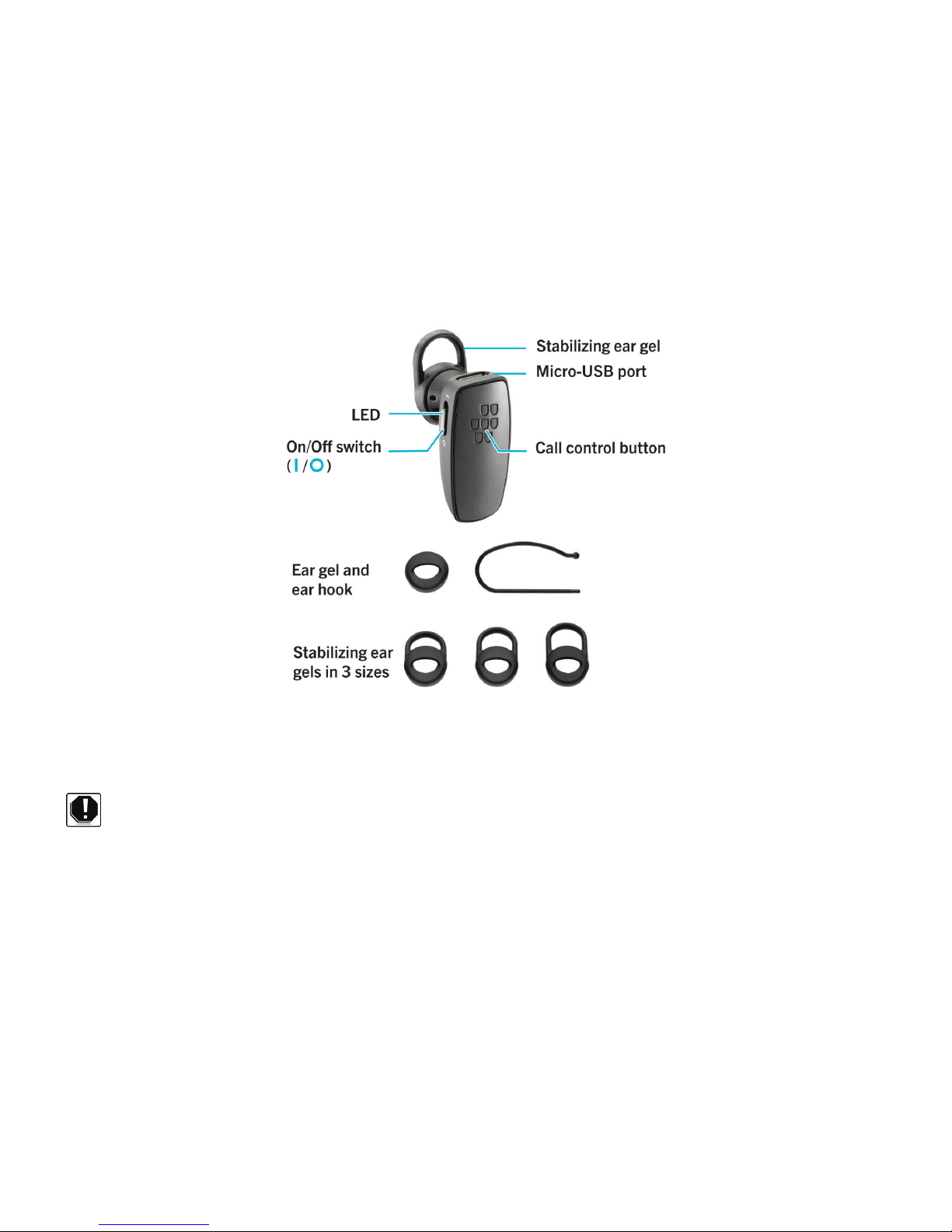
Getting started
Components
Safety information
Before you get started, please read the safety and operation instructions in this guide before using the BlackBerry
Universal Headset or any accessories provided with the headset. Keep this guide in a safe place so that you can refer to it
whenever you need it.
The headset uses 128-bit encryption software. In some countries there may be restrictions on using Bluetooth enabled and
wireless devices with encryption software. Check with your local authorities for the restrictions in your area.
> Important: In some countries, regions, states, or provinces there might be restrictions on the use of any mobile devices while
driving. You are responsible for knowing and complying with the local laws and regulations in the area that you use the
headset.
To find the latest safety and product information, visit www.blackberry.com/go/docs.
User Guide and Safety Information Getting started
2

Pairing the headset
Pair and connect the headset with your BlackBerry device
Before you can use your headset, you need to pair it with your BlackBerry device. When you turn on the headset for the first
time, it's already in pairing mode.
1. Slide the power switch on your headset to the On position.
2. On the Home screen of your BlackBerry device, go to the Bluetooth settings.
• For devices running BlackBerry Device Software 7.0 or later, click
Manage Connections icon > Networks and connections > Bluetooth Connections > Turn Bluetooth On > Add New
Device > Search.
3. Click BlackBerry HS-250.
4. If you receive a prompt to enter a passkey, type 0000 on your BlackBerry device.
5. Press the key on the keyboard.
If you are disconnected, you can press and hold the Call control button for 5 seconds to turn on pairing mode at any time.
To turn off the prompt that appears on your BlackBerry device when connecting and pairing, press the Menu key > Device
Properties and set the Trusted field to Yes. For more information, click the Help icon on the Home screen of your BlackBerry
device.
For information about how to pair a third-party Bluetooth enabled device with your headset, see the help that came with that
device.
To pair your headset with an additional device, press and hold the Call control button for 5 seconds and complete the pairing
procedure above.
Using the headset
Call tasks
You can complete the following call tasks when your headset is paired and connected with your device.
Action Call control button
Make a call Press and hold until you hear 1 beep. Say a voice command.
Answer a call Tap 1 time
Answer a second call Tap 1 time
User Guide and Safety Information Getting started
3

Action Call control button
Return to the first call or switch between calls Press and hold until you hear 1 beep.
Join two calls Press and hold until you hear 2 beeps.
End a call Tap 2 times
Turn on mute Tap 1 time
When mute is turned on, your headset beeps periodically.
Turn off mute Tap 1 time
Ignore a call Tap 2 times
Redial the last phone number Tap 2 times
Common tasks
Action Call control button
Turn on pairing mode Press and hold for 5 seconds.
Cancel pairing mode Tap 1 time
Clear pairing list Press and hold for 8 seconds while sliding the power switch to
the On position.
Voice confirmations
Your headset helps confirm the actions you've completed with short statements (in English) that you hear through your
headset.
Action Voice confirmation
Turned on mute "Muted"
Turned off mute "Unmuted"
Switched between 2 calls "Call swapped"
Redialed a phone number "Redialing last number"
Ended a call "Call ended"
Bluetooth® connection is no longer active "Disconnected"
Battery power level is below 10% Battery low"
User Guide and Safety Information Getting started
4
Charge the headset
Your headset comes partially charged and ready for use. When the battery power level is low you hear a voice prompt (in
English) that says "Battery low".
1. Connect the small end of the micro-USB cable or a car charger to the charging port on the headset.
2. Do one of the following:
• Connect the large end of the micro-USB cable to a USB power plug or the USB port on your computer.
• Plug the car charger into your car's power outlet.
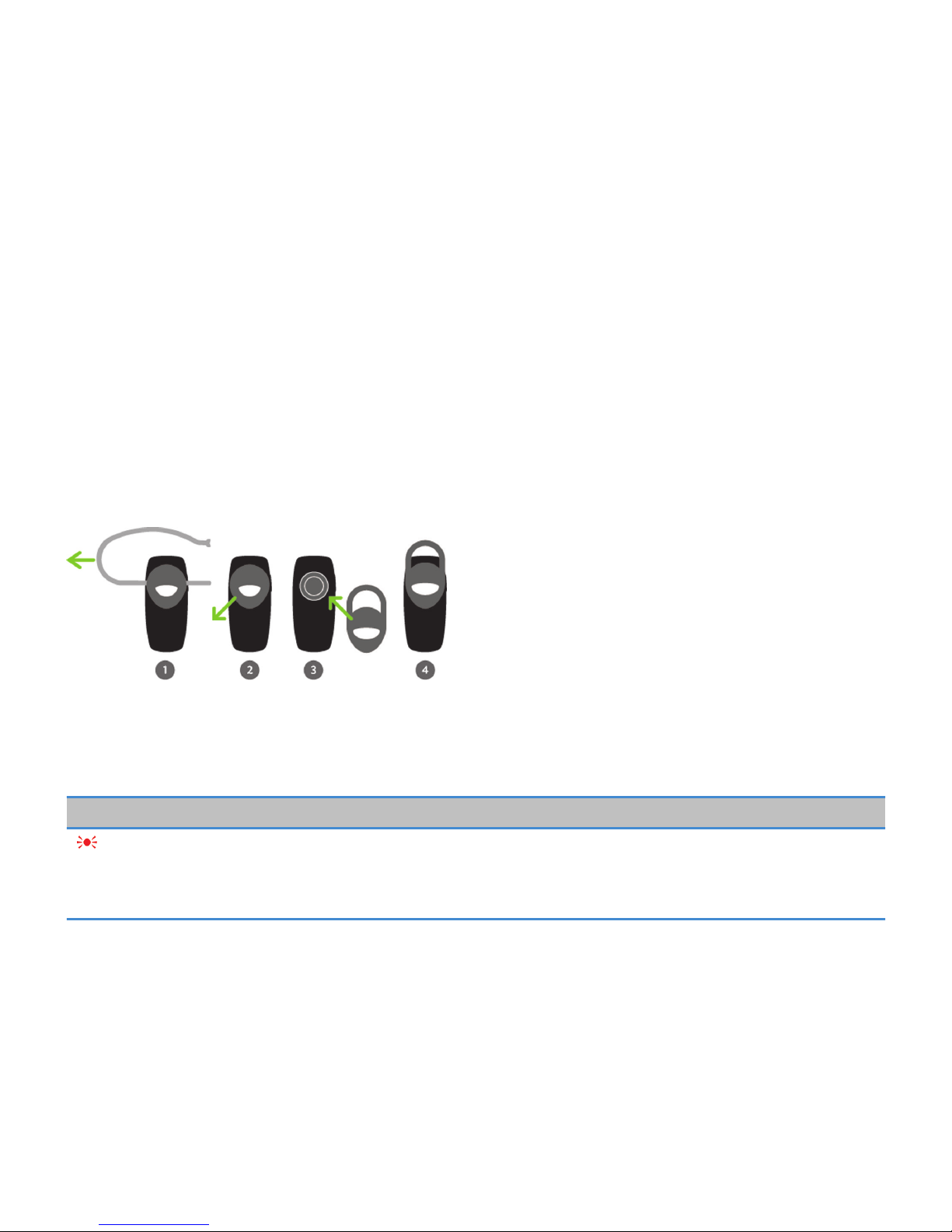
Change the earpiece
Try different combinations of the ear gels and the ear hook to find your best fit.
1. If necessary, gently pull the ear hook to remove it.
2. Gently pull off the ear gel at its edges.
3. Replace the ear gel with a new ear gel.
LED notifications
Red LED
Slow flashes: microphone is muted
Quick flashes: not connected to the device
Quick flashes, followed by a pause: battery power level is low
User Guide and Safety Information Getting started
5
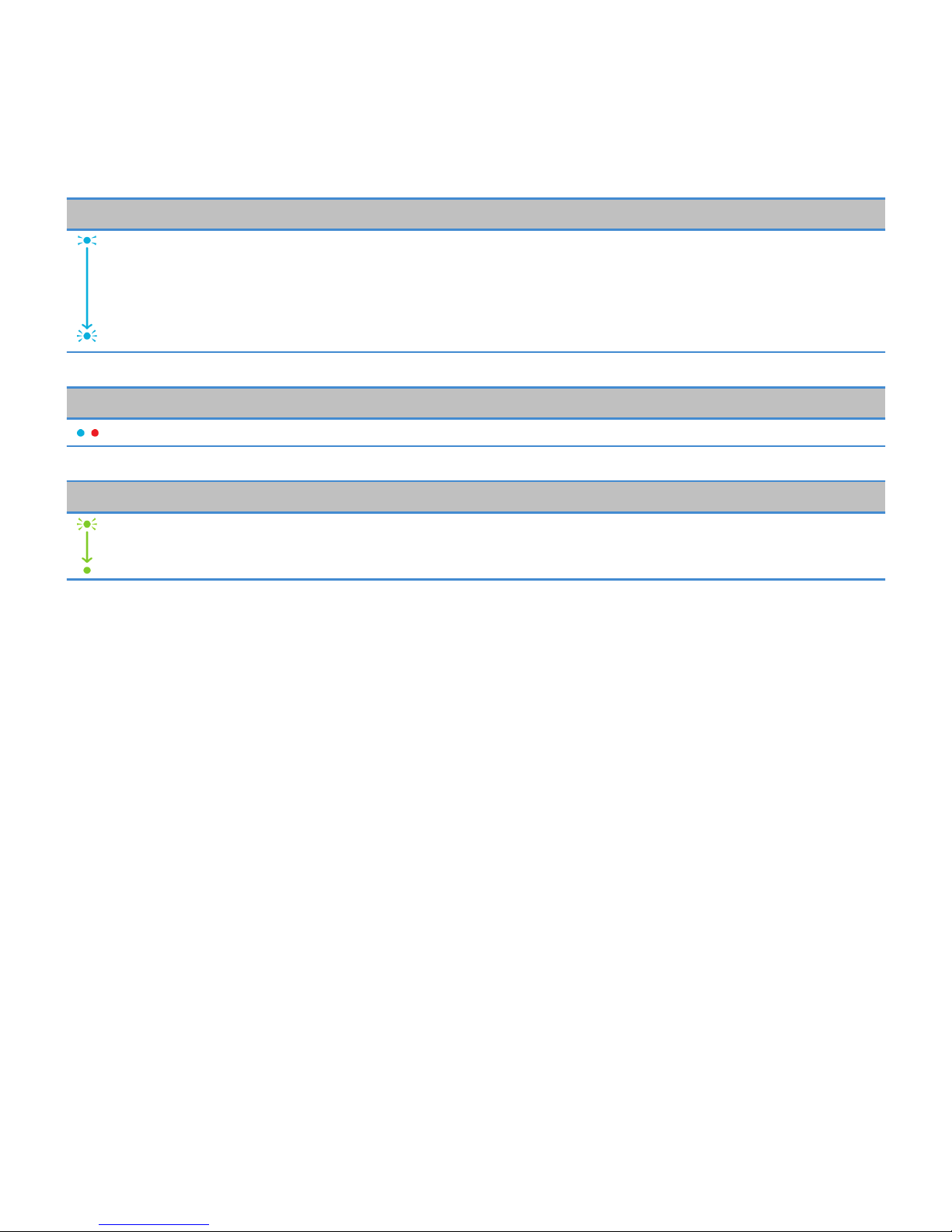
Blue LED
Flashing: connected to a call
1 slow flash: turned on and connected to your device
2 quick flashes: incoming call
5 quick flashes: reconnecting with the last device you paired with
Blue and red LED
Ready for pairing
Green LED
Flashing: turning on or charging
Solid: fully charged
Troubleshooting
I can't connect the headset with my device
You might have accidentally deleted the pairing options that you set for your headset. Complete the steps for connecting and
pairing your headset with your BlackBerry device.
I can't hear anything when I use my headset
Try the following actions:
• Turn up the volume on your BlackBerry device.
• Make sure that your headset is turned on and is connected to your device.
I hear static noise when I use my headset
The headset is designed to be used within 10 meters (33 feet) of your device, without any large objects in between.
Try the following actions:
User Guide and Safety Information Getting started
6

• Move away from any large objects that might cause interference.
• Keep your headset on the same side of your body as your device.
User Guide and Safety Information Getting started
7
Safety and product information
Important safety information
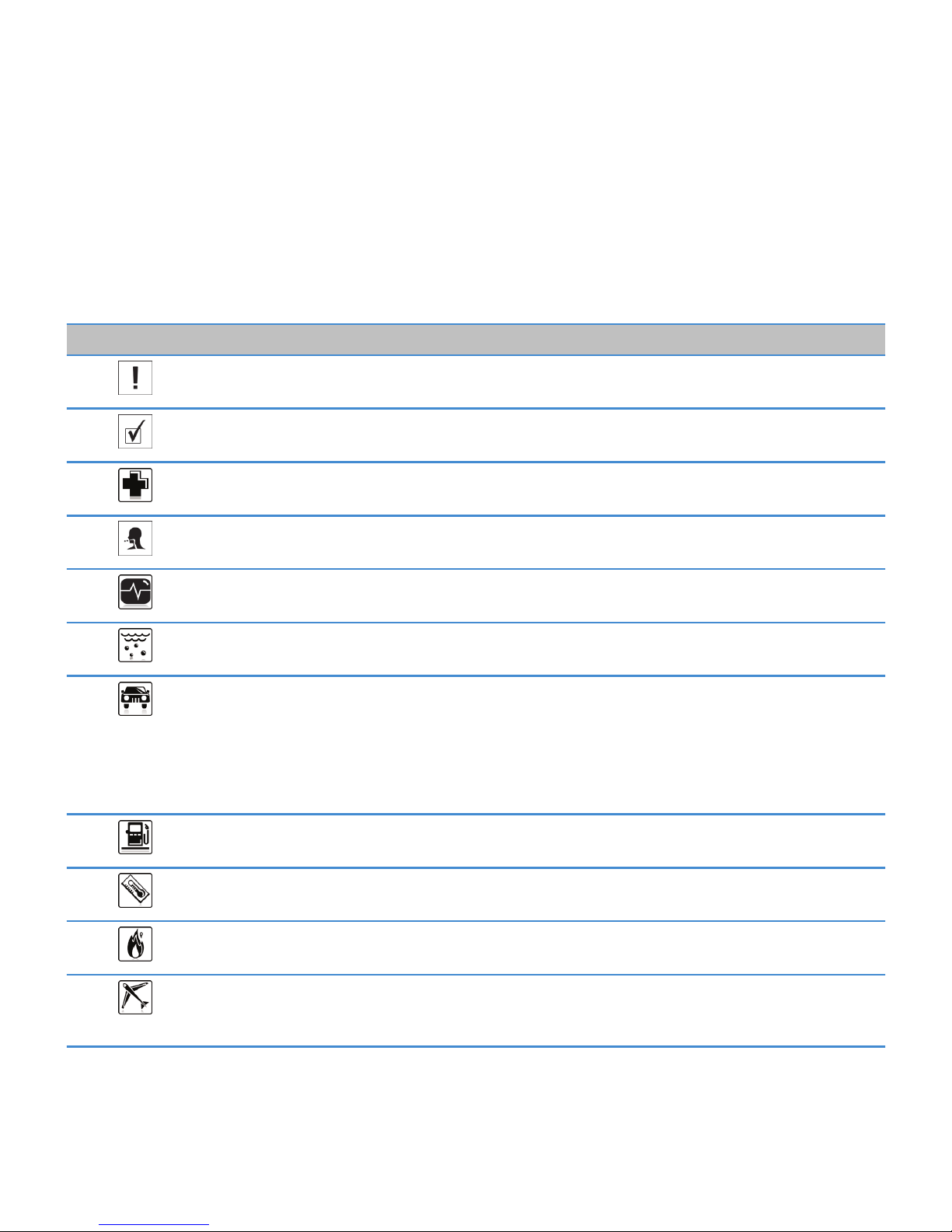
Tip Description
Before you use your BlackBerry Universal Headset, it is important that you read the compliance
information and the guidelines for the safe use of your headset that are found in this guide.
Use only Research In Motion approved chargers. Use of chargers that have not been approved by RIM
might present a risk of fire or explosion, which could cause serious harm, death, or property loss.
Do not rely on your headset for emergency communications.
Do not disassemble your headset. Your headset contains small parts that might be a choking hazard.
Keep your headset away from medical devices, including pacemakers and hearing aids, as they might
malfunction causing serious harm or death to you or others.
Do not put your headset in contact with liquids as this might cause a short circuit, a fire, or an electric
shock.
Driving a vehicle requires your full attention to road conditions, weather, and vehicular traffic. It is
important to set up your BlackBerry Universal Headset prior to driving. Using this hands-free accessory
may cause you to be distracted and may put you, your passengers, and occupants of other vehicles at risk
of suffering bodily injury, death and/or loss of property. You should only use the hands-free accessory
where permitted by law and when you will not be distracted from the proper operation of your motor
vehicle.
Do not use your headset in the presence of gas fumes as it might present a risk of fire or explosion.
Do not use or store your headset in temperatures that exceed 113° F (45°C) as the headset might become
hot.
Do not dispose of your headset device in a fire as this might cause an explosion resulting in serious injury,
death, or property loss.
Turn off your headset in aircrafts. Using your headset on an aircraft might affect aircraft instrumentation,
communication, and performance; might disrupt the network; might otherwise be dangerous to the
operation of the aircraft, its crew, and its passengers; and might be illegal.
User Guide and Safety Information Safety and product information
8
Autres manuels pour HS-250
1
Table des matières
Autres manuels Blackbe;rry casque

Blackbe;rry
Blackbe;rry HS-300 Manuel utilisateur

Blackbe;rry
Blackbe;rry HS-700 Manuel utilisateur

Blackbe;rry
Blackbe;rry HS-300 Manuel utilisateur

Blackbe;rry
Blackbe;rry PREMIM MULTIMEDIA HEADSET - ERSTE SCHRITTE Manuel utilisateur

Blackbe;rry
Blackbe;rry HS-250 Manuel utilisateur

Blackbe;rry
Blackbe;rry HS-500 - LEARN MORE Manuel utilisateur

Blackbe;rry
Blackbe;rry HS-655 Manuel utilisateur
Blackbe;rry
Blackbe;rry HS-500 - LEARN MORE Manuel utilisateur

Blackbe;rry
Blackbe;rry HS-655 Manuel utilisateur

Blackbe;rry
Blackbe;rry HS-300 Manuel utilisateur


