BITTEL 38TSD-CID8
number, then shows ERROR.
2.3
2.3
2.3
2.3 Viewing
Viewing
Viewing
Viewing the
the
the
the caller
caller
caller
caller list
list
list
list /Calling
/Calling
/Calling
/Calling back
back
back
back
To check who made phone call, please follow the steps below:
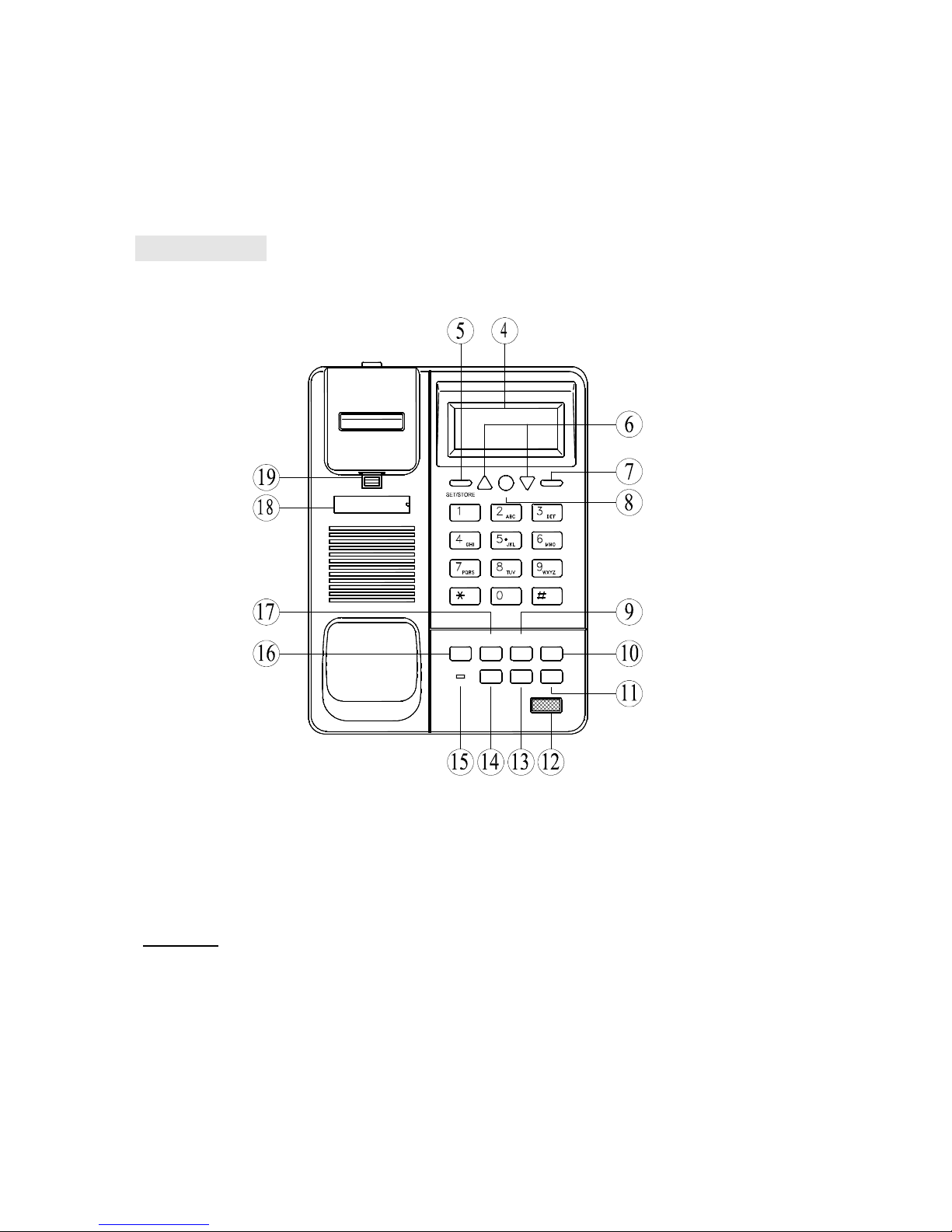
1. Press UP/DOWN key can view the oldest or most resent caller information,
includes the callers numbers, date & time ,etc Press UP/DOWN lasts 4 seconds
can view quickly.
2. “ On-hook ” mode, recalling the local incoming calls , press REDIAL Key or SPRK
key directly ; Recalling the long distance incoming calls ,press REDIAL keys twice
to add the LDS code before the phone number .
2.4
2.4
2.4
2.4 Viewing
Viewing
Viewing
Viewing outgoing
outgoing
outgoing
outgoing calls
calls
calls
calls /redial
/redial
/redial
/redial an
an
an
an outgoing
outgoing
outgoing
outgoing call
call
call
call
Press OUT key to view the outgoing calls & its talking time. Press UP/DOWN key to
view the list. Press OUT key lasts 4 seconds can view quickly. ” On-Hook ” mode,
press “ SPKR ” can dial the outgoing call out.
2.5
2.5
2.5
2.5 UP
UP
UP
UP Key
Key
Key
Key
Press UP key to search incoming calls, from the first group to the last group.
“ On-hook ” or “ Off-hook ” mode can check the oldest numbers to the most current
numbers freely. If no incoming calls information or the searching work finished,
then “ END OF LIST appears to reminder you. If the incoming call with the caller ’ s
name, the name will display with the number.
2.6
2.6
2.6
2.6 DOWN
DOWN
DOWN
DOWN Key
Key
Key
Key
Same as UP key, search from most current calls to the oldest one.
2.7
2.7
2.7
2.7 DEL
DEL
DEL
DEL Key
Key
Key
Key
a. “ On-hook ” mode, press DEL k ey to delete the wrong setting.
b. “ Pre-dial ” mode, press DEL key to delete the wrong number(modification );
When view number, press DEL to delete the incoming call, press DEL lasts 4
seconds will delete all incoming call.
Pressing DEL will delete the outgoing calls when view it.
2.8
2.8
2.8
2.8 Dial
Dial
Dial
Dial out
out
out
out Pre-dial
Pre-dial
Pre-dial
Pre-dial phone
phone
phone
phone numbers
numbers
numbers
numbers
In On-hook mode, input the phone number which will be dialed, press DEL key to
modify the wrong setting, then press SPKR or REDIAL dial out.
2.9
2.9
2.9
2.9 HOT
HOT
HOT
HOT LINE
LINE
LINE
LINE
If the HOT LINE in “ ON ” mode, pick up handset or press any keys except
SET/STORE and VOL can dial the Hot Line number out directly.