BenQ MK2443 Manuel utilisateur


English
Table of Contents i
Table of Contents
Section 1: Quick Start Guide...................................... 1
1. Please read these instructions .........................................2
What's in the Quick Start Guide?............................................... 2
What's in the User Manual?........................................................ 2
2. Package contents...............................................................2
3. Select and prepare the installation location .................3
4. Installing the Base ............................................................4
5. Disconnecting the base and arm ...................................5
6. Adjust the viewing angle .................................................6
7. Connect the antenna cable ..............................................6
8. Connect the power cable ..................................................7
9. Activate the remote control ............................................8
Installing batteries ........................................................................ 8
Battery safety notice..................................................................... 8
Using the remote control ............................................................ 9
10.Initialize your TV ............................................................10
11.View the TV programs ....................................................10
Care and cleaning information ............................................11
What's next?............................................................................11
Section 2: User Manual............................................... 12
Getting to know your TV .....................................................13
Front view ..................................................................................... 13
Rear view ...................................................................................... 14
Getting to know the remote control ...................................16
Remote control ............................................................................. 16
Using the remote control .....................................................20
Power on, o and standby ........................................................... 20
Adjusting sound setting .............................................................. 20
Changing channels ...................................................................... 21
Adjusting backlight ..................................................................... 22
Adjusting aspect ratio ................................................................. 22
Using the Teletext function......................................................... 24
Connecting video and audio signals ...................................26
Input options ................................................................................ 26

English
ii Table of Contents
Connecting the Composite Video input ................................... 26
Connecting the SCART input..................................................... 27
Connecting the Component Video input ................................ 27
Connecting the S-Video input ................................................... 28
Connecting the PC input............................................................. 28
Connecting the DVI input .......................................................... 29
Connecting the HDMI input ..................................................... 29
Connecting the USB input ......................................................... 30
Connecting the headset audio output ...................................... 30
Connecting to A/V Device with SPDIF input ......................... 31
OSD (On-Screen Display) menu .........................................32
OSD structure............................................................................... 32
Navigating the OSD menu .......................................................... 34
Operations in the OSD menu ..................................................... 34
PICTURE menu ........................................................................... 35
SOUND menu .............................................................................. 38
TIME menu................................................................................... 39
OPTION menu ............................................................................. 40
LOCK menu.................................................................................. 42
CHANNEL menu......................................................................... 43
Connecting CI(Common Interface) card ................................. 44
Media Play - USB Device......................................................45
Precautions when using a USB device....................................... 45
Media Screen Display .................................................................. 46
Viewing Photo or Slide Show...................................................... 47
Playing a Music............................................................................. 48
Playing Movie ............................................................................... 50
Display the Text ............................................................................ 52
Reference.................................................................................53
Disclaimer ..................................................................................... 53
Copyright....................................................................................... 53
Dimensions .................................................................................. 53
Specications ............................................................................... 54
Supported PC (D-Sub/DVI) input signal resolutions ............. 55
Supported Component Video input signal resolutions........... 56
Supported HDMI input signal resolutions ............................... 56
Setting up appropriate output resolution on PC ..................... 57
Troubleshooting............................................................................ 58
WEEE directive ............................................................................ 59
CE DOC ........................................................................................ 59

English
MK2443 LCD TV
Section 1: Quick Start Guide
Welcome

English
2 Section 1: Quick Start Guide
1. Please read these instructions
Congratulations. You have a state-of-the-art at widescreen digital LCD TV which should
provide you with years of viewing pleasure. Please take a few minutes to read these quick
start instructions through before installing and using the TV.
What's in the Quick Start Guide?
Section 1 contains the Quick Start Guide which provides you with enough information to
setup the TV. is is section 1.
What's in the User Manual?
Section 2 contains the User Manual which details the features and functions of the TV, and
provides product specications and troubleshooting information for your further assistance.
e User Manual also describes how to customise the TV settings so that you can gain the
best viewing experience possible to suit your preferences and viewing environment.
2. Package contents
Unpack the TV and check that all the following items are included:
The type of power cable supplied may differ from that illustrated, dependant upon your region of
purchase.
If any item is missing or damaged, contact your place of purchase immediately and notify
them of the discrepancy. Please keep the product documentation in a safe place for later
reference.
Dispose of packaging wisely:
•ecardboardcartoncanberecycled.
•Donotleaveplasticbagswithinreachofyoungchildrenorbabies.
•Checkthatyouhaven'tleanaccessoryinsidethepackaging,beforeddiscarding.
For the primary safety of yourself and others, this TV should be handled with care to avoid damage to
it or to persons which come into contact with it.
All LCD screens have a very thin protective layer of glass which is liable to marking or
scratching, and cracking if struck or pressured. e liquid crystal substrate is also liable to
damage under excessive force or extreme temperatures. Please handle with care.
LCD TV (x1) Power cord (x1)
AAA battery
(x2)
Quick Start Guide
(x1)
User Guide (x1)
Remote
control (x1)
Service
Information (x1)

English
Section 1: Quick Start Guide 3
3. Select and prepare the installation location
In order to prevent potential dangers and prolong the service life of the TV, please observe
the following points when installing, operating and cleaning the TV.
Do NOT place the display on an
uneven, sloping or unstable surface
where it may fall and cause damage to
itself or others.
Have a qualied technician secure the
display where it is placed in case there
is an earthquake.
Do NOT place the display near water,
like a spa or pool, or in a position
which will allow the splashing or
spraying of water onto the display,
like in front of an open window where
rain water may enter.
Do NOT place the display near or
above sources of heat, such as
radiators, heaters, fuel stoves and
other heat-generating items
(including audio ampliers).
Otherwise heat may cause damages
to the outer casing as well as the
components inside.
If wall mounting, allow appropriate
space on top for attaching the display
to the wall bracket.
If wall mounting, have a suitable
qualied and experienced
tradesperson mount it safely. Use
only a recommended display wall
bracket for this model display and
ensure that the mounting bracket
(optional accessory) is securely
screw xed to the wall structure, and
not just the wall render, lining or
cladding. Ensure the bracket is level
horizontally. Do not glue the
bracket to the wall.
Do NOT place the display in an
enclosed place without allowing
for ventilation.
All Liquid Crystal Display (LCD)
screens have a very thin protective
layer of glass which is liable to
marking or scratching, and cracking if
struck or pressured.
e liquid crystal substrate is also
liable to damage under excessive
force or extreme temperatures.
Please handle with care.
Do NOT cover or block the vents
and openings while the display is
switched on, as the heat may
accumulate inside the display and
result in danger.
Do NOT place the display in direct
sun or where direct sun or spot
lighting will shine onto the display, as
the heat may damage the display and
the bright light will make viewing the
display more dicult than necessary.
If recessed into a wall opening, you
must leave appropriate free space
both top and bottom for mounting
and removing the display.
When installing the display, connect
the power cord to socket-outlet
which must be provided near the
display and easily accessible. If a fault
should occur during operation of the
unit, operate the disconnect device
to switch the power supply o, or
disconnect the power cord.
Observe all warnings and cautions as
labelled on the display.
To prevent the spread of re, keep
candles or other open ames away
from this product at all times.

English
4 Section 1: Quick Start Guide
4. Installing the Base
Important safety notes
Please pay attention to the following before installing:
• Forsafetyreasons,itisrecommendedthattheinstallationbecarriedoutbyat
least two adult persons.
• eLCDpanelofthedisplayisextremelyfragileandsubjecttodamageseasily.
Avoid touching the LCD panel when installing or moving the display, and
take precautions not be let any objects come into contact with the panel. It is
recommendedthatyouuseaso,cleanandlint-freetoweltoprotectthedisplay
when installing.
• Payattentiontothestabilityofthelocationwherethedisplaywillbeplaced.
Follow the instructions below to install the TV stand:
Open the box, and make sure all necessary parts are in the box. e package
contains:
1. Coveranevenstablesurfacewithasocloth.PlacetheLCDTVunitfacedown
on the cloth. Fit the stand onto the bottom of the LCD TV unit as shown:
LCD TV
Stand
2. en push until stand into the LCD TV’s stand socket.

English
Section 1: Quick Start Guide 5
5. Disconnecting the base and arm
1.Coveranevenstablesurfacewithasocloth.PlacetheLCDDisplayunitfacedown
on the cloth. Fit the stand onto the bottom of the LCD Display unit as shown:
2. Push inward the two inserts located under the stand base of the LCD Display, as
shown above by (2), to take the inserts apart from the base.
3. Remove the base from the arm, as shown above by (3).
4. Pull the hinge cover on the arm upward to remove it, as shown above by (4).
5. Remove the 4 screws from the hinge, then pull o the arm slowly, as shown below by
(5).
6. Removal of the arm from the stand base completed.

English
6 Section 1: Quick Start Guide
7. Connect the antenna cable
Connect a TV antenna cable y-lead from your TV antenna system or Cable TV (CATV)
to the TV input on the TV. Check to make sure that the cable connection is rmly in place.
• ApoorqualityTVsignalwillproduceapoorpictureand/orsoundonyourTV.For
high quality picture and sound ,you will need a high quality TV signal.
Depending upon your location, for best TV signal reception, you should have a
properly aligned outdoor TV antenna system. If need be, consult a professional
antenna specialist.
6. Adjust the viewing angle
is display is equipped with a adjustable base. If necessary, turn the display screen to an
appropriate angle (maximum 20 degrees up and down) for more comfortable viewing.

English
Section 1: Quick Start Guide 7
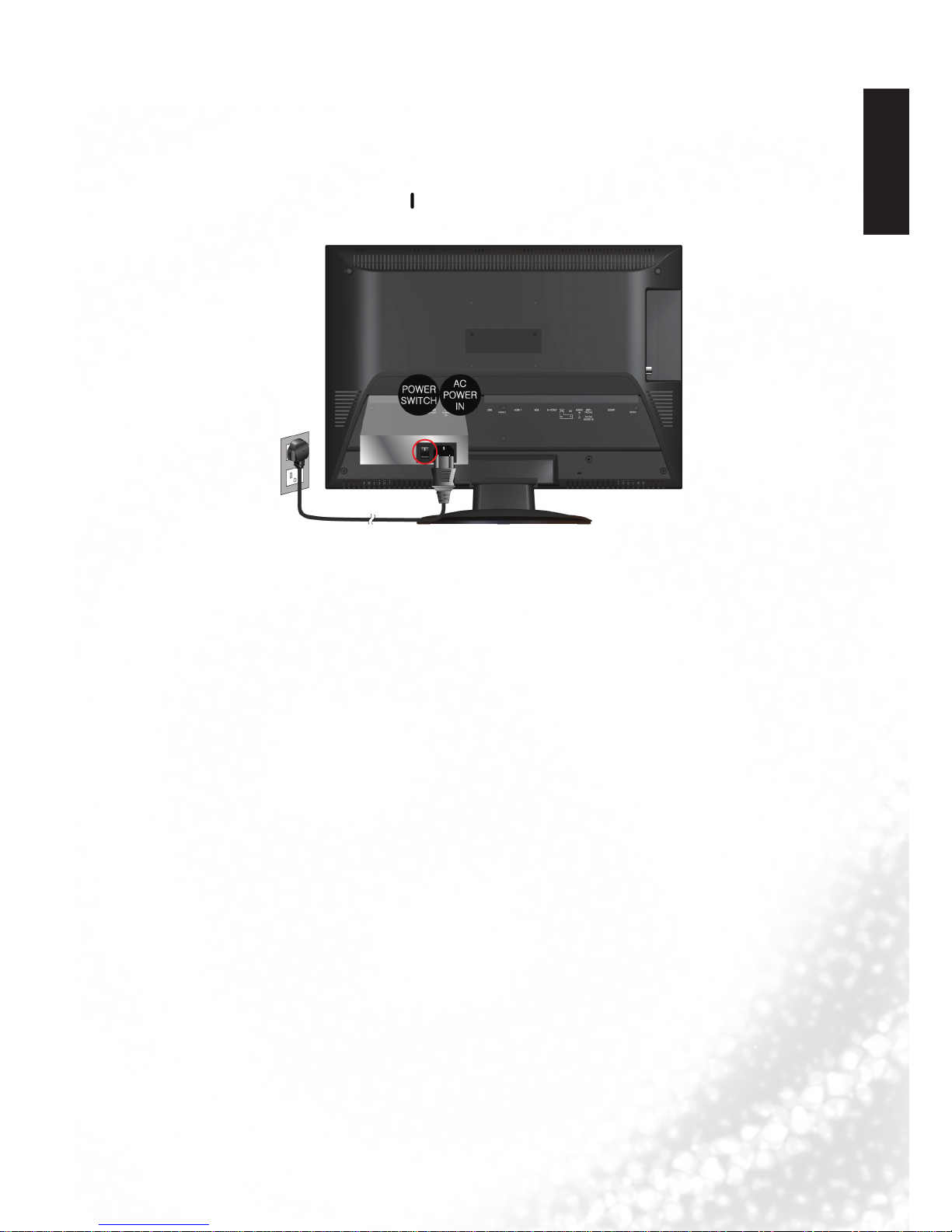
8. Connect the power cable
1. Locate the power cable from the packaging, and plug the appropriate end into the AC
IN socket on the rear of the TV (as illustrated below).
2. Connect the other end into an appropriate wall power outlet, and ip the main power
switch on the TV to the ON ( ) position. e TV will enter standby mode and the
power indicator (on the front lower right) will light up orange.
• etypeofpowercableplugandsocketillustratedmaydierfromthetypeusedinyourregion.
• Onlyuseanappropriatepowercableforyourregion.Neveruseapowercablewhichappears
damaged or frayed. Never change the plug type on a power cable. Be aware of total loading when
using extension cords or multiple outlet power boards.
WARNING:
is TV has been engineered and manufactured with the highest priority on safety, however,
IMPROPER HANDLING OR USE CAN RESULT IN POTENTIAL ELECTRICAL SHOCK OR
FIRE HAZARD. Please handle this TV with care. If damaged, turn o the power and unplug the
power cable from the TV. Transport the TV to your nearest BenQ authorised service centre for
repair.
Table des matières
Autres manuels BenQ Téléviseur LCD

BenQ
BenQ MK2432 Manuel utilisateur

BenQ
BenQ ML2241 Manuel utilisateur

BenQ
BenQ VC3202 Manuel utilisateur

BenQ
BenQ VK Series Manuel utilisateur

BenQ
BenQ DV2680 Manuel utilisateur

BenQ
BenQ SJ4231 Manuel utilisateur

BenQ
BenQ VM2221 Manuel utilisateur

BenQ
BenQ SE2241 Manuel utilisateur

BenQ
BenQ DV2050 Manuel utilisateur

BenQ
BenQ SQ Series Manuel utilisateur

BenQ
BenQ G2450HM Manuel utilisateur

BenQ
BenQ VL3735 Manuel utilisateur

BenQ
BenQ SC3211 Manuel utilisateur

BenQ
BenQ DV2680 Manuel utilisateur

BenQ
BenQ H200:A Manuel utilisateur

BenQ
BenQ VA261 Manuel utilisateur

BenQ
BenQ VM2221 Manuel utilisateur

BenQ
BenQ DV2050 Manuel utilisateur

BenQ
BenQ SE2231 Manuel utilisateur

BenQ
BenQ MK2442 Manuel utilisateur