
Benavis YOOSEE Manuel utilisateur

BENAVIS2018
DOCUMENTREV20180728REV03
MOREINFOPLSVISITWWW.BENAVIS.NET
1
3D Panoramic VR Wireless Camera
Alarm System
Benavis
Morehelptovisitwww.benavis.net

BENAVIS2018
DOCUMENTREV20180728REV03
MOREINFOPLSVISITWWW.BENAVIS.NET
2
Product Overview
Introduction
Congratulations on the purchase of your Wireless IP Cameras. This product is designed to make remote
video surveillance become easier. Leveraging the HD CMOS image sensors and advanced image signal
processor, this camera can deliver 720p/1080p video with high image quality. Included many useful and
smart features including motion detection, push notification alert, email with snapshot alert, even some
models can work with security cameras to allow you setup a customized system to cater your own
specific needs. Utilizing 360° or 180° fisheye lens, VR cameras can provide you panoramic video
monitoring featuring with ePTZ function, bring you the VR user experience.
Major Features:
Integrate Camera and alarm host with one device
Low using cost, no monthly cost, no sim card cost at all.
APP and Email Push Alarm alert Message
Totally Wireless Alarm system
64pcs Wireless Device support
8pcs Remote control Support
P2P camera live view
2 Way audio
1280X960 960P Resolutions
Maximum SD card storage 128 GB
2 operation ways to trigger “Arm”: Remote or APP control
Night Vision: Infrared night distance is 8 meters
Illumination Light function: 500mw pure white light, 2 square meters covering area

BENAVIS2018
DOCUMENTREV20180728REV03
MOREINFOPLSVISITWWW.BENAVIS.NET
3
Preparation:
Check box inside list before using it.
Light bulb Camera X1
Curtain PIR X1
AAA battery X2 For Curtain PIR, installed into PIR already
16G TF sd card X1
Remote control X1
Quick Manual X1
***If any missed, pls contact us at Stonebird.yi@benavis.com.cn or www.benavis.net for help.
Some Tips Before Installation:
1). Camera should not far away from the router, recommend the distance is 10 meters.
If over 10 meters, you need to download “speedtest” check if internet upload speed
over 2Mbps and stable.
2). Under paring wifi status, you need to put your cellphone as close as possible to
the camera. Recommend 30 centimeters around
3). If your home network is 2 lays, eg there are 2 routers, pls use root one to configure
the camera.
4). The camera only supports 2.4GHz WiFi, can't support 5GHz. Making sure the WiFi

BENAVIS2018
DOCUMENTREV20180728REV03
MOREINFOPLSVISITWWW.BENAVIS.NET
4
SSID has no special character, also DHCP function should be enabled in your router
5) If your are going to install camera into ceiling light fixture, pls check if the light cover
is metal. Metal housing will affect wifi signal strength.
www.benavis.net for help.

BENAVIS2018
DOCUMENTREV20180728REV03
MOREINFOPLSVISITWWW.BENAVIS.NET
5
Installation Procedure
1). Cut off the power and insert bulb into E27 socket, Power indicate is
blue flash slowly
2) Download APP as below
Yoosee (Android iOS App)
There are 3 ways to download Yoosee
A). Using an Android device:
install the ‘Yoosee’ app from the Google Play Store
Using an Apple device:
Install the ‘Yoosee' app from iTunes App Store* Once the app has
downloaded and completed installation, launch the app.
Go to the website http://www.yoosee.co/ to get the relative files
If you need some help pls go to www.benavis.net to see more videos or contact us at
[email protected]om.cn.
B). Login into your Yoosee Account

BENAVIS2018
DOCUMENTREV20180728REV03
MOREINFOPLSVISITWWW.BENAVIS.NET
6
If this is your first time using Yoosee you will need to create an account. Select “Quick Register” at the
middle of the Yoosee login screen and follow the steps to create a new account.
Note: If you forget the account number or password, you may simply register another account. Invalid
email address is not allowed in account registration.
To log in to Yoosee, enter your email and password into the fields provided, then press “Login”.
After login, you will go to next phase.
BENAVIS2018
DOCUMENTREV20180728REV03
MOREINFOPLSVISITWWW.BENAVIS.NET
7
C). Add IP Camera Into Your Yoosee Account
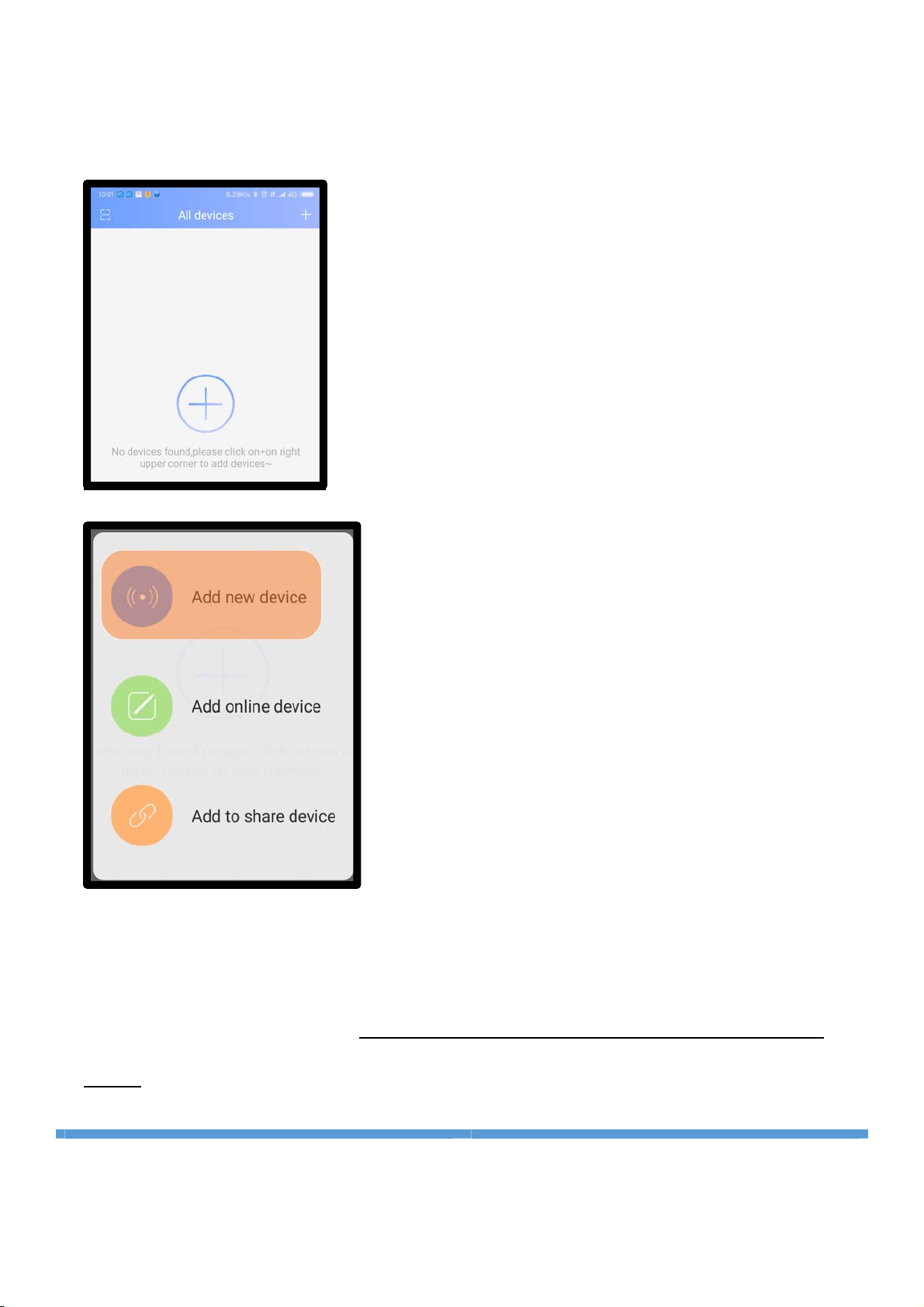
1. After login your account, you will see below page, click “+” at the middle of screen or choose
upper right corner “+”, APP will go to next page.
Please Select Option “Add new Device” at the top of screen.
There are 2 ways to add the light bulb camera into your account
Option#1:
”
SmartLink
”
.
Option#2:
”
Fast Networking
”
If you failed at Optiion#1, pls use
Option#2, Option#2 is recommended
way.

BENAVIS2018
DOCUMENTREV20180728REV03
MOREINFOPLSVISITWWW.BENAVIS.NET
8
2. Then you can see next page, pls choose “Smartlink” option to add your Camera into your
account. That means using the sound wave technology to add the camera into your yoosee
Account.
3. Then input your wifi SSID and Wireless password here, go to next page and following guideline
on the screen, move mobile phone close to your cameras
(30 centimeters
),
mobile phone will

BENAVIS2018
DOCUMENTREV20180728REV03
MOREINFOPLSVISITWWW.BENAVIS.NET
9
active sound wave technology and try to transfer the SSID and password to the camera. Once
you heard “beep” sound, that means IP cameras added successfully. If not, pls reset IP
cameras and repeat above process again. If you tried several times and not successful, pls
reach us and let me know your router brand and other info or use Option#2 to do it.
Note: (A). Must use 2.4G Wifi, the camera does not support 5G Wifi
(B). Make sure there is no special character, punctuation or chinese characters in password
and wifi SSID name, typical like
“
!
”
,
“
@
”
,
“
#
”
, etc.
(C). Make surroundings is clear no very loud noise at the background.
(D). Make sure you are using root Wifi SSID to configure it If there are 2 or 3 wireless routers in
your home.

BENAVIS2018
DOCUMENTREV20180728REV03
MOREINFOPLSVISITWWW.BENAVIS.NET
10
4. The connection may take about1-2 minutes. Please wait patiently. If succeed, Input default
password “123” to bind the camera into your account. If you failed to use sound
wave technology, pls use option #2”Fastnetworking” and try it.
Note: Default password is one time password, once IP camera is added into your account.
That means you are
“
administrator
”
for this camera, you want to share this IP camera with
other people. The receiver needs to download Yoosee APP and register an account also.
Table des matières
Manuels Système de sécurité populaires d'autres marques


EDM
EDM Solution 6+6 Wireless-AE Manuel utilisateur

Highway Safety Group
Highway Safety Group EA401 Manuel utilisateur

Siren
Siren LED GSM Manuel utilisateur

Detection Systems
Detection Systems 7090i Instructions de montage

Se-Kure Controls
Se-Kure Controls MicroMini SK-4841 Manuel utilisateur

Siemens
Siemens FDM273 Manuel utilisateur