
BeiJer H-T40m Series Manuel utilisateur

H-T40m
Installation and Operation Manual
MAEN945B, 2009-03 English
Cover_MAEN945B.fm Page 1 Thursday, February 26, 2009 2:01 PM

Foreword
Beijer Electronics, MAEN945B
H-T40m Installation and Operation Manual
Foreword
H-T40m is a Human Machine Interface (HMIs) with a 3.3" STN Liquid Crys-
tal Display, and is water- and dust-resistant according to IP65/NEMA4X (in-
door use only).
H-T40m-P can be equipped with the HMI I/O Controller, an expansion I/O
module aimed at providing smaller system applications with simple I/O control
interface without the need for a PLC. The compact expansion module is easy to
install and fits seamlessly on the back of the operator panel.
H-T40m is CE-marked and meets your need to be highly transient-resistant
while in operation.
Also, its compact design makes connections with other machinery more flexible,
thus achieving the optimal performance of your machines.
H-Designer is used to design applications of H-T40m; it is reliable, user-friend-
ly and compatible with many models.
© Beijer Electronics AB, MAEN945B, 2009-03
Please read the entire installation manual prior to installing and using this equipment. Only qualified per-
sonnel may install, operate or repair this equipment. Beijer Electronics AB is not responsible for modified,
altered or renovated equipment. Because the equipment has a wide range of applications, users must acquire
the appropriate knowledge to use the equipment properly in their specific applications. Persons responsible
for the application and the equipment must themselves ensure that each application is in
compliance with all relevant requirements, standards and legislation in respect to configuration and safety.
Only parts and accessories manufactured according to specifications set by Beijer Electronics AB may be
used.
BEIJER ELECTRONICS AB SHALL NOT BE LIABLE TO ANYONE FOR ANY DIRECT,
INDIRECT, SPECIAL, INCIDENTAL OR CONSEQUENTIAL DAMAGES RESULTING FROM
THE INSTALLATION, USE OR REPAIR OF THIS EQUIPMENT, WHETHER ARISING IN TORT,
CONTRACT, OR OTHERWISE. BUYER'S SOLE REMEDY SHALL BE THE REPAIR, REPLACE-
MENT, OR REFUND OF PURCHASE PRICE, AND THE CHOICE OF THE APPLICABLE REM-
EDY SHALL BE AT THE SOLE DISCRETION OF BEIJER ELECTRONICS AB.

Contents
Beijer Electronics, MAEN945B
Contents
1 Safety Precautions................................................................................... 5
2 Installation.............................................................................................. 7
2.1 Package Contents.........................................................................7
3 Product Specifications............................................................................. 8
3.1 Description of Parts .....................................................................9
3.2 External and Cut-out Dimensions .............................................10
3.3 Mounting Procedure ..................................................................11
3.4 Grounding .................................................................................11
3.5 Power Supply and Wiring ..........................................................12
4 Dip Switches......................................................................................... 13
5 Communication Port............................................................................ 14
6 Operation ............................................................................................. 15
6.1 Self Test .....................................................................................15
6.2 System Menu .............................................................................16
6.3 Bench and Function Tests ..........................................................17
6.4 Setting Communication Parameters...........................................17
6.5 Touch Screen Calibration...........................................................18
6.6 Downloading an Application .....................................................19
6.7 Uploading an Application ..........................................................20
6.8 Copying an Application .............................................................21
6.9 Passwords...................................................................................22

Contents
Beijer Electronics, MAEN945B

Safety Precautions
Beijer Electronics, MAEN945B 5
1 Safety Precautions
Both the installer and the owner and/or operator of the operator terminal must
read and understand this installation manual.
General
– Only qualified personnel may install or operate the operator terminal.
– The operator terminal must be installed according to the installation instruc-
tions.
– The operator terminal is designed for stationary installation on a plane sur-
face, where the following conditions are fulfilled:
• no high explosive risks
• no strong magnetic fields
• no direct sunlight
• no large, sudden temperature changes
• for use in Pollution Degree 2 Environment
• for use on the flat surface of Types 1 and 4X (indoor use only) enclosures
– Never allow fluids, metal filings or wiring debris to enter any openings in the
operator terminal. This may cause fire or electrical shock.
– The operator terminal fulfills the requirements of article 4 of EMC directive
2004/108/EC.
– Storing the operator terminal where the temperature is lower/higher than
recommended in this manual can cause the LCD display liquid to congeal/
become isotopic.
– The LCD display liquid contains a powerful irritant. In case of skin contact,
wash immediately with plenty of water. In case of eye contact, hold the eye
open, flush with plenty of water and get medical attention.
– The supplier is not responsible for modified, altered or reconstructed equip-
ment.
– Use only parts and accessories manufactured according to specifications of the
supplier.
– Peripheral equipment must be appropriate for the application and location.
– The figures in this manual serves an illustrative purpose. Because of the many
variables associated with any particular installation, the supplier cannot as-
sume responsibility for actual use based on the figures.
– The supplier neither guarantees that the operator terminal is suitable for your
particular application, nor assumes responsibility for your product design, in-
stallation or operation.

Safety Precautions
6Beijer Electronics, MAEN945B
Power source
– The operator terminal is equipped with a 24 V DC input. Supply power other
than 24 V DC ± 15% will severely damage the operator terminal. Thus, check
the power supply supporting the DC power regularly.
Grounding
– Without grounding, the operator terminal may be severely affected by excess
noise. Make sure that the grounding is done properly from the power connec-
tor at the rear side of the operator terminal. When power is connected, make
sure that the wire is grounded.
– Use a cable of at least 2 mm2(AWG 14) to ground the operator terminal.
Ground resistance must be less than 100 Ω (class3). Note that the ground
cable must not be connected to the same ground point as the power circuit.
Installation
– Communication cables must be separated from power cables for operational
circuits. Only use shielded cables to avoid unpredictable problems.
During Use
– Emergency stop and other safety functions may not be controlled from the
operator terminal.
– Do not use too much force or sharp objects when touching the keys, display
etc.
Service and Maintenance
– Only qualified personnel should carry out repairs.
– The agreed warranty applies.
– Before carrying out any cleaning or maintenance operations, disconnect the
equipment from the electrical supply.
– Clean the display and surrounding front cover with a soft cloth and mild
detergent.
– Replacing the battery incorrectly may result in explosion. Only use batteries
recommended by the supplier.
Dismantling and Scrapping
– The operator terminal or parts thereof shall be recycled according to local
regulations.
– The following components contain substances that might be hazardous to
health and the environment: lithium battery, electrolytic capacitor and
display.

Installation
Beijer Electronics, MAEN945B 7
2Installation
2.1 Package Contents
The following parts are found in the box:
– Operator terminal H-T40m
– 4 installation fasteners
– Power connector (connected to the 24 V DC power input)
– Installation and operation manual (MAEN945B)

Product Specifications
8Beijer Electronics, MAEN945B
3 Product Specifications
Parameter H-T40m-S H-T40m-P
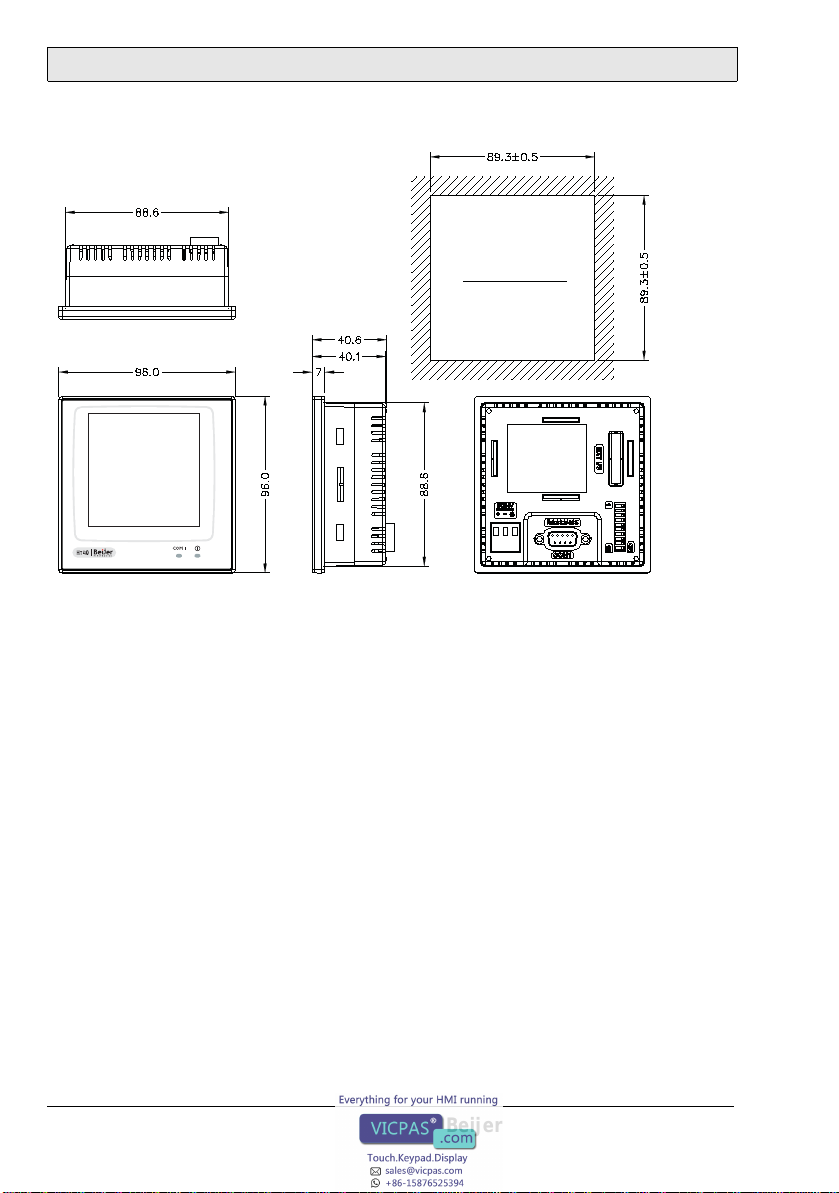
Front panel, W x H x D 96 x 96 x 7 mm
Mounting depth 40.6 mm
Cut-out dimensions 89.3 x 89.3 mm
Front panel seal IP 65/NEMA 4X (indoor use only)
Weight 0.21 kg
COM 1 9-pin female connector: RS232/RS422/RS485
COM 2 -
USB port -
CF card port -
Ethernet -
Flash ROM 4 MB
RAM 256 KB
CPU 32-bit RISC
Battery backed memory -
Data/Recipe - 8 KB
Real time clock Yes (with rechargeable lithium battery)
Display Mono FSTN LCD, 16 shades of gray, 240 x 240 pixels.
LED backlight lifetime: approximately 10,000 h at 25 °C
Active area of display,
W x H 58.5 x 58.5 mm.
30 x 30 characters of 8 x 8 size can be displayed.
Display adjustment Via touch screen
Touch screen Analog
Power supply 24 V DC ± 15%. Less than 4 W
Ambient temperature 0 ° to +50 °C
Storage temperature -10 °to +60 °C
Ambient humidity 20 - 90% RH non-condensed
Vibration endurance 0.5 mm displacement, 10-55 Hz, 2 hours per X-, Y- and
Z-axis directions
Shock endurance 10 G, 11 ms 3 times in each direction of X-, Y- and Z-
axes
CE EN61000-6-4, EN61000-6-2
Cooling Natural cooling

Product Specifications
Beijer Electronics, MAEN945B 9
3.1 Description of Parts
Front
Back
Fixture
Power lamp
Communication lamp
Display
mounting holes
DIP switches (1-10)
COM1: RS232/RS422/RS485
DC power input
Product Specifications
10 Beijer Electronics, MAEN945B
3.2 External and Cut-out Dimensions
CUTOUT DIMENSION
Autres manuels pour H-T40m Series
1
Ce manuel convient aux modèles suivants
2
Table des matières
Autres manuels BeiJer Écran tactile


Manuels Écran tactile populaires d'autres marques


IBASE Technology
IBASE Technology ASTUT-152-RE1S Manuel utilisateur

YASKAWA
YASKAWA TP 610C Manuel utilisateur

B&R
B&R Power Panel C Series Manuel utilisateur

Beijer Electronics
Beijer Electronics X2 control Manuel utilisateur

AXIOMTEK
AXIOMTEK GOT321W-521 Manuel utilisateur

TRIDONIC.ATCO
TRIDONIC.ATCO x-touchBOX Manuel utilisateur


