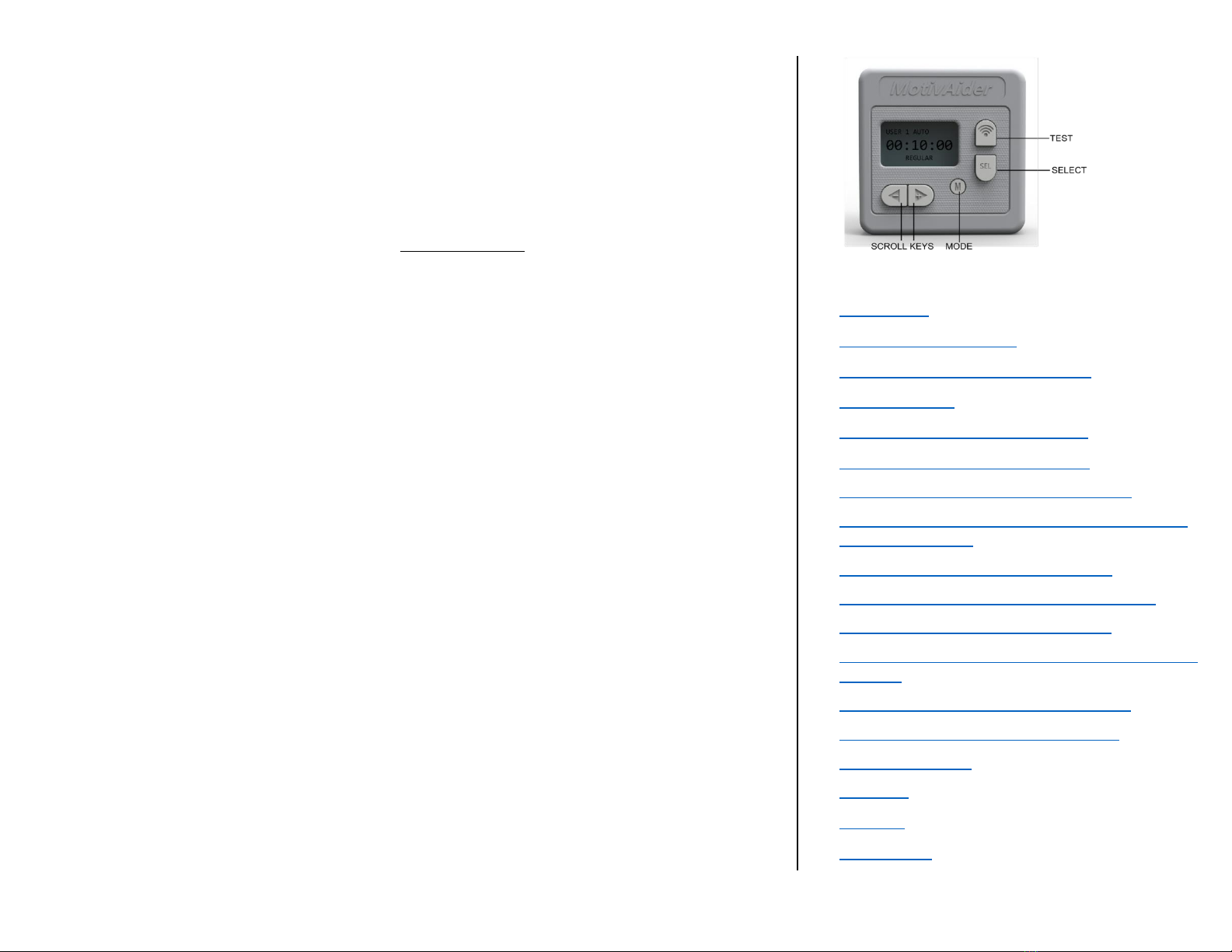
Basic Operation
First, don’t be alarmed if the screen goes blank. To conserve battery power, your MotivAider is
designed to automatically go to “sleep” when there’s no activity for approximately 15 seconds. To
wake it up, just hold down the Mode (M) key for a couple of seconds until the display is no longer
blank, then release the M key.
You’re now at the HOME screen. What you see on the screen is the prompting interval.
The prompting interval is what determines how often you’ll get vibration signals. This is
the MotivAider’s most basic setting, and it’s the only setting that many users will ever
have to change.
The Prompting Interval: The prompting interval is expressed as the number of
Hours:Minutes:Seconds that will pass between vibration signals or prompts. The shorter the interval,
the more frequent the prompts. For example, a prompting interval of 00:10:00 means that you’ll get
vibration signals every 10 minutes, while a prompting interval of 00:00:10 means that you’ll get
vibration signals every 10 seconds.
You’ll notice that “REGULAR” appears below the prompting interval. REGULAR refers to the type of
interval. REGULAR means that you’ll be getting vibration signals at fixed intervals, that is, intervals of
uniform length rather than varying lengths. We’ll explain later how you can set your MotivAider to
send vibration signals at average or random intervals.
Changing the prompting interval: To change the prompting interval from its default value of
00:10:00 (10 minutes), press the Select key (SEL) to reach a time field (Hours, Minutes or Seconds)
you wish to change. With the selected field blinking, use the Scroll keys (<- and +>) to enter the
desired value for that field. Then press SEL again to save the value you entered and move to the next
time field. [TIP: To zero out the entire prompting interval, press and hold down both Scroll keys at
the same time.]
Using the MotivAider with basic settings only: Once your desired time interval is displayed,
you’re ready to use the MotivAider in its most basic way.
Press and hold M for a couple of seconds until you see that the MotivAider is counting down. The
MotivAider will send you a vibration signal when the countdown reaches zero. Then it will
automatically start counting down again from the time interval you entered, and it will send you
another vibration signal when the countdown reaches zero. The MotivAider will keep repeating this
process until you tell it to stop.
Note that to prevent accidental input, some keys are automatically disabled during prompting.
When you want the MotivAider to stop prompting, just hold down M for a couple of seconds until
you’re back at the HOME screen with the display blinking.
When you’re not using your MotivAider, leave it at the HOME screen. Remember, to conserve battery
power, it will go to sleep if there’s no input after about 15 seconds.
Whenever you’re ready to use the MotivAider again, hold down M for a couple of seconds until you see
the HOME screen. The MotivAider will have remembered the prompting interval you previously set, so
to start prompting again using the same interval, all you need to do is hold down M again for a couple
of seconds until the countdown appears on the screen.
CONTENTS
Introduction
The MotivAider Method
Orientation and Operating Basics
Getting Started
Advanced Settings: An Overview *
How to Change the Interval Type *
How to Customize the Vibration Signal *
How to Change What Appears on The Screen
During Prompting *
How to Set Up a Prompting Session *
How to Create and Manage User Profiles *
How to Restore All Original Settings *
How to Prevent Unwanted Access to Advanced
Settings *
How to Pause and Resume Prompting *
Installing and Removing the Belt Clip
About the Battery
Warranty
Support
Contact Us