
Beckhoff CU8801-0000 Manuel utilisateur

Installation- and Operating instructions for
CU8801-0000
USB2.0-Extender-Tx
Version: 1.1
Date: 2013-06-27


Table of contents
Table of contents
1Foreword 3
1.1 Notes on the Documentation 3
1.1.1 Liability Conditions 3
1.1.2 Trademarks 3
1.1.3 Patent Pending 3
1.1.4 Copyright 3
1.1.5 State at Delivery 3
1.1.6 Delivery conditions 3
1.2 Description of safety symbols 4
1.3 Operator’s obligation to exercise diligence 4
2Product Description 5
2.1 Product Overview 5
2.2 Connections 6
2.2.1 Power Supply 6
2.2.2 Data Connections 6
2.3 LED-Diagnostics 7
3Installation 8
3.1 Transport and Unpacking 8
3.1.1 Transport 8
3.1.2 Unpacking 8
3.2 Mounting/ Demounting 9
3.3 Connecting devices 10
3.3.1 Connecting cables 10
3.3.2 Connecting Power Supply 10
4Operation 11
4.1 Architecture Description 11
4.1.1 Configuration 11
4.1.2 Configuration 2 11
4.1.3 Configuration 3 12
4.1.4 Configuration 4 12
4.2 Maintenance 13
4.2.1 Cleaning 13
4.2.2 Maintenance 13
4.3 Shutting down 13
4.3.1 Disposal 13
CU8801-0000 1

Table of contents
5Dimensions 14
6Technical Data 15
7Appendix 16
7.1 Beckhoff Support and Service 16
7.1.1 Beckhoff branches and partner companies 16
7.1.2 Beckhoff company headquarters 16
7.2 Approvals for USA and Canada 17
7.3 FCC Approval for USA 17
7.4 FCC Approval for Canada 17
2CU8801-0000

Foreword
1 Foreword
1.1 Notes on the Documentation
This description is only intended for the use of trained specialists in control and automation engineering
who are familiar with the applicable national standards. It is essential that the following notes and
explanations are followed when installing and commissioning these components.
The responsible staff must ensure that the application or use of the products described satisfy all the
requirements for safety, including all the relevant laws, regulations, guidelines and standards.
1.1.1 Liability Conditions
The documentation has been prepared with care. The products described are, however, constantly under
development. For that reason the documentation is not in every case checked for consistency with
performance data, standards or other characteristics. In the event that it contains technical or editorial
errors, we retain the right to make alterations at any time and without warning. No claims for the
modification of products that have already been supplied may be made on the basis of the data, diagrams
and descriptions in this documentation.
1.1.2 Trademarks
Beckhoff®, TwinCAT®, EtherCAT®, Safety over EtherCAT®, TwinSAFE®and XFC®are registered
trademarks of and licensed by Beckhoff Automation GmbH.
Other designations used in this publication may be trademarks whose use by third parties for their own
purposes could violate the rights of the owners.
1.1.3 Patent Pending
The EtherCAT Technology is covered, including but not limited to the following patent applications and
patents: EP1590927, EP1789857, DE102004044764, DE102007017835 with corresponding applications
or registrations in various other countries.
The TwinCAT Technology is covered, including but not limited to the following patent applications and
patents: EP0851348, US6167425 with corresponding applications or registrations in various other
countries.
1.1.4 Copyright
©Beckhoff Automation GmbH.
The reproduction, distribution and utilization of this document as well as the communication of its contents
to others without express authorization are prohibited. Offenders will be held liable for the payment of
damages. All rights reserved in the event of the grant of a patent, utility model or design.
1.1.5 State at Delivery
All the components are supplied in particular hardware and software configurations appropriate for the
application. Modifications to hardware or software configurations other than those described in the
documentation are not permitted, and nullify the liability of Beckhoff Automation GmbH.
1.1.6 Delivery conditions
In addition, the general delivery conditions of the company Beckhoff Automation GmbH apply.
CU8801-0000 3

Foreword
1.2 Description of safety symbols
The following safety symbols are used in this operating manual. They are intended to alert the reader to
the associated safety instructions.
Acute risk of injury!
DANGER
If you do not adhere the safety advise adjoining this symbol, there is immediate
danger to life and health of individuals!
Risk of injury!
WARNING
If you do not adhere the safety advise adjoining this symbol, there is danger to life and
health of individuals!
Hazard to individuals!
CAUTION
If you do not adhere the safety advise adjoining this symbol, there is obvious hazard to
individuals!
Hazard to devices and environment
Attention
If you do not adhere the notice adjoining this symbol, there is obvious hazard to
materials and environment.
Note or pointer
Note
This symbol indicates information that contributes to better understanding.
1.3 Operator’s obligation to exercise diligence
The operator must ensure that
• the product is only used as intended (see chapter Product Description)
• the product is in a sound condition and in working order during operation (see chapter
Maintenance)
• the product is operated, maintained and repaired only by suitably qualified and authorized
personnel
• the personnel is instructed regularly about relevant occupational safety and environmental
protection aspects, and is familiar with the operating manual and in particular the safety notes
contained herein
• the operation manual is in good condition and complete, and always available for reference at the
location of the product
• none of the safety and warning notes attached to product are removed, and that all notes remain
legible.
4CU8801-0000

Product Description
2 Product Description
2.1 Product Overview
The Beckhoff CU8801-0000 USB2.0-Extender-Tx allows to extend the limits of USB cable length.
Standard USB cable are specified for cable length up to 5 meters. For some industrial applications there
is need for longer distances. This box can extend the distance up to 50 meters. This box sends the USB
signals from input port to the receiver unit. Other outstanding features are:
• User-friendly installation via integrated DIN rail adapter
• No power supply needed – the box is supplied by USB (5V DC)
• 480 Mbit, 12 Mbit, and 1.5 Mbit support for compatibility to USB2.0 standard
• Standard CAT5 network cable for extension
• Compact industrial design.
CU8801-0000 5
Product Description
2.2 Connections
2.2.1 Power Supply
The USB2.0-Extender-Tx does not need any additional power supply. The power supply (5 V DC) is
realized by the USB connector. The LED P10 lights green when power supply is connected.
First establish USB connection
Note
The USB connection between the Industrial PC and the CU8801-0000 should be
established before switching the PC on, otherwise over-current messages can be
displayed.
UL Requirements
Attention
To meet the UL requirements, the USB hub CU8801-0000 must not be connected to
unlimited power sources!
2.2.2 Data Connections
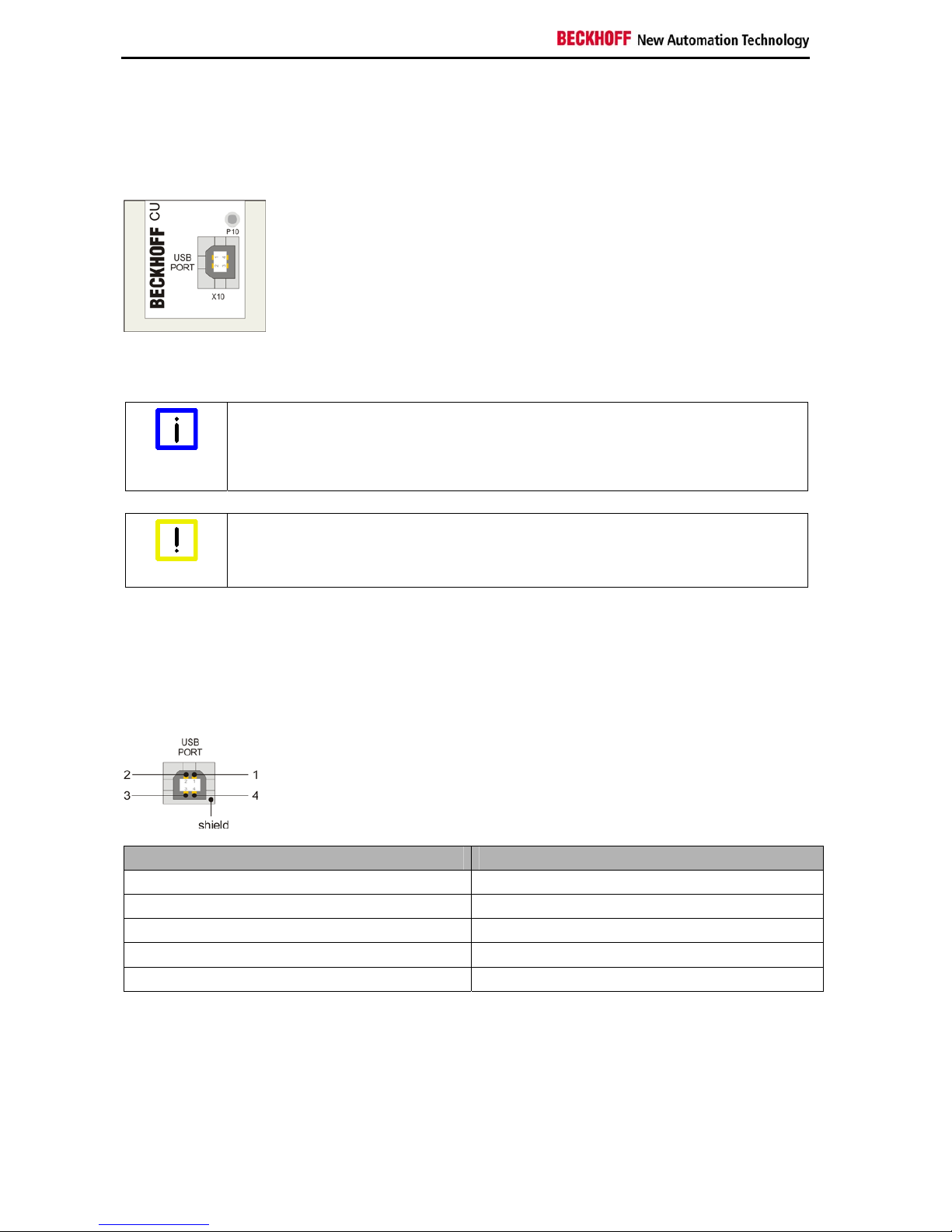
There are two kind of connectors: USB Port type B and RJ45 connector. The pins are described below:
USB type B Port (X10) (standard cable)
Pin Assignment
1 VCC
2 Data -
3 Data +
4 GND
Shield Shield
6CU8801-0000

Product Description
RJ 45 Port (X20) (standard CAT5 cable)
Pin Assignment
1 MX0+
2 MX0-
3 MX1+
4 MX1-
5 MX2+
6 MX2-
7 MX3+
8 MX3-
2.3 LED-Diagnostics
LED Allocation State Meaning
off no power supplyP10 Power supply
lights green 5 VDC connected via USB-Port
off no connectionP20 Connection
lights green USB connection established between transmitter and receiver
off no data trafficP21 Activity
lights yellow data traffic between USB device and Host
off no USB device connected or not identifiedP22 Host
lights green connected USB device identified from Host
CU8801-0000 7

Installation
3 Installation
3.1 Transport and Unpacking
The specified storage conditions must be observed (see chapter Technical Data).
3.1.1 Transport
Despite the robust design of the unit, the components are sensitive to strong vibrations and impacts.
During transport, the unit should therefore be protected from excessive mechanical stress. Therefore,
please use the original packaging.
Danger of damage to the unit
Attention
If the device is transported in cold weather or is exposed to extreme variations in
temperature, make sure that moisture (condensation) does not form on or inside the
device.
Prior to operation, the unit must be allowed to slowly adjust to room temperature. Should condensation
occur, a delay time of approximately 12 hours must be allowed before the unit is switched on.
3.1.2 Unpacking
Proceed as follows to unpack the unit:
1. Remove packaging
2. Do not discard the original packaging. Keep it for future relocation
3. Check the delivery for completeness by comparing it with your order
4. Please keep the associated paperwork. It contains important information for handling the unit
5. Check the contents for visible shipping damage.
If you notice any shipping damage or inconsistencies between the contents and your order, you should
notify Beckhoff Service.
8CU8801-0000
Table des matières
Autres manuels Beckhoff Extenseur


